
An SEO report is a regular update that tells a client how their site performs in organic search, why the numbers moved and what happens next. The best SEO reports are short at the top and detailed underneath: one page a manager can read in two minutes, followed by the data a specialist needs.
This guide covers what an SEO report should include, a monthly SEO report template you can copy, a worked SEO report example with hypothetical numbers, and the mistakes that make clients stop reading.
What is an SEO report and who is it for?
An SEO report is a periodic summary of organic search performance and of the SEO work done in that period. It pulls data from tools such as Google Analytics 4 (GA4), Google Search Console and Bing Webmaster Tools, compares it with a previous period and turns it into conclusions and actions.
The reader decides the format. A business owner wants to know whether SEO brings leads or sales. A marketing manager wants trends and priorities. An in-house SEO specialist wants query-level detail. In the reports we build for clients, the first page is written for the least technical reader and everything after it is reference material.
What should a monthly SEO report include?
A monthly SEO report works best when every section answers one question. These are the sections we recommend, in this order.
Executive summary
Three to five sentences: what went up, what went down, why, and what you will do about it. Write it last, after you have looked at all the data, and put it first.
Organic traffic and conversions (GA4)
Organic sessions, engaged sessions and key events (conversions) from organic search, compared with the previous month and the same month last year. Conversions are the number the client cares about most, so never leave them out. If the site has no conversion tracking, say so and propose setting it up.
Search Console: clicks, impressions, CTR and average position
Google Search Console shows how the site appears in Google results: clicks, impressions, click-through rate and average position. Google explains each metric in its Performance report documentation. Report the four together, because each one alone is easy to misread. Our guide to CTR and what counts as a good click-through rate covers how to interpret the third one.
Bing Webmaster Tools
Bing has a smaller share of searches, but its index also feeds Microsoft Copilot, and B2B audiences on Windows and Edge often use it. Add clicks, impressions and CTR from Bing Webmaster Tools next to the Google figures. If the client has never set it up, our Bing Webmaster Tools guide takes about fifteen minutes to follow.
Top pages and queries
The five to ten pages and queries with the most clicks, plus the biggest winners and losers of the month. This is where you explain movements: a page that lost 40% of its clicks is more useful information than a sitewide average.
Technical issues
Indexing errors, 404s, redirect chains, slow templates. List only what changed or what needs a decision, with a status (open, fixed, waiting for the developer).
Backlinks
New and lost referring domains, in general terms. Bing Webmaster Tools has a free backlinks report, and third-party SEO tools give a wider view. Avoid tool-specific authority scores as headline numbers: clients tend to treat them as a goal.
AI visibility
More and more clients ask whether their brand shows up in ChatGPT, Gemini, Perplexity or Claude answers. If you monitor this, report how often the brand is cited for a fixed set of prompts and how that compares with competitors, which is the idea behind share of voice.
Work done and next steps
What the team did this month (pages published, fixes shipped, links earned) and the plan for next month, including any decisions you need from the client. This section turns the SEO report from a scoreboard into a working document.
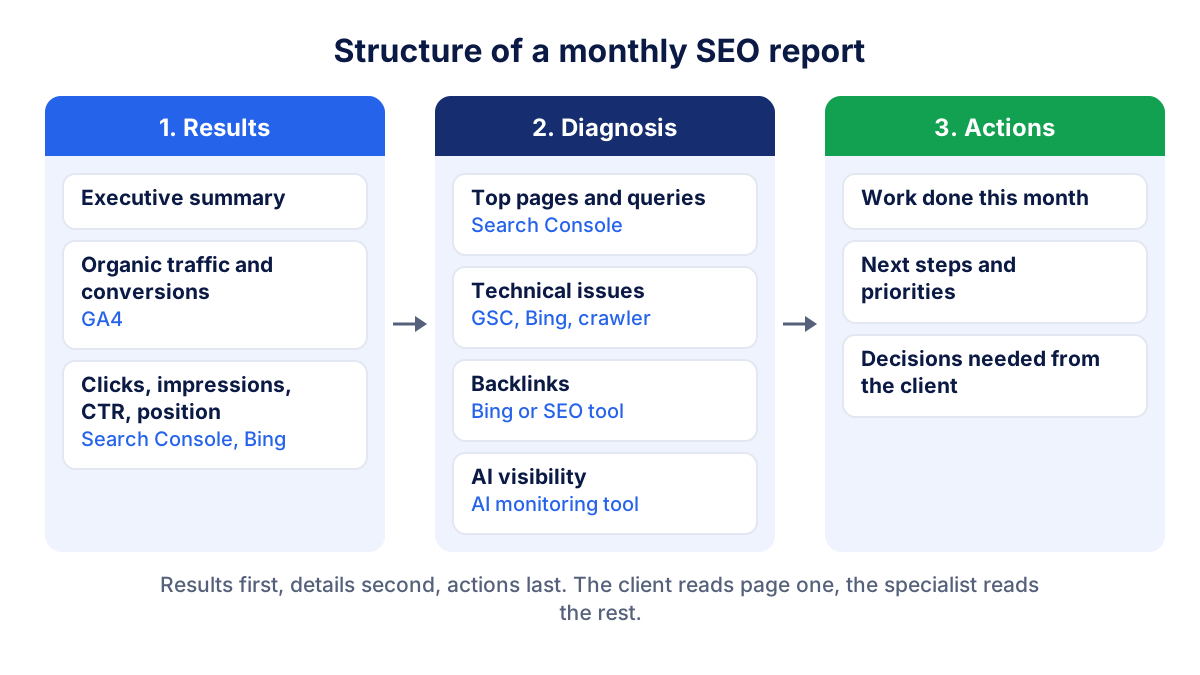
Monthly SEO report template
Use this SEO report template as a checklist. Copy it into your document, slide deck or dashboard and drop the rows that do not apply to the client.
| Section | Key metrics | Source | What to write |
|---|---|---|---|
| Summary | 4-6 headline numbers | All sources | 3-5 sentences: result, cause, next action |
| Traffic and conversions | Organic sessions, key events, conversion rate | GA4 | Change vs last month and last year, and why |
| Google visibility | Clicks, impressions, CTR, average position | Search Console | Which of the four moved and what drove it |
| Bing visibility | Clicks, impressions, CTR | Bing Webmaster Tools | Trend, not absolute comparison with Google |
| Top pages and queries | Clicks per page and query, winners and losers | Search Console | The 3 movements worth explaining |
| Technical | Indexing errors, 404s, Core Web Vitals | Search Console, Bing, crawler | Open issues and their status |
| Backlinks | New and lost referring domains | Bing Webmaster Tools or SEO tool | Notable links, any cleanup needed |
| AI visibility | Citations, share of voice | AI monitoring tool | Trend vs competitors |
| Work and plan | Tasks done, tasks planned | Project notes | What was done, what comes next, decisions needed |
The guide to marketing KPIs helps you choose which metrics belong in the headline row for each type of client.
SEO report example: one month, step by step
Here is a short SEO report example for a hypothetical services company, September compared with August. All numbers are invented and rounded.
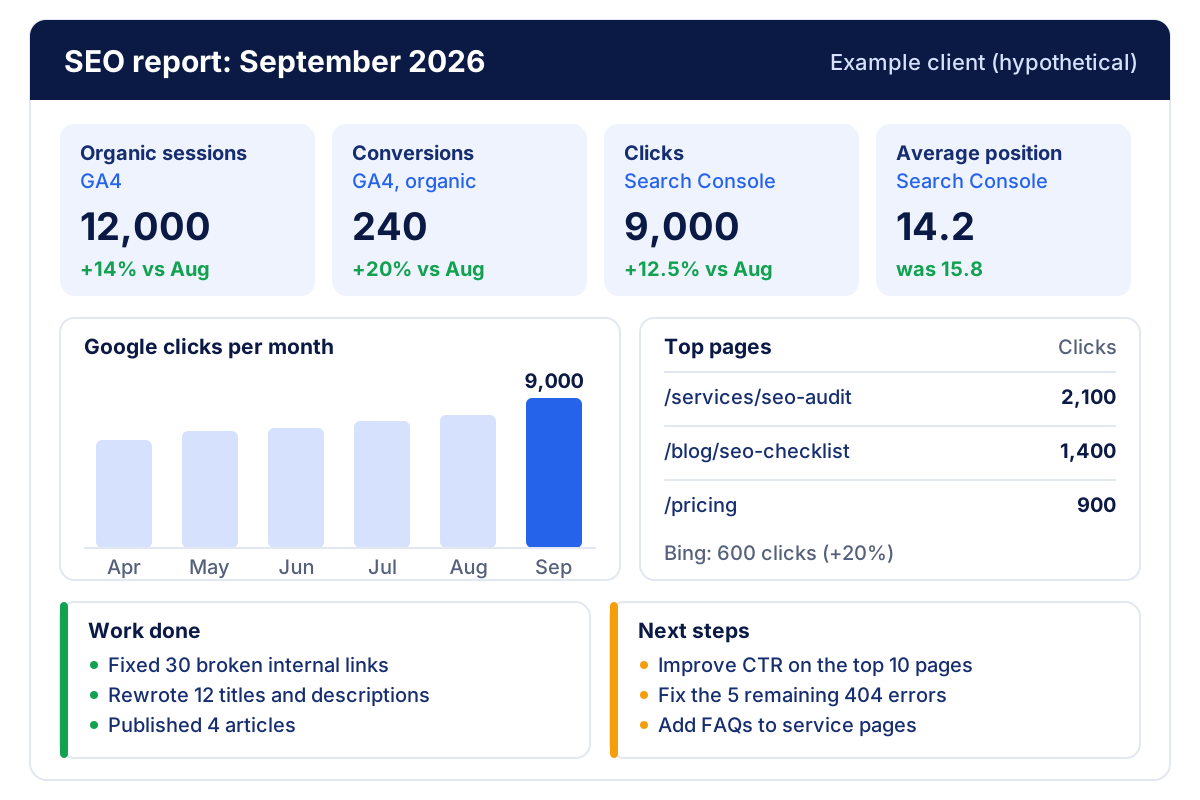
The data:
- GA4: 12,000 organic sessions (August: 10,500, +14%) and 240 conversions from organic (August: 200, +20%).
- Search Console: 9,000 clicks (August: 8,000, +12.5%), 300,000 impressions (August: 250,000, +20%), CTR 3.0% (August: 3.2%), average position 14.2 (August: 15.8).
- Bing Webmaster Tools: 600 clicks (August: 500, +20%), 20,000 impressions.
- Technical: 30 broken internal links fixed, 5 404 errors still open.
- AI visibility: brand cited in 12 of 50 monitored prompts (August: 9 of 50).
The executive summary we would write:
Organic search brought 240 conversions in September, 20% more than in August. Google clicks rose 12.5% after we published four articles and fixed 30 broken links. CTR dipped slightly because the site now appears for many new queries on page two. In October we will rewrite titles and descriptions on the ten pages with the most impressions and close the remaining five 404 errors.
That paragraph answers the only questions most clients ask: is it working, why, and what next. Note that GA4 sessions (12,000) and Search Console clicks (9,000) do not match. They measure different things (sessions from all search engines vs clicks on Google only, with consent and tracking gaps), so explain this once and do not try to reconcile them every month.
How to explain SEO results to non-experts
A client who does not work in SEO needs the same three steps for every number: what happened, why it happened, and what you will do.
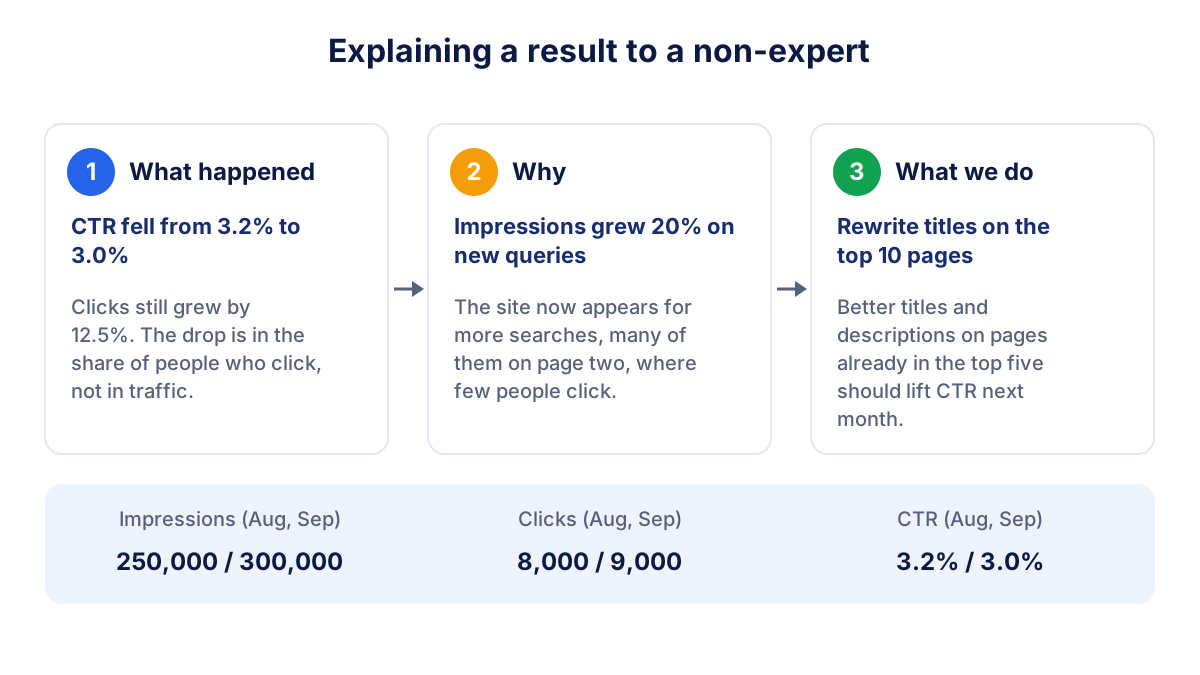
A few rules that work in practice:
- Lead with business outcomes. Conversions and leads first, rankings last.
- Always compare. A number without last month or last year next to it means nothing.
- Use the formula once.
CTR = clicks ÷ impressions × 100takes one line and prevents many questions. - Name the cause. "CTR fell because impressions grew on page two" is reassuring. "CTR fell" alone is alarming.
- Show the trend, not the day. Six or twelve months on one chart beat a daily graph full of noise.
Monthly or weekly SEO reporting?
Monthly is the right default. Organic search changes slowly, Google updates take weeks to settle, and weekly data is full of random swings that trigger needless worry.
Weekly updates make sense in specific situations: a site migration, a large launch, recovery from a traffic drop. Keep them short (a few numbers and a sentence) and go back to monthly once things are stable. A quarterly review on top of the monthly SEO report is a good moment to discuss strategy and budget.
Common SEO reporting mistakes
- Vanity metrics on page one. Total impressions or the number of keywords in the top 100 look impressive and rarely relate to revenue.
- Ranking screenshots without context. A screenshot of position 1 for one keyword says nothing about volume, clicks or the rest of the site. Rankings also vary by location and device.
- No comparison period. Always show the previous month and, for seasonal businesses, the same month last year.
- Different date ranges per tool. Align GA4, Search Console and Bing to the same calendar month.
- Data without explanation. Twenty charts and no conclusion push the work of interpretation onto the client.
- Hiding bad months. Explain drops early and honestly. Clients forgive a bad month, not a surprise.
- No next steps. An SEO report without actions is a history lesson.
Live dashboard or PDF?
Both have a place. A PDF or slide deck is a snapshot: good for the monthly meeting, for clients who print or forward reports, and for keeping a record of what was agreed. A live dashboard is always current, so the client can check results between meetings without asking you.
Many agencies use both: a live dashboard for continuous access and a monthly export with the written summary on top. With Klyrax you connect GA4, Search Console, Bing Webmaster Tools and psentry (for AI visibility in ChatGPT, Gemini, Perplexity and Claude) in read-only mode, share a public live link with the client and export the same report to PDF or PowerPoint with your agency's logo. Whatever tool you use, the written summary and next steps are still yours to write.
Frequently asked questions
What is an SEO report?
An SEO report is a periodic summary of how a website performs in organic search and what the SEO team did during the period. It combines data from Google Analytics 4, Google Search Console, Bing Webmaster Tools and other tools, compares it with the previous period, explains the changes in plain language and lists the next actions. Agencies usually send one to each client every month.
What should be included in a monthly SEO report?
A monthly SEO report should include an executive summary, organic traffic and conversions from GA4, clicks, impressions, CTR and average position from Search Console and Bing Webmaster Tools, top pages and queries, technical issues, backlinks, AI visibility where relevant, the work done in the month and the next steps. Every number needs a comparison and a short explanation.
How often should you send an SEO report to a client?
Monthly is the standard for most clients, because organic search moves slowly and weekly numbers are noisy. Weekly updates make sense during a site migration, a launch or a penalty recovery, and they can be short. Many agencies combine a monthly SEO report with a live dashboard the client can open any time, and a quarterly review for strategy.
How long should an SEO report be?
The first page matters most: a summary of three to five sentences and four to six key numbers should tell the client whether things are going well. The rest of the SEO report can run to a few more pages of detail for people who want it. If a section never leads to a decision or an action, it can usually be removed.
What is the difference between an SEO report and an SEO audit?
An SEO audit is a one-off, in-depth analysis of a site's technical health, content and links, usually done at the start of a project. An SEO report is recurring: it tracks results over time and documents the work done. The audit produces the to-do list, and the monthly SEO report shows progress on that list and its effect on traffic.
All your marketing data in one report
Klyrax connects Google Ads, Meta Ads, GA4, Search Console, Bing Webmaster Tools and more in read-only mode, and turns them into client-ready reports.
Request info