
Share of voice (SOV) is the percentage of the total visibility in a market that belongs to your brand rather than to your competitors. You calculate share of voice by dividing your brand's mentions, impressions or clicks by the total for the market and multiplying by 100. The idea is old, born in advertising, but the same logic now works for paid search, SEO, social media and the answers given by AI assistants.
What is share of voice?
Share of voice is a competitive visibility metric: it tells you how much of the conversation, ad space or search results in your category you own. It does not measure sales or revenue. It measures presence, which is usually the step that comes before sales.
The term started with media buying, where SOV meant your advertising spend as a share of total category spend. Today marketers use it more broadly. In the reports we build for clients, share of voice is the number that answers a simple question: "When people look for what we sell, how often do they see us instead of a competitor?"
Two things make share of voice useful. It is relative, so it adjusts for seasonality (if the whole market drops in December, your SOV may stay flat). And it puts competitors in the same chart as you, which most channel metrics do not.
How do you calculate share of voice?
The share of voice formula is the same on every channel:
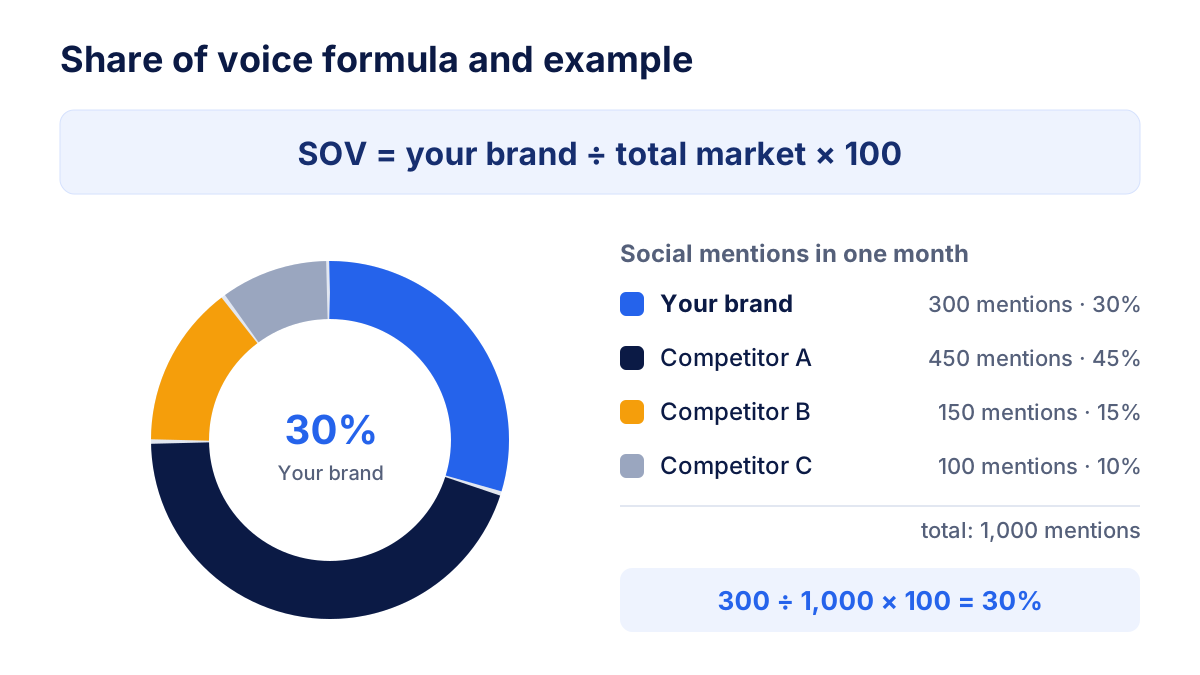
SOV = your brand's mentions (or impressions, clicks) ÷ total market × 100
What changes is the unit you count and how you define "the market". Before you calculate anything, fix three things:
- The competitor set: the 3 to 10 brands you actually compete with. The total market is the sum of your brand plus these competitors.
- The unit: impressions, clicks, mentions or AI answers. Never mix units inside one SOV number.
- The period: a month or a quarter, the same for every brand.
Suppose your brand gets 300 social mentions in a month, and your three competitors get 450, 150 and 100. The market total is 1,000 mentions, so your share of voice is 300 ÷ 1,000 × 100 = 30%.
Share of voice by channel: ads, SEO and social
Each channel needs its own version of share of voice, because the data available is different.
Paid search: impression share
In paid search the platforms give you an official metric. Google Ads reports search impression share: the impressions your ads received divided by the estimated number of impressions they were eligible to receive. Google also splits the lost share into budget and ad rank, and the Auction insights report shows how often competitors appeared in the same auctions. The definition is in the Google Ads help on impression share.
Impression share is the cleanest SOV figure you can get, because it comes from the auction itself. Its limit: it only covers the keywords you bid on.
Organic search: visibility across a keyword set
For SEO there is no single official number, so you build one. Take a fixed set of keywords that matter to the business, then estimate the clicks each brand gets:
estimated clicks = search volume × expected CTR at the ranking position
Add up the estimated clicks for your brand and divide by the total searches (or by the total estimated clicks of all tracked brands). The expected CTR comes from a CTR curve by position, which varies by query type and SERP layout; our guide on click-through rate explains why it moves. Weighting by volume and CTR matters: ranking first for a keyword with 10,000 searches is worth far more than ranking first for one with 50.
Social and PR: mentions
On social media and in the press, share of voice is usually based on mentions of each brand over a period, collected with a listening tool. You can refine it by counting only positive and neutral mentions, or by weighting mentions by reach. Whatever you choose, apply the same rules to every brand.
A worked share of voice example
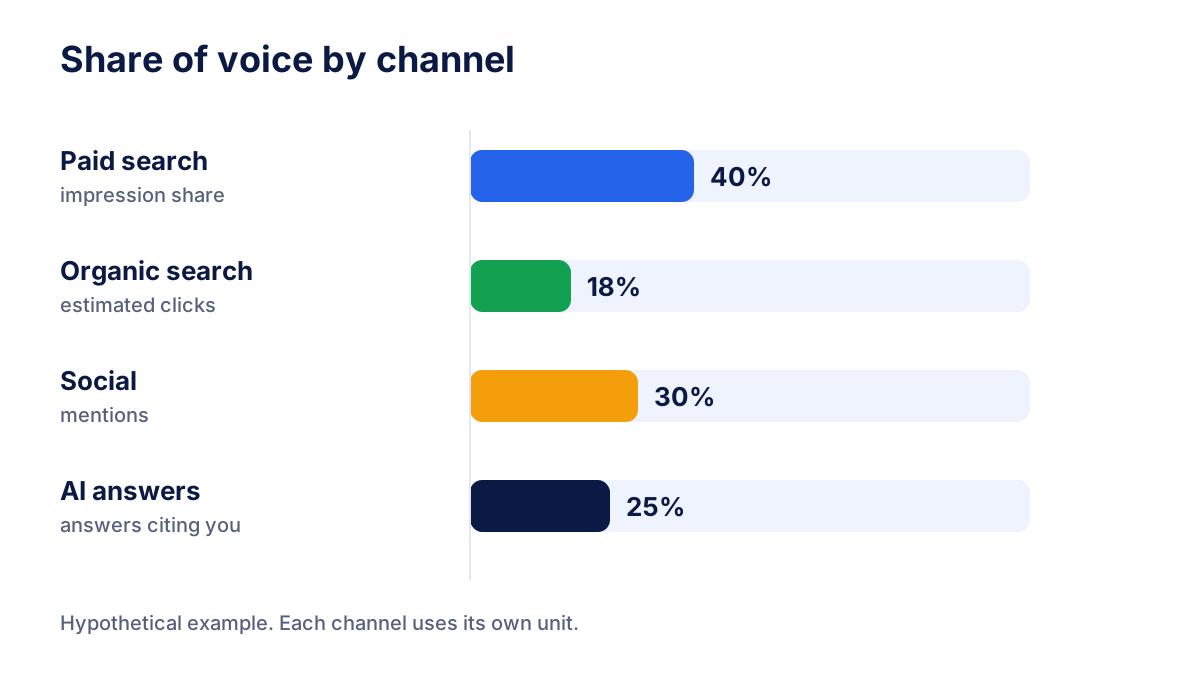
Here is a hypothetical brand measured on four channels in the same month. The numbers are round on purpose.
| Channel | Unit counted | Your brand | Market total | Share of voice |
|---|---|---|---|---|
| Paid search | Impressions vs eligible impressions | 40,000 | 100,000 | 40% |
| Organic search | Estimated clicks vs total searches (20 keywords) | 3,600 | 20,000 | 18% |
| Social | Mentions vs mentions of all 4 brands | 300 | 1,000 | 30% |
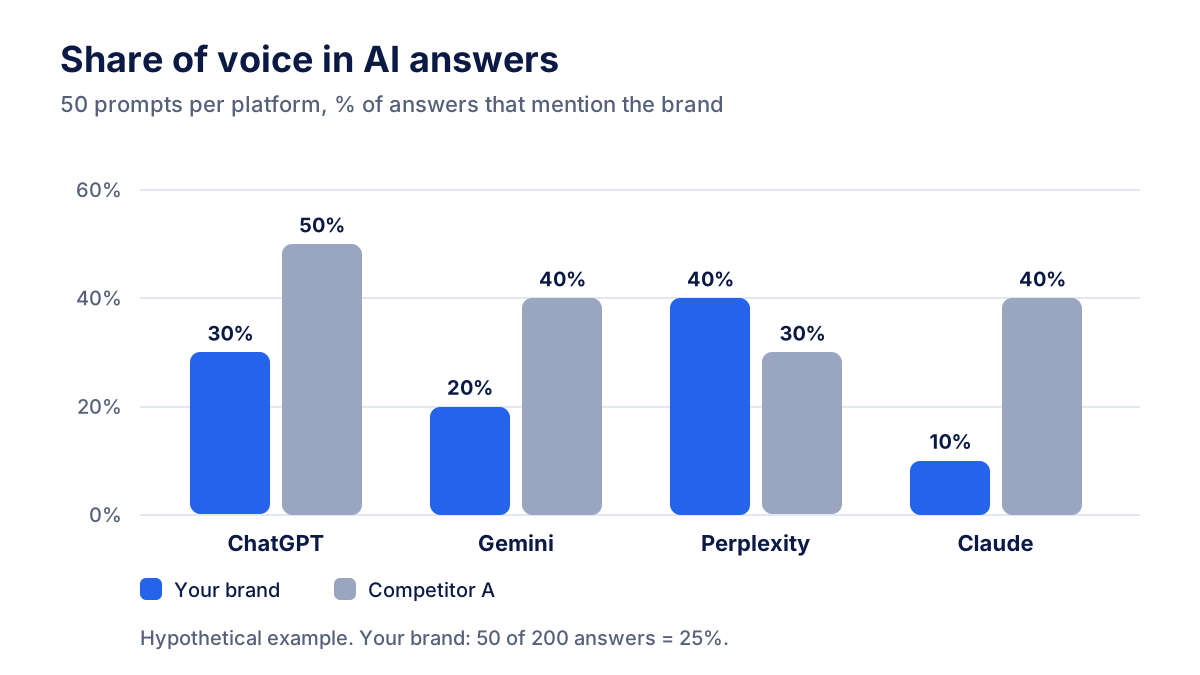
| AI answers | Answers citing you vs all answers (50 prompts × 4 AI) | 50 | 200 | 25% |
The table already tells a story. The brand buys its way to visibility in paid search (40%) but is weak in organic results (18%). If the client asks why organic traffic is flat while ads perform, this gap is the answer, and it points to SEO work rather than more ad budget.
Share of voice vs market share (and ESOV)
Market share is your portion of the category's sales. Share of voice is your portion of the category's visibility. The two are related but not the same.
The gap between them has a name: excess share of voice (ESOV).
ESOV = share of voice − market share
If your brand holds 20% of sales and 30% of share of voice, your ESOV is +10 points. Advertising effectiveness research has long observed that brands with a positive ESOV tend to grow their market share over time, while brands with a negative ESOV tend to lose ground. The strength of the effect varies by sector, brand size and time frame, so treat ESOV as a direction for budget discussions, not a forecast.
In practice ESOV is most useful when you plan budgets: it gives you a reasoned target ("we want SOV a few points above our market share") instead of "spend the same as last year".
Share of voice in AI answers
When someone asks ChatGPT, Gemini, Perplexity or Claude "what is the best tool for X", the answer usually names a handful of brands. Being one of them is the AI version of ranking on page one. This is why AI visibility has become one of the fastest growing search topics in marketing, and why share of voice is the natural way to report it.
Share of voice in AI answers is the percentage of answers, across a fixed set of prompts, that mention your brand, compared with the same percentage for your competitors. You can express it in two ways:
- Presence rate: answers citing your brand ÷ total answers analysed.
- Share of mentions: your brand's mentions ÷ all brand mentions in those answers.
Both are useful. Presence rate tells you how often you appear at all; share of mentions tells you how much of the shortlist you own. The optimisation side of this work is covered in our article on GEO vs SEO.
How to measure AI share of voice with a fixed prompt set
AI assistants have no equivalent of Search Console, so you measure share of voice by sampling. The method that gives stable numbers is simple:
- Write a fixed prompt set. Start with 30 to 100 prompts that real customers would ask: category questions ("best CRM for small agencies"), comparisons ("X vs Y") and problem questions ("how do I…"). Avoid prompts that contain your brand name.
- Run every prompt on every platform. ChatGPT, Gemini, Perplexity and Claude often give different answers to the same question, so track them separately.
- Record who is mentioned and who is cited. For each answer, note which brands appear and which URLs are linked as sources.
- Calculate presence rate and share of mentions per platform and in total.
- Repeat on a schedule. AI answers vary between runs, by country and by wording. Weekly or monthly runs on the same set, read as an average, are far more reliable than a screenshot.
- Change the prompt set rarely and on purpose. If you add prompts, mark the date in the report, otherwise a jump in SOV may only reflect the new questions.
Doing this by hand works for a test with 20 prompts. For regular reporting you need a tool that runs the prompts automatically on each platform and stores the history.
How to report share of voice
A share of voice report should let a client or manager answer two questions in a minute: are we gaining or losing ground, and where?
- One SOV per channel, never a blended number across different units.
- The same competitor set month after month, listed in the report.
- Trend over time, at least the last 3 to 6 periods, because single values move a lot.
- SOV next to outcomes: impression share next to ad conversions, organic SOV next to traffic, AI share of voice next to referral traffic from AI assistants.
- A short note on causes: a new competitor campaign, a lost ranking, a change in the prompt set.
The AI share of voice belongs in the same report as SEO data, because the two depend on each other; see what to include in an SEO report for clients. Klyrax integrates psentry for AI visibility in ChatGPT, Gemini, Perplexity and Claude, so you can show AI share of voice next to Google Ads, Search Console and social data in one dashboard, export it to PDF or PowerPoint, or share a live link.
Common share of voice mistakes
- Changing the competitor set. Adding or removing a brand changes the total and makes your SOV jump without any real change.
- Mixing units. Averaging impression share with social mentions produces a number nobody can interpret.
- Ignoring sentiment. A spike in social mentions during a service outage raises SOV and hurts the brand.
- Judging AI visibility from one prompt. One answer on one day says very little; measure a set, repeatedly.
- Unweighted keyword sets. Counting rankings without search volume and CTR treats a niche keyword like your main money keyword.
Start small: pick your competitors, choose one unit per channel and record this month's numbers. Next month you will have the first trend, and that is where share of voice becomes useful.
Frequently asked questions
What is a good share of voice?
There is no universal good share of voice. It depends on how many competitors share the market and how concentrated it is. A useful reference is your market share: if your share of voice is higher than your market share, you are investing in visibility above your current size. Compare yourself with the same competitor set over time rather than with an absolute number.
How do you calculate share of voice?
Divide your brand's measure by the total for the whole market, then multiply by 100. The measure depends on the channel: impressions or impression share for paid search, estimated organic clicks across a keyword set for SEO, mentions for social and PR, and answers that cite the brand for AI assistants. Keep the competitor set and the period fixed so the numbers stay comparable.
Is impression share the same as share of voice?
Impression share in Google Ads is the paid search version of share of voice. Google calculates it as the impressions you received divided by the impressions you were eligible to receive. It tells you how much of the available ad space you captured, not how visible you are compared with each competitor, which you can see in the Auction insights report.
What is share of voice in AI search?
Share of voice in AI search is the percentage of answers, across a fixed set of prompts, in which ChatGPT, Gemini, Perplexity or Claude mention your brand, compared with how often they mention competitors. Because AI answers change from one run to the next, you measure it on many prompts, repeat the runs regularly and look at averages rather than single answers.
What is the difference between share of voice and market share?
Market share measures your portion of sales in a category. Share of voice measures your portion of visibility, attention or advertising in the same category. The gap between the two is called excess share of voice (ESOV). Advertising research has long linked a positive ESOV with market share growth over time, although the effect varies by sector and brand.
All your marketing data in one report
Klyrax connects Google Ads, Meta Ads, GA4, Search Console, Bing Webmaster Tools and more in read-only mode, and turns them into client-ready reports.
Request info