
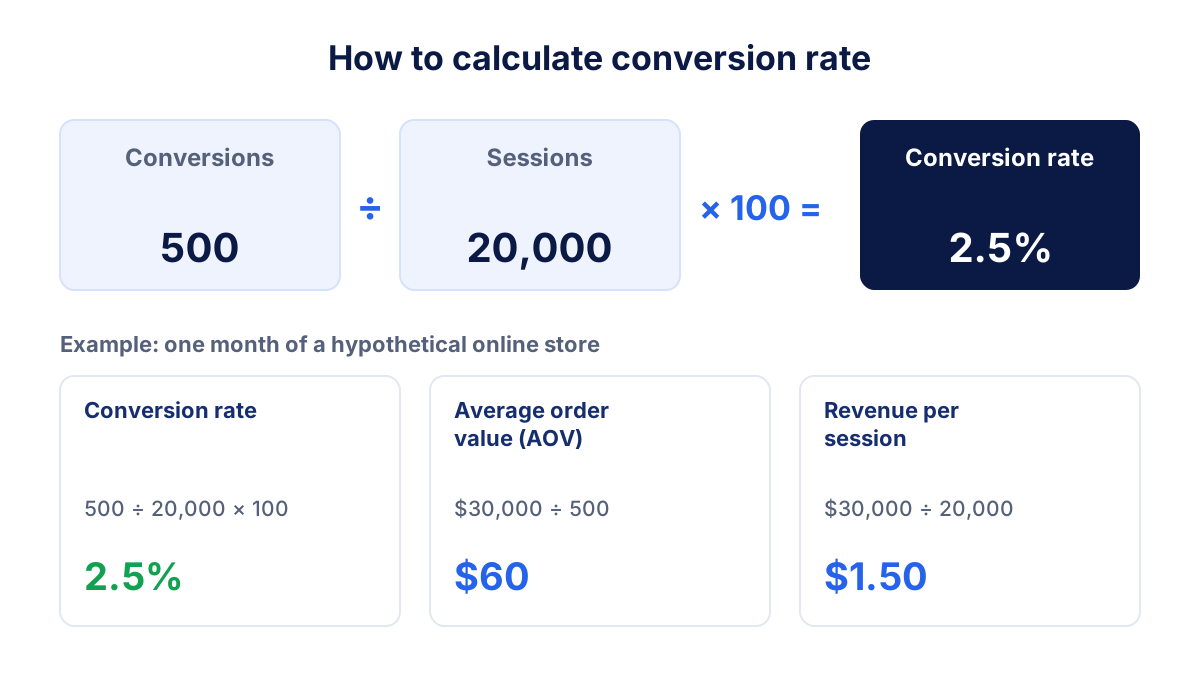
Conversion rate is the share of visits or visitors that end with the action you want: an order, a lead, a sign-up. The conversion rate formula is conversions divided by sessions, times 100, so 500 orders from 20,000 sessions give a 2.5% conversion rate. This guide shows how to calculate it, which e-commerce KPIs belong next to it and how to report it without misleading anyone.
What is conversion rate?
Conversion rate is the percentage of sessions, users or ad clicks that complete a defined goal within a given period. The goal is the "conversion": a purchase for a store, a contact form for a service business, a trial for a SaaS product.
Conversion rate answers one question: of the people who arrived, how many did what we wanted? That makes it the link between traffic and results. Doubling traffic and halving conversion rate leaves you with the same number of orders and a bigger ad bill.
It is also one of the most used marketing KPIs, because it sits between acquisition metrics like CTR and money metrics like revenue and ROAS.
How to calculate conversion rate: the formula
The standard conversion rate formula is:
Conversion rate = conversions ÷ sessions × 100
You can swap the denominator, as long as you say which one you use:
- Per session: conversions ÷ sessions. Common in web analytics and the usual e-commerce conversion rate.
- Per user: users who converted ÷ total users. Higher than the session rate, because one person often visits several times before buying.
- Per ad click: conversions ÷ clicks or interactions. This is how ad platforms report it. Google Ads defines conversion rate as conversions divided by ad interactions.
In Google Analytics 4, conversions are now called key events. GA4 offers both a session key event rate and a user key event rate, so check which one a report shows before you compare it with anything. Our GA4 guide explains where to find them.
Try it with your own numbers. Revenue is optional: add it to get average order value and revenue per session.
Conversion rate calculator
Enter your numbers: the result updates as you type.
Conversion rate examples: e-commerce and lead generation
E-commerce example
Suppose an online store records this in one month:
- Sessions: 20,000
- Orders: 500
- Revenue: $30,000
Conversion rate = 500 ÷ 20,000 × 100 = 2.5%. Average order value = $30,000 ÷ 500 = $60. Revenue per session = $30,000 ÷ 20,000 = $1.50.
Revenue per session is worth watching, because it equals conversion rate × average order value. If a discount campaign lifts conversion rate to 3% but drops average order value to $45, revenue per session falls to $1.35. More orders, less money per visit.
Lead generation example
A consultancy gets 4,000 sessions on its site and 120 contact form submissions. Its conversion rate is 120 ÷ 4,000 × 100 = 3%.
For lead generation the website conversion rate is only half the story. If 30 of those 120 leads become clients, the lead to client rate is 25%, and the full rate from session to client is 30 ÷ 4,000 = 0.75%. Report both: marketing controls the first, sales the second.
Macro and micro conversions
A macro conversion is the main goal of the site: a purchase, a qualified lead, a booking. A micro conversion is a smaller step that usually comes before it: viewing a product, adding to cart, starting checkout, signing up for the newsletter, downloading a price list.
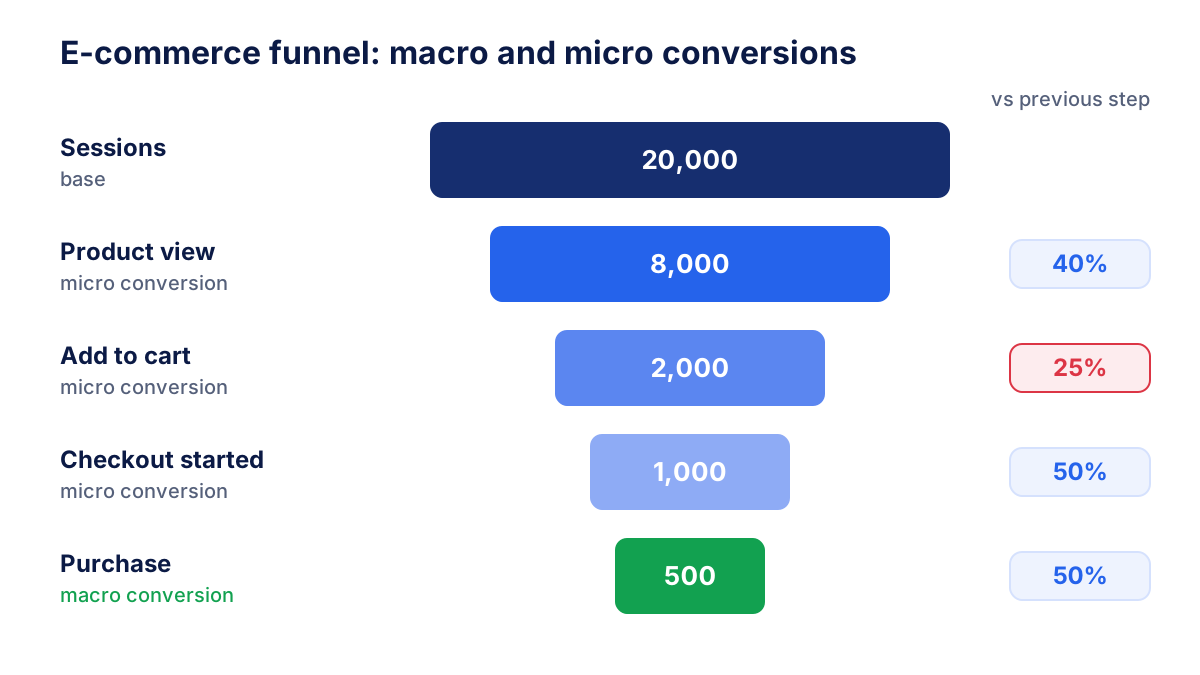
Micro conversions help you find where people drop out. In the funnel above, 40% of sessions view a product, 25% of those add to cart, half of the carts reach checkout and half of the checkouts end in a purchase. The weak point is product to cart, so that is where to test pages, prices and shipping information first.
Keep micro conversions out of the headline conversion rate. If newsletter sign-ups and purchases are both counted as conversions, a popup can inflate the rate while sales stay flat.
Other e-commerce KPIs to track with conversion rate
Conversion rate on its own can mislead. These e-commerce KPIs complete the picture, with the formula and the values from the example store (hypothetical, with $7,500 of ad spend).
| KPI | Formula | Example |
|---|---|---|
| Conversion rate | orders ÷ sessions × 100 | 2.5% |
| Average order value (AOV) | revenue ÷ orders | $60 |
| Revenue per session | revenue ÷ sessions | $1.50 |
| Cart abandonment rate | (carts − orders) ÷ carts × 100 | 75% with 2,000 carts |
| ROAS | ad revenue ÷ ad spend | 4 ($30,000 ÷ $7,500) |
| Customer acquisition cost (CAC) | marketing spend ÷ new customers | $25 with 300 new customers |
| Repeat purchase rate | customers with 2+ orders ÷ all customers × 100 | 25% |
A practical rule: put conversion rate, AOV and revenue per session together, and ROAS and CAC together. The first group tells you about the site, the second about the cost of traffic.
What is a good ecommerce conversion rate?
A good conversion rate is one that beats your own previous periods for the same traffic mix. Industry averages are a weak target, because they mix very different stores and tracking setups.
As a rough orientation, many online stores sit somewhere between 1% and 3% of sessions. Expensive or considered purchases (furniture, electronics, travel) often convert below 1%. Stores with low prices, strong brands or many repeat buyers can be well above 3%. Lead generation pages with a short form often convert higher than stores, because filling in a form costs less than paying.
Inside one site, the spread is just as wide. Mobile usually converts lower than desktop, email and branded search higher than cold social traffic. Compare like with like: a 1.2% rate from prospecting ads can be a good result, a 1.2% rate from returning email subscribers probably is not.
How to improve your conversion rate
- Fix tracking first. Place a test order and check it appears once, with the right value, in GA4 and in your ad platforms.
- Find the leaking step. Use the funnel and micro conversions to see where most people drop out.
- Match ad and landing page. The page should repeat the promise of the ad. Tagging every link with UTM parameters lets you compare conversion rate by campaign.
- Speed up mobile pages. Slow product and checkout pages cost orders, and most traffic is mobile.
- Show costs early. Unexpected shipping fees at checkout are a classic reason for cart abandonment.
- Simplify checkout. Guest checkout, fewer fields, common payment methods.
- Add trust where people hesitate. Reviews, return policy and delivery times next to the buy button.
- Test one change at a time and let it run long enough to reach a few hundred conversions per variant.
How to report conversion rate
In the reports we build for clients, conversion rate never appears alone. A useful block shows conversion rate, orders, AOV and revenue per session for the month, the change against the previous month and the same month last year, and a breakdown by channel and device.
Always name the denominator ("conversion rate per session, GA4") and the source of the conversions. Add one sentence explaining the movement: "conversion rate fell because paid social doubled its share of traffic" is more useful than the number alone.
When the data lives in several tools, the reporting work grows quickly. With Klyrax you see GA4 sessions and key events next to Google Ads and Meta Ads conversions in one report, so channel conversion rates sit side by side instead of in three exports.
Common conversion rate mistakes
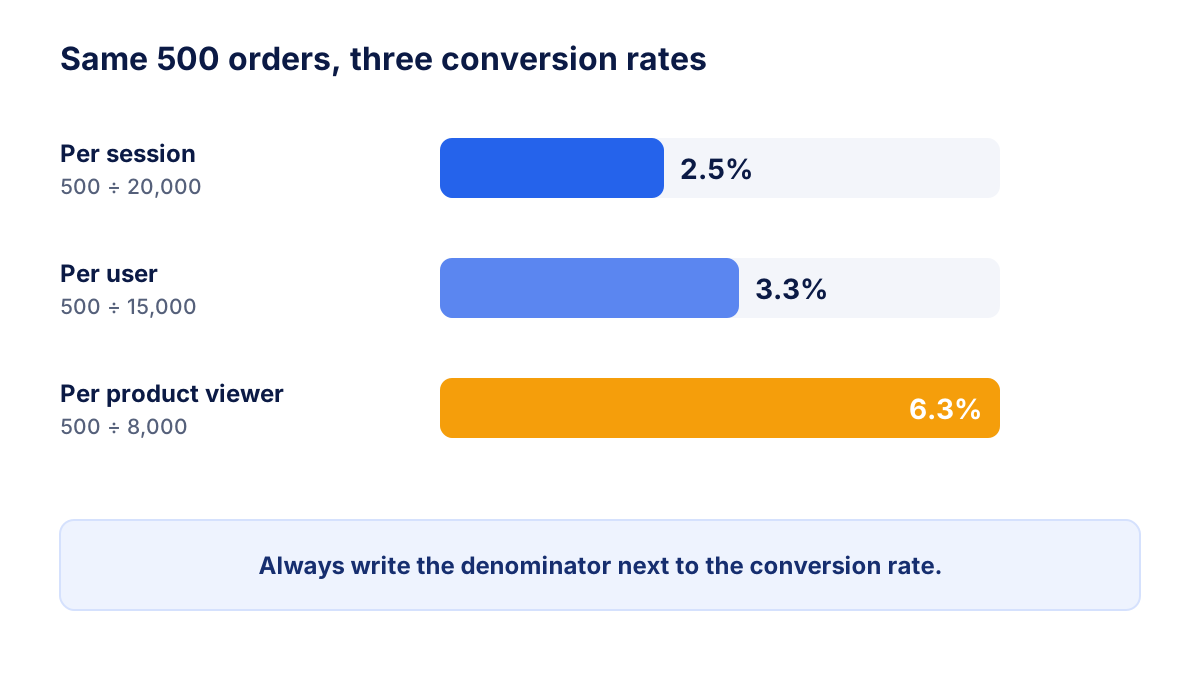
- Comparing different denominators. A rate per ad click from Google Ads and a rate per session from GA4 are different metrics. The same 500 orders give 2.5% per session and 3.3% per user.
- Mixing macro and micro conversions. Counting newsletter sign-ups with orders inflates the rate and hides sales problems.
- Ignoring tracking issues. Duplicate purchase events, missing tags on the thank you page or a broken payment redirect distort the rate overnight. Compare orders in analytics with orders in your shop backend every month.
- Forgetting consent. In the EU, visitors who reject analytics cookies are not fully measured. Depending on your consent setup, part of the sessions and conversions are missing or modeled, so analytics totals usually sit below your backend figures, and not always in the same proportion.
- Judging small samples. A move from 2% to 3% on 300 sessions is six orders. Wait for meaningful volumes before you react.
- Chasing the rate instead of revenue. Cheaper products, heavy discounts or cutting top of funnel traffic can lift conversion rate and lower profit.
Track conversion rate with a fixed definition, read it next to AOV, revenue per session and ROAS, and explain every movement with traffic mix and tracking checks. Then the number tells you something about the site, not about the way it was measured.
Frequently asked questions
How do you calculate conversion rate?
Divide the number of conversions by the number of sessions (or users, or ad clicks) in the same period and multiply by 100. With 500 orders and 20,000 sessions, the conversion rate is 500 ÷ 20,000 × 100 = 2.5%. Use the same denominator every month, otherwise the trend means nothing, and write it next to the number in your report.
What is a good ecommerce conversion rate?
Many online stores sit roughly between 1% and 3% of sessions, but the spread is wide. Expensive or considered purchases often convert below 1%, while stores with loyal repeat buyers or low prices can go well above 3%. Device, country, traffic mix and tracking setup all move the number, so your own trend matters more than any average.
What is the difference between conversion rate in GA4 and Google Ads?
Google Ads divides conversions by ad interactions, usually clicks, and only counts people who came from ads. GA4 divides by sessions or users across all channels and calls conversions key events. GA4 offers a session key event rate and a user key event rate. The two tools also use different attribution, so their numbers will not match.
What are the most important ecommerce KPIs?
The core e-commerce KPIs are conversion rate, average order value, revenue per session, cart abandonment rate, ROAS, customer acquisition cost and repeat purchase rate. Together they show whether visitors buy, how much they spend, what traffic costs and whether customers come back. Track them monthly, with a target for each one.
Why is my conversion rate different in each tool?
Each tool counts conversions and visits in its own way. Ad platforms count clicks and attribute conversions to their own ads, GA4 counts sessions across all channels, and your shop backend counts every paid order. Cookie consent, ad blockers and broken tags remove part of the data in analytics tools. Pick one source of truth per KPI and stick to it.
All your marketing data in one report
Klyrax connects Google Ads, Meta Ads, GA4, Search Console, Bing Webmaster Tools and more in read-only mode, and turns them into client-ready reports.
Request info