
UTM parameters are small tags added to the end of a URL that tell Google Analytics 4 where a visit came from: which website or platform, which type of channel and which campaign. You add them with a UTM builder, share the tagged link, and GA4 groups the resulting sessions by source, medium and campaign.
This guide covers the five parameters, the anatomy of a tagged link, a free UTM builder, a naming convention that matches GA4's default channels, where to read the data in GA4, and the mistakes that break campaign tracking.
What are UTM parameters?
UTM parameters are query string tags (utm_source, utm_medium, utm_campaign, utm_term, utm_content) that you append to a link to identify the traffic it generates. UTM stands for Urchin Tracking Module, from the Urchin software that Google bought and turned into Google Analytics. The name stuck.
Without UTMs, GA4 can only guess. A click from your newsletter opened in a desktop mail app often arrives with no referrer and lands in "Direct". A click from a PDF, a WhatsApp message or a QR code behaves the same way. With UTMs, you tell GA4 exactly what happened: this visit came from the October newsletter, email channel, autumn sale campaign.
UTM parameters do not change the page. They are read by the analytics tag on arrival and stored with the session.
Anatomy of a URL with UTM parameters
A tagged link has three parts: the landing page, a question mark that opens the query string, and the parameters separated by &.
https://www.example.com/offer?utm_source=newsletter&utm_medium=email&utm_campaign=autumn_sale
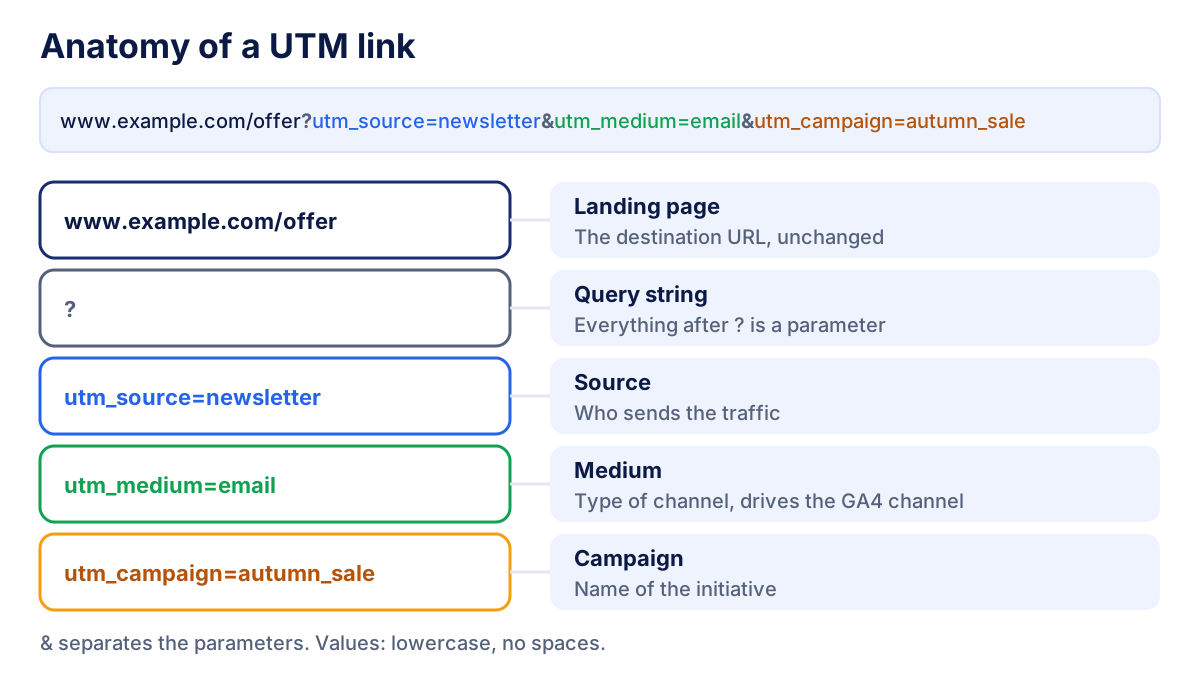
Two details trip people up. If the URL already contains a question mark (for example ?lang=en), the UTMs are added with &, not with a second ?. If the URL has an anchor (#pricing), the parameters go before the #, otherwise they are not sent to analytics.
The 5 UTM parameters explained
| Parameter | What it describes | Example value | Required? |
|---|---|---|---|
utm_source |
Who sends the traffic: a site, platform or list | newsletter, facebook, linkedin |
Yes |
utm_medium |
The type of channel | email, cpc, social, referral |
Yes |
utm_campaign |
The initiative or promotion | autumn_sale, webinar_oct |
Yes (in practice) |
utm_term |
The paid keyword or audience | running_shoes |
Optional |
utm_content |
Which link or creative was clicked | header_button, video_v2 |
Optional |
Source and medium are the pair that matters most, because GA4 uses them to assign each session to a channel group. Campaign is what you will filter on most often. Term and content are for finer detail, for example to compare two buttons in the same email.
GA4 also accepts utm_id (a campaign ID, useful if you import cost data) and a few newer optional parameters such as utm_source_platform. The full list is in Google's help page on collecting campaign data with custom URLs.
Free UTM builder: create your UTM link
Paste the page URL, fill in source, medium and campaign, and copy the tagged link. Term and content can stay empty.
UTM link generator
Fill in URL, source, medium and campaign: the link updates as you type.
The builder lowercases your values and turns spaces into underscores, so Spring Sale becomes spring_sale. Special characters are encoded, but the cleanest links have none to encode.
UTM naming conventions that match GA4 channels
GA4 sorts every session into a default channel group (Organic Search, Paid Search, Email, Organic Social, Paid Social, Referral and so on) using rules based on source and medium. If your medium does not match any rule, the session ends up in "Unassigned" and disappears from the channel view you report on. Google lists the exact rules in the GA4 default channel group help page.
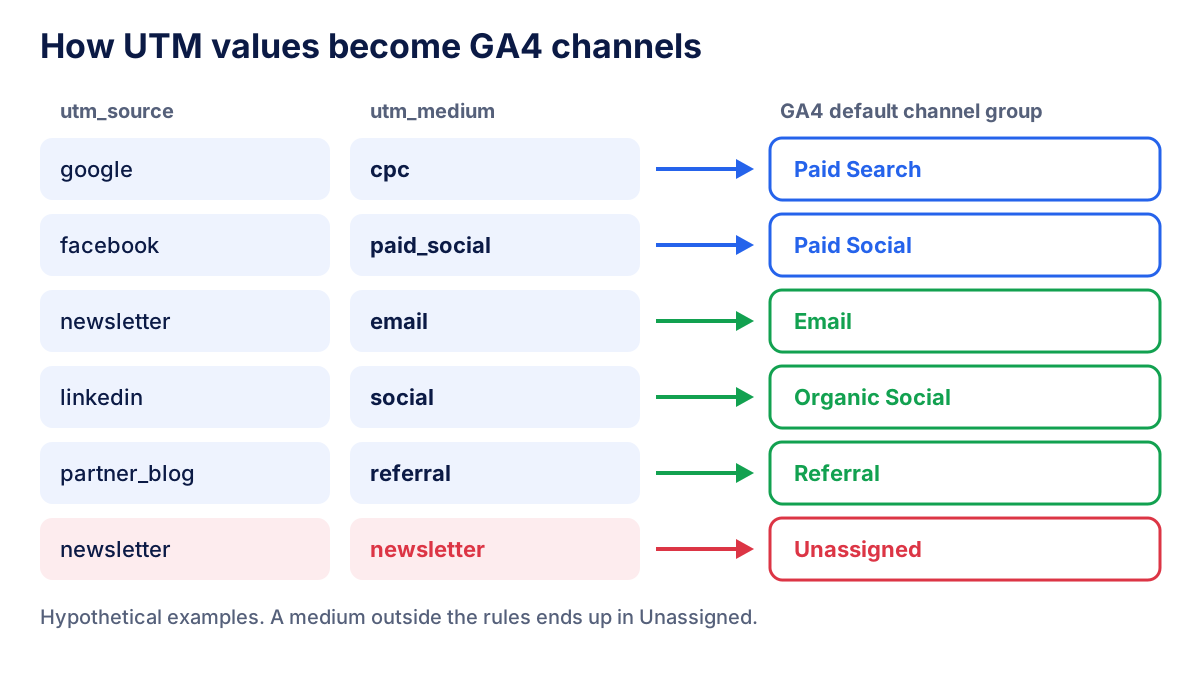
The rules that keep reports clean:
- Everything lowercase. GA4 stores values as typed, so
Emailandemailare two rows. - No spaces. Use underscores:
autumn_sale, notAutumn Sale. - Use mediums GA4 recognizes:
emailfor email,cpcor a value starting withpaidfor paid traffic,socialfor organic social posts,referralfor partner sites,displayfor banners,affiliatefor affiliates. - Source names the platform, not the channel:
facebook,linkedin,newsletter, the partner's domain. - One shared sheet. Write the allowed values down and make everyone build links from it.
UTM naming template
A starting template you can adapt. Values are examples, not GA4 requirements, except for the mediums.
| Channel | utm_source | utm_medium | utm_campaign | GA4 channel |
|---|---|---|---|---|
| Newsletter | newsletter |
email |
2026_10_autumn_sale |
|
| Meta Ads | facebook or instagram |
paid_social |
2026_10_autumn_sale |
Paid Social |
| LinkedIn Ads | linkedin |
paid_social |
2026_q4_leadgen |
Paid Social |
| Organic LinkedIn post | linkedin |
social |
2026_10_case_study |
Organic Social |
| Partner website | partnername |
referral |
2026_co_marketing |
Referral |
| Display banner | sitename |
display |
2026_10_autumn_sale |
Display |
| Affiliate | affiliatename |
affiliate |
2026_evergreen |
Affiliates |
Putting a date prefix in the campaign name makes campaigns sort chronologically in reports, which helps when you look back a year later.
How to see UTM parameters in GA4
The main report is Traffic acquisition:
- In GA4, open Reports, then Acquisition, then Traffic acquisition.
- Click the primary dimension (by default the session channel group) and switch it to Session source / medium or Session campaign.
- To see utm_term or utm_content, click the "+" next to the dimension and add Session manual term or Session manual ad content.
- For deeper analysis, build a free-form exploration with those dimensions and the metrics you need: sessions, engaged sessions, key events, revenue.
The User acquisition report shows the first user source, medium and campaign, that is, how each user first found you. Traffic acquisition looks at every session. Both are useful, but for a single campaign Traffic acquisition is usually the one you want.
To test a link before sending it, click it yourself and open the Realtime report. Standard reports can take a day or two to process, so do not panic if yesterday's newsletter is not there yet.
When not to use UTM parameters
Never put UTMs on internal links, such as a banner on your homepage pointing to a product page. The visitor already arrived from somewhere: from Google, an email, an ad. An internal UTM overwrites that information, so the original source loses credit and your campaign reports fill up with traffic you did not acquire. To measure internal banners, use GA4 events instead.
Also skip UTMs on organic search results (you cannot add them, and Search Console covers that traffic) and on platforms that already tag clicks automatically and are linked to GA4.
Google Ads auto-tagging (gclid) vs UTM parameters
Google Ads auto-tagging adds a gclid parameter to every ad click. When your GA4 property is linked to Google Ads, GA4 uses it to pull in campaign, ad group, keyword and cost data, far more detail than you could fit in UTMs. Google explains the mechanism in its auto-tagging help page.
| Auto-tagging (gclid) | UTM parameters | |
|---|---|---|
| Set up | One setting in Google Ads | Manual, per link |
| Data in GA4 | Campaign, ad group, keyword, cost | Only what you write |
| Works for | Google Ads linked to GA4 | Any link, any platform |
| Risk | Breaks if a redirect strips the gclid | Typos and inconsistent names |
Keep auto-tagging on for Google Ads and use UTMs everywhere else: Meta Ads, LinkedIn Ads, newsletters, partners, offline QR codes. Meta and LinkedIn let you add URL parameters at ad level, so you can set the tags once per campaign. When both gclid and UTMs are present, GA4 generally relies on the auto-tagging data, so doubling up adds work without adding information.
Common UTM mistakes
- Inconsistent capitalization:
Facebook,facebookandFBsplit one source into three rows. - A medium GA4 does not recognize, such as
newsletterormail, which sends sessions to Unassigned. - UTMs on internal links, which steal credit from the real source.
- Redirects or link shorteners that drop the query string. Test every link once after shortening it.
- Personal data in UTM values, such as an email address. Google's policies forbid sending personally identifiable information to Analytics.
- Tagging Google Ads manually while auto-tagging is on.
- No record of what was sent. Without a shared sheet, nobody remembers six months later what
promo2meant.
From UTM data to a client report
Clean UTMs are what make a channel report credible. Once source and medium are consistent, you can compare email, paid social and referral traffic on the same metrics, then link them to the marketing KPIs you already track: sessions, key events, revenue. For paid channels, put sessions and conversions next to spend to calculate ROAS, and next to impressions and clicks to read the CTR of each ad.
In the reports we build for clients, GA4 campaign data sits next to the ad platforms' own numbers. Klyrax connects read-only to Google Analytics 4, Google Ads, Meta Ads, LinkedIn and Microsoft Ads, so traffic by source / medium and the spend behind it appear in one shareable report.
Frequently asked questions
What are UTM parameters?
UTM parameters are short text tags added to a URL after a question mark, such as utm_source=newsletter&utm_medium=email. When someone clicks the link, Google Analytics 4 reads the tags and records the visit's source, medium and campaign. They do not change the page the visitor sees. They only tell your analytics tool where the click came from.
Which UTM parameters are required?
In practice you should always set utm_source, utm_medium and utm_campaign. Source and medium decide how GA4 groups the visit into a channel, and campaign lets you compare initiatives. utm_term and utm_content are optional: use term for paid keywords and content to tell apart two links or creatives inside the same campaign.
Where do I see UTM parameters in GA4?
Open Reports, then Acquisition, then Traffic acquisition. Change the primary dimension from the default channel group to Session source / medium or Session campaign. For utm_term and utm_content, add the dimensions Session manual term and Session manual ad content, or build an exploration. Standard reports can take a day or two to fill in.
Should I use UTM parameters on Google Ads?
Usually not. Google Ads auto-tagging adds a gclid parameter to each click, and a GA4 property linked to Google Ads uses it to import campaign, ad group and keyword data automatically. Manual UTMs on top of auto-tagging add work without adding information. Use UTMs for the platforms that are not linked to GA4.
Are UTM parameters case-sensitive?
Yes. GA4 stores the values exactly as they appear in the link, so utm_source=Facebook and utm_source=facebook show up as two separate rows in your reports. The simplest rule is to write every value in lowercase, use underscores instead of spaces and keep a shared naming sheet that everyone on the team follows.
All your marketing data in one report
Klyrax connects Google Ads, Meta Ads, GA4, Search Console, Bing Webmaster Tools and more in read-only mode, and turns them into client-ready reports.
Request info