
A Facebook Ads report, also called a Meta Ads report, summarizes what your ads on Facebook, Instagram, Messenger and the Audience Network delivered in a given period: how much you spent, how many people saw the ads, what they did and what it cost. A good report reads those numbers against the campaign objective instead of listing every column Ads Manager offers.
This guide covers how Meta Ads campaigns are structured, where the data lives in Ads Manager, the Facebook Ads metrics that matter with their formulas, why Meta and GA4 rarely agree, a monthly report structure for clients and how to use the Meta Ad Library for competitor research.
What is Meta Ads?
Meta Ads is Meta's advertising platform, the system you use to buy ads that appear on Facebook, Instagram, Messenger and the Audience Network (a network of partner apps). Many people still say "Facebook Ads": it is the same platform, the same ad accounts and the same data.
You build and manage campaigns in Meta Ads Manager. Agencies usually reach client ad accounts through a Business Manager, which Meta now calls a business portfolio. It separates who owns the assets (Pages, ad accounts, pixels) from who works on them. For reporting, all you need is access to the ad account with permission to view performance.
How is a Meta Ads campaign structured?
Every Meta Ads campaign has three levels, and each level holds different settings:
- Campaign: the objective, and optionally a campaign budget that Meta distributes across ad sets.
- Ad set: budget and schedule, audience, placements, the performance goal and the attribution setting.
- Ad: the creative (image, video or carousel), the text, the call to action and the destination.
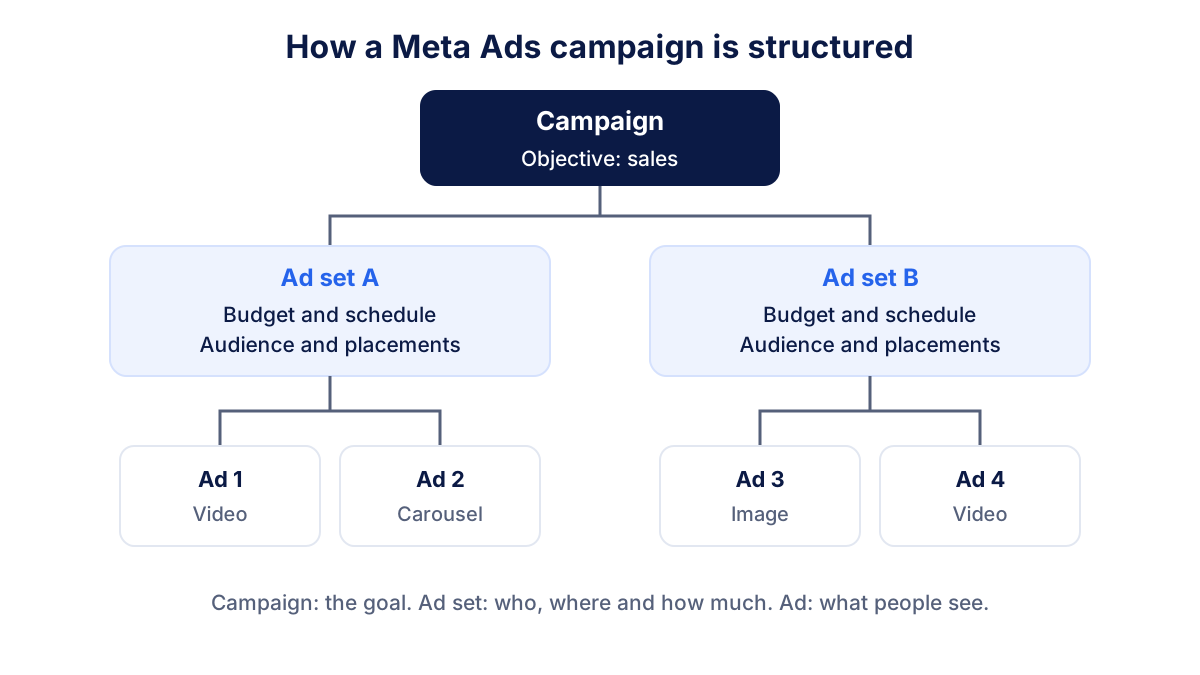
Campaign objectives
Meta groups its objectives into six families: awareness, traffic, engagement, leads, app promotion and sales. The objective tells the delivery system which outcome to look for, and it also decides what Ads Manager counts in the Results column. That is why adding up "results" from an awareness campaign and a sales campaign makes no sense in a report: one result might be a person reached, the other a purchase.
How Ads Manager works for reporting
Ads Manager has a handful of areas you will use every month. Meta updates the interface often, so the exact labels may differ slightly in your account:
- The main table with tabs for campaigns, ad sets and ads, plus filters and a date range picker.
- Columns: preset views (performance, delivery, engagement) or a custom set you save and reuse.
- Breakdowns: split any metric by age, gender, country, placement, platform, device or time.
- Ads Reporting: custom pivot-style reports you can save, export as CSV or Excel and schedule by email.
- Events Manager: where the Meta pixel and the Conversions API send website events such as leads and purchases.
A practical habit: save one custom column set called "Monthly report" so the same metrics appear in the same order every time you open the account.
Which Facebook Ads metrics matter?
The metrics below cover most client reports. Definitions follow the Meta Business Help Center wording in simplified form.
| Metric | Formula or definition | What it tells you |
|---|---|---|
| Amount spent | Total cost in the period | Budget pacing |
| Reach | Accounts that saw the ad at least once (estimated) | How many people you touched |
| Impressions | Times the ads were on screen | Total delivery volume |
| Frequency | Impressions ÷ reach | Repetition and creative fatigue |
| CPM | Spend ÷ impressions × 1,000 | Cost of visibility |
| CTR (link) | Link clicks ÷ impressions × 100 | Whether the ad earns the click |
| CPC (cost per link click) | Spend ÷ link clicks | Cost of traffic |
| Results | Actions that match the objective | Outcome volume |
| Cost per result | Spend ÷ results | Efficiency against the goal |
| Purchase ROAS | Purchase conversion value ÷ spend | Revenue returned per dollar |
A worked example
Take a hypothetical month: $1,000 spent, 200,000 impressions, 80,000 people reached, 2,000 link clicks and 40 purchases worth $3,000 in total.
- CPM = $1,000 ÷ 200,000 × 1,000 = $5.00
- Frequency = 200,000 ÷ 80,000 = 2.5
- Link CTR = 2,000 ÷ 200,000 × 100 = 1%
- CPC = $1,000 ÷ 2,000 = $0.50
- Cost per purchase = $1,000 ÷ 40 = $25
- ROAS = $3,000 ÷ $1,000 = 3.0
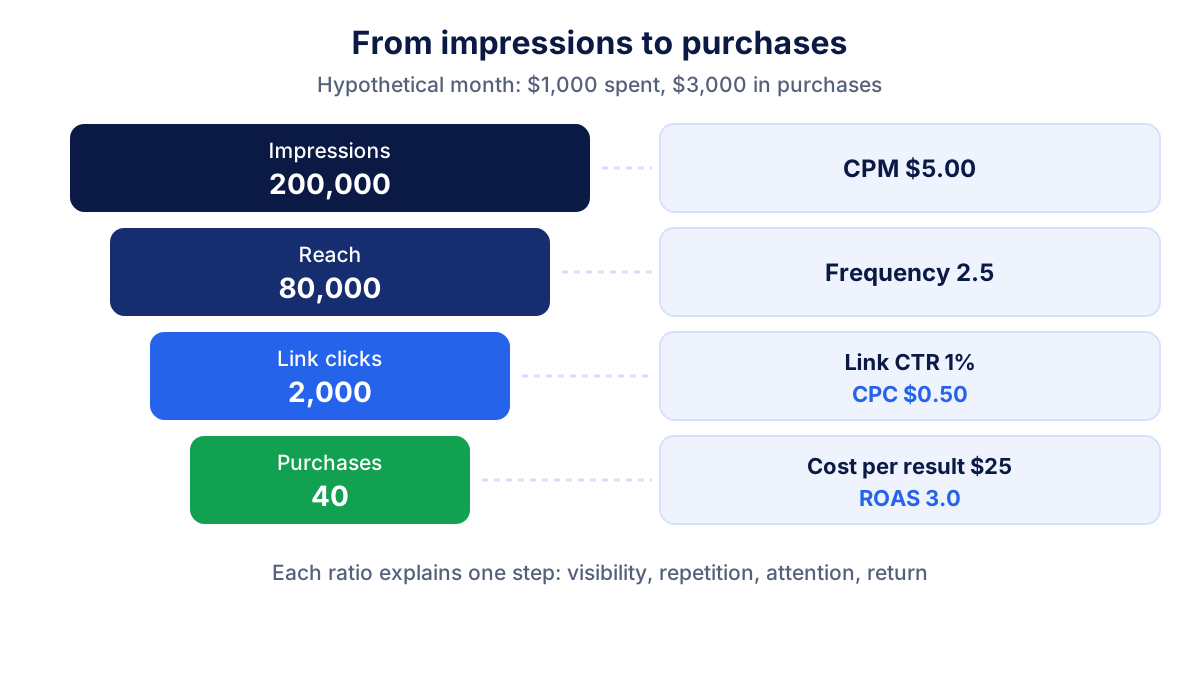
Read the chain from top to bottom. A rising CPM means visibility got more expensive. A falling CTR points to the creative or the audience. A stable cost per result with a lower ROAS means people still buy, but buy less.
One detail trips up many reports: Ads Manager offers both CTR (all) and CTR (link click-through rate). CTR (all) counts every click, including reactions, profile clicks and opening the image. For a report about traffic or sales, use the link version.
Why don't Meta Ads and GA4 numbers match?
Conversions in Ads Manager almost never equal conversions in Google Analytics 4. That is expected, because the two tools answer different questions.
- Attribution window. Meta credits a conversion to an ad if it happens within the attribution setting of the ad set. At the time of writing the default is 7-day click or 1-day view; you can see it in the "Attribution setting" column.
- View-through conversions. Meta can count a purchase made after someone only saw an ad. GA4 cannot see ad views at all.
- Cross-channel credit. GA4 spreads credit across all channels with its own attribution model. Meta only looks at Meta ads.
- Reporting date. Ads Manager usually reports a conversion on the day of the ad click or impression, GA4 on the day the conversion happens.
- Modeled data and consent. Both tools fill some gaps with modeling, and cookie consent affects each one differently.
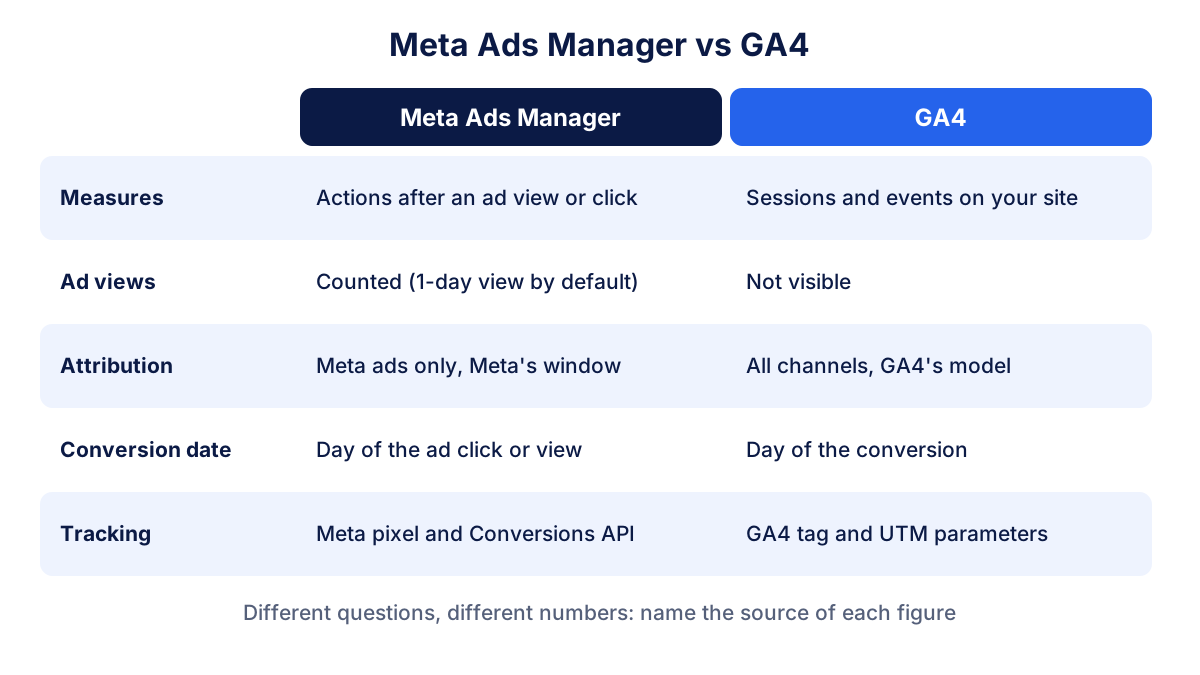
Two habits make this manageable. Tag every ad destination with UTM parameters so GA4 attributes sessions to the right campaign. Then say in the report which tool each number comes from: Meta for "what did our ads drive by Meta's rules", GA4 for "how does paid social compare with other channels".
How to build a monthly Facebook Ads report for clients
In the reports we build for clients, the structure barely changes from month to month. Consistency is what lets the client spot real changes. A workable template:
- Objective and KPI. One line per campaign: its objective and the number it is judged on.
- Summary. Amount spent, results, cost per result and ROAS, against last month and the target.
- Trend. A daily or weekly chart of spend and results, so spikes have context.
- Campaign table. Campaigns or ad sets with the same columns as the summary.
- Creative. Top and bottom ads by cost per result, with frequency to flag fatigue.
- Breakdowns. Placement and age or country, only where they change a decision.
- Organic context. Facebook Page and Instagram results, such as follower growth and engagement rate, if you also manage social.
- Notes and next steps. What changed, why, and what you will test next month.
Exports from Ads Manager work for one account. When you report on several clients, or need Meta next to Google Ads and GA4, a reporting tool saves the copy-paste. Klyrax connects to Meta Ads, Facebook Pages and Instagram in read-only mode, including ad accounts you access through a Business Manager, and turns them into live dashboards and PDF or PowerPoint exports.
Meta Ad Library: how to use it for competitor research
The Meta Ad Library is a public, free database of ads currently running across Meta technologies. Anyone can open the Meta Ad Library without an account, choose a country and an ad category, then search by advertiser name or keyword.
For each ad you see the creative, the text, the date it started running, the platforms it runs on and whether several versions exist. Ads about social issues, elections or politics carry extra information such as spend and impression ranges. In the EU, ads delivered there also show additional transparency details. For ordinary commercial ads, the library does not show spend or performance.
How to use it for competitor research:
- List the offers, hooks and calls to action competitors repeat across ads.
- Note which formats they favor: video, carousel or static images.
- Check how long ads have been running. A long-running ad is often one that performs, though that is a hint, not proof.
- Follow the links to see the landing pages behind the ads.
- Revisit monthly before seasonal peaks to see when competitors ramp up.
Common mistakes in Facebook Ads reporting
- Mixing objectives in one "results" total.
- Reporting CTR (all) instead of link CTR for traffic and sales campaigns.
- Comparing Meta and GA4 conversions as if one were wrong.
- Changing the attribution setting mid-period without saying so in the report.
- Ignoring frequency until results drop: rising frequency with falling CTR is a classic sign of creative fatigue.
- Reporting ROAS without margins: a ROAS of 3.0 is profitable only if your margins allow it.
For the official definitions of every column, the Meta Business Help Center is the reference to check when a metric looks odd.
Frequently asked questions
What metrics should a Facebook Ads report include?
Start with amount spent, results and cost per result, because they tie directly to the campaign objective. Add ROAS for sales campaigns, then the delivery metrics that explain the outcome: reach, impressions, frequency, CPM, link CTR and CPC. Keep the same metric set every month so the client can compare periods without relearning the report.
How do I export a report from Meta Ads Manager?
In Ads Manager, pick the date range, the level (campaigns, ad sets or ads) and the columns you want, then use the export option to download the table as a CSV or Excel file. The Ads Reporting area lets you build custom pivot-style reports, save them and schedule them by email. Menu names can change, so check the Meta Business Help Center if an option has moved.
Why do Facebook Ads and Google Analytics show different conversions?
The two tools measure different things. Meta Ads Manager credits conversions to its ads within its attribution window, including some after an ad view, and can use modeled data. GA4 tracks sessions on your site, credits conversions across every channel with its own model and cannot see ad views. Differences are normal; use each tool for the question it answers best.
What is a good CTR or ROAS for Facebook ads?
There is no universal benchmark. Link CTR and ROAS depend on the objective, audience, country, sector, creative format, margins and season. A ROAS that makes money for a high-margin product can lose money for a low-margin one. Compare against your own history and against the break-even ROAS of the business, not against an average from another market.
What is the Meta Ad Library?
The Meta Ad Library is a free, public database of ads running across Meta technologies. You can search it by advertiser or keyword without logging in, filter by country, and see each ad's creative, start date and platforms. It does not show performance for ordinary commercial ads, but it is useful for studying competitors' messages, offers and formats.
All your marketing data in one report
Klyrax connects Google Ads, Meta Ads, GA4, Search Console, Bing Webmaster Tools and more in read-only mode, and turns them into client-ready reports.
Request info