
Engagement rate tells you what share of your audience interacts with your content. To calculate engagement rate, divide the interactions on a post (or in a period) by followers, reach or impressions and multiply by 100. This guide shows each formula, includes a free engagement rate calculator, explains what counts as an interaction on Instagram, TikTok, LinkedIn and Facebook, and covers how to report the number to clients.
What is engagement rate?
Engagement rate is a social media metric that measures how many interactions a piece of content gets relative to the size of its audience, expressed as a percentage. Interactions are actions such as likes, comments, shares and saves. The audience can be the account's followers, the people reached or the number of impressions.
Raw counts mislead. A post with 1,000 likes on an account with 500,000 followers did worse than a post with 300 likes on an account with 5,000 followers. Engagement rate puts both on the same scale, which is why it is the most quoted of all social media KPIs. If you are still deciding which numbers belong in a report, the guide to marketing KPIs explains how to tie each one to a goal.
How to calculate engagement rate: the formulas
Every engagement rate formula has the same shape: interactions divided by a base, times 100. What changes is the base.
Engagement rate by followers
Engagement rate by followers = interactions ÷ followers × 100
This is the version most public tools use, because follower counts are visible on every profile. It works for comparing your account with competitors or for screening influencers. Its weakness is that only a fraction of followers see any given post, so the number tends to be low and moves with the platform's distribution.
Engagement rate by reach
Engagement rate by reach = interactions ÷ reach × 100
Reach is the number of unique accounts that saw the content. Dividing by reach shows how people who actually saw the post responded, which makes it the better measure of content quality. You need access to the account's insights, so use it for your own accounts and your clients'.
Engagement rate by impressions or views
Engagement rate by impressions = interactions ÷ impressions × 100
Impressions count every time the content was displayed, including repeat views by the same person. Several platforms now report views rather than impressions, especially for video. LinkedIn and TikTok users often work with this version, since impressions and views are the main audience numbers those platforms show.
Per post or per period
For a single post, use that post's interactions and reach. For a month, you have two options. Add up all interactions and divide by the total reach of the posts in that month. Or calculate the rate for each post and take the average. Both are valid; pick one and keep it. If you use followers as the base for a period, divide total interactions by the number of posts first, otherwise accounts that post more look more engaging.
Engagement rate calculator
Use the same period for interactions, followers and reach: the result updates as you type.
Worked example: Instagram engagement rate for a post and a month
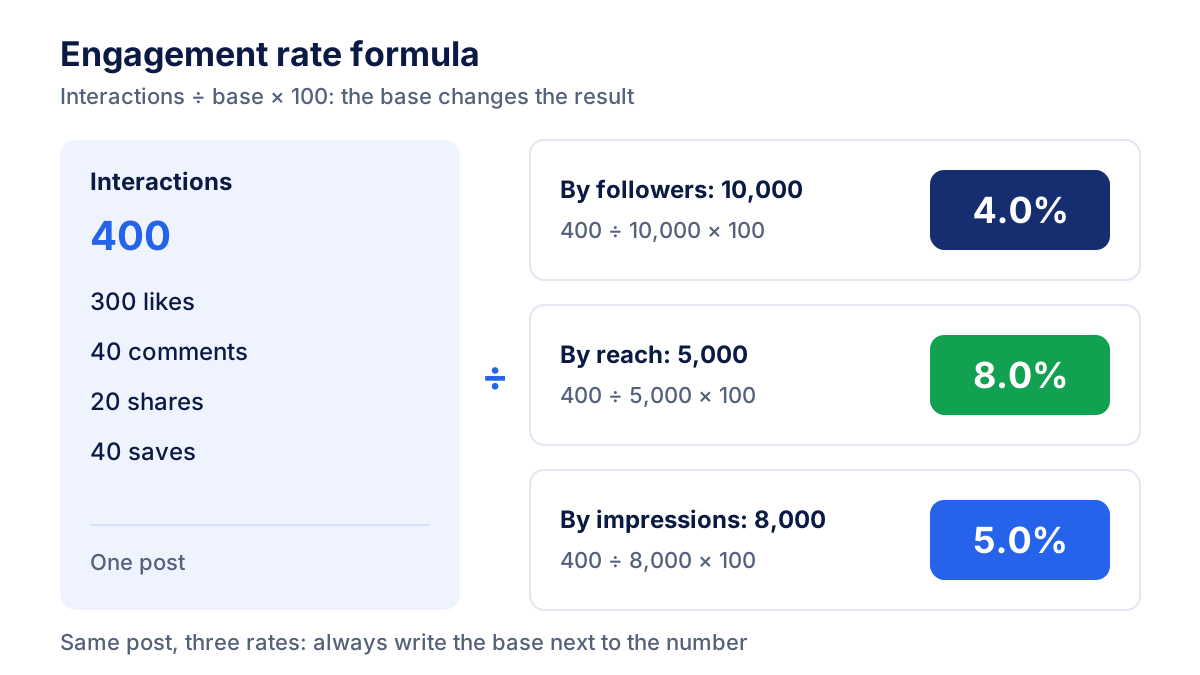
Assume a hypothetical Instagram post with these numbers:
- Likes: 300, comments: 40, shares: 20, saves: 40
- Total interactions: 400
- Followers: 10,000, reach: 5,000, impressions: 8,000
The three formulas give:
- By followers: 400 ÷ 10,000 × 100 = 4.0%
- By reach: 400 ÷ 5,000 × 100 = 8.0%
- By impressions: 400 ÷ 8,000 × 100 = 5.0%
Same post, three different numbers. None of them is wrong, which is exactly why the base must be written next to the figure.
Now the whole month. The account published 20 posts, which collected 6,000 interactions and a combined reach of 100,000. Engagement rate by reach for the month is 6,000 ÷ 100,000 × 100 = 6.0%. Engagement rate by followers per post is 6,000 ÷ 20 ÷ 10,000 × 100 = 3.0%.
Which interactions count on Instagram, TikTok, LinkedIn and Facebook?
Each platform defines and displays its metrics differently, so an "engagement" figure from one network is rarely comparable with another. Before calculating anything, check what each platform's insights include.
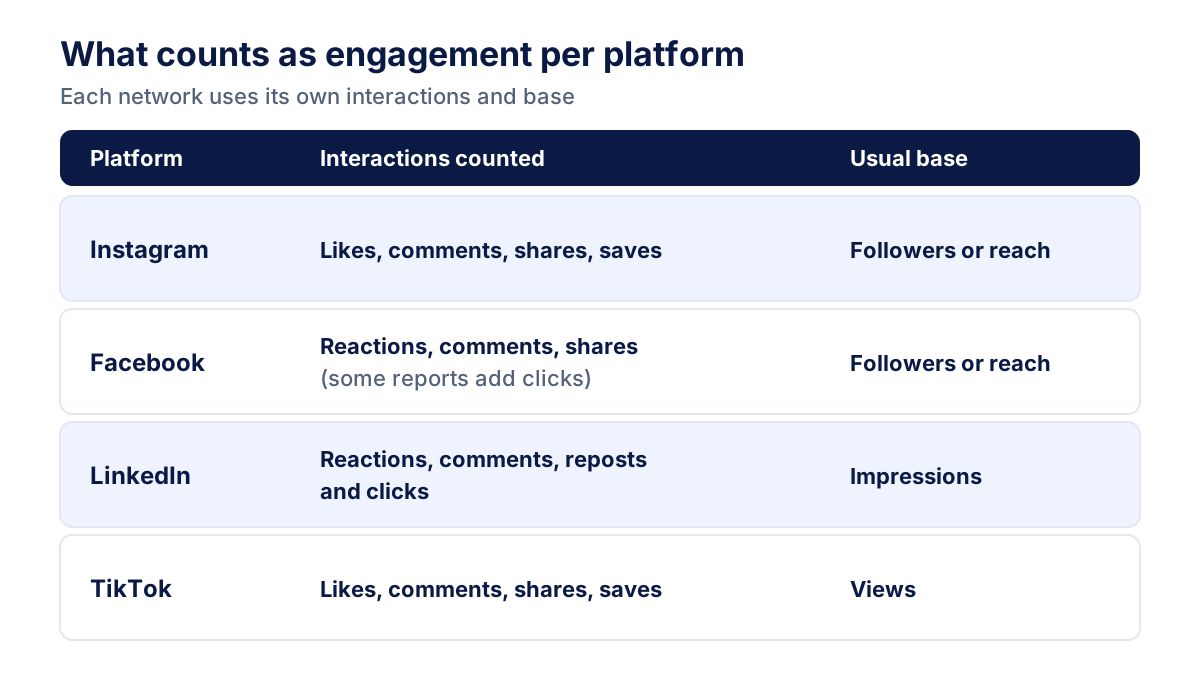
- Instagram. Likes, comments, shares and saves are the usual interactions. Professional accounts see reach and interactions per post in Instagram's insights. The Instagram Help Center explains which metrics are available for each format.
- Facebook Pages. Reactions, comments and shares form the core. Some Meta reports also count clicks on the post inside "engagement", so check the metric definition in the Meta Business Help Center before comparing with Instagram.
- LinkedIn. Page analytics shows an engagement rate per update that is calculated on impressions and includes clicks as well as reactions, comments and reposts. That makes LinkedIn's figure look higher than one based only on reactions and comments.
- TikTok. Likes, comments and shares are counted against video views. Saves are also visible on videos. Because views can be very high for content pushed to non-followers, the rate by followers is rarely useful on TikTok.
My practical rule: decide which actions you count per platform, write it in the report notes, and do not mix in clicks on one network and leave them out on another.
What is a good engagement rate?
There is no universal good engagement rate. The value depends on the platform, the base used, the size of the account, the sector and the content format. Treat the ranges below as a rough orientation from public industry reports, not as standards.
| Platform | Usual base | Rough range often reported |
|---|---|---|
| Followers | about 1-3% | |
| Facebook Pages | Followers | often below 1% |
| LinkedIn pages | Impressions (incl. clicks) | about 2-5% |
| TikTok | Views | often several percent, wide variation |
Smaller accounts usually have higher rates than large ones. A local brand with 3,000 loyal followers can beat a national brand with 300,000. The most reliable benchmark is your own history: compare each month with the previous three to six, and with two or three competitors measured with the same formula.
Engagement rate and other social media KPIs
Engagement rate measures interest, not results. A complete social report pairs it with KPIs for reach, growth and outcomes.
| KPI | Formula | What it tells you |
|---|---|---|
| Engagement rate | interactions ÷ reach × 100 | How the audience responds to content |
| Reach | unique accounts that saw the content | How many people you get in front of |
| Follower growth rate | new followers ÷ followers at start × 100 | Whether the audience is growing |
| Link click-through rate | link clicks ÷ reach (or impressions) × 100 | Whether content drives traffic |
| Conversions from social | leads or sales attributed to social | Whether social contributes to revenue |
The click-through rate is calculated as in search and ads, so the same guide applies. To see how a brand's visibility compares with competitors, add share of voice. For paid social, the KPIs come from the ad account, explained in the guide to Meta Ads.
How to report engagement rate to clients
In the reports we build for clients, the engagement section always answers three questions: how much, compared to what, and why.
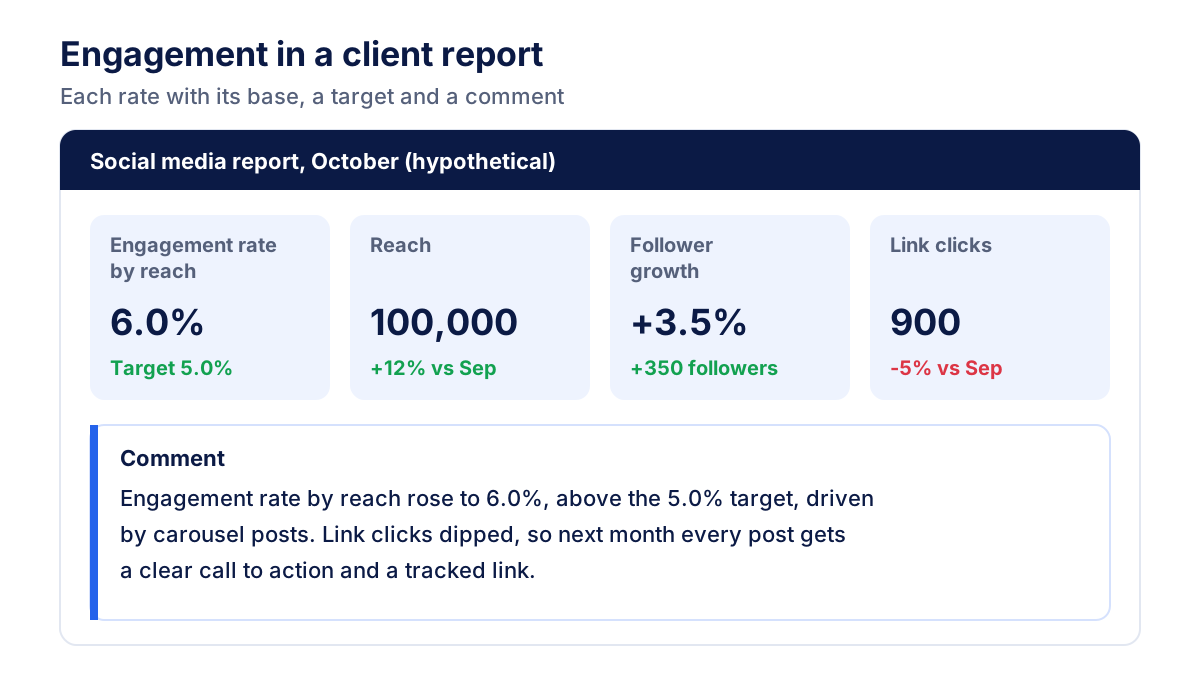
- Show one engagement rate per platform, with the base written in the tile label ("engagement rate by reach").
- Add the comparison: previous month, same month last year, and the target agreed with the client.
- Show the top three posts by engagement rate, not by likes, so small accounts and big posts are judged fairly.
- Write two or three sentences on what drove the result and what changes next month.
The tedious part is collecting the numbers from each network's insights every month. Klyrax connects to Instagram, Facebook Pages and LinkedIn pages in read-only mode and puts social metrics next to the website and ads data in one dashboard you can share with a link or export to PDF and PowerPoint.
Common engagement rate mistakes
- Not stating the base. "Engagement rate 6%" means nothing until you say whether it is by followers, reach or impressions.
- Comparing platforms directly. LinkedIn includes clicks and divides by impressions; Instagram calculators often divide by followers. A higher number on LinkedIn does not mean better content.
- Changing the formula mid-year. Switching from followers to reach makes every month look better overnight. If you change, recalculate past months.
- Using totals for a period by followers. Accounts that post twice as often will show double the rate. Divide by the number of posts first.
- Treating engagement as the goal. High engagement with no clicks or leads may be fine for awareness, but not for a sales objective.
- Chasing giveaways. Contests inflate comments for a week and leave the following months looking weak.
Pick one formula per platform, write it down, and track it every month next to reach and clicks. Engagement rate becomes useful the moment it is consistent.
Frequently asked questions
How do you calculate engagement rate?
Add up the interactions on a post or in a period (likes, comments, shares, saves), divide by a base and multiply by 100. The base can be followers, reach or impressions. For example, 400 interactions on a post that reached 5,000 accounts give an engagement rate of 8%. Use the same base every time you compare posts, months or accounts.
How do you calculate Instagram engagement rate?
For a single Instagram post, add likes, comments, shares and saves, then divide by the post's reach and multiply by 100. If you do not have access to the account's insights, divide by the number of followers instead. Engagement rate by followers is the version most public calculators use, while engagement rate by reach is more accurate for your own accounts.
What is a good engagement rate on Instagram?
There is no universal good engagement rate. Industry reports often place Instagram engagement rate by followers somewhere around 1% to 3%, with smaller accounts usually higher and large brand accounts lower. The figure also varies by sector and by format. The most useful benchmark is your own account: compare each month with the previous months and with similar accounts.
Should I calculate engagement rate by followers or by reach?
Use engagement rate by reach when you have access to the account's insights, because it measures how people who actually saw the post responded. Use engagement rate by followers to compare accounts you do not manage, such as competitors or influencers, since followers are public. Either way, write the base next to the number in your report.
What are the main social media KPIs?
The main social media KPIs are engagement rate, reach, follower growth rate, click-through rate on links, and conversions or leads coming from social traffic. Which ones matter depends on the goal: awareness campaigns lean on reach and engagement, while sales or lead generation goals need clicks and conversions tracked on the website.
All your marketing data in one report
Klyrax connects Google Ads, Meta Ads, GA4, Search Console, Bing Webmaster Tools and more in read-only mode, and turns them into client-ready reports.
Request info