
A Meta Ads report should answer one question: are your ads on Facebook and Instagram bringing customers at a price that works for your business? To answer it you need about eight numbers, read in the right order and compared with last month. Everything else in Ads Manager is detail for whoever runs the campaigns.
This guide shows which Meta Ads metrics to check every month, which ones to ignore, why Meta and Google Analytics never agree, a one-page template you can copy, the red flags worth acting on and the questions to ask if someone else manages your ads.
What should a monthly Meta Ads report show?
A monthly Meta Ads report is a short summary of what your campaigns cost, what they delivered and how both changed compared with the previous month. It is not an export of every column in Ads Manager. If the report needs a meeting to explain it, it is too long.
Read the numbers in this order:
- Amount spent: what you paid Meta in the month.
- Results and cost per result: what you bought with that money.
- ROAS: for online shops, how much revenue each unit of spend brought back.
- Reach, frequency, CPM and link CTR: the numbers that explain why results went up or down.
The first three tell you whether the ads are working. The last group tells you where to look when they are not. If you are new to the platform itself, start with the guide to Meta Ads and Ads Manager and come back here.
Results and cost per result: the numbers that matter most
In Ads Manager, results are the outcomes counted for the objective and performance goal you chose: purchases, leads, messages, calls, landing page views. Meta's help page on results explains that the result type depends on how the campaign is set up, so two campaigns in the same account can count different things.
Cost per result is the amount spent divided by the number of results:
Cost per result = amount spent ÷ results
With $1,000 spent and 25 purchases, each purchase cost $40. Whether $40 is good depends on your margin, not on an average from another business. If an order leaves you $60 of profit before advertising, $40 per purchase works. If it leaves $30, the campaign loses money on every sale.
Two checks before you trust the number:
- Is the result the one you care about? A campaign optimized for landing page views will show cheap results that are not customers.
- Does it show up in your business? Twenty-five purchases in Meta should look like roughly that many orders in your shop, give or take the attribution differences explained below.
Reach, frequency and CPM: how many people saw the ads
Reach is the number of people who saw your ads at least once. Impressions count every time an ad was shown. Frequency is the average number of times each person saw them:
Frequency = impressions ÷ reach
CPM is the cost of 1,000 impressions. It reflects how much competition there is for your audience in the ad auction, which moves with season, country and sector. A rising CPM in November is not necessarily a sign of a badly run account. The guide to CPM and how it is calculated covers the formula and what pushes it up.
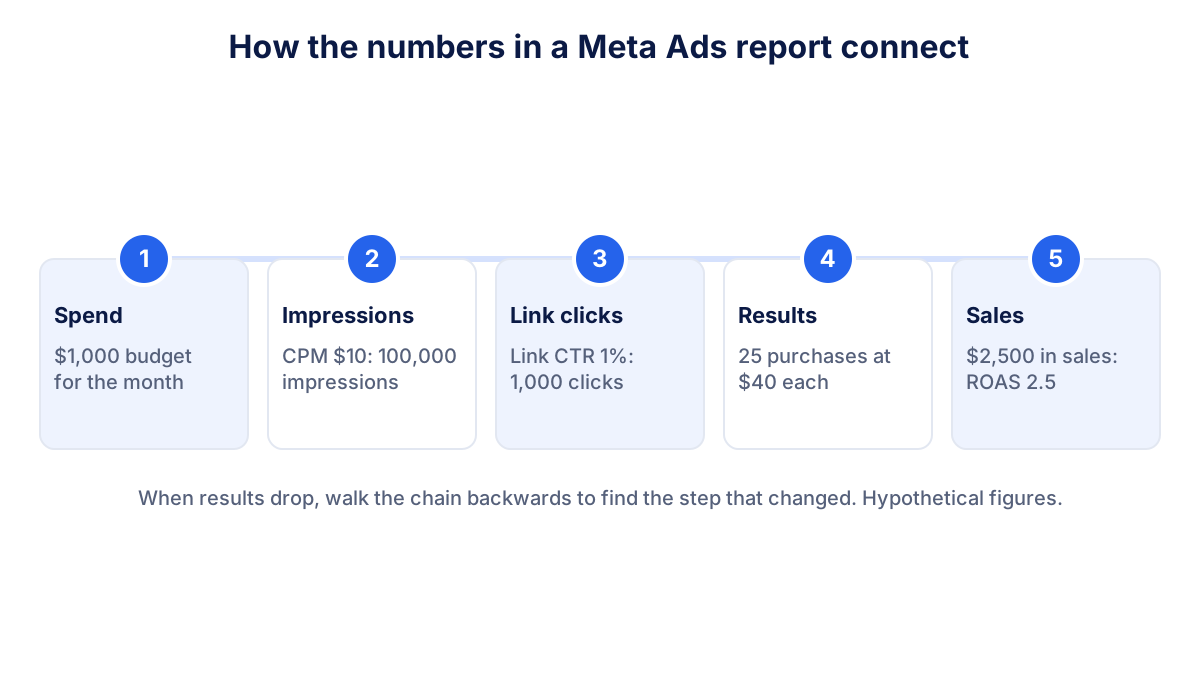
These numbers matter together. Frequency going up while reach goes down means your budget is showing the same ads to the same people again and again. In a small local audience that happens quickly, and after a while those people stop clicking.
Link CTR: are people interested in the ad?
Link CTR is the share of impressions that led to a click on a link to your site or offer:
Link CTR = link clicks ÷ impressions × 100
Use link CTR, not the general CTR (all) column. CTR (all) also counts clicks on the profile name, likes, comments and clicks to expand the image, which say little about buying interest. A falling link CTR usually points to the ad itself: the creative is worn out, the offer is weak or the audience is wrong. The article on click-through rate explains how to read it across channels.
There is no universal good link CTR. It changes with format, placement, country and sector. Your own history is the benchmark: compare each month with the previous two or three.
ROAS: is the money coming back?
For an online shop, ROAS (return on ad spend) closes the loop:
ROAS = purchase value ÷ amount spent
With $2,500 of purchase value from $1,000 of spend, ROAS is 2.5. A ROAS of 2.5 is not automatically good or bad. It has to beat your break-even point, which depends on your margins. The guide to ROAS and break-even ROAS shows how to calculate the minimum you need.
Keep in mind that Meta's ROAS uses Meta's own attribution. It is a useful trend line inside Meta, not the final word on profit. Compare it with the revenue your shop or your accounting actually recorded.
Why Meta Ads and Google Analytics never agree
Almost every business owner who opens both tools sees two different numbers for the same campaign. That is normal, and it has a few general causes:
- Attribution setting. Meta credits a conversion to an ad if it happens within the attribution setting of the ad set, which combines a click window and, optionally, a view window. Meta's page about attribution settings lists the options. Someone who saw your ad without clicking and bought the next day can count in Meta and never appear as a Meta visit in GA4.
- Different models. GA4 spreads credit across every channel with its own model. Meta only looks at Meta ads and can also use modeled data where tracking is limited.
- Consent and blocked tags. In the EU many visitors decline analytics cookies or block scripts, so GA4 sees fewer sessions than actually happened.
- Dates and time zones. The ad account and the GA4 property can use different time zones, and one tool may date a conversion to the ad interaction while the other dates it to the visit.
The practical rule: use Meta to compare campaigns and ads with each other, use GA4 or your shop to measure what really arrived, and never add the two together. If the gap suddenly changes, something in the setup has changed. Check it.
A one-page monthly Meta Ads report template
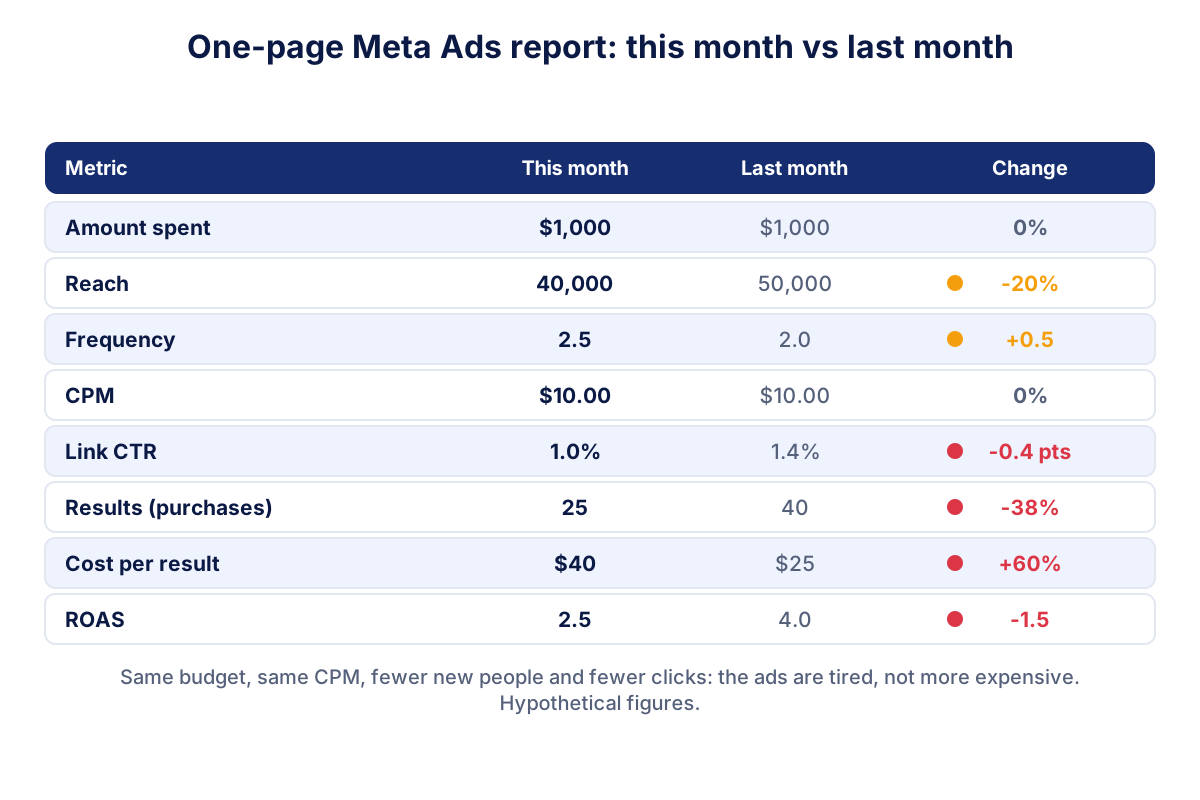
Here is the template we suggest, with hypothetical numbers for a small online shop. Same budget and same CPM in both months, yet results dropped.
| Metric | This month | Last month | What it tells you |
|---|---|---|---|
| Amount spent | $1,000 | $1,000 | Budget unchanged |
| Reach | 40,000 | 50,000 | Fewer new people |
| Frequency | 2.5 | 2.0 | Same people see the ads more often |
| CPM | $10.00 | $10.00 | The auction did not get more expensive |
| Link CTR | 1.0% | 1.4% | Less interest in the ads |
| Results (purchases) | 25 | 40 | Fewer sales |
| Cost per result | $40 | $25 | Each sale cost more |
| ROAS | 2.5 | 4.0 | Less revenue per unit of spend |
Read it as a chain. Spend and CPM did not move, so the problem is not the price of the audience. Reach went down and frequency went up, link CTR fell: the same people are seeing the same ads and are less interested. The likely fix is new creative or a broader audience, not more budget.
What to ignore in a monthly report: likes, post reactions, comments, post engagement, CTR (all), video plays of two seconds and "people reached" in organic posts. These metrics can matter for a brand awareness campaign, but they do not tell a business owner whether the ads paid off.
Red flags in a Meta Ads report
Some movement from month to month is normal, especially on small budgets. These patterns deserve attention:
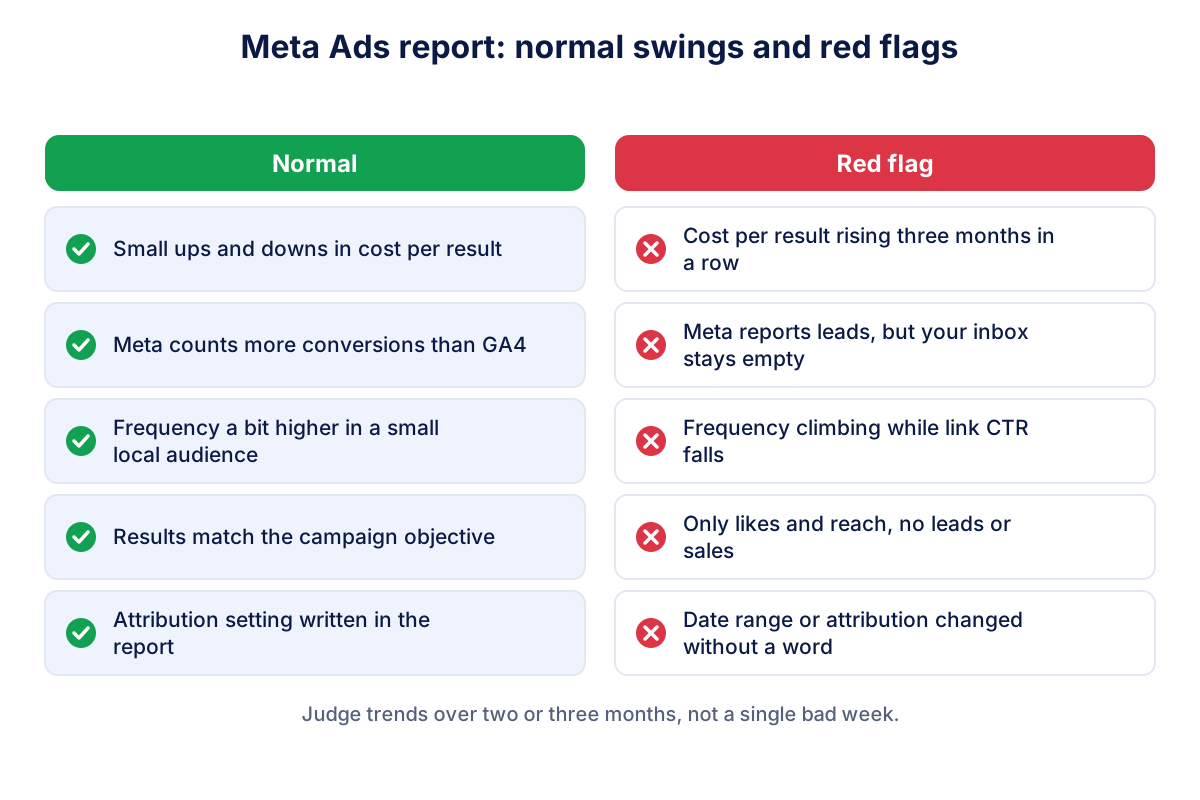
- Cost per result rising for three months in a row while budget stays the same.
- Meta reports leads, but your inbox is empty. Check the form, the pixel and the conversion event before anything else.
- Frequency climbing while link CTR falls. Classic creative fatigue.
- A report full of reach and likes but no results. Ask what the campaign is supposed to achieve.
- Attribution or date range changed without a note. Two months measured differently cannot be compared.
What to ask whoever manages your ads
If an agency or a freelancer runs your campaigns, these questions keep the monthly conversation short and useful:
- What is the objective of each campaign, and which result does it count?
- Which attribution setting is used, and has it changed?
- How does cost per result compare with the last three months, and why?
- How many of the results reported by Meta can we find in our shop, CRM or inbox?
- Which ads are tired (high frequency, falling link CTR), and what replaces them?
- What will you change next month, and how will we know if it worked?
Also make sure the ad account belongs to your business and that the agency has access as a partner, so the history stays with you.
How to fit Meta Ads into your monthly marketing check
Meta Ads is one channel among several. The numbers above make most sense next to your website traffic, Google Ads and email results, in the same monthly marketing report. Klyrax connects to Meta Ads in read-only mode, shows spend, results and ROAS next to your other channels in a summary built around your business goal, and on the 1st of each month writes a plain-language report on what changed and what to do next.
Frequently asked questions
How do I know if my Facebook ads are working?
Look at results and cost per result for the objective you chose, then check that they show up in your business: orders in the shop, calls, form requests in your inbox. If cost per result is stable or falling and your real sales or leads move with it, the ads are working. If Meta reports results that you cannot find anywhere else, investigate tracking before spending more.
Which Meta Ads metrics matter most for a small business?
Amount spent, results, cost per result and, for online sales, ROAS. These four tell you what you paid and what you got. Reach, frequency, CPM and link CTR come next because they explain why the results changed. Likes, post engagement and total clicks rarely help a business owner decide anything, unless brand awareness is the declared goal.
Why does Meta show more conversions than Google Analytics?
Meta credits a conversion to an ad when it happens within the attribution setting, which can include people who only saw the ad and bought later. GA4 counts sessions on your site, credits conversions across all channels with its own model and cannot see ad views at all. Cookie consent and blocked tags reduce GA4 further. A gap between the two is normal.
What is a good frequency for Facebook ads?
There is no single right number. Frequency is impressions divided by reach, so it depends on audience size, budget and how long the campaign runs. Small local audiences reach higher frequency faster. The useful signal is the trend: when frequency keeps climbing while link CTR falls and cost per result rises, the same people are tired of the same ads.
How often should I check my Meta Ads report?
Once a month for decisions, with a quick weekly glance at spend to catch errors such as a budget set too high. Meta campaigns go through a learning phase after big changes, and daily numbers swing a lot on small budgets. Monthly comparisons, read over two or three months, show real trends instead of noise.
See how your marketing is really doing
Klyrax connects GA4, Search Console, Google Ads, Meta Ads, your Google reviews and more in read-only mode, shows the numbers that matter for your business and writes you a plain-language report every month.
Request info