
A monthly marketing report is a one-page summary that tells you whether your marketing is working: 5 or 6 numbers tied to your business goal, compared with the previous month and the same month last year, with up to 3 actions for the month ahead. It is not a collection of every chart your tools can produce. It is the page you read on the first working day of the month to decide what to do next.
This guide shows which numbers to check for each type of business, gives you a template you can copy, explains how to read changes without being fooled by seasonality, and walks through turning numbers into actions.
What is a monthly marketing report?
A monthly marketing report is a short, recurring document that collects the key results of your website, ads, search and social channels for one calendar month and explains what they mean for the business. The word that matters is "short". Most marketing tools show dozens of metrics, and most of them are useful only when you investigate a specific problem.
In the reports we prepare for business owners, the useful version always answers three questions:
- Did we get more or fewer results (sales, leads, calls, visits) than before?
- Why did that happen, according to the data?
- What are we going to do about it next month?
If your current marketing report does not answer these three questions, it is a data dump, not a report.
Which numbers should a marketing report include?
The right numbers depend on what your website is for. A shop and a law firm need different reports, even if both use Google Analytics 4. Choose your main goal first, then pick 5 or 6 numbers that measure it, from results back to traffic.
| Business goal | The 5 or 6 numbers to check |
|---|---|
| Online shop | Revenue, orders, conversion rate, average order value, ad spend and ROAS, sessions |
| Lead generation | Leads (form submissions), cost per lead, lead conversion rate, sessions from search and ads, qualified leads |
| Local business | Google rating and new reviews, unanswered reviews, Maps position for key searches, website visits, calls or bookings |
| Professional services | Contact requests, clicks from Google Search, visits to service pages, position for key queries, reviews |
| Content site | Users, engaged sessions, newsletter sign-ups, clicks from Google Search, revenue per 1,000 sessions if you sell ads |
Two rules keep this list honest. First, put the result at the top (revenue, leads, calls) and traffic at the bottom: traffic is a means, not the goal. Second, keep the list stable. If you change the numbers every month, you lose the comparison that makes the report useful. The article on marketing KPIs explains how to choose them in more detail.
A one-page marketing report template
You can build a good marketing report template with a single table. Copy this structure into a spreadsheet or a document and fill it in each month:
| Number | This month | Previous month | Change | Same month last year | Change | Note |
|---|---|---|---|---|---|---|
| Result 1 (e.g. orders) | ||||||
| Result 2 (e.g. revenue) | ||||||
| Efficiency (e.g. conversion rate) | ||||||
| Cost (e.g. ROAS or cost per lead) | ||||||
| Traffic (e.g. sessions) |
Below the table, add a box with no more than three actions for next month. Each action needs a verb, an owner and a date. "Improve SEO" is not an action. "Rewrite the title and description of the three service pages that lost clicks, Anna, by the 15th" is.
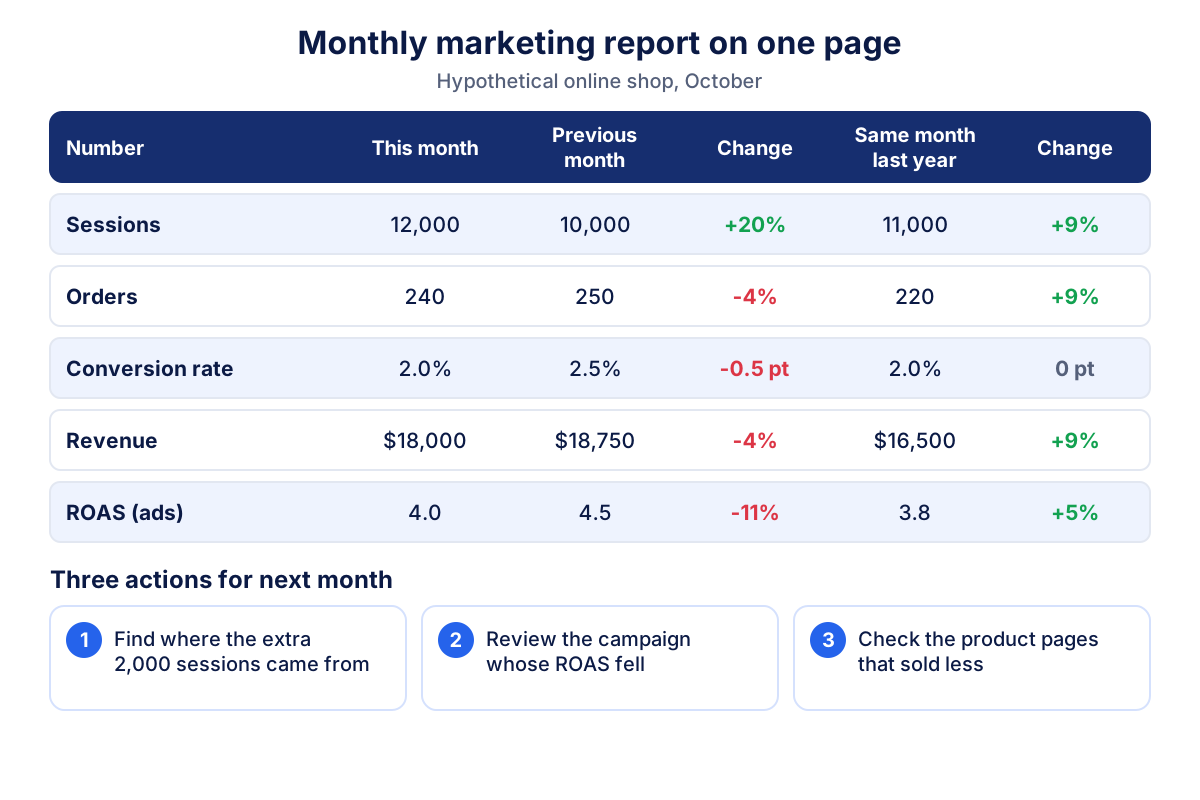
A monthly marketing report example
Here is a hypothetical online shop in October, with round numbers. Sessions rose from 10,000 to 12,000 (+20%), but orders fell from 250 to 240 (-4%). The conversion rate therefore dropped from 2.5% to 2.0%, and revenue went from $18,750 to $18,000 with an average order value of $75. ROAS from ads moved from 4.5 to 4.0.
Read against the previous month alone, this looks like a bad month: more visitors, fewer sales. Now add the same month last year: 11,000 sessions, 220 orders, a 2.0% conversion rate and $16,500 in revenue. Against last year, orders and revenue are up 9% and the conversion rate is unchanged. The previous month was simply unusually strong, perhaps because of a promotion or a seasonal peak.
The report then says something precise: the business is growing year on year, and this month 2,000 extra sessions arrived that bought less than usual. The useful question is where those sessions came from.
How to read changes: previous month, last year and seasonality
Every number in a marketing report moves a little each month. The skill is telling noise, seasonality and real change apart.
- Previous month shows recent movement, but it is distorted by the calendar: February has fewer days, August is quiet for many B2B companies, November is busy for most shops.
- Same month last year removes most seasonal effects. It is the fairer comparison for any business with a seasonal pattern, which is most of them.
- Three month trend protects you from overreacting. One weak month is a signal to watch; three weak months in a row are a problem to solve.
A simple threshold helps. Ignore changes below 5 to 10% on small numbers, because 20 leads becoming 18 is not a trend. Investigate changes above 10% when they appear in both comparisons.
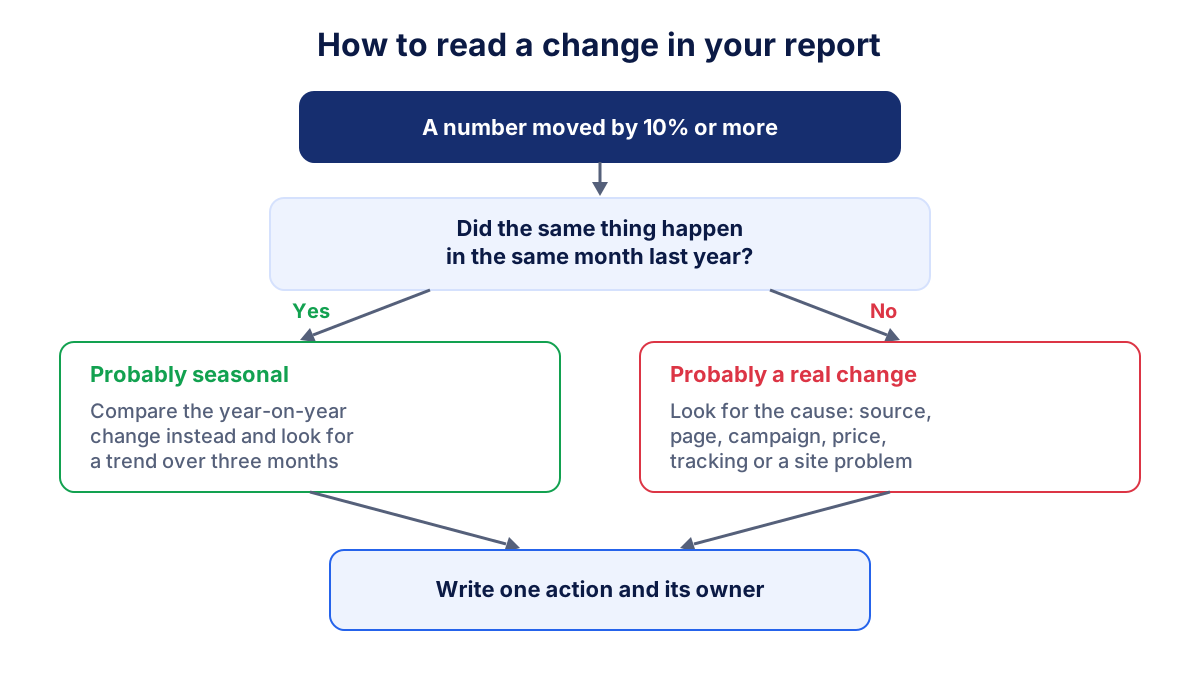
When a change is real, look for the cause in this order: traffic source (which channel brought more or fewer visits), landing page, campaign, price or offer, and finally tracking. A sudden drop to zero conversions is more often a broken form or a lost tracking tag than a collapse in demand. The guide to traffic sources shows how to see where visits come from in GA4.
How to turn the numbers into 3 actions
A monthly marketing report earns its time only if it changes what you do. Limit yourself to three actions, because a list of ten will not get done. For the shop in the example, the actions could be:
- Find out where the extra 2,000 sessions came from, for instance in the GA4 traffic acquisition report, and check the conversion rate of that channel.
- Review the ad campaign whose ROAS fell, and move budget to the campaigns that kept their return.
- Check the product pages that sold less than last month: price, stock, photos, page speed.
Good actions have three features: they come from a number in the report, they have one owner, and you can check next month whether they worked. Write them down and open the next report by reviewing them.
Common mistakes in a marketing report
- Too many metrics. Thirty numbers hide the five that matter. Move everything else to an appendix or leave it in the tools.
- Vanity metrics at the top. Impressions, followers and page views look good but rarely decide anything. Put results first.
- No comparison. "1,200 sessions" means nothing alone. Always show the previous month and the same month last year.
- Mixing definitions. Sessions in GA4, clicks in Search Console and clicks in Google Ads are three different things. Label each number with its source.
- Changing the template every month. Consistency is what makes a change visible.
- Explaining with guesses. "Probably the weather" is not an explanation. If the data does not show a cause, write that the cause is unknown and what you will check.
- Ignoring tracking. A conversion rate that halves overnight often means tracking broke, not customers. The article on conversion rate covers how to check it.
How Klyrax writes this report every month
If you do not want to build this report yourself, Klyrax writes it for you. You choose your business goal (online shop, lead generation, local business, professional services or content site) and the summary shows the 4 to 6 numbers that matter for it, compared with the previous period.
On the 1st of every month Klyrax writes a report in plain language: what happened, why it happened according to your data, and up to three things to do. The report is written automatically from the connected accounts, such as Google Analytics 4, Search Console, Google Ads, Meta Ads and your public Google reviews and Maps data, through read-only connections. You find it in the app with the history of previous months, and it is also sent by email. Klyrax only uses the data you connect, so offline sales or phone orders that no tool records will not appear in it. The full dashboards per channel stay available when you want to look deeper.
A monthly marketing report does not need to be long. Pick your numbers once, compare them twice, write three actions, and read the next one against what you decided.
Frequently asked questions
What should a monthly marketing report include?
A monthly marketing report should include 5 or 6 numbers linked to your business goal, each shown with the previous month and the same month last year, a short explanation of what changed and why, and up to 3 actions for the next month. Leave out metrics that do not change a decision, such as total page views on a lead generation site.
How do I make a simple marketing report template?
Use one table with six columns: the number, this month, the previous month, the change, the same month last year and the change. Add one line of notes per number and a box with three actions below it. Keep the same numbers and the same layout every month so that changes stand out at a glance.
Should I compare with last month or with last year?
Use both. The previous month shows short term movement, while the same month last year removes most of the seasonal effect. If a number drops 15% against last month but is stable against last year, the drop is probably seasonal. If it drops against both, look for a real cause.
How long should a monthly marketing report take to read?
A good monthly marketing report for a small or medium business can be read in five to ten minutes. One page of numbers and a few lines of explanation are enough. The full channel data can stay in the tools for anyone who wants to dig deeper into a specific change.
Who should write the monthly marketing report?
Whoever has access to the data and understands the business: an internal marketing person, an agency or the owner. If an agency manages your ads, ask it for the same numbers in the same format every month. The format matters less than consistency and a clear link between numbers and actions.
See how your marketing is really doing
Klyrax connects GA4, Search Console, Google Ads, Meta Ads, your Google reviews and more in read-only mode, shows the numbers that matter for your business and writes you a plain-language report every month.
Request info