
Umami Analytics vs Google Analytics comes down to one trade-off: privacy and simplicity against advertising depth. Umami Analytics is an open source, cookieless tool that shows you traffic, sources and events on one clean screen. Google Analytics 4 measures much more and feeds Google Ads, but in the EU it depends on cookie consent. This guide compares the two on data model, consent, features and reporting, so you can pick one, or both.
What is Umami Analytics?
Umami Analytics is an open source web analytics platform that measures pageviews, visitors, referrers and custom events without cookies. It was built as a privacy-focused Google Analytics alternative: one dashboard, a lightweight tracking script and no cross-site tracking.
You can run Umami in two ways:
- Self-hosted: you install the open source application on your own server with a PostgreSQL database. You own the data and decide where it lives.
- Umami Cloud: the managed version, where the Umami team handles hosting, updates, backups and scaling.
The official Umami documentation states that the tracking code does not use cookies, that it does not collect personally identifiable information and that visitors are identified with an anonymous session identifier. Beyond pageviews, Umami supports custom events, UTM campaign reports, goals, funnels, shareable dashboards and an API.
We use Umami on our own site to count visits and form submissions as an event, and the reports it produces are enough for most content and lead generation sites.
How does Umami differ from Google Analytics 4?
The difference between Umami and Google Analytics 4 is not only cookies. The two tools have different data models, different consent needs and very different feature sets.
Data model
Google Analytics 4 is event-based and user-centric. Every interaction is an event with parameters, and GA4 tries to stitch events into users and sessions over time, across devices when signals allow. That model powers retention reports, audiences and attribution.
Umami keeps the model simple: pageviews, visits, visitors and events, aggregated by page, source, country, device and campaign. Because Umami uses an anonymous session identifier instead of a persistent cookie, a person who switches browser or device counts as a new visitor. For trend reporting that is usually fine. For lifetime value analysis it is not.
Cookies and consent
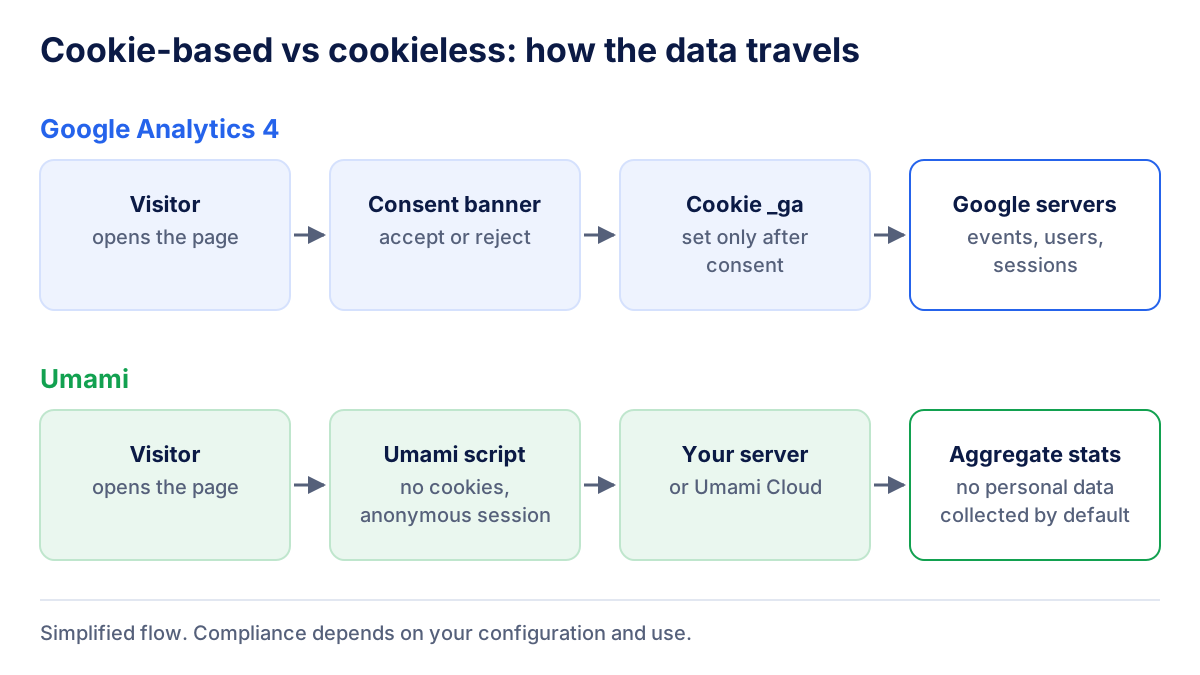
Google Analytics 4 sets first-party cookies (such as _ga) to recognize returning browsers. Under the GDPR and the ePrivacy rules, that kind of storage on the device generally requires prior consent in the EU. Google's Consent Mode lets the tag adjust its behavior to the visitor's choice, and GA4 can model part of the missing data when certain conditions are met. Without consent, though, you never see the full picture.
Umami is cookieless by design. No cookie banner gate means the script runs for every visitor, so your traffic numbers are not cut by refusal rates.
Features
GA4 is a full marketing analytics suite: Google Ads linking, conversion import, remarketing audiences, data-driven attribution, exploration reports and a BigQuery export. Umami deliberately leaves most of this out. It covers what a site owner checks every week and stops there.
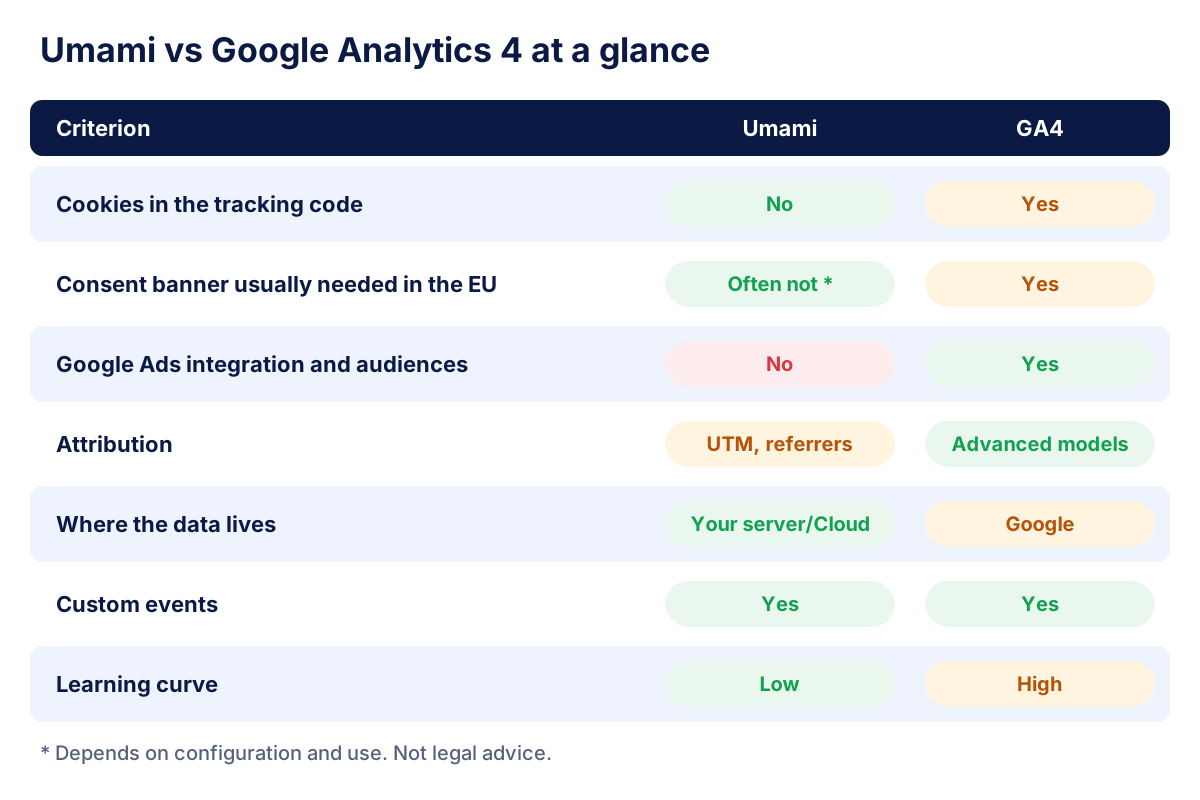
Umami vs Google Analytics: comparison table
| Criterion | Umami Analytics | Google Analytics 4 |
|---|---|---|
| License | Open source | Proprietary, free standard version |
| Hosting | Self-hosted or Umami Cloud | Google's infrastructure |
| Cookies in the tracking code | No | Yes (first-party cookies) |
| Consent in the EU | Often not required (depends on setup) | Normally required |
| Data model | Pageviews, visits, events | Events, users, sessions |
| Ads integration and audiences | No | Google Ads, audiences, conversion import |
| Attribution | Referrers and UTM parameters | Attribution models, including data-driven |
| Custom events | Yes | Yes |
| Data retention | Yours to decide when self-hosted | Event data kept 2 or 14 months (standard) |
| Learning curve | Low | High |
Is Google Analytics GDPR compliant?
Google Analytics GDPR compliance is the question that pushed many European sites toward cookieless analytics. In 2022 several EU regulators, including the Austrian authority, the French CNIL and the Italian Garante, found specific uses of Universal Analytics unlawful, mainly because of data transfers to the United States. Since July 2023 the EU-U.S. Data Privacy Framework gives a legal basis for transfers to certified US companies, which changed the picture again.
Today, using GA4 in the EU usually means: a consent banner that blocks the tag until the visitor agrees, a privacy notice that names Google Analytics, the data processing terms accepted in the account, and careful settings for data retention and data sharing. Google also states that GA4 does not log or store IP addresses. Check the current details in the Google Analytics help center.
Umami does not remove your obligations. If you send emails, user IDs or other personal data in custom events, you are processing personal data again. Legal compliance depends on your configuration and use, and nothing in this article is legal advice.
When should you choose Umami, and when Google Analytics?
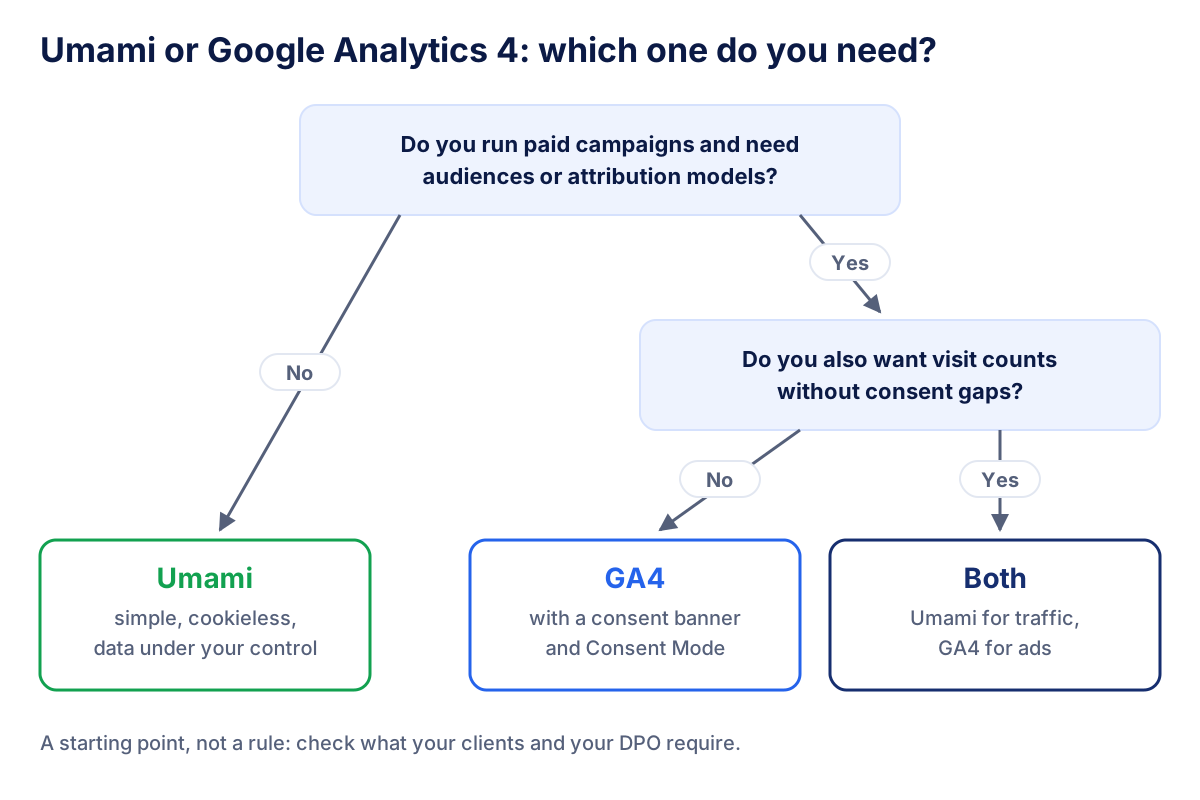
Choose Umami when the site lives on content, SEO and leads, when the client wants a simple dashboard they will actually open, and when data ownership or a consent-free script matters. Typical cases: blogs, SaaS marketing sites, local businesses, public bodies and agencies with privacy-sensitive clients.
Choose Google Analytics 4 when paid media drives the business. If you need to import conversions into Google Ads, build remarketing audiences or compare attribution models, Umami cannot replace it.
Can you use Umami and Google Analytics together?
Running both is common and makes sense. Umami loads on every page and gives you complete, cookieless traffic trends. GA4 loads only after consent and powers advertising, audiences and attribution.
Expect the numbers to disagree. Hypothetically, if Umami counts 10,000 visits in a month and 60% of visitors accept cookies, GA4 might report around 6,000 observed sessions plus whatever modeling adds. Neither tool is wrong: they count different populations in different ways. Pick one source of truth per KPI and say so in the report. Our guide to marketing KPIs helps you decide which metric belongs to which tool.
Campaign tagging should be identical in both. Both tools read the same UTM parameters, so a consistent naming convention gives you comparable campaign reports.
How to set up Umami and migrate from Google Analytics
Moving from GA4 to Umami, or adding Umami next to it, takes a few steps:
- Choose hosting. Self-host on your own server (Node.js application plus PostgreSQL) or sign up for Umami Cloud.
- Add the website. Umami creates a website ID and a tracking snippet.
- Install the script in the
<head>of every page, through your template, CMS or tag manager. - Recreate key events. Map your most important GA4 events (form submissions, signups, purchases) to Umami custom events, using the data attributes or the JavaScript tracker described in the docs.
- Set up goals and funnels for the conversions you report on.
- Run both in parallel for a month and document the gap between the two tools before you switch reports.
- Export historical GA4 data you want to keep, because Umami cannot import it.
If you also use behavior analytics such as Microsoft Clarity, remember that it uses cookies and needs its own consent, even if Umami does not.
Common mistakes when switching to cookieless analytics
- Treating Umami as a consent solution. The Umami script sets no cookies, but other tools on the same site (ad pixels, chat widgets, heatmaps) still need consent.
- Sending personal data in events. An email address or customer number as an event property turns anonymous statistics back into personal data processing.
- Adding up or directly comparing totals. Umami and GA4 count by different rules. Compare trends, not absolute numbers.
- Inconsistent UTM tagging. "Newsletter" and "newsletter" end up on separate rows and split your campaign reports.
- Forgetting the server. When you self-host, updates, backups and access rights are your job. If nobody on the team can own that, Umami Cloud is the safer choice.
How to report Umami and GA4 data to clients
A client report should answer business questions, not show two tools side by side with conflicting totals. A structure that works:
- Traffic trend from Umami: visits, visitors and top sources, comparable month over month because consent does not cut them.
- Campaign performance from GA4 and the ad platforms: conversions, cost, ROAS and attribution.
- One note on methodology: which tool feeds which number, and why the totals differ.
Klyrax connects in read-only mode to both Umami and Google Analytics 4, plus Google Ads, Meta Ads, Search Console and other platforms, so you can put cookieless traffic and paid performance in one dashboard, share a live link with the client or export it to PDF and PowerPoint. Data is hosted in the EU, which matters to the same clients who choose Umami for privacy.
The best Umami vs Google Analytics decision is often not "either/or". Use Umami where you need honest, consent-proof traffic numbers, GA4 where you need advertising depth, and a report that explains the difference in one sentence.
Frequently asked questions
Is Umami Analytics really free?
The Umami software is open source, so you can self-host it at no license cost and pay only for your server and database. Umami Cloud is the managed version, where the Umami team runs hosting, updates and backups for you. Plans and limits change over time, so check the current offer on umami.is before you choose between self-hosting and Cloud.
Does Umami Analytics need a cookie banner?
According to the official Umami documentation, the tracking code does not use cookies and does not collect personally identifiable information. For that reason many sites run Umami without asking for consent. Whether that holds for your site depends on your setup, for example if you send user IDs or personal data in events. Check with your privacy counsel or DPO.
Is Google Analytics 4 GDPR compliant?
Google Analytics 4 can be used in a GDPR-conscious way, but it is not compliant by default. In the EU you normally need prior consent for its cookies, a clear privacy notice, a data processing agreement with Google and sensible settings for retention and data sharing. Rules and regulator positions vary by country, so this is not legal advice.
Can I use Umami and Google Analytics at the same time?
Yes. Many sites run Umami on every page for complete, cookieless traffic counts and load Google Analytics 4 only after consent for advertising, audiences and attribution. Expect the numbers to differ: the two tools count visitors differently, and GA4 only sees visitors who accepted cookies unless modeling fills part of the gap.
Is Umami a good Google Analytics alternative for agencies?
Umami is a strong Google Analytics alternative when a client needs clean traffic numbers, a light script and data on infrastructure they control. It is a weaker fit when the client lives on Google Ads and needs audiences, conversion imports or attribution models. Many agencies use Umami for content sites and GA4 for e-commerce and paid media.
All your marketing data in one report
Klyrax connects Google Ads, Meta Ads, GA4, Search Console, Bing Webmaster Tools and more in read-only mode, and turns them into client-ready reports.
Request info