
The Meta Ad Library is the free public archive where you can see the ads that any business is currently running on Facebook, Instagram and Meta's other apps. Open facebook.com/ads/library, choose a country and a category, then search for a keyword or a competitor's Page name: you get their active ads, the date each one started and the platforms it runs on. Many people still call it the Facebook Ad Library; it is the same tool.
This guide explains how to search the Meta Ad Library, which filters matter, what it shows and what it hides (commercial versus political ads, and ads shown in the EU), and a simple monthly routine to learn from competitors without copying them.
What is the Meta Ad Library?
The Meta Ad Library is a transparency tool. In its help page on the Ad Library, Meta describes it as a place where you can search for ads running across Meta products and get information about the ads you see.
Three things make it useful for a business owner:
- It is public. You do not need an ad account, and the search works even without logging in.
- It covers every advertiser. Large brands and the bakery round the corner appear in the same list.
- It shows the real ads. Texts, images, videos, carousels and their variants, as people see them in the feed.
Meta also offers an Ad Library Report and an API for researchers. For competitor research you only need the library itself.
Two notes from Meta help when reading results. Ads that break Meta's advertising policies may still appear in the library, with a warning message before you view them. And in limited circumstances ads are removed from the library, for example after serious Community Standards violations or a valid government request.
How to search the Meta Ad Library step by step
The search takes less than a minute once you know the order of the choices.
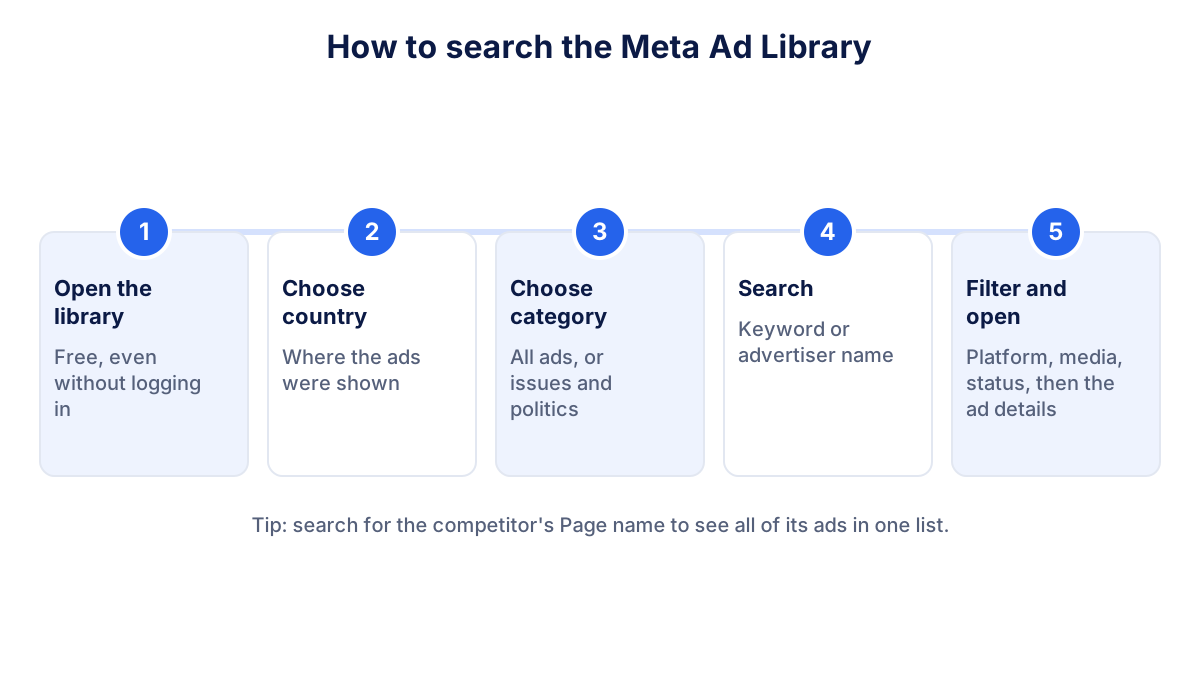
- Open the library at facebook.com/ads/library.
- Choose the country where the ads were shown. Pick the market where your customers are, or "All" for a broad view.
- Choose the category. The category for all ads covers commercial ads. The category for ads about social issues, elections or politics shows the extra transparency data for those ads.
- Search for a keyword ("kitchen renovation", "physiotherapy") or start typing an advertiser's name and pick their Page from the suggestions.
- Filter and open the details of the ads that interest you.
Searching by Page is the most reliable way to study one competitor: you see all of their active ads in one list instead of a mix of advertisers who happen to use the same words.
Meta Ad Library filters you should know
Once results appear, the filter panel narrows them down. In the current interface the filters include:
| Filter | What it does | When to use it |
|---|---|---|
| Language | Shows ads in one language | Bilingual markets, or competitors targeting tourists |
| Advertiser | Limits results to one or more Pages | When a keyword search mixes many businesses |
| Platform | Facebook, Instagram, Messenger and Meta's other placements | To see what runs on Instagram only |
| Media type | Images, videos and other formats | To study video ads |
| Active status | Active or inactive ads | Inactive ads appear only where Meta keeps them |
| Impressions by date | A date or date range | To see what ran during a season or a sale |
You can also change the sort order of the results. Each ad card shows a library ID, the start date, icons for the platforms where it runs and a link to the full ad details.
What you can and cannot see in the Ad Library
What the library shows depends on two things: the type of ad and where it was shown.
Commercial ads
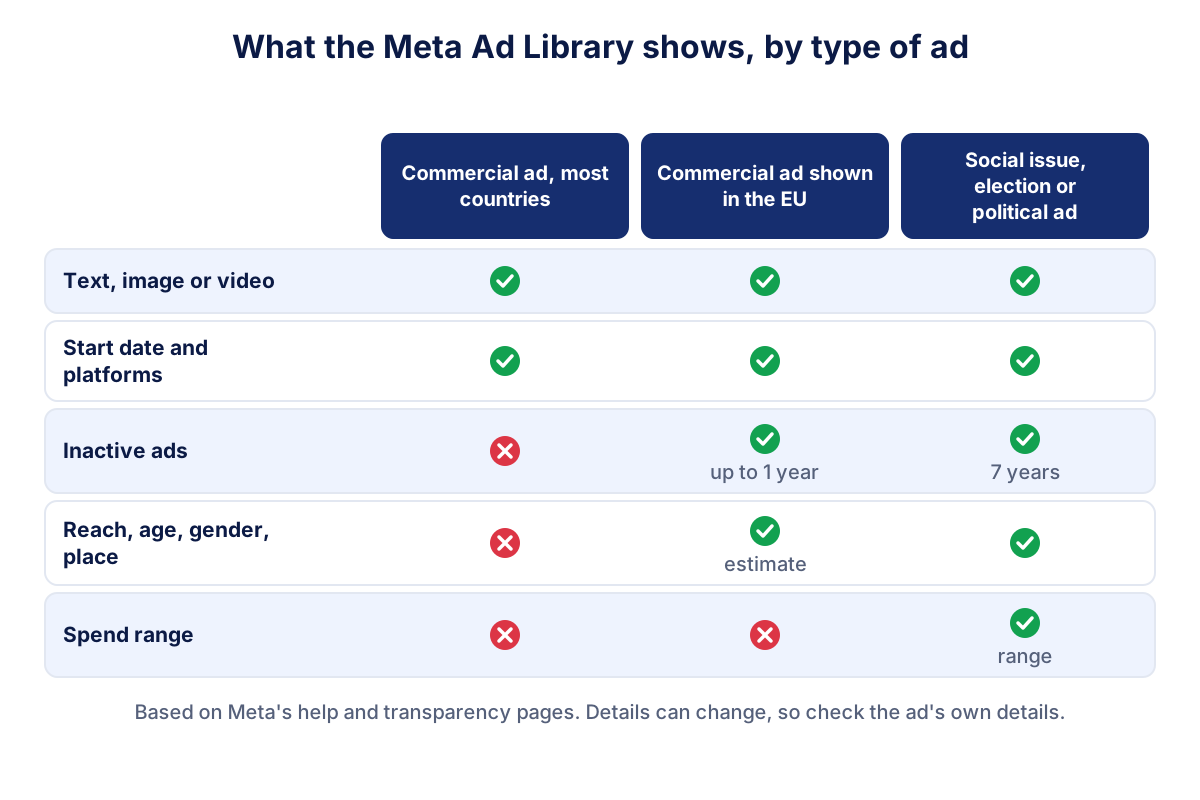
For ordinary ads, the kind your competitors run to sell products and services, Meta's help page says you can search the ads that are currently active. You see the creative, the text, the start date and the platforms. You do not see the budget, the targeting, the clicks or the sales.
Ads about social issues, elections or politics
Since 6 October 2025 Meta no longer runs ads about social issues, elections or politics in the European Union, citing new EU rules on political advertising: in EU countries this category mainly shows older ads.
For these ads Meta shows more: inactive ads as well as active ones, who paid for the ad, a range of how much was spent and the reach across age, gender and location. Meta states that it keeps these ads in the library for seven years. Unless you sell to public bodies or run campaigns on a social topic, this category rarely matters for competitor research.
Ads shown in the European Union
Ads delivered in the EU come with an extra transparency section. In our searches for Italy, an ad's details showed the targeting chosen by the advertiser (locations, age range, gender), an estimated reach in the EU with a breakdown by country, age and gender, and the names of the advertiser and the payer. Inactive commercial ads also appeared. Meta's Ad Library tools page explains that ads delivered in the EU are archived for one year after their last impression. Exact details can change, so check the ad's own details before drawing conclusions.
One caveat applies everywhere: reach is not results. A competitor can reach a million people and sell nothing.
A monthly competitor research routine
Looking at the library once is curiosity. Looking at it every month with the same method is research. A routine that takes about thirty minutes:
- List three to five competitors that sell to the same customers in the same area, plus one larger player you admire.
- Search each one by Page, with the country set to your market and the status set to active ads.
- Note five facts per competitor: number of active ads, the oldest start date, the main offer, the formats used and the landing page the ads point to.
- Mark the long-running ads. An ad that has been active for months is probably acceptable to the advertiser, otherwise they would have switched it off. It is a hint, not proof.
- Save the library IDs or links of the ads worth remembering, so you can compare next month.
- Compare with last month: new offers, new formats, ads that disappeared, seasonal pushes.
A simple spreadsheet with one row per competitor and one column per month is enough. After a few months you see patterns: who advertises all year, who only before Christmas, who keeps testing new offers.
Keyword searches add a second view. Search the words your customers use ("boiler service", "wedding photographer") to find advertisers you did not know about, including businesses from nearby towns competing for the same people.
What to learn from competitor ads, and what not to copy
The library tells you what competitors say. It never tells you whether it works. Use it to ask better questions, not to clone campaigns.
Worth learning:
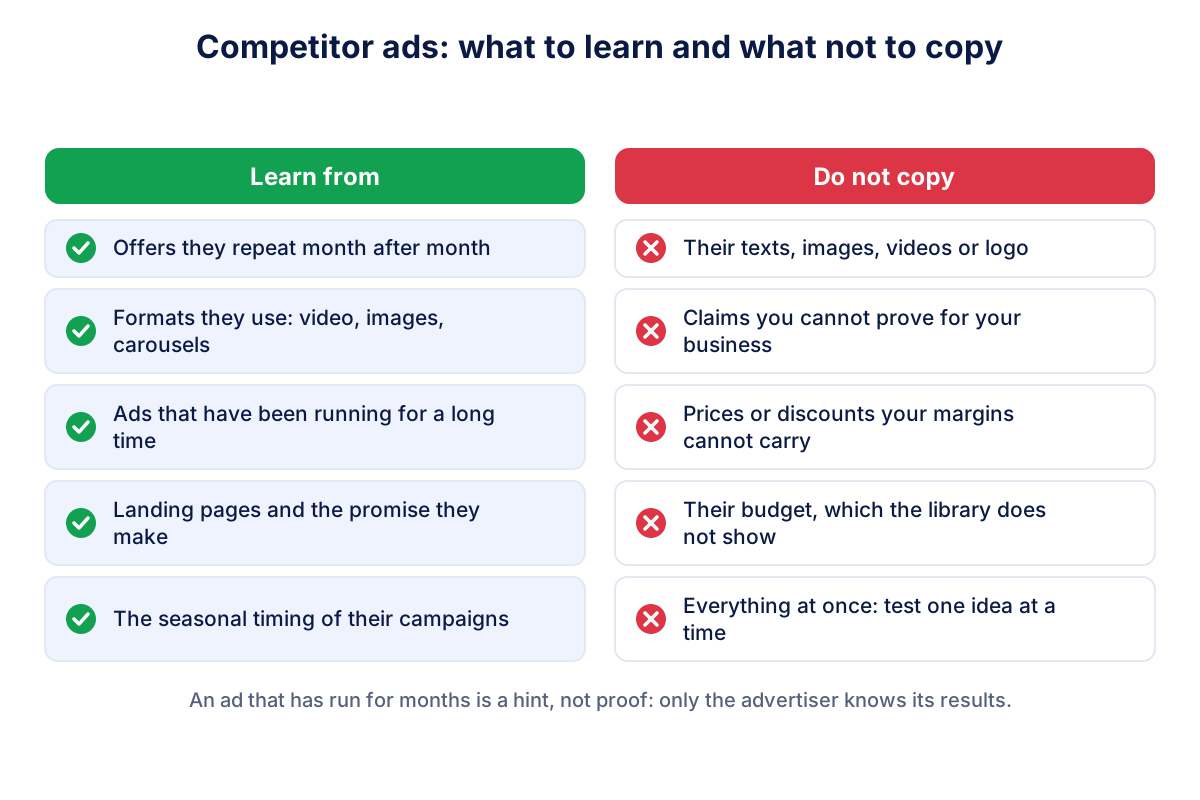
- Offers that keep coming back: a free consultation, a seasonal package, a guarantee.
- Formats: if every competitor uses short videos and you only use photos, that is worth testing.
- Landing pages: what happens after the click, and what the page promises.
- Timing: when competitors start their seasonal campaigns.
Not worth copying:
- Texts, images, videos or logos. They belong to someone else, and a copied ad makes you look like the follower.
- Claims you cannot prove for your own business.
- Prices and discounts that your margins cannot carry.
- Their budget, which you cannot see anyway.
Change one thing at a time in your own campaigns and measure the effect. The guide to Meta Ads explains how to read cost per result, CTR and the other numbers in Ads Manager, and the guide to share of voice shows how to estimate your presence compared with competitors.
Common mistakes when reading the Ad Library
- Treating the number of ads as a budget. Ten active ads can be ten small variants of one modest campaign. The count tells you about testing habits, not about spend.
- Searching only by keyword. Keyword results mix many advertisers and miss ads whose text does not contain your word. Search by Page for each known competitor.
- Forgetting the country setting. A competitor that sells abroad may run very different ads in another market. Set the country to the one where you compete.
- Reading reach as success. In the EU you may see an estimated reach, but never clicks, leads or sales.
- Checking once. A single look shows a moment. The value comes from the monthly comparison.
From research to your own numbers
The Ad Library shows the competition from the outside. Your own results come from your ad account. When you test an idea inspired by a competitor, compare cost per lead or cost per sale before and after, over at least a few weeks.
Klyrax connects in read-only mode to your Meta Ads, Facebook Page and Instagram account and puts the results next to Google Ads, your website and your other channels. On the 1st of each month it writes a short report in plain language with what changed and up to three things to do. It does not track competitors' ads: the Ad Library remains the place for that.
Frequently asked questions
Is the Meta Ad Library free?
Yes. The Meta Ad Library is free and public at facebook.com/ads/library. You do not need an ad account to search it, and in our tests the search worked without logging in. Meta built it as a transparency tool, so anyone can see the ads that are currently running across its apps, plus extra information for ads about social issues, elections or politics.
Can I see how much a competitor spends on Facebook ads?
Not for ordinary commercial ads. The Ad Library shows the ad, when it started, where it runs and, for ads shown in the EU, an estimated reach with some audience details. A spend range appears only for ads about social issues, elections or politics. Clicks, conversions and results are never shown for any ad.
Does the Facebook Ad Library include Instagram ads?
Yes. The library covers ads across Meta's technologies, including Facebook, Instagram, Messenger and the Audience Network. Each ad shows the platforms it runs on, and a platform filter lets you show only ads that appear on Instagram, for example. The name Facebook Ad Library is still widely used, but the official name is now Meta Ad Library.
Why can't I see a competitor's old ads?
For most commercial ads, the library shows only ads that are currently active. Inactive ads stay visible for ads about social issues, elections or politics, which Meta keeps for seven years. Ads delivered in the European Union are also archived for one year after their last impression. If a competitor paused all campaigns, you may simply find nothing outside these cases.
Is it legal to copy a competitor's ad from the Ad Library?
Looking at competitors' ads is exactly what the library allows, but copying their texts, images or videos is a different matter: creative work is usually protected, and a copied ad also confuses customers. Use the library to understand offers, formats and timing, then build your own message from what makes your business different.
See how your marketing is really doing
Klyrax connects GA4, Search Console, Google Ads, Meta Ads, your Google reviews and more in read-only mode, shows the numbers that matter for your business and writes you a plain-language report every month.
Request info