
Local Google Ads are search ads shown only to people in the area you serve, for searches like "emergency plumber Denver" or "dentist near me". For a local business with a small budget, the setup matters more than the amount: a campaign that reaches the wrong city, runs at 3 a.m. and has no phone button can spend a month of budget without a single call.
This guide walks you through a small-budget local campaign step by step: location targeting, keywords with local intent, call and location assets, ad schedule, budget and measurement. It is written for owners and managers who want to run the campaign themselves or check the work of whoever runs it.
What are local Google Ads?
Local Google Ads are campaigns aimed at customers in a defined area, usually Search campaigns that appear when people look for a service near them. They differ from a national campaign in three settings: where the ads are shown, which searches trigger them and what the ad lets people do, such as call you or get directions.
The free alternative is your listing on Google Maps. Ads and the free listing work side by side: the ads give you visibility from day one, the listing builds up over time. The guide to local SEO on Google Maps covers the free side.
Is Google Ads worth it for a local business?
Google Ads for a local business is worth testing when two things are true. People search for your service with clear intent ("boiler repair", "family lawyer"), and one new customer is worth much more than a few clicks. A locksmith or a physiotherapy clinic usually fits. A business that sells something nobody searches for usually does better elsewhere.
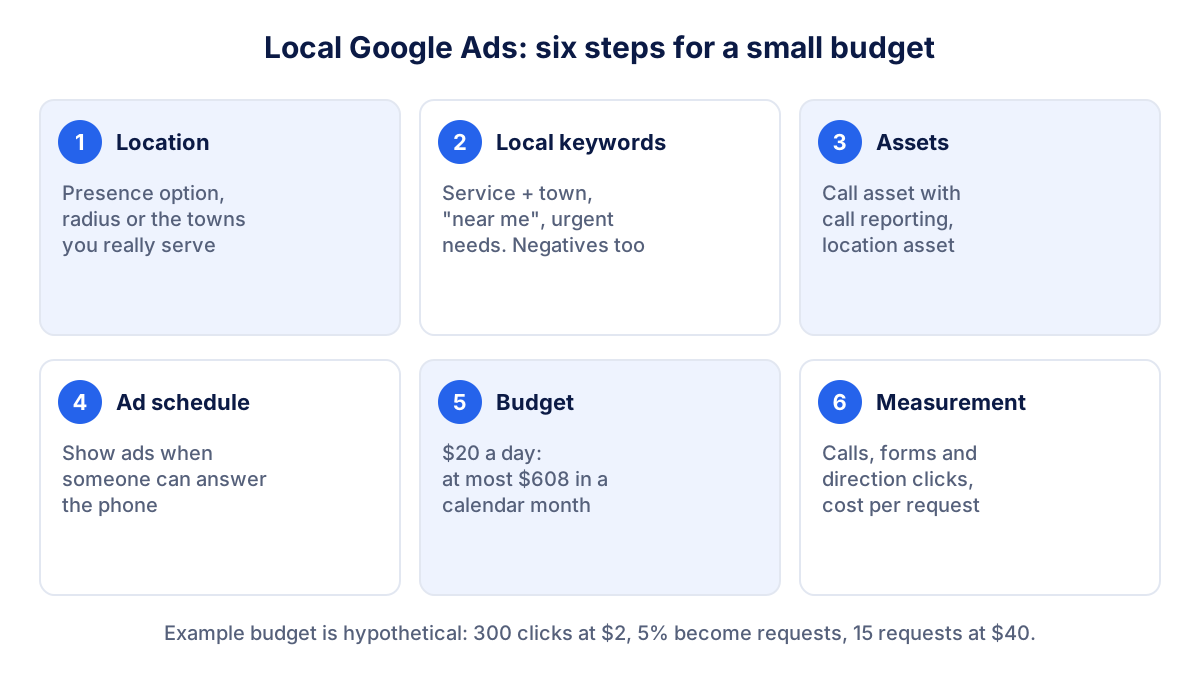
Step 1: set location targeting (presence or interest)
Location targeting decides who can see your ads. In the campaign settings you add the places to target: countries, regions, cities, postal codes or a radius around an address. Google's help page on location targeting also describes two options for how strictly that location is applied:
- Presence or interest: people in your locations, regularly in them, or who have shown interest in them. Google recommends this broader option as a best practice for Search.
- Presence: only people who are in, or regularly in, your locations.
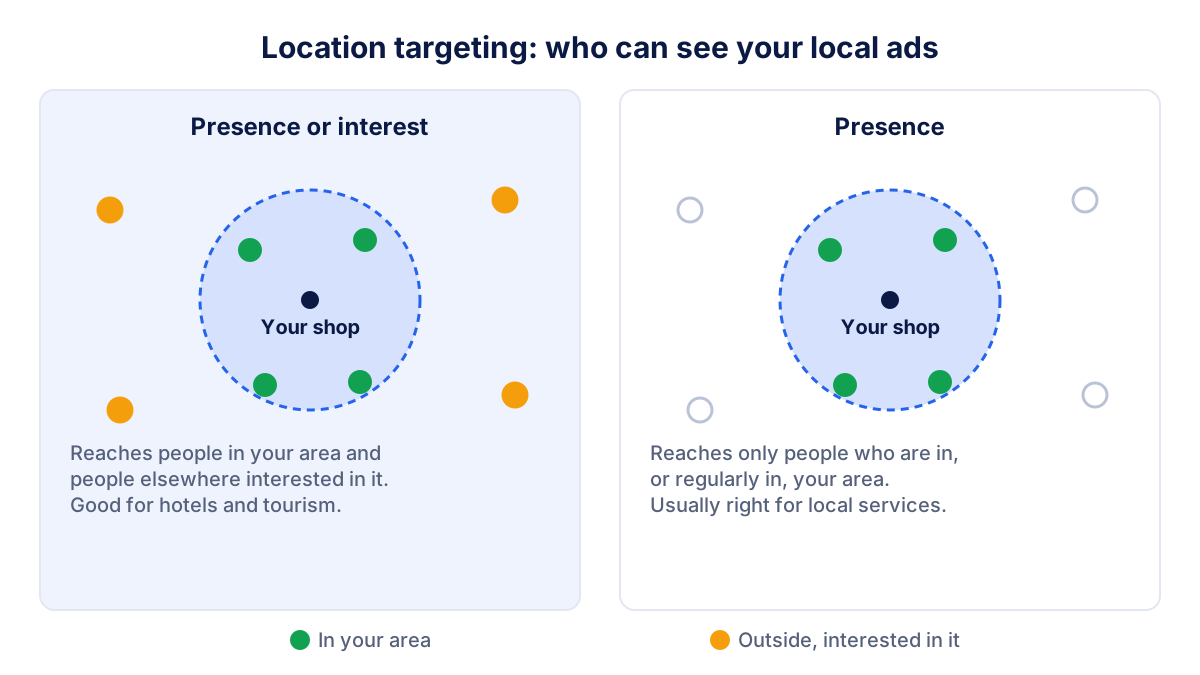
For a hotel, Presence or interest makes sense: guests search from home. For a plumber, a dentist or a shop, a click from someone 200 miles away is usually wasted money. Most local businesses should choose Presence, check the location report after a few weeks and widen only if needed.
Radius or postal codes?
A radius around your address is the quickest option. Google states that the minimum radius is 1 km (about 0.6 miles). Choose the distance customers really travel: perhaps 5 miles for a hairdresser, 20 for a kitchen fitter. If you serve specific towns rather than a circle, target those towns or postal codes instead. You can also exclude areas you never serve.
Google notes that location targeting is never 100% accurate, because it relies on signals that vary. Check where clicks come from in the locations report and adjust.
Step 2: choose keywords with local intent
Keywords decide which searches trigger your ads. With a small budget, pick fewer and more precise keywords and avoid broad terms that attract curious visitors.
| Keyword type | Example | Use it? |
|---|---|---|
| Service + town | "emergency plumber Denver" | Yes, the core of the campaign |
| Service + "near me" | "plumber near me" | Yes, location targeting does the rest |
| Urgent service | "burst pipe repair" | Yes, if you offer it |
| Generic topic | "plumbing" | No, too broad for a small budget |
| Do it yourself | "how to fix a leaking tap" | No, add as negative |
| Jobs | "plumber jobs" | No, add as negative |
Use phrase match or exact match for most keywords, so your ads show for searches close to what you chose. Then add negative keywords from day one: "jobs", "salary", "course", "free", "DIY". Look at the search terms report every week during the first month and add new negatives as they appear.
Step 3: add call and location assets
Assets add extra information to your ad. For a local business, two matter most.
Call assets put your phone number in the ad, with a call button on mobile. Google's page on call assets explains that you can set the number to appear only when you can take calls, and that call reporting, which uses Google forwarding numbers, measures how the calls perform.
Location assets show your address, distance and a link to directions. They come from your Google Business Profile, which you link to Google Ads. According to Google's page on location assets, they can appear on Search, on Google Maps and in other placements, and they make store visit conversions possible for eligible accounts.
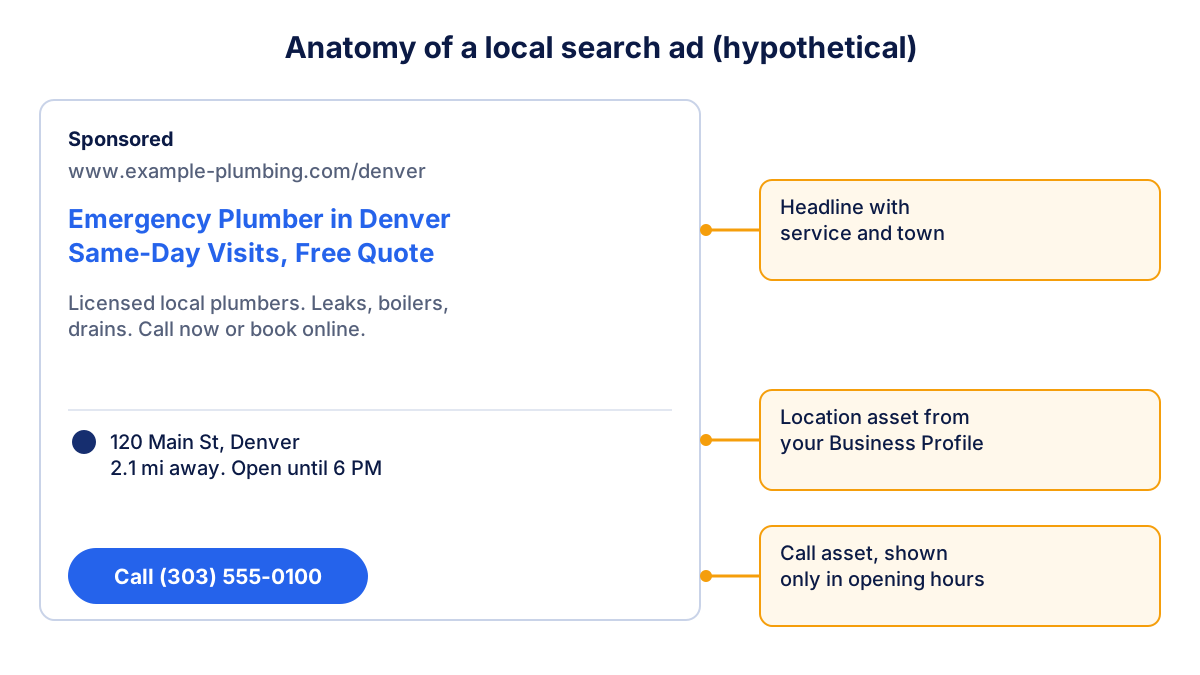
Add sitelinks to your main services and a few callouts ("Same-day visits", "Free quote") as well. Your Google reviews also count: a searcher who sees the ad often checks your rating before calling.
Step 4: set an ad schedule
By default, ads run all day. If nobody answers the phone at night, a night-time click is often lost. An ad schedule limits the days and hours your ads appear, in your account's time zone.
- Start with your opening hours, plus an hour before opening if people book in the morning.
- Keep evenings if your form handles requests and you call back the next morning.
- After a month, look at results by day and hour, then lower bids or pause the weakest slots.
An urgent service such as a locksmith can do the opposite and keep nights on, as long as somebody really answers.
Step 5: set a small budget that makes sense
Google Ads has no minimum spend: you set an average daily budget per campaign. Google may spend up to twice that on busy days, but in a calendar month you are not charged more than 30.4 times the average daily budget.
Work out the budget from your goal, not the other way round. Take a hypothetical example: you want 15 requests a month, about 5% of clicks become a call or form request and the average cost per click in your area is $2. You need 300 clicks, so about $600 a month or $20 a day, and each request costs about $40.
The guide on Google Ads cost explains how the auction sets the price of a click and has a calculator for this estimate. If the result is far above what you can spend, narrow the area, cut keywords or improve the landing page before you cut the budget.
How to measure calls and visits from local Google Ads
Clicks are not customers. Before you judge a local campaign, make sure it counts what matters:
- Calls from ads: with call reporting turned on, Google creates a "Calls from ads" conversion. Only calls that reach the minimum length set in that conversion action count, so check the value in your account. Google forwarding numbers are not available in every country.
- Calls from your website: a call made after clicking through to your site needs a separate conversion, set up with a website call conversion or a phone click event.
- Form requests: track the thank-you page or the form submission as a conversion, ideally imported from GA4.
- Directions and store visits: location assets report direction clicks. Store visit conversions are enabled automatically only for accounts that meet Google's eligibility criteria, so many small businesses will not see them.
Then compare cost per request with the value of a new customer. If a new client is worth $500 and a request costs $40, the campaign probably pays even if only one request in four becomes a customer.
What about Performance Max for store goals?
Performance Max for store goals is a campaign type that uses your Business Profile locations and shows ads across Search, Maps, YouTube and other Google placements to drive store visits, calls and direction clicks. Google's overview of Performance Max for store goals describes how it works. Google automates bids and placements, so you control less. For a single location on a small budget, a well-targeted Search campaign is usually easier to understand and to correct. Consider Performance Max later, once your conversions are measured reliably.
Common mistakes in local campaigns
- Leaving Presence or interest on for a business that only serves nearby customers.
- No negative keywords, so the budget pays for job seekers and DIY searches.
- Ads running when nobody answers the phone.
- Counting clicks instead of calls and requests.
- Judging after one week. A small budget needs a few weeks to show a pattern.
Check the campaign every month next to the rest of your data. Klyrax puts your Google Ads numbers next to GA4, your Google reviews and your Maps positions in one summary for the local business goal, and on the 1st of each month explains in plain language what changed and what to do next.
Frequently asked questions
How much should a local business spend on Google Ads?
There is no standard amount. Work backwards from your goal: leads you want per month, divided by the share of clicks that become leads, multiplied by the average cost per click in your area. A campaign with too little budget for its keywords gets very few clicks. Start with enough budget to collect data for a month, then adjust.
Should I use Presence or Presence or interest for a local campaign?
For most local businesses, Presence is the safer choice, because it reaches people who are in or regularly in your area. Presence or interest also reaches people elsewhere who show interest in your area, which suits hotels or tourist services but often wastes budget for a plumber, a dentist or a shop that needs customers nearby.
What is the minimum radius in Google Ads?
Google's help center states that radius targeting has a minimum of 1 kilometer, about 0.6 miles. A very small radius limits how many people can see your ads, so test a realistic area first, often the distance customers usually travel to you, and narrow it only if you see clicks from places you do not serve.
Can Google Ads count phone calls as conversions?
Yes. With call assets and call reporting turned on, Google shows a forwarding number and can count calls from ads as conversions. A call counts as a conversion when it lasts at least the minimum length you set in the conversion action. Google forwarding numbers are not available in every country, so check the help center.
Do I need a Google Business Profile to run local Google Ads?
Not to run search ads. You need one for location assets, which show your address, distance and directions in the ad, and for Performance Max campaigns with store goals. Linking a verified profile is worth it for most local businesses, because the same profile also powers your free listing on Google Maps.
See how your marketing is really doing
Klyrax connects GA4, Search Console, Google Ads, Meta Ads, your Google reviews and more in read-only mode, shows the numbers that matter for your business and writes you a plain-language report every month.
Request info