
How much does Google Ads cost? The honest answer is that Google Ads cost is set by you: you choose a budget, and with cost-per-click bidding you pay only when someone clicks an ad. What a single click costs depends on an auction that runs every time someone searches, so the same keyword can cost very different amounts for two businesses.
This guide explains how that auction sets your cost per click, how to work out a budget backwards from the leads or sales you want, how the daily budget behaves, and how to tell whether the money comes back.
How does Google Ads pricing work?
Google Ads works on an auction, not a price list. When someone searches, Google decides which ads can appear and in what order. With the most common bidding method for search campaigns, cost-per-click (CPC) bidding, you pay for each click on your ad and nothing for the times it is only shown.
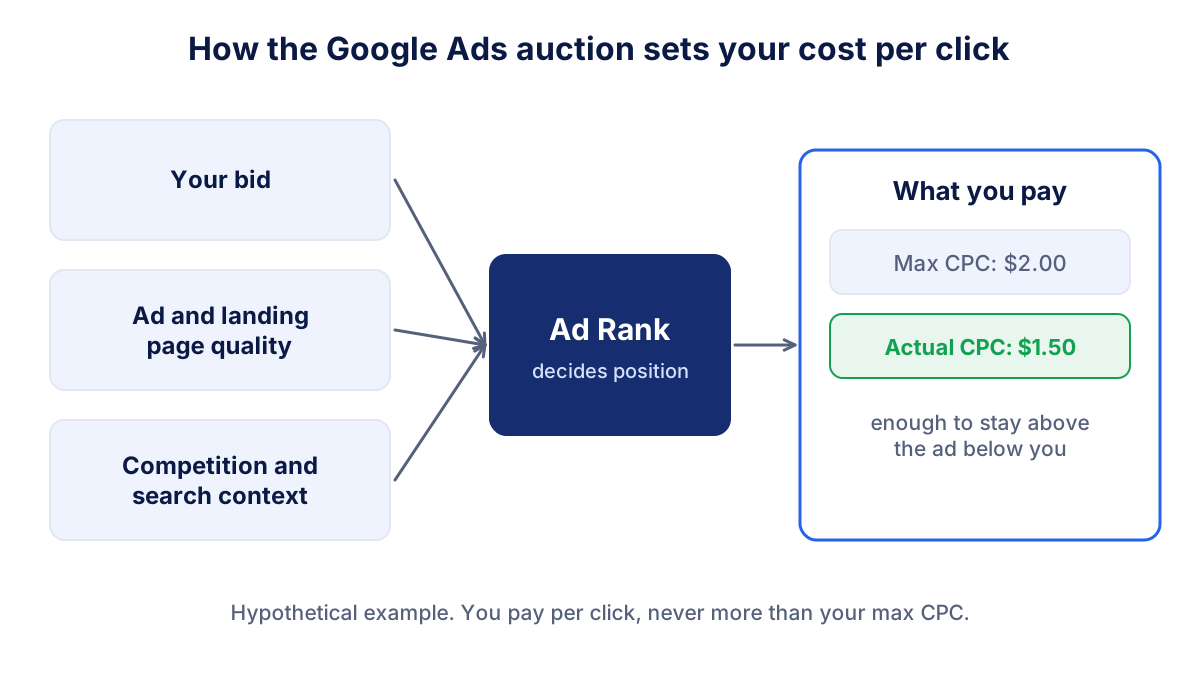
You set a maximum CPC, either yourself or through an automated bidding strategy. According to the Google Ads help page on actual cost per click, you are often charged less than that maximum. You pay what is minimally required to clear the Ad Rank thresholds and stay above the advertiser below you. If nobody is below you, you pay a reserve price.
There are other ways to pay. Display and video campaigns can be bought per thousand impressions, and automated strategies can optimise towards conversions. For a business starting with search ads, though, the click is the unit to think in.
What determines the cost per click?
The position of your ad and the price of each click come from Ad Rank. Google lists the factors on its page about how Ad Rank is calculated:
- Your bid: the most you are willing to pay for a click.
- Ad and landing page quality: how relevant and useful your ad and the page behind it are for the search.
- Ad Rank thresholds: minimum levels an ad must reach to appear in a given position.
- Competitiveness of the auction: how close the other advertisers are to you.
- Search context: location, device, time of day, the search terms and the other results on the page.
- Expected impact of assets: extras such as sitelinks or a phone number, and how they are likely to perform.
Two practical consequences follow. First, a better ad and landing page can lower what you pay for the same position. Second, keywords where many businesses compete, and where a customer is worth a lot (legal services, insurance, home repairs), tend to be more expensive than niche or local terms. Google also notes that ads shown above the search results generally face higher thresholds, so they often cost more per click than ads shown below.
How to estimate CPC with Keyword Planner
Do not rely on "average CPC" figures from articles: they mix countries, sectors and years. The free Keyword Planner inside Google Ads shows, for the keywords and location you choose, monthly searches and an estimated range for what advertisers bid to appear at the top of the page.
- Open Keyword Planner from the Tools menu of your Google Ads account.
- Enter five to ten searches your customers would really type, for example "emergency plumber chicago" rather than "plumbing".
- Set the location and language you will target.
- Note the low and high bid estimates for each keyword and the search volume.
- Treat the result as a range, not a price. Google says actual results vary with your bid, budget, ad quality and settings.
Suppose Keyword Planner shows a range of $1.00 to $3.00 for your main keywords. For planning, take a value in the middle, say $1.50 to $2.00, and check it against reality after the first two or three weeks.
How to set a Google Ads budget from your goals
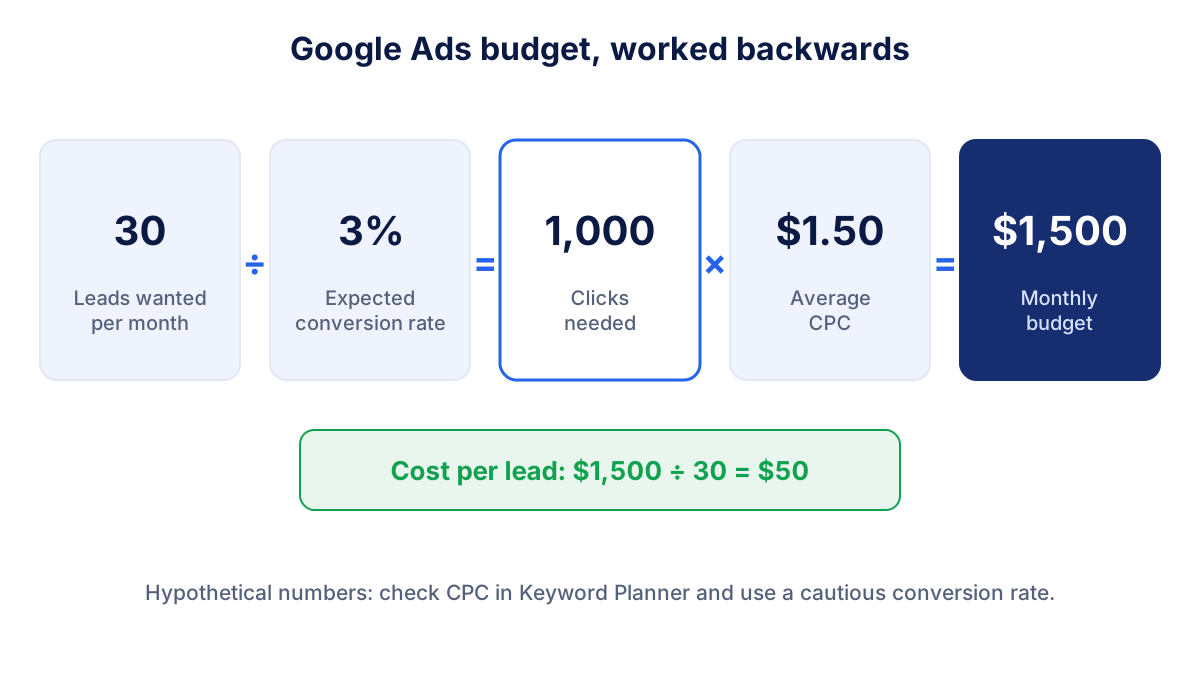
The most useful budget is not "what we can afford" but "what it takes to reach the goal". Work backwards from the number of leads or sales you want:
Clicks needed = leads wanted ÷ conversion rate
Monthly budget = clicks needed × average CPC
A hypothetical example: you want 30 enquiries per month. You expect 3% of visitors from ads to fill in the form. You need 30 ÷ 0.03 = 1,000 clicks. At an average CPC of $1.50, that is a monthly budget of $1,500 and a cost per lead of $50.
Be cautious with the conversion rate. If you have no history, use your current site-wide conversion rate from GA4 or start lower than you hope. A form on a strong service page converts very differently from a generic home page. Try your own numbers here:
Google Ads budget calculator
Start from the average CPC in Keyword Planner and a cautious conversion rate: the result updates as you type.
If the budget that comes out is far beyond what you can spend, you have three levers: accept fewer leads for now, narrow the targeting to the most specific and profitable searches, or raise the conversion rate with a better landing page. Cutting the budget while keeping the goal only produces disappointing results.
Daily budget: how Google Ads spends it
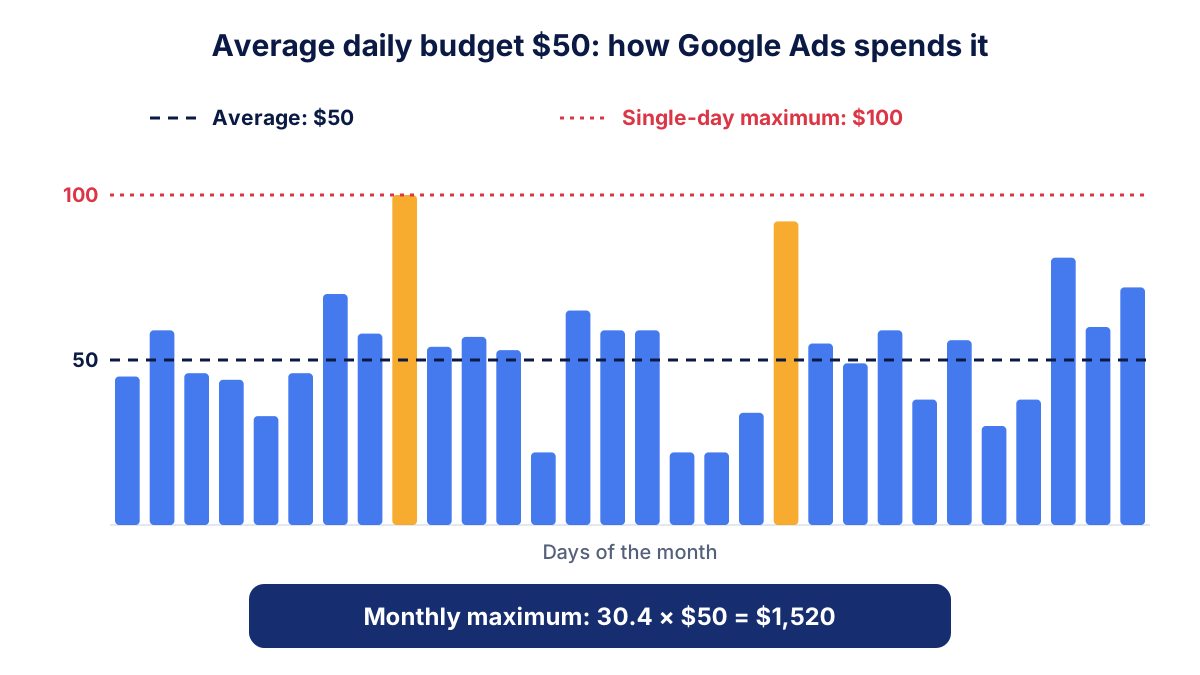
In Google Ads you set an average daily budget per campaign, not a monthly one. Google's help page on average daily budgets explains two rules that surprise many business owners:
- On a given day, the campaign may spend up to twice the average daily budget, for example when traffic is higher.
- Over the month, you will not be charged more than 30.4 times the average daily budget (30.4 is the average number of days in a month).
| Average daily budget | Maximum on a single day | Maximum for the month |
|---|---|---|
| $20 | $40 | $608 |
| $50 | $100 | $1,520 |
| $100 | $200 | $3,040 |
So for a monthly budget of $1,500, an average daily budget of about $50 is right. Expect some days around $80 and others around $30. If you change the budget during the month, the monthly limit is recalculated from that point.
When does Google Ads pay off?
Google Ads pays off when the value of the customers it brings is higher than what they cost, including your own time. Three numbers tell you that.
Cost per lead or cost per sale. Spend divided by conversions. In the example above, $50 per enquiry. Compare it with how many enquiries become customers and what a customer is worth.
ROAS for online shops. Revenue from ads divided by ad spend. Our guide to ROAS explains how to find your break-even value from your margin.
Customer acquisition cost. If only one enquiry in five becomes a customer, each new customer costs $250 in ads alone. The customer acquisition cost adds the other costs of winning the sale.
As a rule of thumb, give a new campaign four to eight weeks before judging it, so that bidding and your own changes can settle. Make sure conversions are tracked properly first: without them you only know what you spent, not what you got.
What else to budget for besides clicks
The money paid to Google is not the only cost of running ads:
- Management: if an agency or freelancer runs the campaigns, its fee is separate from the ad spend. Common models are a fixed monthly fee or a percentage of spend. Neither is better by default: ask what is included, who owns the account and what is reported each month.
- Landing pages: a dedicated page often matters more than the bid. Budget for writing and testing it.
- Tracking: setting up conversions in Google Ads and key events in GA4, plus consent management in the EU.
- Your time: reviewing search terms, adding negative keywords and answering the leads quickly.
Common mistakes that make Google Ads expensive
- Broad keywords with no negatives. "Accountant" also attracts students and job seekers. Review the search terms report weekly at first.
- Sending ads to the home page. Each ad group should land on the page that answers that search.
- No conversion tracking. Automated bidding then optimises for clicks, not for customers.
- Judging after a few days. Small numbers swing a lot; look at weeks, not days.
- Spreading a small budget over many campaigns. Better one campaign that gets enough clicks to learn from.
How to check the numbers every month
Once the campaign runs, look at the same short list each month: spend, clicks, average CPC, click-through rate, conversions, cost per conversion and, if you sell online, revenue and ROAS. Compare with the previous month and note what you changed.
Klyrax puts these Google Ads numbers next to your website data from GA4 in one summary chosen for your business goal, and on the 1st of each month writes a plain-language report on what changed and what to look at next. Whether you use a tool or a spreadsheet, the point is the same: decide on the cost per lead you can accept, and check every month that the campaign stays below it.
Frequently asked questions
How much does Google Ads cost per month?
Google Ads has no fixed monthly price. You set an average daily budget and Google charges for clicks up to that limit. Over a calendar month you pay no more than 30.4 times the average daily budget. A sensible starting budget is the one that buys enough clicks to reach your lead goal, which you can estimate from Keyword Planner and your conversion rate.
How much does a click on Google Ads cost?
There is no standard price per click. The actual cost per click comes out of an auction for each search and depends on your bid, the quality of your ad and landing page, the competition for that keyword, the searcher's location and device. Keyword Planner shows estimated bid ranges for your keywords and country, which is the best starting point.
Can Google Ads spend more than my daily budget?
Yes, on single days. Google says a campaign may spend up to twice its average daily budget on a given day when there is more traffic. Over the month it balances out: you are not charged more than 30.4 times the average daily budget for that month. If you change the budget mid-month, the limit is recalculated.
Is Google Ads worth it for a small business?
It can be, when people actively search for what you sell and you can measure leads or sales from the ads. Compare the cost per lead or per sale with what a customer is worth to you. If the numbers only work with an unrealistic conversion rate, improve the landing page or choose more specific keywords before spending more.
Do I have to pay an agency to run Google Ads?
No. You can create and manage campaigns yourself in your own Google Ads account. Many businesses hire an agency or a freelancer to do it, and that fee comes on top of the money paid to Google. If you work with someone, keep the account in your company's name and give them access as a user.
See how your marketing is really doing
Klyrax connects GA4, Search Console, Google Ads, Meta Ads, your Google reviews and more in read-only mode, shows the numbers that matter for your business and writes you a plain-language report every month.
Request info