
Bounce rate is the percentage of visits in which people leave your website without engaging with it. In Google Analytics 4 it has a precise meaning: the share of sessions that were not engaged, which makes it the mirror image of engagement rate. What counts as a good bounce rate depends on the page: a high value is a problem on a landing page for ads and often fine on a contact page.
This guide covers the GA4 definition, how it differs from the old Universal Analytics and from tools such as Umami, what a normal value looks like and how to lower bounce rate where it matters.
What is bounce rate?
Bounce rate measures how often a visit ends without the visitor doing anything you would count as interest: reading for a while, opening a second page or completing an action such as a form. A "bounce" is a visit that lands and leaves.
The idea is simple, but the exact rule depends on the tool. Google Analytics changed its definition with GA4, and privacy-friendly tools use yet another one. Before you judge a number, check which tool and which rule produced it.
How GA4 defines bounce rate
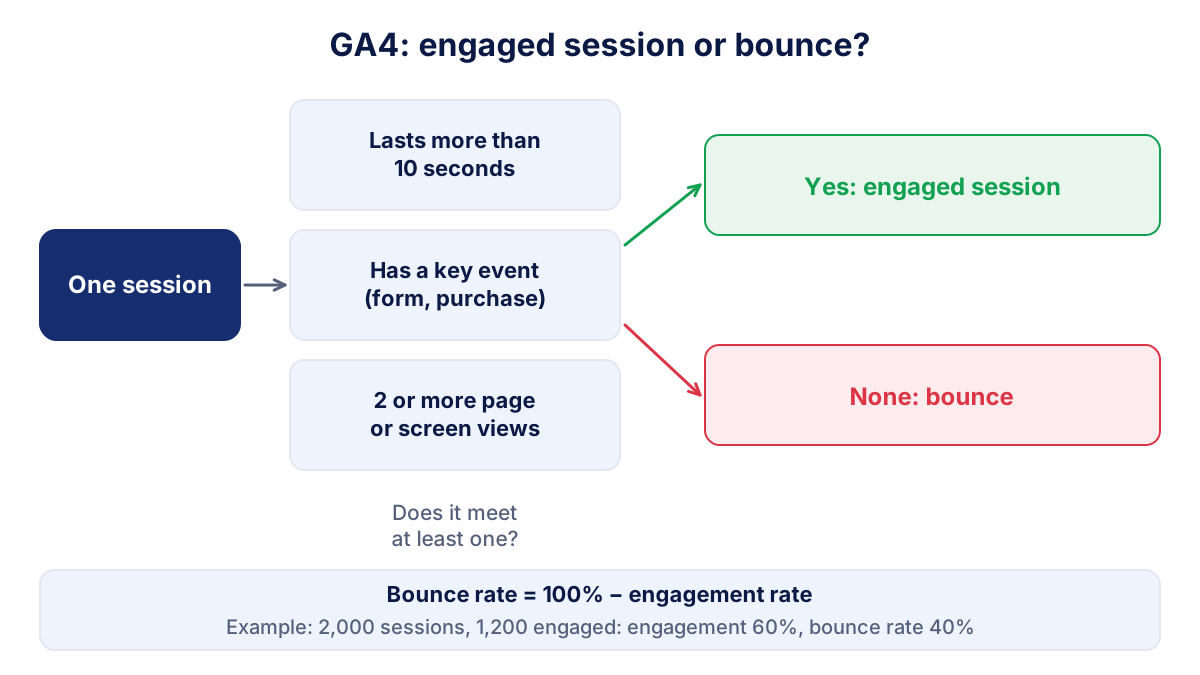
According to the Google Analytics help page on engagement rate and bounce rate, the bounce rate is the percentage of sessions that were not engaged. An engaged session is a session that meets at least one of three conditions:
- it lasts longer than 10 seconds;
- it has a key event (for example a form submission or a purchase);
- it has two or more page or screen views.
Every session that meets none of them is a bounce. The formula follows directly:
Bounce rate = sessions not engaged ÷ all sessions × 100
Bounce rate = 100% − engagement rate
A hypothetical example: your site records 2,000 sessions in a month and 1,200 of them are engaged. The engagement rate is 60% and the bounce rate is 40%.
Bounce rate is a standard metric in GA4, but it is not visible in every report by default. You can add it to a report through report customization, or use it in an exploration by page, landing page, source or device. Our GA4 guide shows where the engagement metrics sit.
Bounce rate in GA4 vs Universal Analytics
Universal Analytics, which stopped processing data in 2023, used a different rule. Google's comparison of the two versions describes it: a bounce was a session in which the user viewed only one page and triggered only one request to Analytics.
The difference matters for one very common visit: someone finds a blog post on Google, reads it for two minutes and leaves satisfied. Universal Analytics called that a bounce. GA4 does not, because the session lasted more than 10 seconds.
| Situation | Universal Analytics | GA4 |
|---|---|---|
| One page, leaves after 5 seconds | Bounce | Bounce |
| One page, reads for 2 minutes | Bounce | Engaged, not a bounce |
| One page, submits a form (key event) | Usually not a bounce | Engaged, not a bounce |
| Two or more pages | Not a bounce | Engaged, not a bounce |
For the same site, GA4 bounce rates are therefore usually lower than the old ones. If you compare this year with a report from the Universal Analytics era, you are comparing two different metrics.
Other tools count bounces differently
Privacy-friendly analytics tools have their own definitions. In Umami, for example, the documentation defines a bounce as a visit with only one event, and the bounce rate as bounces divided by visits. A single page view with no further event is a bounce, however long the person stayed. That is closer to the old Universal Analytics logic than to GA4.
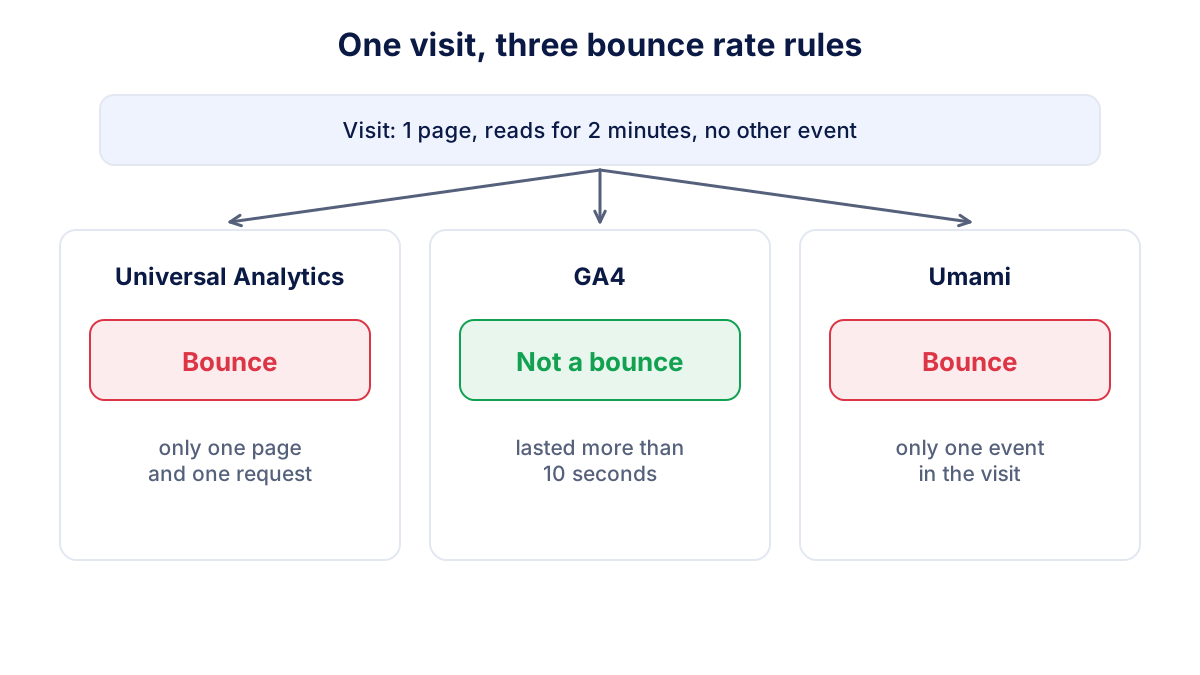
So if GA4 shows 35% and Umami shows 65% for the same month, both can be right. Our comparison of Umami and Google Analytics explains the other differences, including why the visit counts themselves differ.
What is a good bounce rate?
There is no official benchmark: Google does not publish one, and figures in articles mix tools, definitions and sectors. As a rough orientation only, many sites see a site-wide GA4 bounce rate somewhere between 30% and 60%. Treat that as a wide band, not a target.
The type of page explains most of the difference:
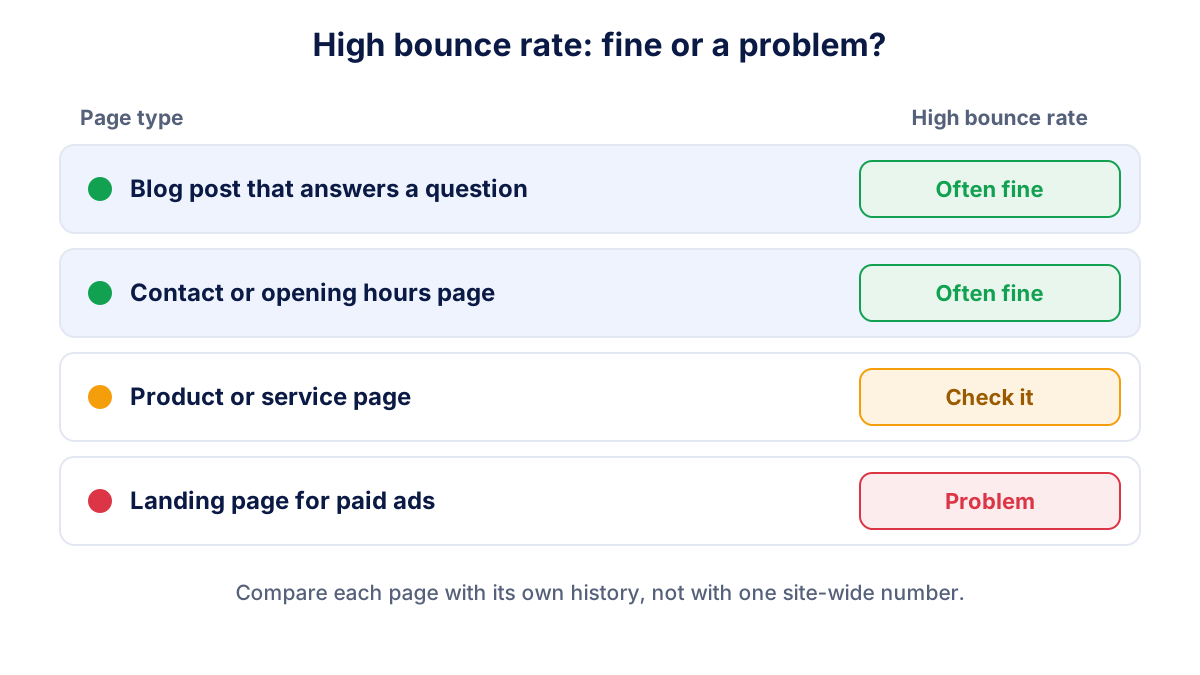
- Blog posts and guides: often higher, because people find an answer and leave.
- Contact and location pages: can be high and still fine, since the visitor may call you after reading the number.
- Landing pages for ads: should be lower, because the visitor came with a clear intent and you paid for the click.
- Product, category and checkout pages: usually lower, as shopping means moving between pages.
Other factors shift the number too: mobile traffic, traffic sources (social media visits tend to engage less than search), cookie consent settings and how well key events are set up. The most useful benchmark is your own page compared with the same page last month and last year.
When a high bounce rate is fine
A high bounce rate is not automatically bad. It is fine when the page did its job in one view:
- the contact page, where people copy your phone number or address;
- a blog post that answers one question completely;
- an opening hours or directions page;
- a single-page site where every action is on that page.
In these cases look at results instead: calls, form submissions, direction requests. If you can track the action as a key event (a click on the phone number, for example), those sessions become engaged in GA4 and the bounce rate drops for the right reason.
How to reduce bounce rate where it matters
Focus on pages where a bounce means a lost lead or sale: ad landing pages, service pages and product pages.
- Match the promise. The headline should repeat what the ad or search result promised. A mismatch is the most common reason people leave.
- Speed up the page. A slow first screen on mobile loses visitors before they see anything.
- Make the next step obvious. One clear call to action above the fold, with price or availability if people need it to decide.
- Link to what comes next. Related services, a FAQ or a case example give interested visitors a second page.
- Check the traffic. If one source has a much higher bounce rate, the targeting may be wrong. The guide to traffic sources helps you read this.
- Fix the tracking. Missing key events or a broken tag can inflate the bounce rate. Test a form submission and check it in GA4.
Common mistakes when reading bounce rate
- Judging the site-wide average. A blog with many readers can push the total up while your service pages perform well. Always break bounce rate down by landing page.
- Comparing tools. GA4, Umami and old Universal Analytics reports use different rules, so their bounce rates are not comparable.
- Reading small numbers. A page with 40 sessions a month can swing from 30% to 60% by chance. Look at pages with enough traffic, or at longer periods.
- Chasing the metric. Tricks that keep people on the page longer without helping them, such as splitting an article over several pages, lower the bounce rate and annoy visitors.
- Forgetting consent. If many visitors decline analytics cookies, GA4 sees only part of the traffic, and that part may behave differently.
How to read bounce rate every month
Bounce rate is a diagnostic metric, not a goal. Read it next to the numbers that pay the bills: leads, sales and the conversion rate. A falling bounce rate with flat conversions does not help much; a stable bounce rate with more leads does.
Each month, check the bounce rate of your five most visited landing pages against the previous month, and look again at any page whose value jumped. Klyrax connects read-only to GA4 or Umami, shows the numbers that matter for your business goal in one summary and explains in its monthly written report what changed, so a jump in bounces is read together with traffic and leads.
Frequently asked questions
What is bounce rate in simple terms?
Bounce rate is the percentage of visits to your website in which the visitor leaves without doing anything meaningful. In GA4 that means the session lasted 10 seconds or less, viewed only one page and triggered no key event. A high bounce rate on a page that should lead somewhere is a warning sign; on a contact page it can be perfectly normal.
What is a good bounce rate?
There is no single good bounce rate and Google does not publish a benchmark. As a rough orientation, many sites see a site-wide GA4 bounce rate somewhere between 30% and 60%, with blog posts and single-page sites higher and product or checkout pages lower. Sector, device, traffic source and consent settings shift it a lot, so compare each page with its own history.
How is bounce rate calculated in GA4?
GA4 divides the sessions that were not engaged by all sessions. A session is engaged if it lasts longer than 10 seconds, has a key event or has at least two page or screen views. Bounce rate is therefore the inverse of engagement rate: with a 60% engagement rate, the bounce rate is 40%.
Why is my bounce rate lower in GA4 than in Universal Analytics?
Universal Analytics counted a bounce when a session viewed only one page and sent only one request. GA4 counts a bounce only when the session was not engaged, so someone who reads a single article for two minutes is a bounce in Universal Analytics but not in GA4. For the same site, GA4 values are usually lower, so do not compare the two directly.
Where do I find bounce rate in GA4?
Bounce rate is a standard GA4 metric, but it is not shown in every report by default. You can add it to a report through the report customization option, or use it in an exploration together with dimensions such as page, landing page, source and device. Engagement rate, its mirror image, is often already visible.
See how your marketing is really doing
Klyrax connects GA4, Search Console, Google Ads, Meta Ads, your Google reviews and more in read-only mode, shows the numbers that matter for your business and writes you a plain-language report every month.
Request info