
Google Business Profile (formerly Google My Business) is the free listing that shows a local business on Google Search and Google Maps: name, address, hours, phone, photos, reviews and a link to the website. If you run a shop, a practice or a service business, it is often the first thing people see before they call you or visit.
This guide covers who can create a Google Business Profile, how to claim and verify it, what to fill in, how reviews and posts work, how Google ranks local results and how to read and report the performance metrics.
What is Google Business Profile?
Google Business Profile is Google's free tool for managing how a business appears in local results on Search and Maps. Google's own help pages note that it was formerly known as Google My Business and, earlier, Google Places. Many people still search for "Google My Business", and the old name refers to the same product.
The rename came with a change in how you manage the profile. If you own a single business, you edit it directly from Google Search or Google Maps when signed in with the owner account. Agencies and brands with many locations use the Business Profile Manager (business.google.com), which lists all profiles in one place.
A profile is different from your website. Google can show it even if you have no website, and it competes in the "local pack", the block of businesses with a map that appears for searches like "dentist near me" or "bakery Springfield".
Who can create a Google Business Profile?
Google's guidelines for representing your business set clear eligibility rules. In short:
- The business must have a physical location that customers can visit, or travel to customers where they are (a service-area business).
- Service-area businesses that do not receive customers at their address should hide the address and set a service area instead.
- A virtual office or a mailing address you do not operate from is not eligible.
- There should be one profile per business location. Individual practitioners and departments follow specific rules.
- The business name must match the real-world name. Taglines, keywords, phone numbers or locations added to the name are not allowed.
Purely online businesses with no customer contact at a location usually do not qualify. Their visibility work happens in organic search, which you track in Google Search Console.
How to create, claim and verify your profile
First search for your business on Google Maps. A profile may already exist, created by Google from public data or by a former owner.
- No profile exists: go to business.google.com/add, choose "Add your business to Google" and enter name, category and location.
- An unverified profile exists: open it on Maps, select the option to claim the business and follow the steps.
- Someone else already verified it: request ownership from the current owner through the same flow. Google contacts them and you can follow up if they do not respond.
- Verify the profile: pick one of the options Google shows and follow the on-screen steps.
Verification proves you run the business at that address. According to Google's verification help page, methods can include phone or text, email, a video recording, a live video call and a postcard by mail. The options depend on business type, public information, region and hours, and Google states that they are determined automatically. You cannot request a method that is not offered, and some businesses need more than one step.
Agencies should never verify a client's profile from the agency account. Have the client verify as owner, then add the agency as a manager. If the relationship ends, the client keeps the profile.
How to optimize a Google Business Profile
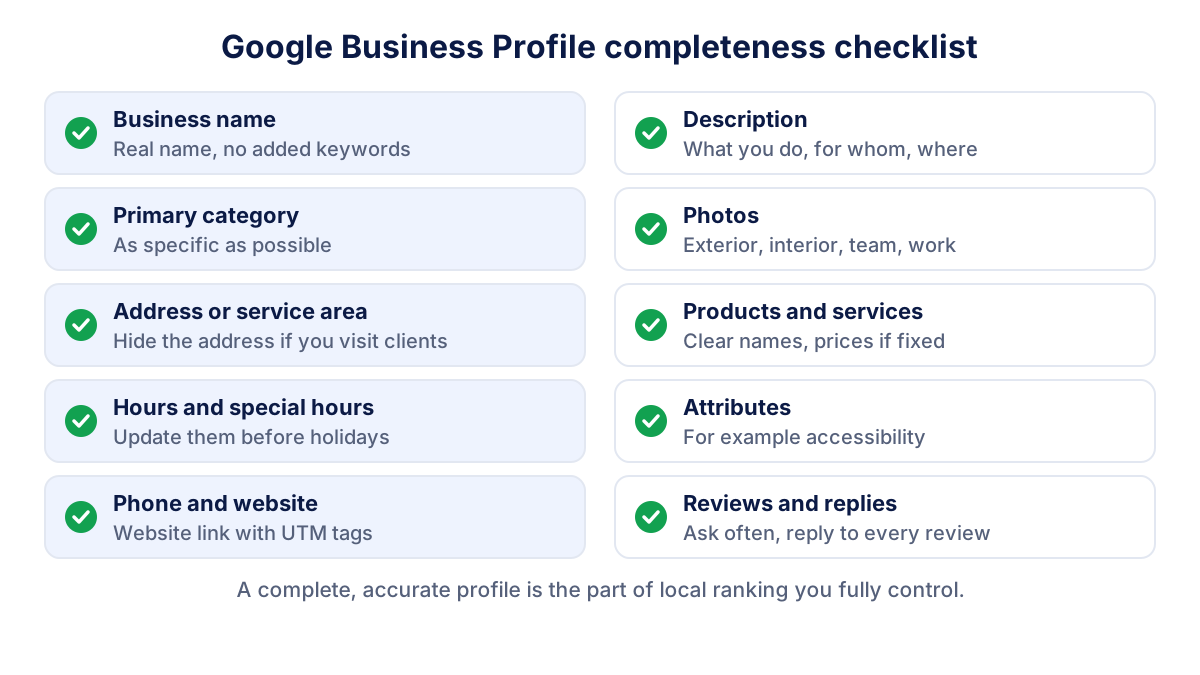
A complete, accurate profile is the part of local visibility you fully control. Work through these sections.
Categories
The category tells Google what your business is. Google asks you to choose as few categories as possible and to pick the most specific one that represents your core business: "Italian restaurant" rather than "Restaurant". Add secondary categories only for things the business genuinely is, not for things it offers.
Hours, phone and website
Enter regular customer-facing hours and set special hours for holidays. Use a local phone number that reaches the location directly. Point the website link to the most relevant page, which for a multi-location business is usually the location page, not the home page.
A practical tip: add UTM parameters to that website link, for example ?utm_source=google&utm_medium=organic&utm_campaign=gbp. Visits from the profile then appear as a separate campaign in Google Analytics 4 instead of blending into organic search. Our guide to UTM parameters shows how to build the link.
Photos, products, services and attributes
Upload real photos of the exterior, the interior, the team and your work. Add products and services with clear names and, when they are fixed, prices. Attributes describe facts such as accessibility or payment options. Some are set by the owner, others come from customer feedback, and the list depends on the category.
Description
Write a plain description: what you do, for whom and where. No links, no promotional claims, no keyword lists.
Reviews, replies and posts
Reviews influence both customers and ranking. Google says that more reviews and positive ratings can help a business's local ranking.
To get more reviews, share the review link or QR code from your profile after each sale or appointment. Customers need a Google account to post. Google's policy is strict on one point: offering discounts, gifts or other incentives in exchange for posting, changing or removing a review is prohibited.
Reply to every review, positive and negative. Keep replies short, personal and free of promotions. For a negative review, thank the person, apologize where appropriate, avoid sharing private details and offer to continue offline. Future customers read your reply as much as the review. You can flag reviews that break Google's policies, such as spam or conflicts of interest, but not reviews that are simply unfavorable.
Posts and updates
Posts let you publish short updates, offers and events on the profile. They are useful for news that matters to local customers: new opening hours, a seasonal menu, an event date. Posts do not replace a complete profile, but a profile that shows recent activity gives customers a reason to trust that the information is current.
Google Business Profile performance metrics
The performance report shows how people find and use the profile. It is available only for verified profiles, and only the metrics relevant to your business appear. Google defines them in Understand your Business Profile performance:
| Metric | What it counts |
|---|---|
| Interactions | Total of all interactions with the profile |
| Profile views | People who viewed the profile on Search and Maps (each person once per day) |
| Searches | Search terms people used to find the business |
| Calls | Taps on the call button |
| Directions | Direction requests, adjusted for repeated taps and cancellations |
| Website clicks | Clicks on the website link |
| Messages, bookings | Conversations and completed bookings, where enabled |
Search terms update monthly and can take a few days to appear. Data covers both organic results and Google Ads.
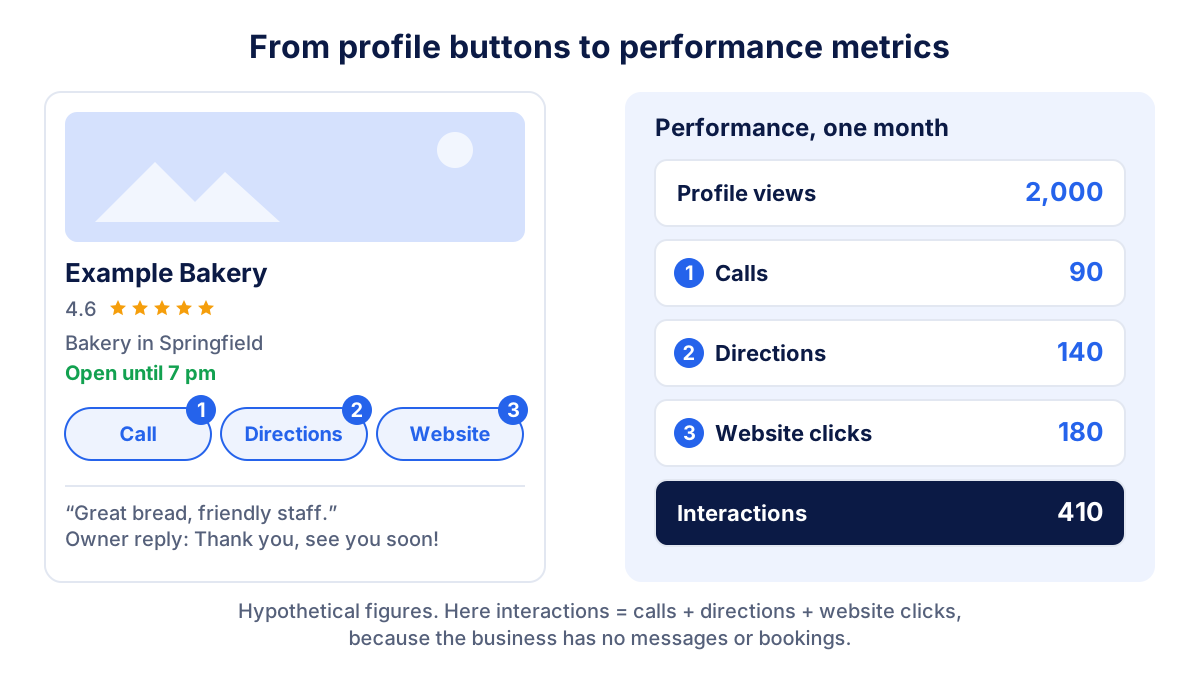
A worked example with round, hypothetical numbers: in one month a bakery gets 2,000 profile views, 90 calls, 140 direction requests and 180 website clicks, so 410 interactions. Dividing interactions by views gives a rough action rate of about 20%. It is not an official Google metric, but tracked month over month it tells you whether the profile converts attention into action. Compare it with the click-through rate of your organic listings to see which surface brings more visits.
How does Google rank local results?
Google states on its local ranking page that local results are mainly based on three factors:
- Relevance: how well a profile matches what someone is searching for.
- Distance: how far the business is from the searcher or from the location in the query.
- Prominence: how well known the business is. Google mentions, among other signals, how many websites link to the business and how many reviews it has.
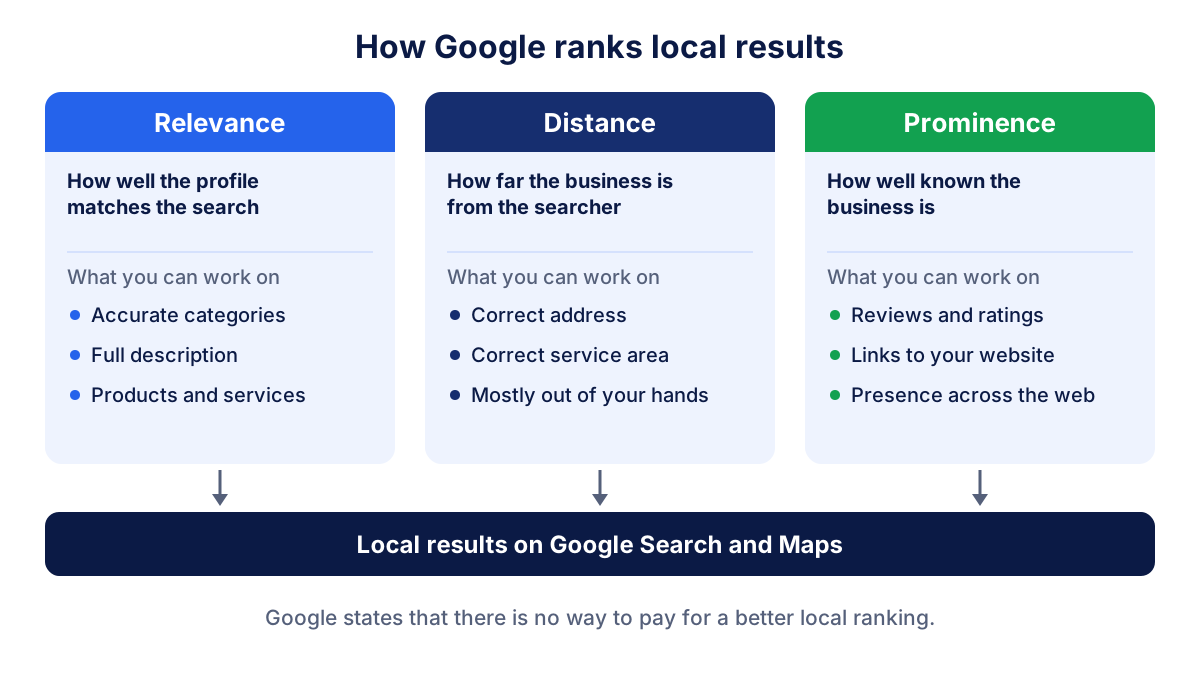
Google also states that there is no way to request or pay for a better local ranking. In practice, relevance improves with accurate categories and complete information, and prominence with reviews, a good website and mentions on other sites. Distance is largely outside your control.
Common mistakes and suspensions
- Keywords in the business name. "Smith Dental Implants Cheap Springfield" breaks the guidelines and is a frequent reason for suspension.
- Virtual offices or coworking addresses that the business does not staff.
- Duplicate profiles for the same location.
- Too many or vague categories instead of one specific primary category.
- Outdated hours, especially around holidays, which create bad reviews quickly.
- Review incentives, or reviews written by staff, friends and family.
- Verifying from the agency account, which leaves the client without control.
If a profile is suspended, fix the cause first, then submit an appeal through the official appeals tool. Do not create a new profile for the same business while the appeal is pending.
How to report Google Business Profile results to clients
In the reports we build for local clients, the profile gets its own section next to organic search. A monthly view needs four things: views, the main search terms, the three action metrics (calls, directions, website clicks) and the review count with the average rating. Show each as a trend against the previous month and the same month last year, because local demand is seasonal.
Then connect the profile to the website. With UTM tags on the website link, GA4 shows how many sessions and conversions came from the profile. Google Search Console covers the organic listings of the same site. Our SEO report guide explains how to structure the whole document so the client reads results before details.
The profile data itself comes from the performance report export, the Business Profile APIs or the GA4 link mentioned in the FAQ. Tools like Klyrax cover the other channels of the same report (GA4, Search Console, social and ads) in read-only mode, so the local section sits next to numbers the client already knows.
Frequently asked questions
Is Google My Business the same as Google Business Profile?
Yes. Google Business Profile is the current name of the product that used to be called Google My Business, and before that Google Places. The listing, the reviews and the data carried over. What changed is mainly how you manage it: single profiles are now edited directly from Google Search or Google Maps, while businesses with many locations use the Business Profile Manager.
Is Google Business Profile free?
Yes. Creating, verifying and managing a Google Business Profile costs nothing, and Google states that there is no way to pay for a better local ranking. You can run Google Ads that show your business more prominently on Maps or Search, but that is a separate paid product. Be wary of anyone selling guaranteed local rankings.
How do I verify my Google Business Profile?
After you create or claim the profile, Google shows the verification options available to you. These can include a phone call or text, email, a video recording, a live video call or a postcard with a code. Google decides which methods appear based on business type, region and other signals, and you cannot choose a different one. Some businesses must complete more than one step.
Why is my business not showing on Google Maps?
The usual reasons are an unverified or suspended profile, a new profile still under review, an address that breaks the guidelines (such as a virtual office) or simply low relevance or prominence for the search. Check the profile status first, then compare your categories and reviews with the businesses that do appear. Distance also matters: results change with the searcher's location.
Can I see Google Business Profile data in Google Analytics 4?
Google Analytics now offers a link to Google Business Profile that adds a report collection with interactions, website clicks, calls, directions and a few other metrics. Google documents some limits: only the last six months of data, totals across all linked profiles and no use in explorations. Tagging the profile's website link with UTM parameters remains useful to track visits and conversions.
All your marketing data in one report
Klyrax connects Google Ads, Meta Ads, GA4, Search Console, Bing Webmaster Tools and more in read-only mode, and turns them into client-ready reports.
Request info