
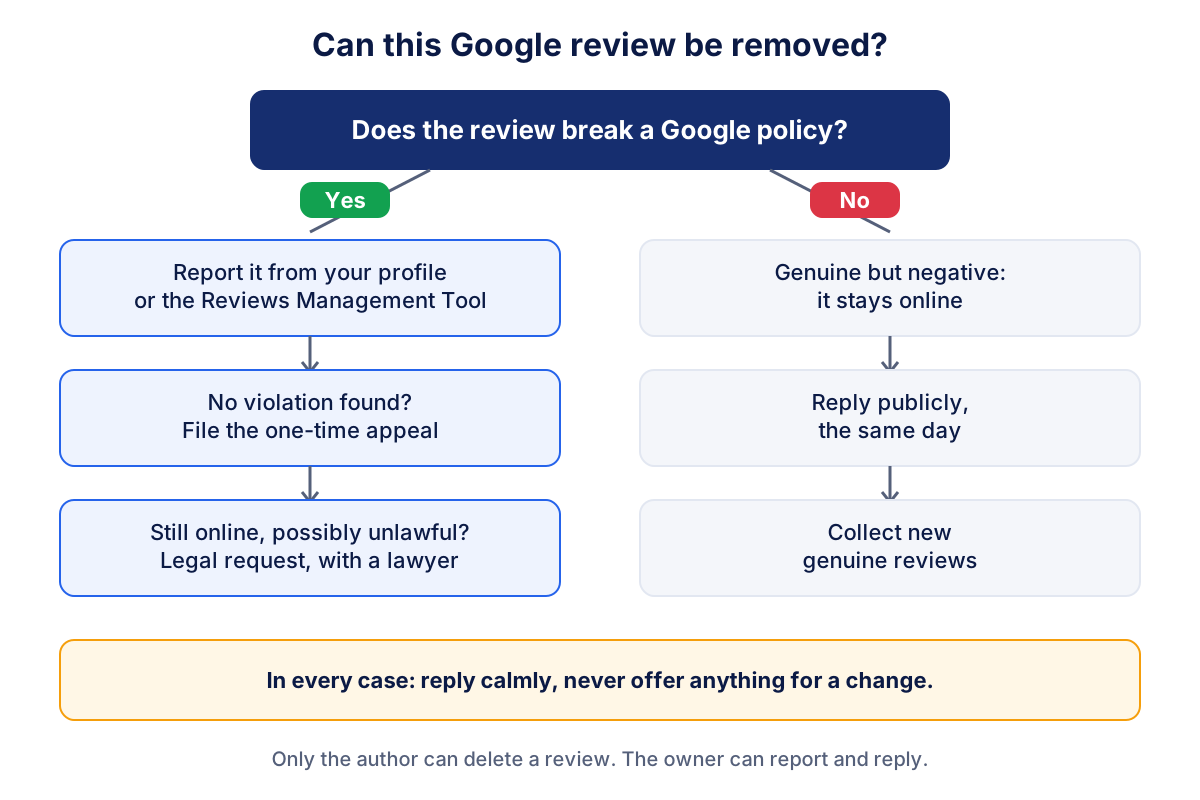
If you are wondering how to remove a Google review from your business, the honest answer is that you cannot delete it yourself. Google removes a review only when it breaks its content policies, and you have to report it and wait for Google's decision. A review that is negative but genuine stays, and then the best thing you can do is reply well.
That sounds discouraging, but there is more you can do than most owners think. This guide shows which reviews Google actually deletes, how to report a review and appeal step by step, how long it takes, what to do when Google says no, and why buying reviews to drown out a bad one can cost you far more than one star.
Can a business delete a Google review?
No. A business owner cannot delete a Google review directly, not even on a verified Business Profile. Google's own help page on adding, editing and deleting reviews is clear that only the author can delete their review. What the owner can do falls into three actions:
- Report a review that violates Google's policies, so Google evaluates it and removes it if it agrees.
- Reply publicly to any review, positive or negative.
- Ask the customer, once and politely, if they want to update their review after you have solved the problem. Never offer anything in return.
Many owners feel that a one-star review from someone they never met is unfair. Sometimes it is. But "unfair" is not a reason Google accepts. The question that matters is whether the review breaks a specific rule.
Which Google reviews can be removed?
Google removes reviews that violate the prohibited and restricted content policy for user contributed content on Maps. The categories that matter most for a business are these:
| Policy category | What it covers | Typical example |
|---|---|---|
| Fake engagement | Content not based on a real experience, rating manipulation | A batch of one-star reviews from accounts that never visited |
| Conflict of interest | Reviews by owners, staff, former staff or competitors | A competitor reviewing your shop |
| Off-topic | Content not about the place or the experience | A political rant, a review meant for another business |
| Harassment and hate speech | Attacks on individuals or groups | Insults against a named employee |
| Offensive content, obscenity and profanity | Vulgar or obscene language | A review full of swear words |
| Personal information | Private data such as phone numbers or health details | A review that publishes an employee's home address |
| Advertising and solicitation | Promotional content, links, spam | A review that advertises another company |
| Impersonation and misrepresentation | Pretending to be someone else | A review posted in the name of a real person who did not write it |
What does not qualify: a low rating without comment, a harsh but honest opinion, a complaint you think is exaggerated, or a review from a customer you simply cannot identify. Google says explicitly that disagreeing with a review or disliking it is not a reason to report it.
How to report a Google review from your Business Profile
The fastest route starts from your profile. The steps on Google's page about reporting inappropriate reviews are:
- Open your Business Profile on Google Search or Maps, signed in with the account that manages it.
- Select Read reviews.
- Next to the review, select the report icon.
- Choose the reason that matches the violation, for example spam or profanity.
- Submit the report.
Pick the reason carefully. A review from a competitor is a conflict of interest, not "offensive". A review that names an employee and insults them is harassment. The more precisely the reason matches the content, the easier it is for Google to see the problem.
If a single account looks fake, for example it has left dozens of one-star reviews for businesses across the country in one day, you can also report the user profile. In the Maps app, tap the reviewer's name, then More and Report.
How to follow a report with the Reviews Management Tool
The Reviews Management Tool is Google's page for reporting reviews and checking what happened to them. You reach it from the help page above. After confirming the Google Account linked to your profile, you select your business and choose between reporting a new review for removal or checking the status of a review you reported before.
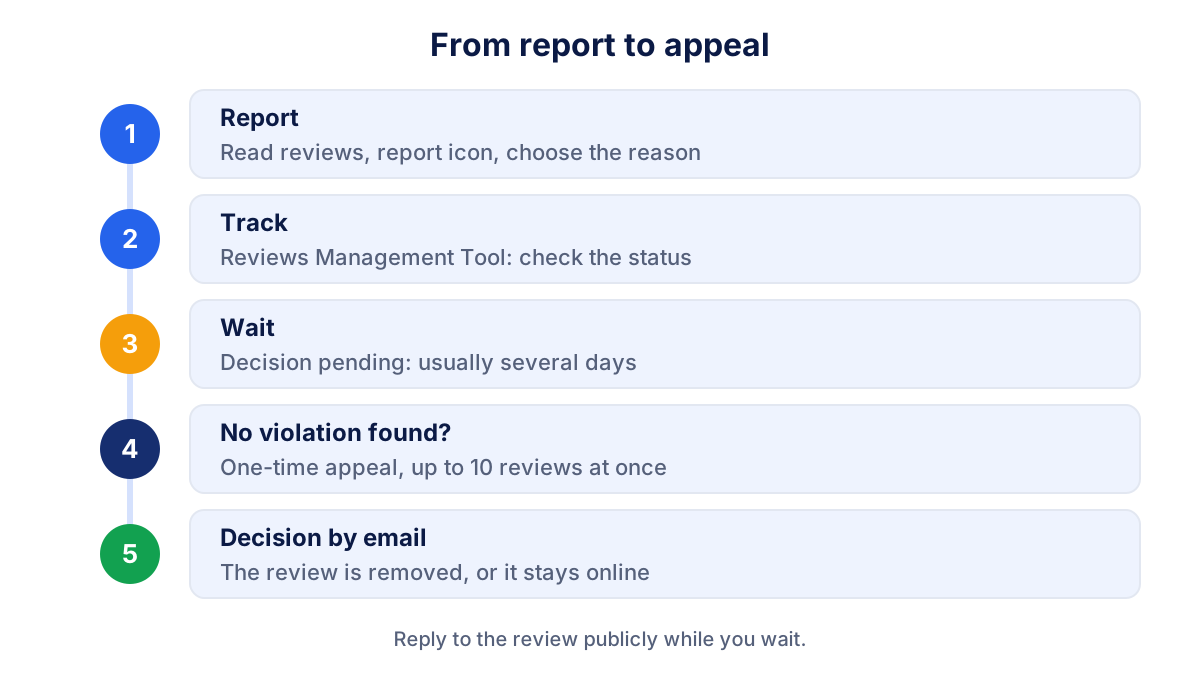
The tool shows one of three statuses for each report:
- Decision pending: the review is flagged and Google has not evaluated it yet.
- Reviewed, no policy violation: Google decided the review can stay. You can now submit a one-time appeal.
- Escalated: your appeal is being handled and the final decision arrives by email.
To appeal, open the status page, choose the eligible reviews (up to 10 at a time), select the appeal option and fill in the form. Use the form to explain what the first report could not: for example that the reviewer works for a competitor, or that the review describes a service you do not offer. If the appeal confirms a violation, the review is removed. If not, it stays.
How long does it take Google to remove a review?
Google says that review evaluation typically takes several days. There is no official deadline, and an appeal adds more time on top. In practice, plan for the review to be visible for at least a week, and do not wait for Google before replying.
A short, factual reply posted the same day protects you better than silence. If the review is later removed, your reply disappears with it. If it stays, readers see both sides.
Sometimes reviews also vanish without any report. Google uses automated systems to remove spam, and the help page admits they can occasionally remove legitimate reviews too. If genuine reviews from your customers disappear, contact Google Business Profile support rather than asking customers to post again and again.
What to do when Google refuses to remove a review
When both the report and the appeal fail, you still have options. They depend on what kind of review it is.
The review is genuine but harsh. Reply. Thank the person, acknowledge what went wrong if it did, explain what you changed and offer a direct contact. The guide on how to respond to Google reviews has examples and a four-part structure for negative replies. Then let new reviews do their work: a steady flow of recent, genuine reviews puts one bad review in context.
The review is factually false. Reply with the facts, briefly and without attacking: "We have no booking under this name on that date. Please call us so we can check." Readers notice a calm answer.
The review may break the law. Google has a separate route for content that may violate local law, for example defamation or a privacy breach. It starts from Google's legal removal request page, where you choose the product and the type of issue. A legal request is not a stronger version of a policy report: it is a different process with its own requirements, and the rules differ from country to country. Speak to a lawyer before you file one, and do not treat this article as legal advice.
Someone demands money. If a person threatens to post negative reviews unless you pay, do not pay. Google has a separate process for reporting extortion attempts linked to reviews, referenced from the same help page on reporting reviews.
How a reviewer can delete or edit their own review
The person who wrote the review can delete or change it at any time. In Google Maps on a computer, they open the menu, go to their contributions, open the reviews, select More next to the review and choose edit or delete. In the Maps app, the same options are in their profile. When a review is edited, the date shown becomes the date of the latest edit.
This matters when you resolve a complaint. If a customer had a bad experience and you fixed it, you can tell them once that they are welcome to update the review if they feel differently now. That is all. Offering a refund, a discount or a gift in exchange for changing or deleting a review is an incentive, and Google's policy prohibits it.
Why buying or faking reviews backfires
When one bad review hurts, buying a few five-star reviews to push it down can look tempting. It is a bad trade.
Google's policy forbids fake engagement, incentivized reviews and reviews written by people with a conflict of interest, such as staff or family. Google removes such reviews, and according to its page on Business Profile restrictions, it can also restrict a profile that breaks the fake engagement rules: for a set period the profile may be unable to receive new reviews, existing reviews may be unpublished, or a warning may tell visitors that fake reviews were removed. A public warning on your profile does more damage than any single one-star review.
There is also the law. In the European Union, consumer protection rules updated in 2022 treat submitting or commissioning fake consumer reviews as an unfair commercial practice. Other countries have similar rules. If an agency or a "reputation service" offers to post reviews for you, or promises it can remove any review, walk away.
Notice new reviews quickly, then act
The sooner you see a problematic review, the sooner you can report it and reply. Google sends notifications to profile managers, but they are easy to miss in a busy inbox. A short weekly look at your profile, or the review link you share with customers (see the guide to your Google review link), keeps you close to what people are writing.
Klyrax reads the public data of your Google profile through its Google reviews and Maps channel: rating, new reviews and unanswered reviews over time, next to your website and ads data. A sudden drop in rating or a cluster of new low-star reviews stands out, and the monthly written report can point it out. Klyrax does not show Business Profile performance data such as calls or direction requests. For the rest of your local presence, see the guides to Google Business Profile and local SEO on Google Maps.
Frequently asked questions
Can a business owner delete a Google review?
No. Google does not give business owners a delete button, not even on their own verified profile. Only the person who wrote the review can delete it. As an owner you can report a review that breaks Google's policies and ask Google to remove it, and you can reply publicly to every review. A review that is negative but genuine stays online.
How long does Google take to remove a reported review?
Google says the evaluation of a reported review typically takes several days. You can follow the status in the Reviews Management Tool: decision pending, reviewed with no policy violation, or escalated after an appeal. If you appeal, Google sends the final decision by email. There is no guaranteed deadline, so reply to the review publicly while you wait.
What can I do if Google refuses to remove a review?
If the Reviews Management Tool says no policy violation was found, you can file a one-time appeal from the same tool. If the appeal fails too, reply calmly and factually, so readers see your side. If you believe the review breaks the law, for example with false statements of fact, Google has a separate legal removal request. Get legal advice before you use it.
How many reports does it take to remove a Google review?
The number of reports does not decide the outcome. Google evaluates whether the review violates its prohibited and restricted content policy. One well chosen report with the right reason is worth more than many reports from friends or staff, and asking people to mass report a review can look like manipulation. Report once, then follow the status.
How does a customer delete or edit their own Google review?
In Google Maps on a computer, the reviewer opens the menu, goes to their contributions and then reviews, selects More next to the review and chooses edit or delete. On the phone the same options sit in the reviewer's profile in the Maps app. When a review is edited, the date shown becomes the date of the latest edit.
See how your marketing is really doing
Klyrax connects GA4, Search Console, Google Ads, Meta Ads, your Google reviews and more in read-only mode, shows the numbers that matter for your business and writes you a plain-language report every month.
Request info