
Knowing how to respond to Google reviews matters because the reply is public: every future customer who reads the review also reads your answer. The short version is to reply to every review, thank people by name, answer the specific point and, when a review is negative, own the problem and offer to continue the conversation privately. Getting more Google reviews follows a similar logic: ask every customer, at the right moment, with the official review link.
This guide covers both sides. How to ask for reviews without breaking Google's rules, how to reply to positive and negative reviews with examples, how to report fake reviews, and what to check every month.
Why Google reviews matter for a local business
Google reviews appear next to your Business Profile on Google Search and Maps, with the average star rating and the number of reviews. For many people that is the first thing they see before calling, booking or walking in.
Reviews also count for visibility. In its page on how local ranking works, Google explains that local results depend mainly on relevance, distance and prominence. Prominence is how well known a business is, and Google lists the number of reviews among its signals. In Google's own words, more reviews and positive ratings can help your business's local ranking. You cannot pay for a better position, so reviews are one of the few levers you control.
The three numbers that matter are easy to read:
- Rating: the average of all star ratings, from 1 to 5.
- Volume: how many reviews you have in total.
- Recency: how many new reviews arrived recently. A profile with plenty of reviews but nothing new for a year looks less active than one that receives a few every month.
If your profile is not set up yet, start with the guide to Google Business Profile: reviews only work on a verified, complete profile.
How to get Google reviews: ask every customer
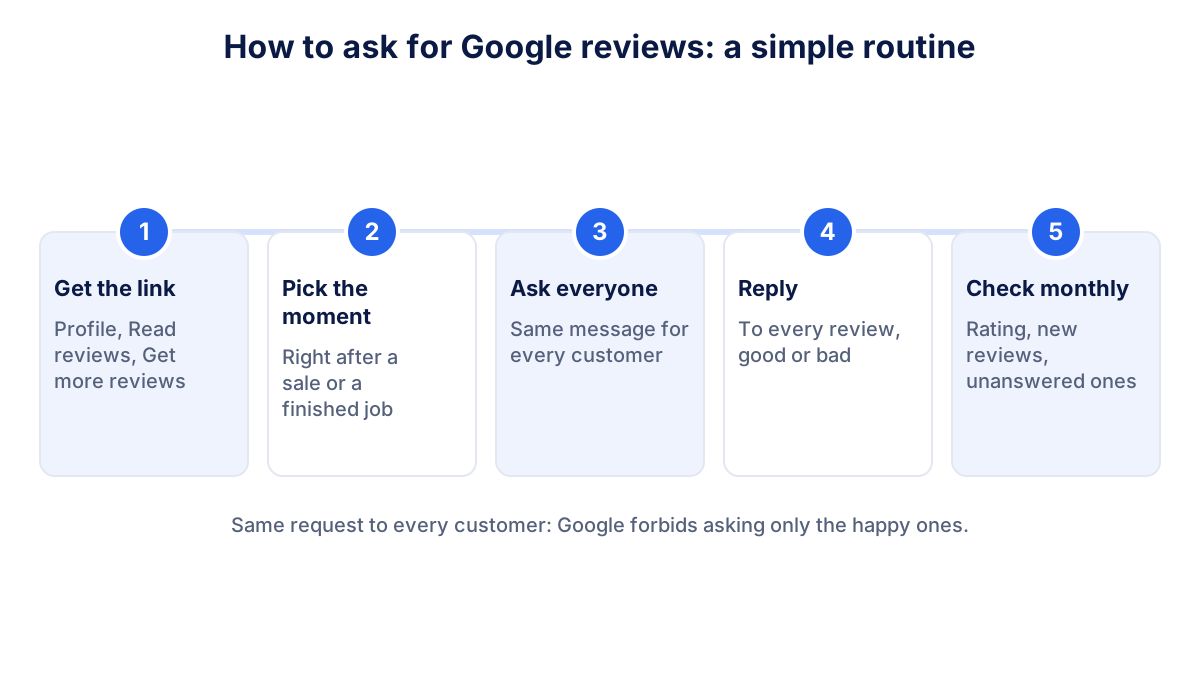
The most reliable way to get more Google reviews is boring and effective: ask every customer, every time, at the moment they are most satisfied. People rarely leave a review spontaneously, but many will if you make it easy.
Get your Google review link and QR code
Google provides an official link and QR code that open the review form directly. According to the help page on creating a review link or QR code, you go to your Business Profile, select Read reviews, then Get more reviews, and copy the link or save the QR code. Google notes that the review QR code can currently be generated only in a computer browser, not on a phone.
Customers need a Google Account to leave a review. They can create one with any email address, not only Gmail.
Pick the right moment and channel
Ask when the experience is fresh: right after the job is finished, the order is delivered or the appointment ends. Practical places for the link, all suggested by Google:
- On the receipt or invoice.
- In the thank-you email after a purchase or a visit.
- At the end of a chat or WhatsApp conversation.
- As a printed QR code at the counter or reception.
Keep the request short and neutral: "Thank you for choosing us. If you have a minute, a review on Google helps other people find us. Here is the link." Send the same message to every customer, not only the ones you expect to be happy.
What Google forbids: incentives, gating and fake reviews
Google's rules are strict and apply to every business. The Maps user contributed content policy lists what counts as fake engagement and rating manipulation.
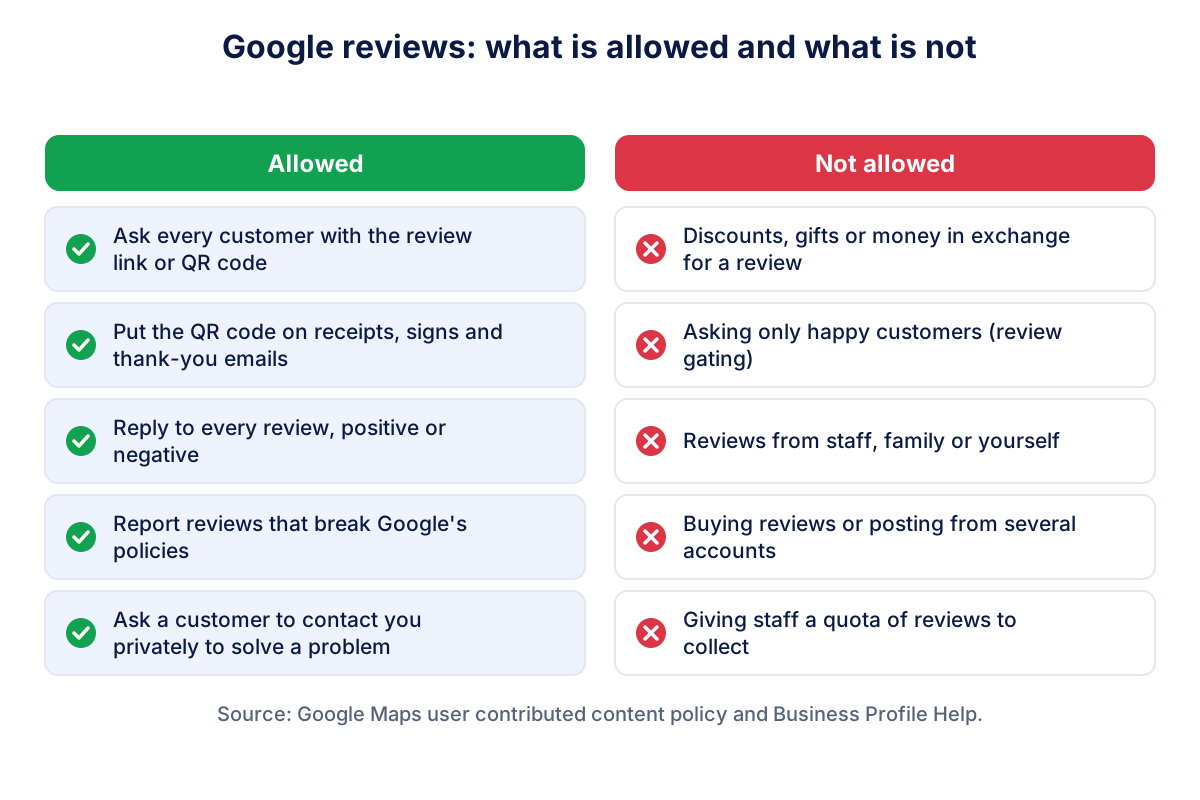
| Practice | Allowed? | Why |
|---|---|---|
| Asking every customer with the official link | Yes | This is what Google suggests |
| A discount, gift or payment for a review | No | Incentives are prohibited, and such reviews are removed |
| Asking only satisfied customers (review gating) | No | Selectively soliciting positive reviews is prohibited |
| Reviews from employees, former employees or family | No | Conflict of interest |
| Buying reviews or posting from several accounts | No | Fake engagement |
| Giving staff a quota of reviews to collect | No | Explicitly listed in the policy |
The rule on incentives covers more than new reviews. Offering something to change a review or to remove a negative one is also prohibited. A common trap is the "leave us five stars and get 10% off your next visit" sign: it breaks the policy even if the customer was genuinely happy.
How to respond to Google reviews: the basics
Google's own tips for replying to reviews are short and sensible. Replies should be professional, polite, short and relevant. Personalize them with the reviewer's name and your name or initials, reply promptly, and keep the tone conversational rather than promotional. Do not use replies to push offers.
Two habits make a difference in practice:
- Answer the specific point. "Glad you liked the gluten-free pizza" beats "Thanks for your review!" because it proves a person read it.
- Write for the next reader. The reviewer reads your reply once. Dozens of future customers may read it later.
You can reply from your Business Profile on Search or Maps after signing in with the account that manages it.
How to reply to positive Google reviews
A positive review needs a short, warm answer. Thank the person by name, mention one detail from the review, and stop there. Two examples:
- "Thank you, Mark. We are glad the new kitchen came out exactly as you pictured it. Enjoy cooking in it. Paolo"
- "Thanks, Sara! Happy to hear the express service saved your weekend. See you next time. The team at Green Cycles"
Avoid copying the same sentence under every review. Repeated generic replies look automatic, and Google itself recommends skipping generic thank-yous in favour of something useful or personal.
How to respond to negative Google reviews
A negative Google review is uncomfortable, but a good reply can show more about your business than ten positive ones. Google's advice is clear: do not share private information, do not attack the reviewer, be honest, apologize when appropriate and take responsibility only for what is within your control. For complex issues, invite the person to contact you by phone or email.
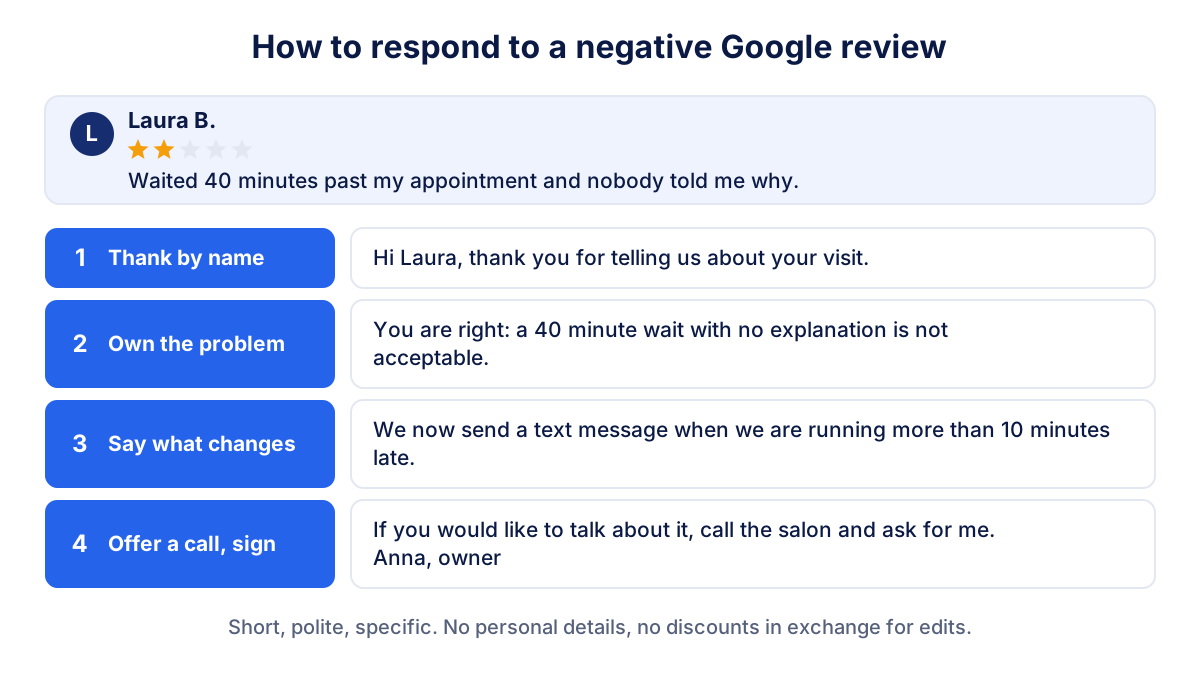
A structure that works in four steps:
- Thank by name. "Hi Laura, thank you for telling us about your visit."
- Own the problem, if it is real. "You are right: a 40 minute wait with no explanation is not acceptable."
- Say what changes. "We now send a text message when we are running more than 10 minutes late."
- Offer a private contact and sign. "If you would like to talk about it, call the salon and ask for me. Anna, owner."
If the review is unfair or factually wrong, stay calm and state the facts briefly: "We have no booking under this name on that date. If we have made a mistake, please call us so we can check." Readers notice the difference between a defensive reply and a factual one.
Do not offer a refund or a voucher in exchange for removing or changing the review. That counts as an incentive. You can solve the problem privately, and the customer may decide to update the review on their own.
How to report a fake or abusive Google review
You cannot delete a review yourself, even on your own profile. What you can do is report reviews that violate Google's policies: spam, fake engagement, conflicts of interest, offensive or off-topic content. Google is explicit that you should not report a review just because you disagree with it or dislike it.
The help page on reporting inappropriate reviews describes two routes:
- From your Business Profile: open the reviews, select the report icon next to the review, choose a reason and send the report.
- With the Reviews Management Tool: select your business, report the review and follow the status of each report.
Evaluation usually takes several days. If Google finds no violation, you can submit a one-time appeal from the same tool. While you wait, reply to the review calmly and factually: a short, polite answer protects you better than silence.
What to check every month
Reviews are a stream, not a one-off project. Ten minutes a month is enough to stay on top of them:
- Average rating: is it stable, rising or falling compared with last month?
- New reviews this month: if the count drops to zero, your request routine has stopped somewhere.
- Unanswered reviews: reply to all of them, starting with the negative ones.
- Themes: if three reviews in a month mention waiting times, that is operational feedback, not a reputation problem.
- Position on Maps for the two or three searches that matter to you, such as "dentist Leeds".
Klyrax connects to the public data of your Google profile through its Google reviews and Maps integration: rating, new and unanswered reviews, Maps positions for the keywords you choose and profile completeness. It puts these numbers next to your website and ads data and explains the month in a short written report, so you see whether reviews are moving in the right direction without opening five tools. The guide to the monthly marketing report shows how to read everything together, and the guide to local SEO on Google Maps covers the other levers of local visibility.
Frequently asked questions
Should I respond to every Google review?
Yes, reply to every review you can, positive and negative. Google says replying shows customers that you value their feedback, and that helpful replies can make your business stand out. Keep replies short and personal. A one-line thank you is fine for a short five-star review; a negative review deserves a specific, calm answer that future customers can read.
How do I get a link for customers to leave a Google review?
Open your Business Profile on Google, select Read reviews and then Get more reviews. You can copy the link or download a QR code. Google notes that the review QR code can currently be generated only in a computer browser. Share the link by email, WhatsApp or on receipts, and print the QR code for your counter.
Can I offer a discount in exchange for a Google review?
No. Google's policies prohibit offering incentives such as payment, discounts or free goods and services in exchange for a review, for changing a review or for removing a negative one. Reviews posted because of an incentive can be removed. Asking only satisfied customers for reviews is also against the rules.
How do I remove a fake Google review?
You cannot delete a review yourself. If it breaks Google's policies, for example spam, a conflict of interest or offensive content, report it from your Business Profile or with the Reviews Management Tool. Evaluation usually takes several days. If Google finds no violation, you can file a one-time appeal. Honest negative reviews stay online.
Do Google reviews help local ranking?
Yes, according to Google. Local results are based mainly on relevance, distance and prominence, and the number of reviews is one of the signals of prominence. Google states that more reviews and positive ratings can help a business's local ranking. There is no way to pay Google for a better local position.
See how your marketing is really doing
Klyrax connects GA4, Search Console, Google Ads, Meta Ads, your Google reviews and more in read-only mode, shows the numbers that matter for your business and writes you a plain-language report every month.
Request info