
Local SEO is the work that makes your business appear when people nearby search for what you offer, on Google Maps and in the map results of Google Search. If you want to know how to rank on Google Maps, start from what Google itself says: local results depend on relevance, distance and prominence. The rest of this guide turns those three words into a checklist you can work through.
It is written for owners of local businesses: shops, trades, clinics, studios, restaurants. No technical skills needed.
How does Google rank businesses on Google Maps?
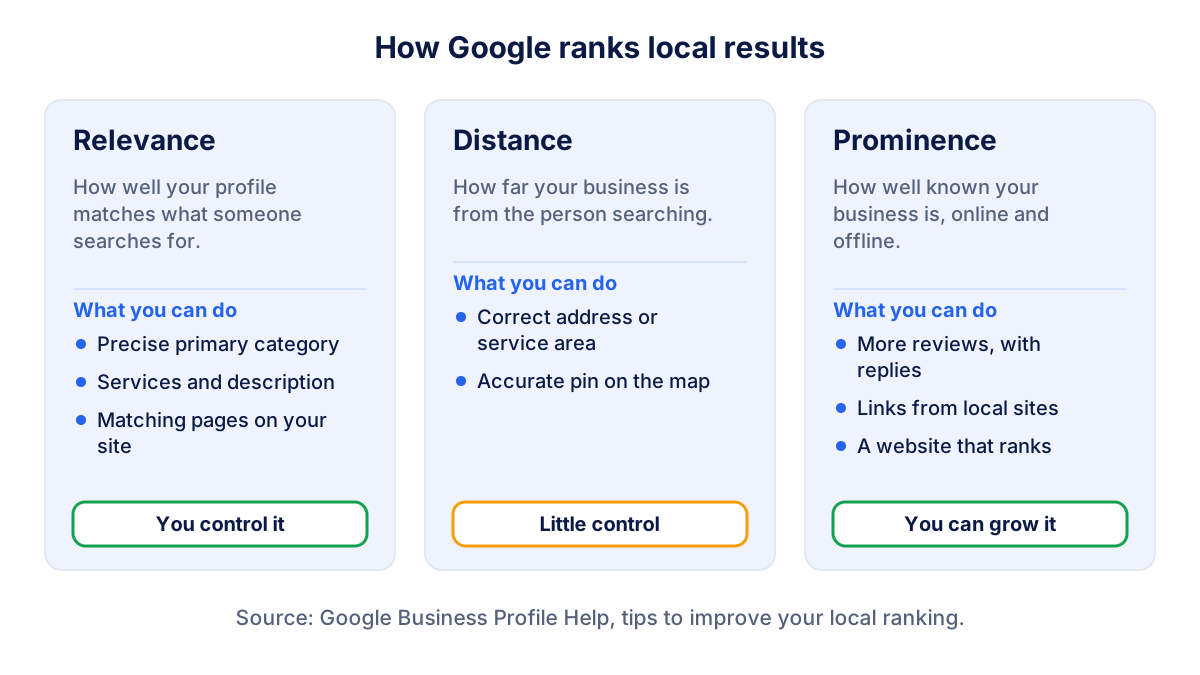
Google explains its local ranking in the Business Profile help page on how to improve your local ranking. Local results are mainly based on three factors:
- Relevance: how well your Business Profile matches what someone searches for.
- Distance: how far your business is from the person searching, or from the place named in the search.
- Prominence: how well known your business is. Google mentions links from other websites and the number of reviews and ratings.
Google also states that there is no way to request or pay for a better local ranking. Ads on Maps exist, but they are a separate, labelled product.
Local SEO vs classic SEO: what is different?
Classic SEO is about ranking your website pages in the list of ordinary results. Local SEO is about your Business Profile appearing in two places: in Google Maps itself and in the block with a map and a few businesses that Google shows in Search for queries with local intent, such as "plumber near me" or "dentist Leeds". Often people never reach your website: they call, ask for directions or read reviews straight from the profile.
That changes what you measure. For classic SEO you look at clicks and positions in Search Console. For local SEO the key numbers are your position on Maps from different points, your reviews and rating, and the actions on your profile. The two still work together: a website that ranks well for your services also supports your local visibility.
Local SEO step 1: a complete Business Profile
Relevance starts with your Google Business Profile. Google says that businesses with complete and accurate information are more likely to show up in local results. Go through the profile section by section:
- Verify the profile. An unverified profile has little chance of ranking well.
- Primary category: the most specific one that describes your main business ("Emergency plumber" or "Plumber", not "Contractor"). Add secondary categories only for what you really are.
- Address or service area. If customers visit you, show the address. If you go to them, hide the address and list the areas you serve.
- Hours, phone, website. Keep special hours updated for holidays.
- Services and products with clear names, plus a short description of what you do and where.
- Photos of the outside, the inside, the team and your work, refreshed over time.
Categories are the strongest relevance signal you control. Look at the categories of the businesses ranking first for your main keyword: if they all use a more specific category than yours, check whether it fits you too.
Step 2: reviews and replies
Reviews feed prominence. Google says that more reviews and positive ratings can help a business's local ranking, and that replying to reviews helps your profile stand out.
What works for a small business:
- ask every satisfied customer, at the moment the job is done, with a direct link or QR code;
- reply to every review, positive and negative, briefly and personally;
- keep a steady flow: a profile with recent reviews looks alive to customers;
- never offer discounts, gifts or other incentives for reviews, which Google's policies prohibit.
When a review is negative, answer calmly: thank the customer, apologise if it is fair, never publish personal details and offer to continue the conversation privately. Future customers read your reply as much as the review. You can report reviews that break Google's policies, such as spam or conflicts of interest, but not reviews that are simply unfavourable.
The full method is in the guide to getting and answering Google reviews.
Step 3: the same name, address and phone everywhere
Your business details appear in many places: your profile, your website, directories, social pages, industry associations, suppliers' "where to buy" lists. When they disagree (an old phone number, a previous address, a different spelling of the name) both customers and search engines get mixed signals.
This is a practitioner's rule more than a published Google factor, but it costs little:
- write down the exact official version of name, address and phone;
- use it on the website footer and contact page;
- update the main directories and social profiles in your country;
- remove or correct old listings after a move or a change of number.
Links from local websites (your trade association, a local newspaper, a partner, a sponsored event) also count toward prominence, as Google mentions links from other websites. One real local link is worth more than dozens of directory entries nobody visits.
Step 4: local pages on your website
Your website supports relevance and prominence at the same time. The profile links to it, and Google can read it to understand what you do and where.
- One page per service you want to rank for, with the words customers use.
- One page per location if you have several, each linked from its own Business Profile, with address, hours, directions and real content about that place.
- Service area pages only where you genuinely work, with something specific to say (typical jobs, travel times, local regulations). Pages that only swap the town name add nothing.
- Contact details in text, not only inside an image, identical to the profile.
Add UTM parameters to the website link in your profile so that visits from Maps show up separately in Google Analytics 4. The guide to traffic sources explains how to read them.
How to check your Google Maps ranking near your business
Your Google Maps ranking is not one number. Because distance matters, the same search gives different results depending on where the phone is. A plumber can be first next to the workshop, fourth two kilometres away and not visible across town.
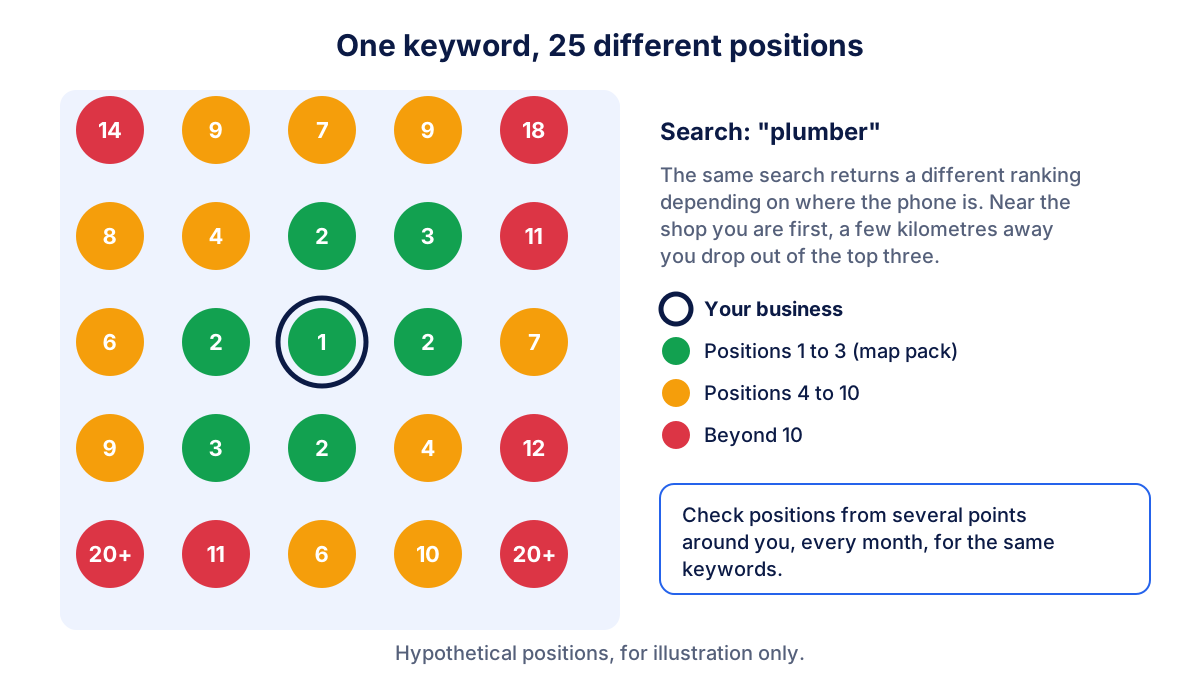
A useful way to measure it:
- choose five to ten keywords customers really use ("plumber", "emergency plumber", "boiler repair");
- pick a few fixed points around you: your street, the nearest neighbourhoods, the edge of your service area;
- check the position from those points every month, with the same keywords;
- write the results in a simple table and compare month on month.
| Keyword | Near the business | 2 km away | Edge of service area |
|---|---|---|---|
| plumber | 1 | 3 | 9 |
| emergency plumber | 2 | 4 | 12 |
| boiler repair | 3 | 7 | not in top 20 |
Numbers are hypothetical. What matters is the trend: positions improving at 2 km after a few months of reviews and a new service page tell you the work is paying off.
Klyrax does this check for you: it tracks your Google Maps position for the keywords you choose, together with your rating, new and unanswered reviews and profile completeness. With the local business goal selected, those numbers sit next to your website traffic, and the monthly written report explains what changed.
What not to do: shortcuts that get profiles suspended
Google's guidelines for representing your business are strict, and breaking them can lead to suspension.
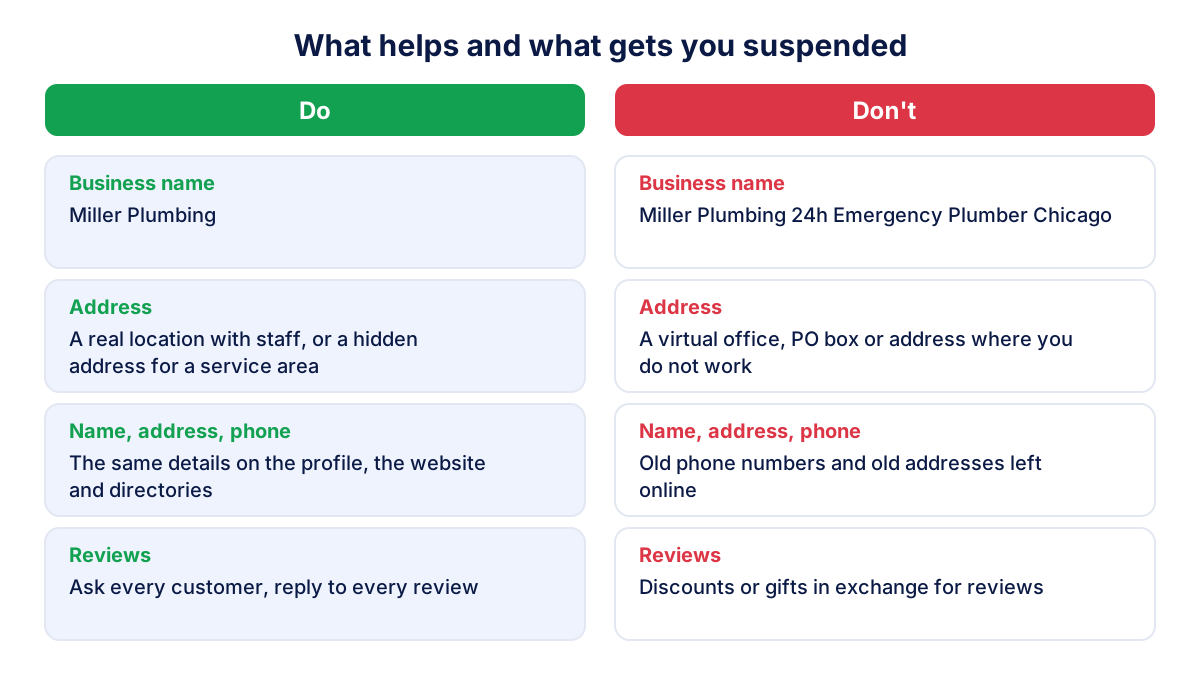
- Keywords in the business name. The name must reflect your real-world name. "Miller Plumbing 24h Emergency Plumber Chicago" is not allowed.
- Fake or virtual addresses. A virtual office, a mailbox or an address where you do not work is not eligible. A co-working desk only qualifies under specific conditions.
- Duplicate profiles for the same location to cover more searches.
- Bought or incentivized reviews, or reviews written by staff and family.
- Too many or unrelated categories to appear for more keywords.
If a competitor breaks these rules, you can suggest an edit on Maps or report it through Google's official form. Do not copy them: the gain is short and the risk falls on your business.
Local SEO checklist for every month
| Check | Why it matters |
|---|---|
| Maps positions for your keywords | The direct result of your local SEO work |
| New reviews and average rating | Prominence and customer trust |
| Unanswered reviews | Replies help your profile stand out |
| Profile details and special hours | Accuracy affects relevance and reviews |
| Visits from the profile to the site | Shows whether visibility turns into visits |
Ten minutes a month is enough when you check the same things in the same order.
Frequently asked questions
How long does it take to rank on Google Maps?
There is no fixed time. Changes to your Business Profile usually need to be reviewed by Google first, and reviews and links build up over months, not days. In practice, judge progress over three to six months, checking the same keywords from the same points every month. If nothing moves after that, compare your category, reviews and website with the businesses ranking above you.
Can I pay Google to rank higher on Google Maps?
No. Google states that there is no way to request or pay for a better local ranking. You can buy ads that appear on Google Maps and in local results, but they are labelled as sponsored and stop when the budget stops. Be wary of anyone who sells guaranteed top positions on Maps: Google does not offer that.
Why does my business rank first near my shop but not across town?
Distance is one of the three local ranking factors. Google compares your business with others close to the person searching, so the same keyword gives different results a few streets or kilometres away. Being first next to your door is normal. To appear further away you need more relevance and prominence than the businesses that are closer to those people.
Should I add keywords to my business name on Google Maps?
No. Google's guidelines say the name must reflect your real-world business name, and adding unnecessary information can lead to suspension of your Business Profile. A name like Miller Plumbing 24h Emergency Plumber Chicago breaks the rules. Put services in the categories, the description and your website instead, where they help relevance safely.
Do reviews help my Google Maps ranking?
Yes. Google says that more reviews and positive ratings can help a business's local ranking, and that replying to reviews helps a profile stand out. Ask every satisfied customer, reply to every review, positive or negative, and never offer discounts or gifts in exchange, which Google's policies prohibit.
See how your marketing is really doing
Klyrax connects GA4, Search Console, Google Ads, Meta Ads, your Google reviews and more in read-only mode, shows the numbers that matter for your business and writes you a plain-language report every month.
Request info