An Instagram shadowban is the popular name for something Instagram calls being "not eligible for recommendations": your posts still reach your followers, but Instagram stops showing them to people who don't follow you in Explore, Reels and Feed recommendations. You can check it in two minutes. Open Account Status in your settings, then compare the share of views from non-followers in your insights with last month.
This guide is for a business account, not an influencer. It shows how to run an Instagram shadowban check with your own data, how to tell a real limit from an ordinary drop in reach, what to fix and how long it takes. For the basics of the metrics, see the Instagram Insights guide.
Is an Instagram shadowban real?
Instagram doesn't use the word, but the effect exists. Instagram applies two levels of rules. The Community Guidelines decide what can stay on the platform at all. The stricter Recommendations Guidelines decide what can be suggested to people who never chose to follow you.
Content that breaks the recommendation rules is not removed. According to Instagram's creator guidance, it keeps reaching your followers normally, but it isn't recommended to non-followers. If an account repeatedly posts content of that kind, the whole account can become ineligible, and then none of its content is recommended for a period.
For a business that relies on reels to reach new customers, that is exactly what a shadowban feels like: followers still like your posts, but new people stop finding you.
How to know if you are shadowbanned on Instagram: Account Status
Account Status is the official place to check. Instagram added it in 2021 and has extended it several times, as described on the Instagram announcements page.
- Open your profile and tap the menu to reach Settings. Instagram gives the path Settings, Account, Account Status; if your app shows a different layout, type "Account Status" in the settings search bar.
- Read the sections about removed content and features you can't use.
- On a professional account, read the part about recommendations. It tells you whether your content and your account can be recommended to non-followers, and in which places: Explore, Reels, Feed recommendations, and since 2023 Search and Suggested accounts.
- If something is flagged, open it. Instagram shows a sample of the posts or profile elements that may go against the guidelines, with the option to edit, delete or request a review.
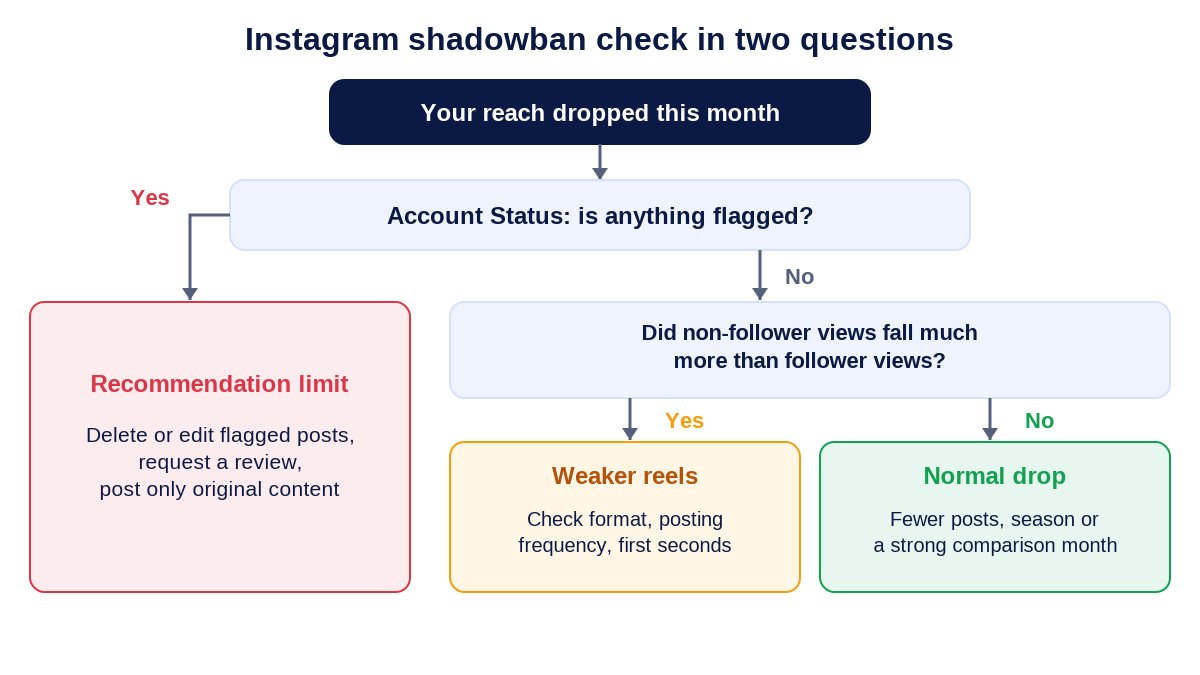
If Account Status says everything is fine, Instagram is not limiting your recommendations. The drop has another cause, and the next section helps you find it.
Instagram reach dropped: read the right numbers in your insights
Total views and reach mix two audiences: followers, who see you because they chose to, and non-followers, who see you because Instagram recommended you. A recommendation limit hits only the second group. So the useful Instagram shadowban check is a split, not a total.
In the professional dashboard, open Views for the account and look at the breakdown between followers and non-followers for the last 30 days. Then do the same for the 30 days before. Write four numbers down: views from followers and from non-followers, in both periods.
| What you see in insights | Likely cause | What to do |
|---|---|---|
| Non-follower views collapse, follower views stable | Recommendation limit (the "shadowban") | Check Account Status, fix flagged posts |
| Both fall by a similar share | Less posting, weaker content, season | Compare formats, posting frequency, last year |
| Only follower views fall | Followers lost interest or many unfollows | Check net followers and content topics |
| Views stable, link taps and profile visits fall | Not a reach problem | Check your bio link and profile buttons |
Data in insights can take up to two days to settle, and small accounts swing a lot from week to week. Compare whole months, or at least 28 days against 28 days.
Instagram shadowban check: a worked example
Imagine a small furniture shop with a business account. These numbers are hypothetical and rounded.
- October: 20,000 views, 60% from non-followers. That is 12,000 views from non-followers and 8,000 from followers.
- November: 9,000 views, 15% from non-followers. That is 1,350 from non-followers and 7,650 from followers.
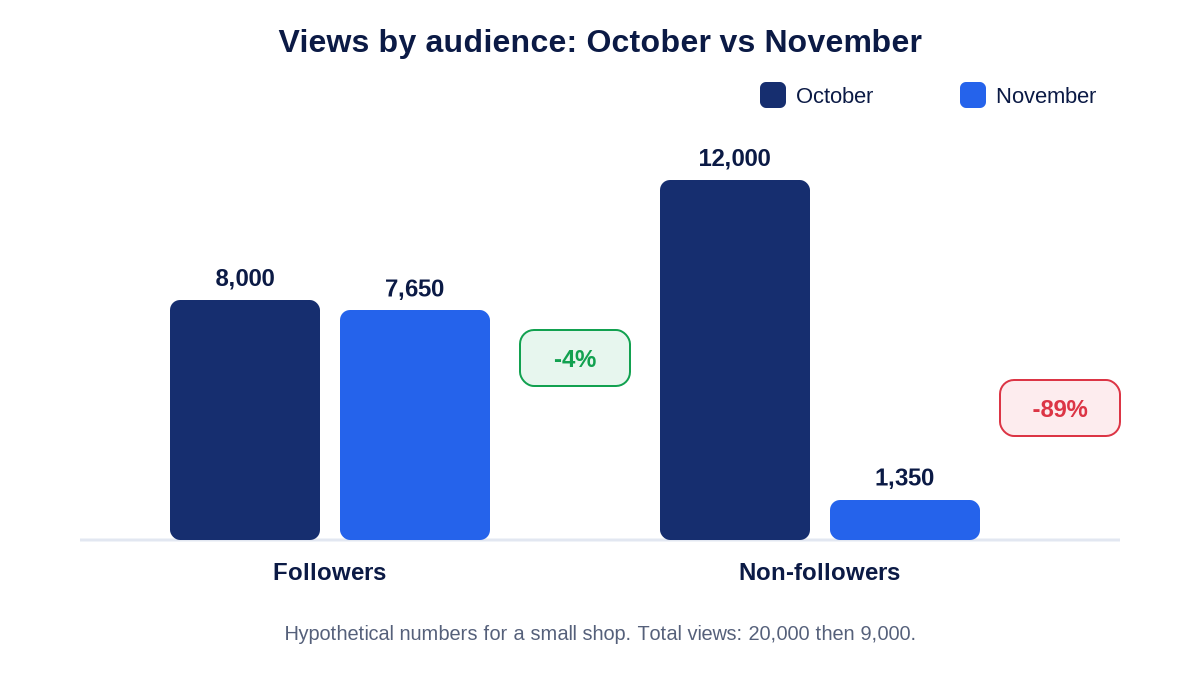
Total views fell by 55%, which looks alarming. The split tells a clearer story. Views from followers fell by about 4%, which is normal monthly noise. Views from non-followers fell by almost 90%. Instagram stopped recommending the shop's content to new people.
Here the owner should open Account Status straight away. Say it shows two reels flagged as not eligible for recommendations because they reused a video from another account. Deleting them, and posting only original video from then on, is the fix.
Now a counter example: if November had 9,000 views split 55% and 45%, both groups would have fallen by about half. That is not a shadowban. It usually means fewer posts, a different format or content that people scroll past. The guides to engagement rate and to the best time to post help with those causes.
Why is my Instagram reach so low? Causes that are not a shadowban
Most reach drops we see in business accounts have nothing to do with a penalty. Before you blame the algorithm, check these.
- You posted less. Ten reels in September and four in October will not reach the same people.
- You changed format. Reels are the format most often recommended to non-followers, while stories are seen almost only by followers. Fewer reels usually means fewer new viewers.
- The first seconds don't hold. If people swipe away quickly, Instagram shows the reel to fewer people. Watch time and shares say more than likes.
- The comparison month was unusual. A reel that went far in September makes October look poor.
- Seasonality. Many sectors are quieter in summer or after the holidays. Compare with the same month last year if you have it.
- Paid reach ended. If you boosted posts last month, organic views alone will look lower.
How to fix a shadowban on Instagram
If Account Status flags your account or content, work through these steps in order.
- Open each flagged item. Read which guideline it may break. Delete posts that clearly do, and edit captions or profile elements where that's enough.
- Request a review for anything you think was flagged by mistake. The option is in Account Status next to the item.
- Stop reposting content you didn't make. Instagram's originality guidance says accounts that mostly repost others' videos without meaningful changes can be left out of recommendations, and that the original version is recommended instead of copies.
- Remove automation. Disconnect apps that like, follow or comment for you, and don't buy followers or engagement. Both break Instagram's rules.
- Keep posting normally. Deleting your whole feed or pausing for weeks doesn't reset anything. Post original content at your usual pace.
- Check again after two to four weeks. Look at Account Status and the share of views from non-followers. Write both numbers down with the date.
There is no hidden "reset" button and no hashtag trick. Anyone selling a guaranteed unban is selling something Instagram doesn't offer.
How long does an Instagram shadowban last?
Instagram doesn't publish a fixed duration. Its creator guidance says only that an ineligible account's content isn't recommended for a period of time, without saying how long. In practice the limit lasts as long as its cause: a single flagged post stops counting against you once it's gone or overturned on review, while an account that keeps posting borderline or unoriginal content stays out of recommendations.
For a business, the realistic plan is to fix what Account Status shows, keep posting original content and measure. If the share of views from non-followers climbs back over a few weeks, the limit has lifted. If Account Status says all is fine and the share stays low, the cause is in your content, not in a penalty.
Common mistakes when you suspect a shadowban
- Using "shadowban test" websites. They can't see your Account Status or your insights. Instagram's own tools can.
- Reading total views only. The split between followers and non-followers is the signal.
- Comparing a week with a month. Use equal periods, ideally full months.
- Changing everything at once. If you change format, frequency and topics in the same week, you won't know what helped.
- Ignoring the business numbers. Profile visits, link taps and website visits matter more than views. Track the link in your bio with UTM parameters.
Keep an eye on it every month
A shadowban is easier to spot when you already know your normal numbers. Note views, reach, the share from non-followers, followers and profile activity at the start of each month, next to the month before. A sudden break in one line, while the others hold, is your early warning.
Klyrax connects to Instagram in read-only mode, next to Google Analytics 4 and your other channels, and compares your Instagram numbers with the previous period. On the 1st of each month its written report explains in plain language what changed, so a sharp fall in reach doesn't go unnoticed for weeks.
Frequently asked questions
How do I know if I am shadowbanned on Instagram?
Open Settings, then Account Status. On a professional account it shows whether your content and your account can be recommended to people who don't follow you, and lists removed content or limited features. Then open your insights and compare the share of views from non-followers with the previous month. A sharp drop in that share while follower views hold steady points to a recommendation limit.
What is Instagram Account Status?
Account Status is a section of Instagram's settings that shows your account's standing. It lists content removed for breaking the Community Guidelines, tells professional accounts whether their content can appear in Explore, Reels, Feed recommendations, Search and Suggested accounts, and shows features you cannot use. From there you can see the posts involved and request a review if you think Instagram made a mistake.
How long does an Instagram shadowban last?
Instagram does not publish a fixed duration. When an account is not eligible for recommendations, Instagram says its content is not recommended for a certain period. In practice the limit lasts as long as the reason behind it: recent violations, removed posts or unoriginal content. Fixing or deleting the flagged posts, or winning a review, is usually what brings recommendations back.
How do I fix a shadowban on Instagram?
Start in Account Status: delete or edit the posts it flags, and request a review for anything you think was flagged by mistake. Stop reposting other people's videos without real changes, since Instagram favors original content in recommendations. Remove third-party apps that automate likes, follows or comments. Then keep posting normally and watch the share of views from non-followers in your insights over the next weeks.
Why is my Instagram reach so low if I am not shadowbanned?
Most reach drops are not shadowbans. Common causes are posting less often, a change of format (fewer reels, more static posts), content that people stop watching in the first seconds, seasonal dips, or a strong month you are comparing against. Compare the same format over the same number of days, and check whether follower views fell as much as non-follower views.
See how your marketing is really doing
Klyrax connects GA4, Search Console, Google Ads, Meta Ads, your Google reviews and more in read-only mode, shows the numbers that matter for your business and writes you a plain-language report every month.
Request info