
Instagram Insights are the statistics Instagram gives to professional accounts: how many times your content was seen, by how many people, how many of them interacted, followed you or tapped the link to your website. To see insights on Instagram you need a business or creator account. Then you find them on your profile in the app, under each post, and on a computer in Meta Business Suite.
This guide is written for a business owner, not an influencer. It shows where the insights are, what each metric means after the 2025 changes, how to compare posts, reels and stories, what to check every month and how to connect Instagram to visits on your website.
What are Instagram Insights?
Instagram Insights are the built-in analytics of a professional Instagram account. They measure your content (posts, reels, stories, live videos), your audience (followers, where they live, when they are online) and the actions people take on your profile.
Instagram analytics tools from third parties read the same data through Meta's official API. So the numbers do not get more accurate in another tool. What changes is how they are presented and whether you see them next to your other channels.
One point matters before anything else: Instagram has renamed its metrics several times. Next to each number in the app there is a small (i) icon with the current definition. When a label in this guide differs slightly from your screen, trust the (i) text.
How to see insights on Instagram
Step 1: turn on a professional account
Insights are only available for professional accounts. On a personal account, switch in a minute:
- Open your profile, then the menu and Settings.
- Under the section for professionals, tap Account type and tools.
- Tap Switch to professional account, choose a category and pick Business.
The Instagram Help Center describes the same steps and the differences between business and creator accounts. Two things to know: a private account becomes public when you switch, and insights only count from the day the account is professional.
Step 2: open the insights
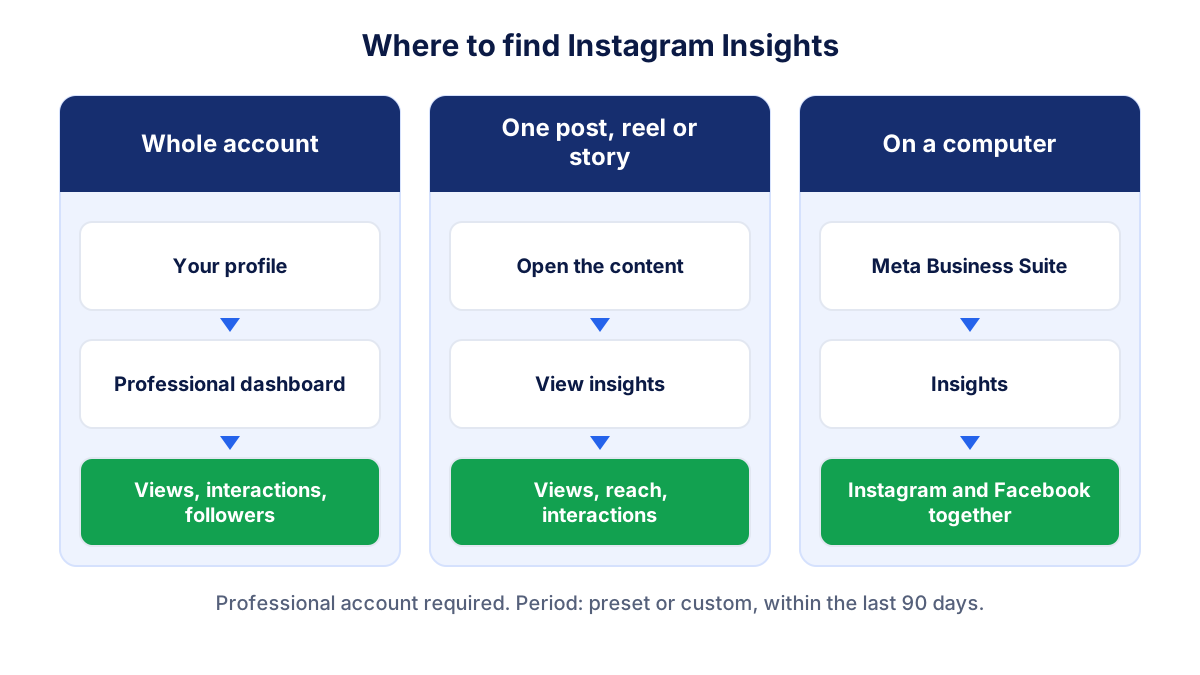
- For the whole account: on your profile, tap the professional dashboard. You see an overview with views, interactions and followers for the period. Tap a metric to open its detail.
- For one post, reel or story: open the content and tap View insights below it. Story insights stay available for up to two years, even though the story disappears after 24 hours.
- On a computer: in Meta Business Suite, open Insights. It shows Instagram and your Facebook Page side by side, which helps if you run both.
The period selector at the top lets you choose a preset or a custom range within the last 90 days. If you want a longer history, note the monthly figures somewhere or use a tool that stores them.
Instagram metrics explained: views, reach, interactions and more
In 2025 Instagram made views the main metric for all formats. Impressions are gone from insights (they still exist for ads in Ads Manager). In the developer documentation, Meta deprecated impressions for all API versions on 21 April 2025 and lists views as the replacement.
| Metric | What it counts | What it tells a business |
|---|---|---|
| Views | times your content was played or shown, repeats included | how much attention your content got |
| Reach (accounts reached) | different accounts that saw your content at least once | how many people you reached |
| Interactions | likes, comments, saves, shares, replies, reposts | whether people cared enough to act |
| Followers | new follows, unfollows, total | whether your audience is growing |
| Profile activity | profile visits and taps on links and buttons | whether people moved from content to your business |
| External link taps | taps on the link in your bio | how many left Instagram towards your site |
Views can also be split between followers and non-followers. That split is useful: a reel with 80% of views from non-followers is bringing your business in front of new people, while a post seen mostly by followers keeps existing customers in touch.
Profile activity is the closest Instagram gets to business results. It groups profile visits and taps on the buttons you show on your profile, such as the website link, address, call or email. A business with a shop or an office should look at these more than at likes.
Views vs reach vs interactions: a worked example
Imagine a small furniture shop. In one month its content gets 12,000 views, reaches 4,000 accounts and collects 300 interactions. These are hypothetical, round numbers.
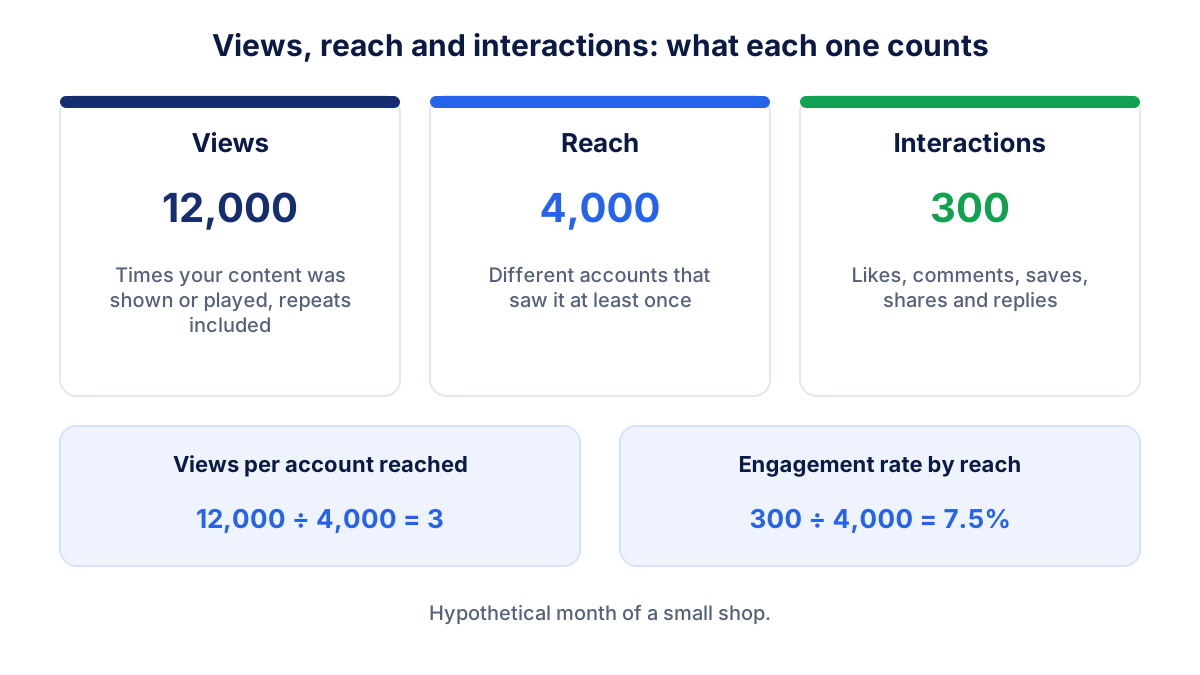
- Views per account reached: 12,000 ÷ 4,000 = 3. On average each person saw the content three times, across several posts or repeat plays.
- Engagement rate by reach: 300 ÷ 4,000 × 100 = 7.5%. Our guide to engagement rate explains the other bases you can use and why you should always keep the same one.
- Interactions per 1,000 views: 300 ÷ 12,000 × 1,000 = 25. Handy when you compare months with very different volumes.
If views rise and reach stays flat, the same people are seeing you more often. If reach rises, you are getting in front of new people. The difference between the two is the same idea as reach and impressions in advertising.
How to compare posts, reels and stories
Formats behave differently, so compare like with like. A reel can travel far beyond your followers, while a story is mostly seen by people who already follow you.
- Reels: look at views, reach, the share of non-followers, shares and follows from the reel.
- Feed posts and carousels: look at reach, saves and shares. Saves often show that the content was useful.
- Stories: look at reach of the first story and how many people drop off before the last one, plus link taps if you use a link sticker.
To compare two pieces of content of the same format, use rates rather than totals: interactions divided by reach, or link taps divided by views. A post published a week ago will always have more views than one published yesterday. Compare content after the same number of days.
In the account insights you can list the content you shared and sort it by a metric, for example reach or shares over the last 30 days. Do that once a month to find the three best pieces and ask what they have in common: the topic, the format, the hook in the first seconds.
What to check in Instagram analytics every month
A monthly check takes ten minutes. Use the same period each time (the previous calendar month) and write the numbers next to the month before.
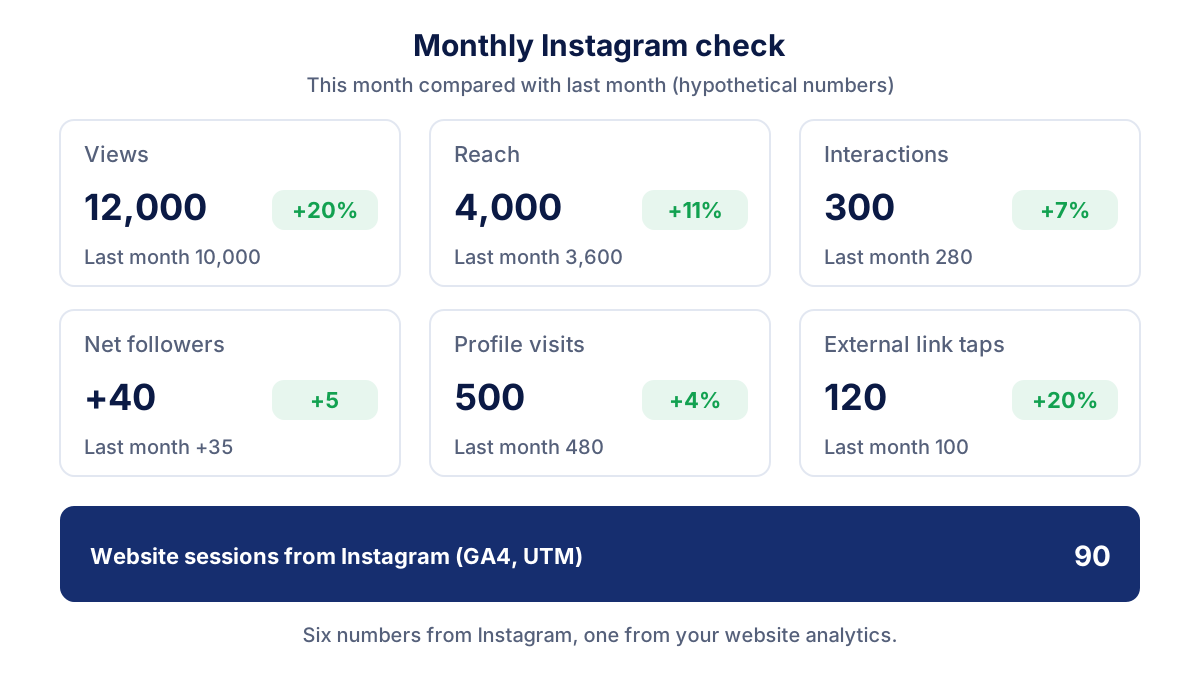
- Views and reach: is the content seen more or less than last month?
- Share of views from non-followers: is Instagram showing you to new people?
- Interactions and engagement rate: did the content work, or only reach more people?
- Net followers: new follows minus unfollows. A spike in unfollows after a campaign is worth a look.
- Profile visits and external link taps: the steps between content and business.
- Website sessions from Instagram: from your analytics tool, as explained below.
- The best three and the worst three pieces of content: what to repeat, what to drop.
If ads run on Instagram, keep paid results separate. Boosted posts and ads appear in insights too, but their cost, results and ROAS belong to the monthly Meta Ads report.
From Instagram to your website: link in bio with UTM
Instagram tells you how many people tapped your link. It does not tell you what they did on your website. For that you need your website analytics and a tagged link.
Add UTM parameters to the link in your bio, for example:
https://www.example.com/?utm_source=instagram&utm_medium=social&utm_campaign=bio
In Google Analytics 4 those visits then appear with source instagram and medium social, and you can see sessions, leads and sales from them. Use a different utm_campaign for link stickers in stories or for a seasonal promotion. Our guide to UTM parameters has a free link builder and naming rules that match GA4 channels.
Expect external link taps in Instagram to be higher than sessions in GA4. Some people close the page before it loads, and visitors who refuse cookies may not be counted. A gap is normal; a gap that suddenly doubles usually means a broken link or a slow page.
Common Instagram Insights mistakes
- Comparing old impressions with new views. They are calculated differently. Restart your trend line from 2025.
- Judging success by followers. A business needs visits, calls and sales. Profile activity and website sessions say more.
- Mixing organic and paid. A boosted post can look like a success in insights only because you paid for its reach.
- Comparing formats with totals. Reels and stories reach different audiences. Use rates and compare within the same format.
- Reading one day. Data can take up to 48 hours to settle, and small accounts swing a lot. Read months.
- No link tracking. Without UTM parameters, visits from Instagram often end up mixed with other referrals in your analytics.
Instagram next to your website and ads data
Instagram Insights answer the question "how is my content doing on Instagram". A business owner usually wants a broader answer: did Instagram bring people to the website, and did it do better or worse than search or ads this month.
Klyrax connects to Instagram and Facebook Pages in read-only mode, next to Google Analytics 4, Meta Ads and your other channels. The summary shows the few numbers that matter for your business goal compared with the previous period, and on the 1st of each month a written report explains in plain language what happened on Instagram and on your site, and up to three things to do next.
Frequently asked questions
How do I see insights on Instagram?
Your account must be a professional account (business or creator). In the Instagram app, go to your profile and open the professional dashboard to see the insights for the whole account, or tap View insights under a single post, reel or story. On a computer, open Meta Business Suite and go to the Insights section. You can choose a preset or custom period within the last 90 days.
What is the difference between views and reach on Instagram?
Views count how many times your content was played or shown on screen, including repeat views by the same person. Reach counts how many different accounts saw your content at least once. If one person watches your reel three times, that is three views and one account reached. Views are therefore always equal to or higher than reach.
Why did impressions disappear from Instagram Insights?
Instagram replaced impressions with views as the main metric for all formats, from reels to photos, carousels and stories. In the API for developers, Meta deprecated the impressions metric for all versions on 21 April 2025. Impressions are still reported for ads in Meta Ads Manager, so do not compare old impressions from insights with new views as if they were the same number.
Are Instagram Insights free?
Yes. Instagram Insights are free for every professional account, business or creator. Switching from a personal account to a professional account is also free, but it makes a private account public. Some data has limits: audience demographics appear only once you have enough followers or reach (Instagram mentions a threshold of 100), and the selectable period is the last 90 days.
How do I see how many people visit my website from Instagram?
Instagram shows external link taps in profile activity, which counts taps on the link in your bio. To see what those visitors did on your site, add UTM parameters to the link, for example utm_source=instagram and utm_medium=social, and read the sessions, leads and sales from that source in Google Analytics 4 or the analytics tool you use.
See how your marketing is really doing
Klyrax connects GA4, Search Console, Google Ads, Meta Ads, your Google reviews and more in read-only mode, shows the numbers that matter for your business and writes you a plain-language report every month.
Request info