
The best time to post on Instagram is the time when your own followers are online and in the mood to look, and it is different for a bakery, a law firm and an online shop. Generic studies give you a starting guess. Your insights and a short test give you the answer for your business.
This guide shows where Instagram and Meta Business Suite show your audience's active hours, how to run a four week test with a few posts a week, how to read the numbers and what matters more than the clock.
Is there one best time to post on Instagram?
No. Every year tools that schedule social media posts publish studies with a "best time to post on Instagram", based on millions of posts. Those studies are honest averages, but an average of accounts from every country, sector and time zone does not describe your followers.
Studies also disagree with each other, because each one uses different accounts, different metrics and a different definition of "best". One measures likes, another reach, another comments. If your customers are parents who scroll after the children are in bed, a global average built around office workers will point you to the wrong hour.
There is a second reason. Your feed is not a timeline. Instagram explains in its help center that the order of posts depends on several signals: how likely you are to be interested, your past interactions with the account and the date the post was shared. Time is one signal among many, so a post can keep finding people for days, especially a reel.
Why generic "best times" don't fit your business
Think about when your customers actually have their phone in hand and a minute to spare. That depends on their day, not on yours.
| Type of business | When customers often have time | First slots to test |
|---|---|---|
| Office services, B2B | commute, lunch break, early evening | 08:00, 12:30, 18:00 |
| Restaurant, café | before deciding where to eat | 11:00, 17:30 |
| Local shop | evenings, Saturday morning | 19:00, Saturday 10:00 |
| Online shop | evenings and Sunday | 20:00, 21:30, Sunday 18:00 |
| Gym, wellness | early morning, evening | 06:30, 19:00 |
These are hypotheses to test, not answers. Use them only to pick two or three slots for the test below.
How to find your best time to post on Instagram in your insights
Instagram already tracks when your followers are online. You need a professional account (business or creator), which you can set up for free as described in our guide to Instagram Insights.
- Open your profile and tap the professional dashboard.
- Open the insights and go to your followers (the section with your Total followers).
- Scroll to the chart of most active times. It shows the hours of a chosen day and the days of the week.
- Note the two or three hours with the highest bars and the busiest days.
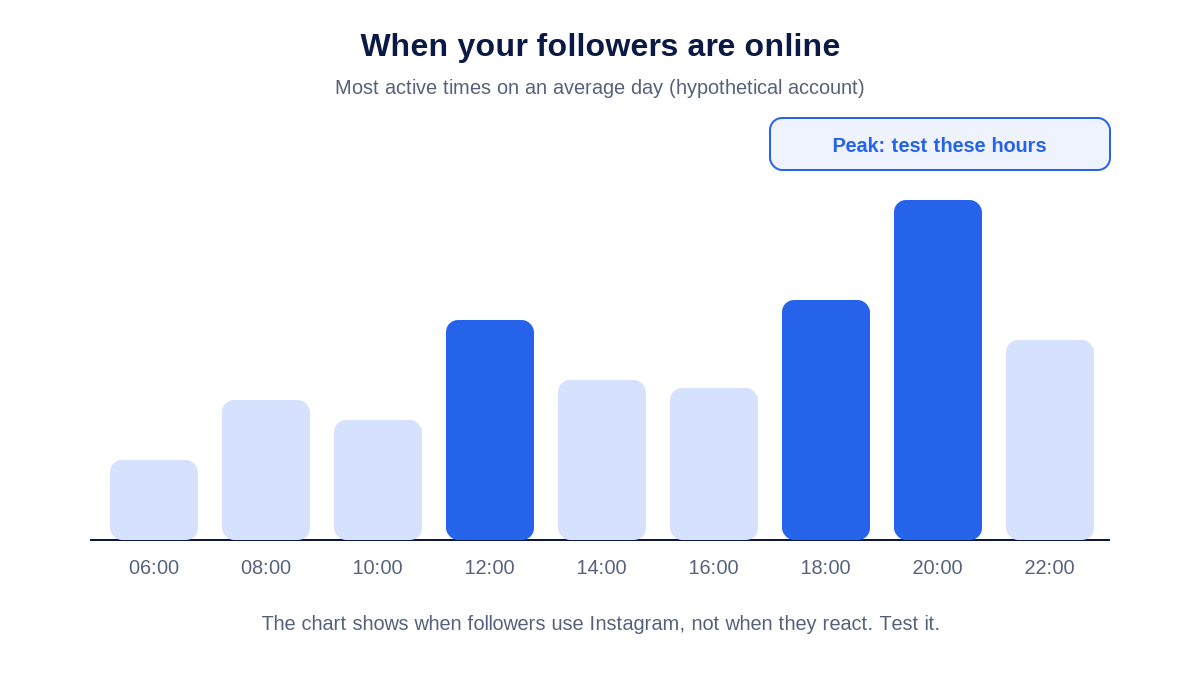
Instagram shows these follower trends only once you have at least 100 followers. Meta's developer documentation for the same data (the online followers metric) also limits it to accounts with 100 followers or more and to the last 30 days.
Keep one limit in mind: the chart shows when followers are using Instagram, not when they react to you. At 21:00 many people are online, but they are also seeing many other accounts. That is exactly why you test.
Best time to post on Facebook: where to look
For a Facebook Page, open Meta Business Suite on a computer and go to Insights. There you can see the results of each post, for the Page and for Instagram, with the date and time it went out. Sort your content by reach and look for a pattern in the hours of the best posts.
When you schedule a post in Business Suite, the scheduling options may suggest times based on when your audience is active. Menu labels change from time to time, so if you see suggested times, treat them like the Instagram chart: a hint, not a rule. Our guide to Meta Business Suite covers the monthly checks for both the Page and the Instagram account.
Facebook Page audiences are often older than Instagram ones and more local, so do not assume the same slot works on both. Run the test separately, or at least read the results separately.
A 4 week test to find your own best time
The test compares a few time slots with the same kind of content, so the time is the main thing that changes.
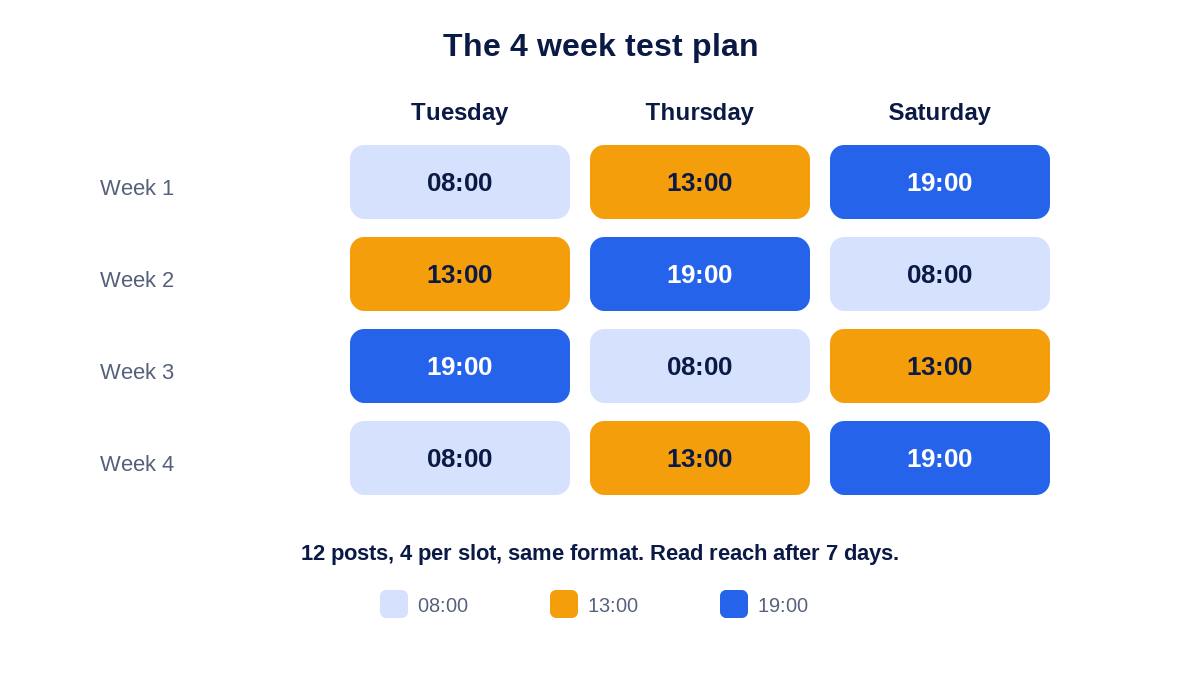
- Pick 3 slots from your active times chart, for example 08:00, 13:00 and 19:00.
- Post 3 times a week for four weeks: 12 posts, 4 per slot.
- Rotate the days, so each slot falls on different days. Otherwise you test Tuesday against Saturday, not morning against evening.
- Keep the format constant: compare reels with reels or carousels with carousels.
- Wait 7 days, then note each post's reach and interactions from View insights.
Avoid holidays, sales events and paid boosts during the test. A boosted post gets reach you paid for and hides the effect of time.
How to read the results of your test
At the end, calculate one number per slot:
Average reach per slot = sum of the reach of its posts ÷ number of posts
Suppose (hypothetically) the four posts at 08:00 reached 900, 1,100, 1,000 and 1,000 accounts. The average is 4,000 ÷ 4 = 1,000. Do the same for the other slots, and add interactions per 1,000 accounts reached to see whether people also reacted.
| Slot | Posts | Average reach after 7 days | Average interactions | Interactions per 1,000 reached |
|---|---|---|---|---|
| 08:00 | 4 | 1,000 | 40 | 40 |
| 13:00 | 4 | 1,300 | 52 | 40 |
| 19:00 | 4 | 1,700 | 85 | 50 |
Here 19:00 wins on both counts: 70% more reach than 08:00 and a higher engagement rate.
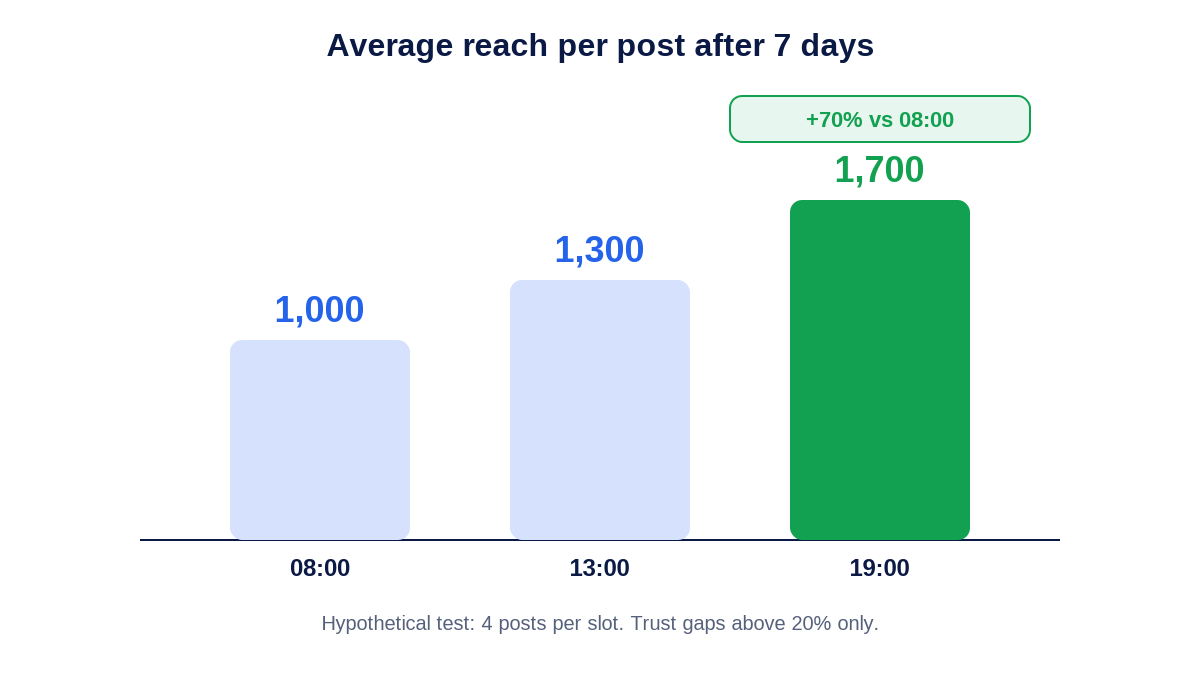
Two rules keep you honest. First, trust a difference only if it is large (say more than 20%) and the same slot wins in most weeks. Second, with a small account the numbers jump around: if the gap is small, the time does not matter much for you, and that is also a useful answer.
What matters more than the time you post
Timing can add a part to your reach. These things usually add more:
- The first second. A reel that does not hook in the first moments loses viewers whatever the hour.
- Format. Reels can reach people who do not follow you yet. Carousels collect saves. Stories keep current customers in touch.
- Consistency. Posting every week for months beats a perfect hour once a month.
- Replies. Answering comments soon after you publish keeps the conversation going. Post when you can be there to reply.
- A reason to act. Mention the offer, the booking link or the address. Profile visits and link taps matter more to a business than likes.
Timing matters most for stories, which last 24 hours, and for posts tied to a moment, like "table free tonight" or "last day of the sale".
Common mistakes when choosing when to post
- Copying a global study without checking your followers.
- Changing the time and the content together, then crediting the time.
- Judging a post after one hour. Reels keep collecting views for days; compare after the same number of days.
- Reading views instead of reach. Views include repeat plays; reach counts people. Impressions were replaced by views in 2025, so old and new numbers are not comparable.
- Forgetting the time zone. If your customers live in another country, convert the hours.
- Never testing again. Audiences change with seasons. Repeat the test once or twice a year.
Schedule, then check every month
Once you know your slots, schedule posts in Meta Business Suite or in the Instagram app so you publish at the right time without being on your phone. Then look at the results once a month, not once a day.
Klyrax connects to Instagram and Facebook Pages in read-only mode, next to your website analytics and ads. You see reach and interactions compared with the previous month, and on the 1st of each month a plain language report explains what changed and up to three things to do next.
Frequently asked questions
What is the best time to post on Instagram?
The best time to post on Instagram is when your own followers are online and have a moment to look at your content. For an office audience that is often early morning, lunchtime or evening; for shops and restaurants it can be different. Check the most active times in your insights, then confirm them with a four week test on your own posts.
Where can I see when my followers are most active on Instagram?
Open your professional dashboard, go to your followers insights and scroll to the chart of most active times, which shows hours and days. Instagram shows these trends only once the account has at least 100 followers. The chart tells you when followers use Instagram, not when they react to your posts, so treat it as a starting point for testing.
What is the best time to post on Facebook?
The same logic applies to a Facebook Page: the best time is when your own audience is online. In Meta Business Suite, look at the results of your past posts in Insights and compare reach by the time they went out. Generic Facebook studies mix very different pages, so use them only as a first guess before your own test.
Does posting time affect the Instagram algorithm?
Yes, but less than most people think. Instagram says the date a post was shared is one of the signals that shapes feed order, together with how likely you are to be interested and your past interactions with the account. A strong post published at an average time usually beats a weak post published at the perfect time.
How often should I post on Instagram as a business?
Post as often as you can keep up with good content for months, not weeks. For many small businesses that means two to four feed posts or reels a week plus stories. Consistency helps your test too: if you post at random intervals, you cannot tell whether a better result came from the time slot or from the gap since the last post.
See how your marketing is really doing
Klyrax connects GA4, Search Console, Google Ads, Meta Ads, your Google reviews and more in read-only mode, shows the numbers that matter for your business and writes you a plain-language report every month.
Request info