
Meta Business Suite is Meta's free workspace for managing your Facebook Page, your Instagram account and their messages from one place. For a business owner it is the right place for a short monthly check: are people seeing your content, which posts worked, has anyone been left without an answer, and what did your ads cost per result.
This guide skips the tour of every button. It shows what to check each month, how Meta Business Suite differs from Business Manager (now called business portfolio) and Ads Manager, who should have which access, and how to fix the problems owners run into most.
What is Meta Business Suite, in one sentence?
Meta Business Suite is a free tool, on a computer at business.facebook.com and as a mobile app, that brings together posting, scheduling, messages, comments, Insights and simple ads for a connected Facebook Page and Instagram account (How Meta Business Suite works).
The main areas you will use are Home, Planner (scheduled posts), Content, Inbox, Insights and Ads. Menu labels move from time to time, but these areas have been stable for years. Where WhatsApp Business can be synced, its chats can appear in the same inbox.
Meta Business Suite vs Business Manager vs Ads Manager
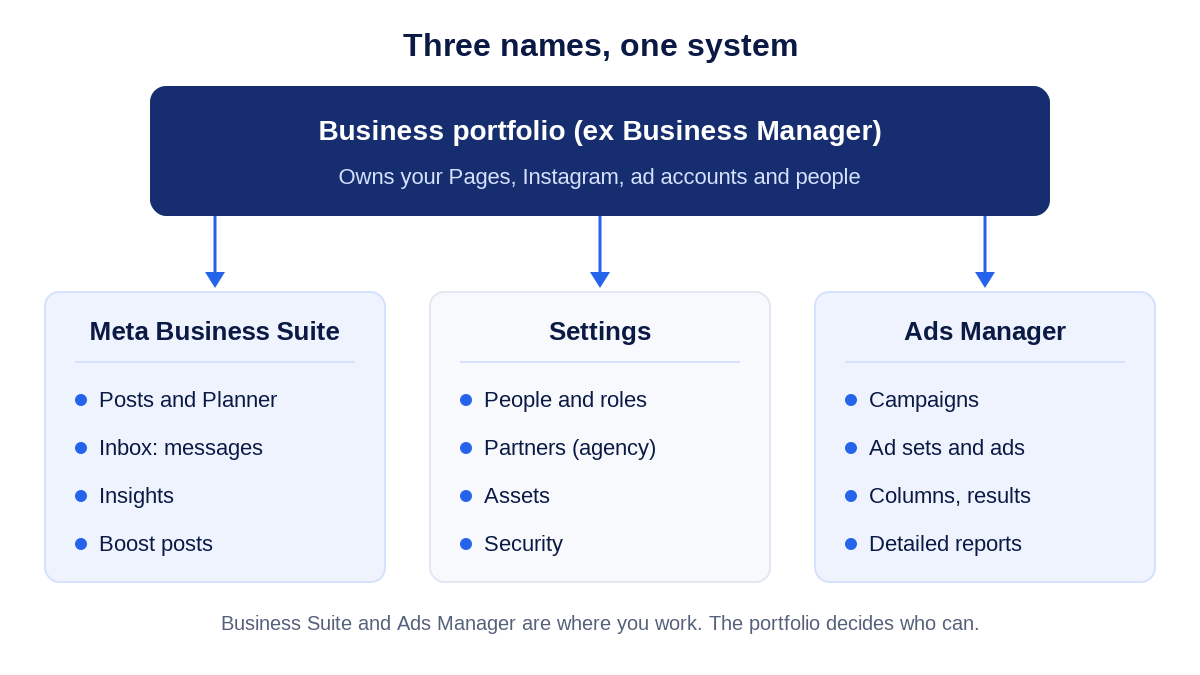
Three names cause most of the confusion. They are three layers of the same system, not three competing products.
| Meta Business Suite | Business portfolio (ex Business Manager) | Ads Manager | |
|---|---|---|---|
| What it is | Daily workspace | The container that owns everything | The full advertising tool |
| What you do there | Post, schedule, reply, read Insights, boost posts | Add people, assign Pages and ad accounts, add partners | Build and analyze campaigns, ad sets and ads |
| Who uses it | Owner, marketing person, whoever answers messages | Owner and one backup with full control | Whoever runs your ads, in house or agency |
| How often | Weekly, plus a monthly check | A few times a year | Daily or weekly while ads run |
The business portfolio is what people still search as "Facebook Business Manager" or "Meta Business Manager". It holds your Pages, Instagram accounts, ad accounts, pixels and datasets, and the list of people and partners who can touch them. You reach it from Settings inside Meta Business Suite.
Ads Manager is where campaigns are built and where the detailed ad numbers live. The Ads section of Business Suite shows a simpler view and is fine for boosted posts. For anything more, read our guide to the Ads Manager columns.
What to check in Meta Business Suite every month
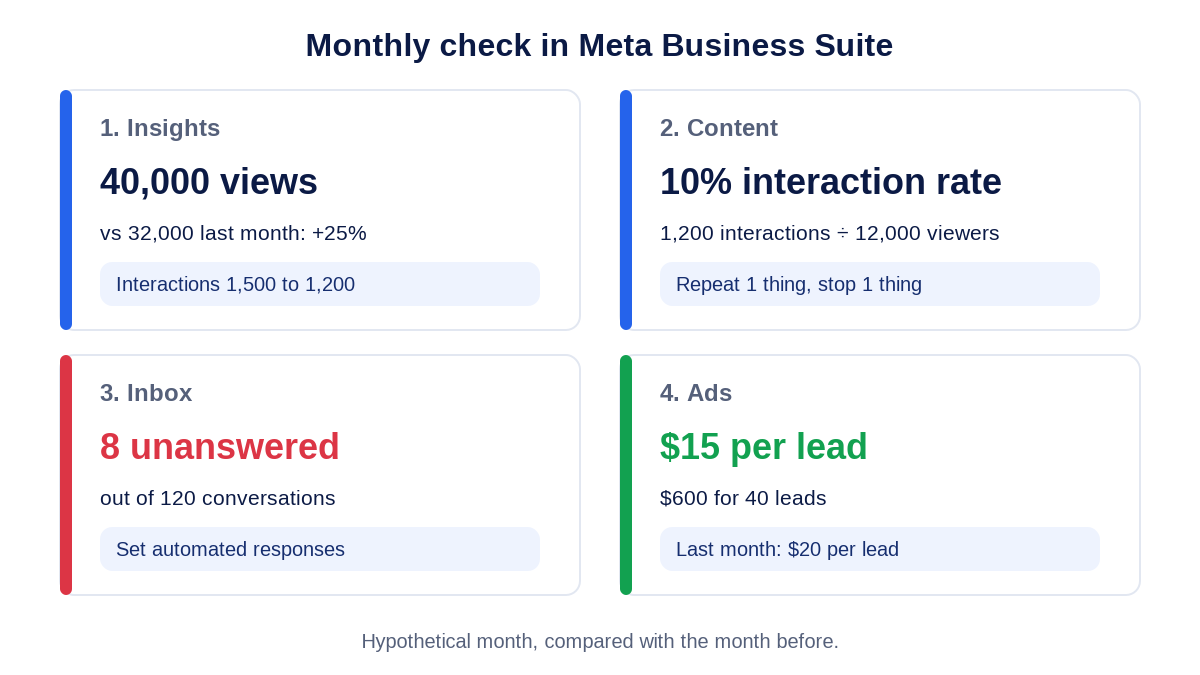
A monthly check takes about 20 minutes if you always look at the same things in the same order. Set the date range to last month and compare it with the month before.
- Insights: are more or fewer people seeing your content?
- Content: which posts and reels did the work, and which did nothing?
- Inbox: did every message and comment get an answer?
- Ads: how much did you spend and what did each result cost?
Write the four answers in one place, the same table every month. After three months you will see trends instead of single numbers.
Insights: views, viewers, interactions and follows
Meta Business Suite Insights shows Facebook and Instagram side by side. Since 2025 Meta has made views the main reach metric on both platforms, replacing impressions in many reports, with a count of unique viewers next to it. Check the exact labels in your account, because Meta still renames metrics.
Read four numbers, per platform:
- Views: how many times your content was shown.
- Viewers (or reach, if your account still shows it): how many different people saw it.
- Interactions: likes, comments, shares, saves.
- Follows: new followers minus those who left, if shown.
A hypothetical example. Last month your Instagram had 40,000 views from 12,000 viewers, against 32,000 views the month before: views grew by 25%. Interactions dropped from 1,500 to 1,200. So more people saw your content, but fewer reacted. That usually points at the content, not at the algorithm: perhaps more reels reached strangers who did not care.
To turn interactions into a comparable rate, divide them by viewers: 1,200 ÷ 12,000 = 10%. The engagement rate guide explains which base to use and why. For the Instagram side in detail, see Instagram Insights.
Content: which posts did the work?
Open the content view in Insights (or the Content area) and sort last month's posts by views, then by interactions. Look at the top three and the bottom three.
Ask practical questions. Were the best posts reels, photos or carousels? Did they show the product, a person, a price? Did the worst ones go out at an odd time? You are looking for one thing to repeat next month and one thing to stop.
Do not judge a single post on views alone. A post with few views and many saves or messages may have done more for your sales than a viral one. If you want to find your own best posting times, our guide on when to post uses the same data.
Inbox: unanswered messages and comments
The Inbox collects Messenger, Instagram Direct, comments on Facebook and Instagram, and, where it is synced, WhatsApp Business (Manage messages with Inbox). For many small businesses this is where real customers ask for prices and appointments.
Once a month, filter for unread and unanswered conversations and count them. In our example, 120 conversations arrived and 8 got no reply. Eight lost questions can mean eight lost sales.
- Check comments under ads too: they collect questions nobody sees.
- Set up automated responses for the basics (opening hours, prices, how to book), so nobody waits overnight for a simple answer.
- If several people answer, assign conversations so the same message is not handled twice or not at all.
Ads: spend and cost per result
If you boost posts or run campaigns, look at two numbers for the month: amount spent and cost per result, where the result is what the campaign was set up for (leads, messages, purchases, link clicks).
Hypothetically: this month $600 brought 40 leads, a cost per lead of $15. Last month $500 brought 25 leads, $20 each. Spend went up, but each lead got cheaper, which is the direction you want.
The Ads view in Business Suite is enough for this check. For anything deeper (frequency, CPM, link CTR, ROAS), open Ads Manager or ask whoever runs your ads. The monthly Meta Ads report lists the numbers to request.
Access and roles: who should have what
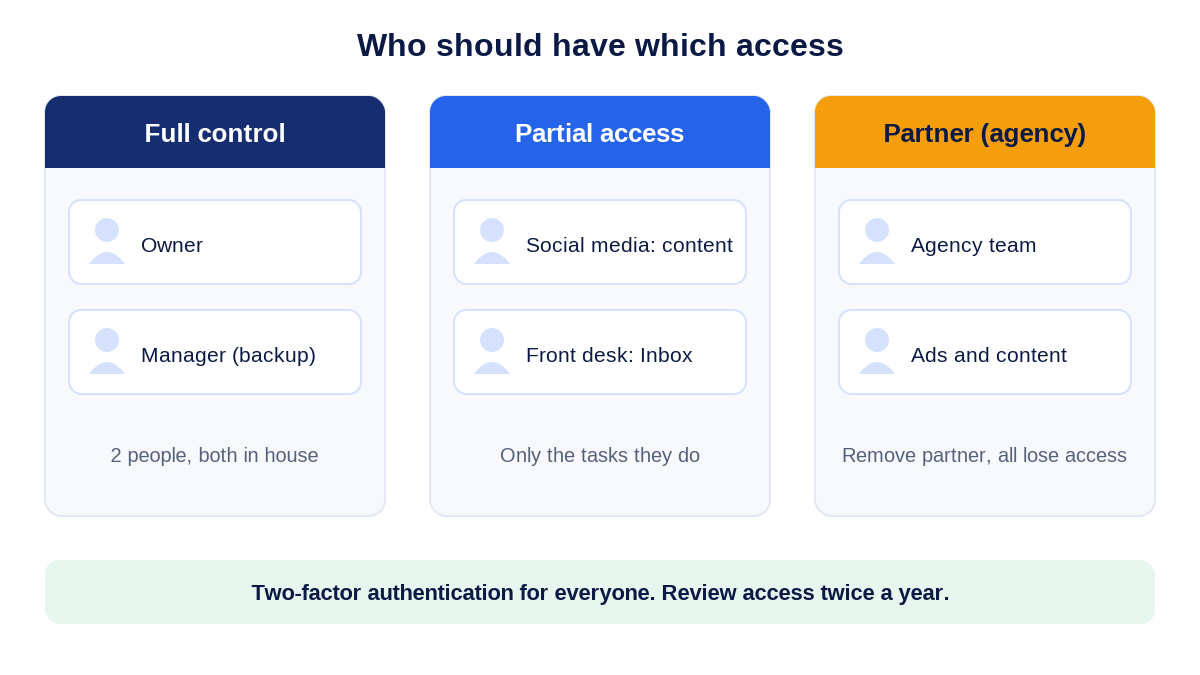
Access is where most businesses get hurt, usually when the only person with control leaves or loses their account. In your business portfolio, people get either full control (they can manage settings, people, assets and partners) or partial access limited to chosen tasks and assets, such as content, messages or ads (Give a partner access).
A safe setup for a small business:
- Two people with full control, both inside the company. Meta's Security Center recommends more than one, so administration continues if someone leaves.
- Partial access for everyone else: the person who answers messages gets the Page and inbox, the person who posts gets content.
- Agencies as partners, not as people. Add their business portfolio as a partner with partial access to the assets they work on. When the contract ends, you remove the partner and their whole team loses access at once.
- Two-factor authentication on every account with access.
- A review twice a year: remove former employees and old partners.
The golden rule: your company owns the business portfolio, the Page and the ad account. An agency can create things for you, but they should live in your portfolio.
Common problems in Meta Business Suite and how to fix them
| Problem | Usual cause | What to do |
|---|---|---|
| Instagram does not appear | Account not connected or not professional | Switch Instagram to a professional account and connect it from Settings |
| You cannot see your own Page | The Page sits in someone else's portfolio | Ask its owner to transfer it, or request access from your portfolio |
| Nobody can add people | No one has full control any more | Use Meta's recovery options in the Help Center and add a second person with full control as soon as you can |
| Numbers differ from the app | Different date range, time zone or metric | Compare the same period and use one source for trends |
| Ad account restricted | Payment issue or ad policy | Open Account Quality from the menu and follow the request review steps |
| Messages arrive late or are lost | Notifications off, nobody assigned | Turn on notifications and assign conversations |
Two habits prevent most of these. Keep a list of who has access to what, and never let your only access depend on a former employee's personal Facebook profile.
How to fit Meta Business Suite into your monthly report
The monthly check above answers "how did Facebook and Instagram do". The real question is how they compare with your website, your Google campaigns and your newsletter. Business Suite cannot show that: it only knows Meta.
Add the four answers to your monthly marketing report, next to visits, leads and sales from the other channels. If you link to your site from posts and ads, add UTM parameters so you can see in Google Analytics what those visits did.
Klyrax connects in read-only mode to Facebook Pages, Instagram and Meta Ads, together with Google Analytics, Google Ads and your other channels. You see the numbers that matter for your business goal compared with last month, and on the 1st of each month a written report explains what changed and up to three things to do.
Twenty minutes a month in Meta Business Suite, the same four questions every time, and access set up so that the business owns its own accounts: that is enough to stay in control of Facebook and Instagram without becoming a social media manager.
Frequently asked questions
Is Meta Business Suite free?
Yes. Meta Business Suite costs nothing to use. You can post, schedule, answer messages and read Insights for your Facebook Page and Instagram account without paying. You only pay for the ads you choose to run, and those charges come from your ad account, not from Business Suite itself.
What is the difference between Meta Business Suite and Facebook Business Manager?
Facebook Business Manager is the old name of what Meta now calls a business portfolio: the container that owns your Pages, Instagram accounts, ad accounts and the people who can access them. Meta Business Suite is the workspace where you use those assets day to day. You manage the portfolio from the Settings area inside Business Suite.
Do I need Meta Business Suite to use Instagram for business?
No. You can post and read insights in the Instagram app with a professional account. Business Suite becomes useful when you also run a Facebook Page, want to schedule posts from a computer, answer Instagram and Messenger in one inbox, or give a colleague access without sharing your password.
Who should have full control of my business portfolio?
At least two people inside your company, for example the owner and one trusted manager. If only one person has full control and loses access, recovering the Page and ad account can take weeks. Give everyone else, agencies included, partial access limited to the tasks they actually do.
Why are the numbers in Meta Business Suite different from the Instagram app?
The two often use different date ranges, time zones or a slightly different metric definition, and some figures are estimated or updated with a delay. Compare the same period in both places, use one source for your monthly trend, and do not mix numbers from the app and from Business Suite in the same report.
See how your marketing is really doing
Klyrax connects GA4, Search Console, Google Ads, Meta Ads, your Google reviews and more in read-only mode, shows the numbers that matter for your business and writes you a plain-language report every month.
Request info