
A Google Business Profile suspended means Google has decided the profile, or the account that manages it, does not follow the Business Profile guidelines. The fix is the same in almost every case: correct the cause, prepare documents whose name and address match the profile exactly, and submit one appeal in the Business Profile appeals tool. Google's help page on suspended or disabled profiles adds one rule that matters more than any other: do not create a new profile for the same business.
This guide covers what each status means, the usual reasons, how to prepare and submit the appeal, what happens after and how to avoid a second suspension. For setting up the profile from scratch, see the Google Business Profile guide.
Suspended, disabled or restricted: what does each status mean?
Google uses several words, and they do not mean the same thing. The table is based on Google's Business Profile policy overview.
| Status | What it means | Who can see the profile | First step |
|---|---|---|---|
| Suspended profile | The profile breaks the guidelines | Often no one, or with limits | Fix the cause, appeal the profile |
| Disabled profile | Google decided the business is ineligible or not at that location | No one | Appeal with proof of the business and address |
| Account restricted | A pattern of violations by the Google Account | All its profiles are suspended | Appeal the account first, then the profiles |
| Review restriction | Fake engagement on the profile | Profile visible, reviews limited | Read the email, appeal the restriction |
The last row is not a suspension, but owners often confuse it with one. The profile stays online, while new reviews can be blocked and visitors may see a warning. It is explained in the guide on fake Google reviews.
How do you know your profile is suspended?
Usually from three signals at the same time:
- An email from Google about the profile, with the reason and a link to the appeals tool.
- A status message in Business Profile when you open it in Search or Maps while signed in, and editing options that no longer work.
- The profile disappears or stops changing. Searches for your business name no longer show it, your edits are rejected and calls from Maps drop.
The appeals tool is the most reliable place to check. It lists each decision with its date, the reason, a link to the policy that was broken, whether it can be appealed and its current status.
Why was my Google Business Profile suspended?
Google does not tell you more than the policy name, so you have to compare your profile with the guidelines for representing your business. These are the causes we see most often:
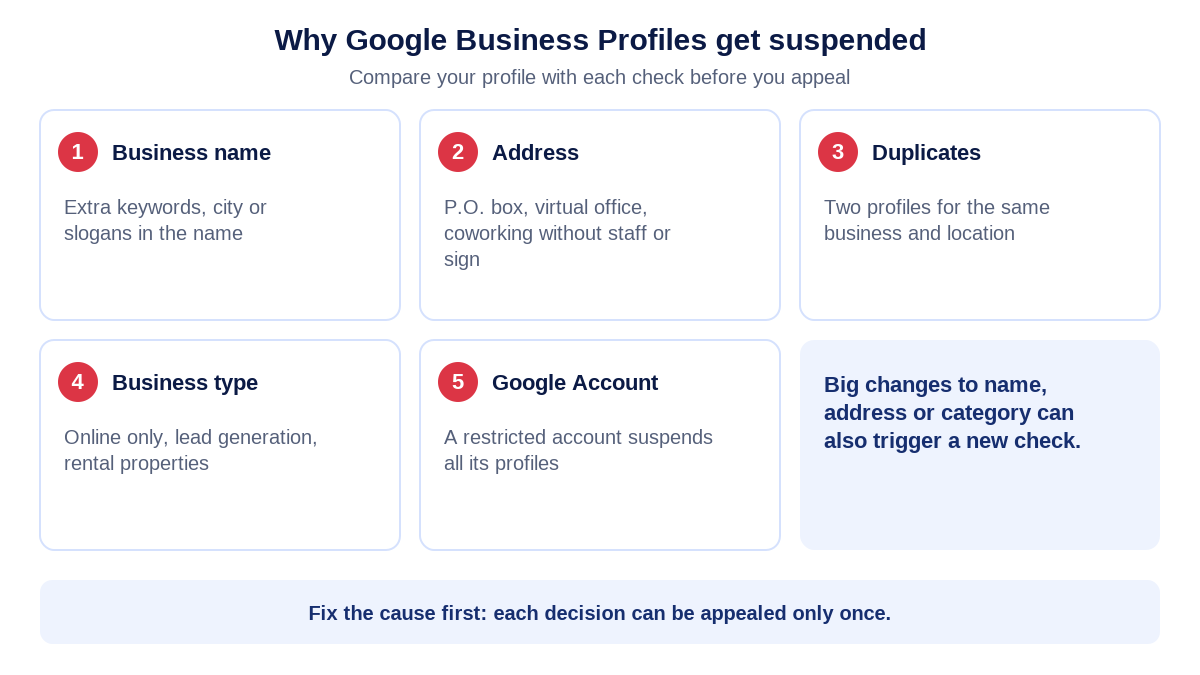
- Keywords in the business name. "Rossi Plumbing 24h Emergency Plumber Boston" instead of "Rossi Plumbing". Google says unnecessary information in the name is not permitted.
- An address that does not qualify. P.O. boxes and remote mailboxes are not accepted. A virtual office or rented mailing address where you do not work is not eligible. A coworking desk qualifies only with signage, customers received during opening hours and your own staff there.
- A service-area business showing its address. If you go to customers (plumbers, cleaners, consultants who visit), the address must be hidden.
- Duplicate profiles. One business, one location, one profile.
- An ineligible business type. Online-only businesses, lead generation companies and rental or for-sale properties are not eligible.
- Big identity changes. Changing name, address or category drastically, or moving the pin, can trigger a new check. "Suspended after changing address" is a common search for this reason.
- The account, not the profile. If the Google Account that manages the profile is restricted, all its profiles are suspended.
Before the appeal: fix the cause and collect evidence
Each decision can be appealed only once, so preparation is where you win or lose. Follow this order:
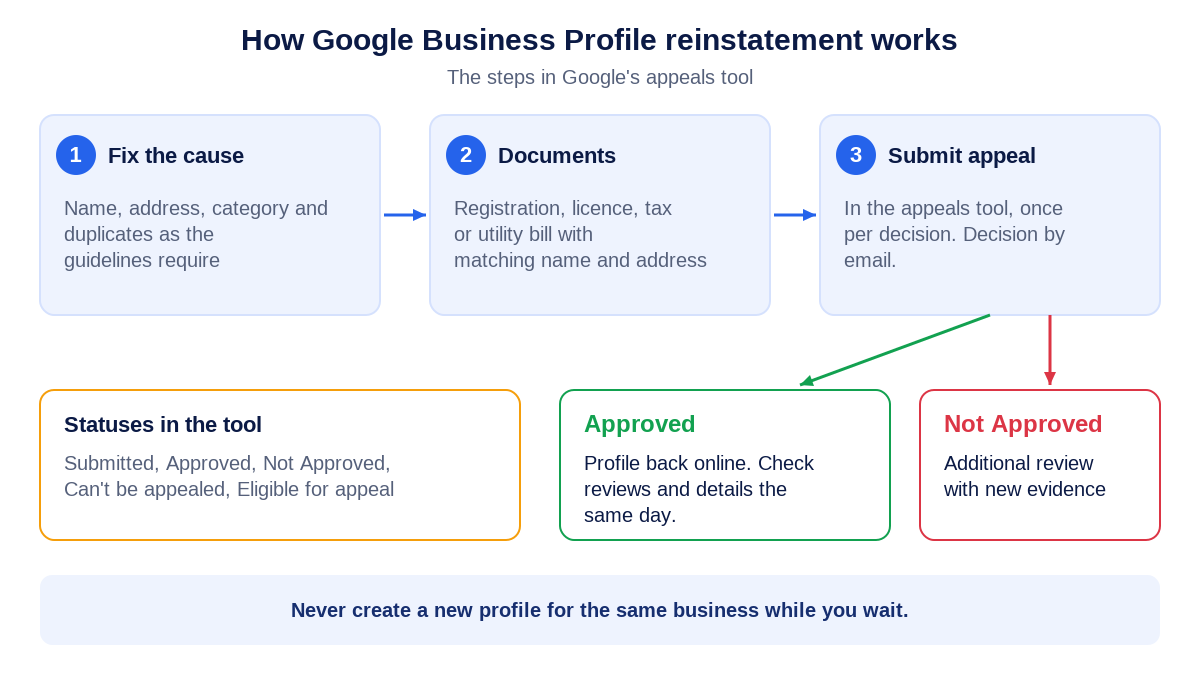
- Correct the profile. Remove keywords from the name, hide the address if you serve customers at their place, fix the category, close or report duplicates. The appeal is checked against the profile as it is when you submit.
- Collect documents. Google lists business registration, business licence, tax certificates and utility bills (electricity, phone, water, internet) as useful evidence.
- Check that names and addresses match. The name and address on each document must match the profile exactly. "Rossi Plumbing LLC" on the licence and "Rossi Plumbing Boston" on the profile is a mismatch.
- Add proof of the place if it is a storefront. Photos of the permanent sign with the business name, the entrance with the street number and the inside of the shop help a reviewer understand the location.
- Write two or three sentences. What the business is, what you corrected and which documents prove it. No long story.
How to request reinstatement in the appeals tool
These are the steps Google describes on its help page, with the button labels as they appear in English:
- Open the Business Profile appeals tool and sign in with the account that owns the profile. Select Confirm, or Switch account if needed.
- Select the suspended profile, then Continue.
- Select the decision you want to appeal, then Continue. The tool shows the date, reason, policy and status.
- Upload your evidence with Choose file. You can add several files.
- Explain in the text box why the profile should be reinstated.
- Tick the box that confirms you are ready and select Submit appeal.
If 10 or more locations are suspended, the tool asks whether you want bulk reinstatement and lets you attach a spreadsheet with each location's Business Profile ID. If the account itself is restricted, appeal that first from the restrictions page of your Google Account, then appeal the profile once the account is fine.
After the appeal: statuses, timing and what to do if it is denied
The appeals tool shows one of five statuses: Submitted, Approved, Not Approved, Can't be appealed or Eligible for appeal. Google also sends the decision by email.
Google's help page does not give a deadline. Some decisions arrive in a few days; when many appeals are queued, it can take weeks. While you wait, do not edit the profile heavily and do not file the same appeal again.
If the answer is Not Approved, Google allows an additional review through its local appeals contact form, where you can add evidence that was missing the first time. Read the reason again before using it. A request with the same documents usually gets the same answer.
When the profile comes back, check it the same day. Google says that if something is wrong after reinstatement, such as reviews missing, you should contact Business Profile support. The guide on Google reviews not showing explains the review side.
Will Google ask for video verification?
Possibly. Google can ask you to verify a profile again after significant changes to the business information, and video is one of the methods it offers. Google's page on video verification sets these rules:
- An unedited, complete recording with no breaks, at least 30 seconds, recorded live and uploaded from a mobile device. Pre-recorded videos are not accepted.
- Storefronts show the location (street signs, building number, nearby businesses), the permanent sign with the business name and something only management can access, such as the till or a staff-only area.
- Service-area businesses show the area they operate from, branded tools or vehicles and proof of management, such as an invoice or permit with the profile name.
- Do not show bank, tax or ID numbers, private information or other people's faces.
Google says the review can take up to 5 business days, and if the video is not successful you can record a new one.
Mistakes that make a suspension harder to solve
- Creating a new profile. Google says not to. It is a duplicate and adds a second problem.
- Appealing before fixing the cause. You use your one appeal on a profile that still breaks the rules.
- Documents that do not match. A different trading name or an old address on the utility bill weakens the appeal.
- Letting a supplier appeal from their own account. Keep ownership in a Google Account of the business, and give an agency manager access if it helps you.
- Paying someone who promises a guaranteed reinstatement. Only Google decides, through the same tool you can use yourself.
How to avoid another suspension and notice problems quickly
Once the profile is back, make changes slowly and one at a time, especially to name, address and category. Keep the business name identical to the one on your sign and documents, and keep one profile per location. The guide to ranking on Google Maps lists the shortcuts that most often lead to suspensions.
A suspension is easier to handle when you notice it the same day. A hypothetical example: a shop averages 300 profile actions a month and ranks in the top 3 on Maps for four local keywords. If the profile is suspended on the 3rd and nobody checks until the end of the month, almost a month of calls and visits is lost before the appeal even starts.
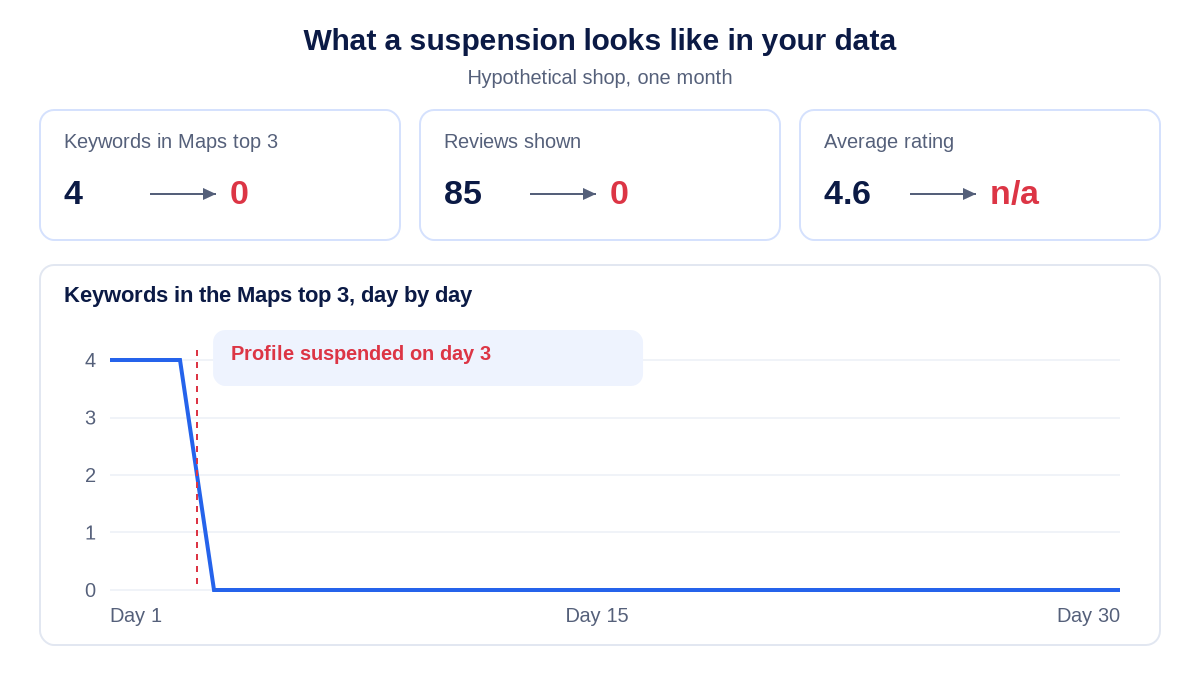
Klyrax follows the public data of your Google profile (rating, reviews, unanswered reviews and Maps positions for the keywords you choose) next to your website and ads data. If the profile stops appearing on Maps, the positions drop in the dashboard and the monthly report points it out, so you can open the appeals tool without losing weeks.
Frequently asked questions
Why was my Google Business Profile suspended?
Google suspends or disables profiles that break its Business Profile guidelines. The most common causes are extra keywords in the business name, a P.O. box or virtual office as address, duplicate profiles, a service-area business showing an address where customers are not served, an ineligible business type and big changes to name or address. A restriction on the Google Account that manages the profile also suspends every profile it manages.
How do I get my Google Business Profile reinstated?
First fix whatever breaks the guidelines. Then open the Business Profile appeals tool, select the profile and the decision, upload documents such as a business registration, licence, tax certificate or utility bill whose name and address match the profile, explain briefly and select Submit appeal. Google sends the decision by email. Each decision can be appealed only once.
How long does a Google Business Profile reinstatement take?
Google does not publish a fixed time on its help page about suspended profiles. In practice, decisions can come in a few days or take several weeks when many appeals are queued. You can follow the status in the appeals tool: Submitted, Approved, Not Approved, Can't be appealed or Eligible for appeal. Do not file a second appeal for the same decision while you wait.
What happens if my Google Business Profile appeal is denied?
If the reinstatement request is not approved, Google lets you request an additional review through its local appeals contact form, adding evidence that was not in the first appeal. Before you do, check the decision's reason and the linked policy again: a second request that repeats the first one with the same documents has little chance. Never create a new profile for the same business.
Should I create a new Google Business Profile if mine is suspended?
No. Google's help page says explicitly not to create a new Business Profile for the same business. A second profile is a duplicate, which is itself against the guidelines, and it can make the original case harder to solve. Work on the suspended profile through the appeals tool and keep your existing reviews and history.
See how your marketing is really doing
Klyrax connects GA4, Search Console, Google Ads, Meta Ads, your Google reviews and more in read-only mode, shows the numbers that matter for your business and writes you a plain-language report every month.
Request info