
A Google review not showing is, in most cases, a review that Google is still checking or one its filters decided not to publish. Google says on its help page about missing or delayed reviews that policy checks can take a few days, and that reviews removed for policy violations will not be restored. The rest of the cases come from the profile itself: a merge, a suspension, a restriction.
This guide is for owners who see a customer's review missing, and for customers whose own review vanished. It explains how to tell pending from removed, the reasons Google gives, what the reviewer can do, what you can do as the owner and how to ask for reviews so fewer get filtered. If the review is visible and you want it gone, that is a different topic, covered in how to remove a Google review.
Why is my Google review not showing? The seven usual reasons
Google does not publish the rules of its review filters, but its help pages and the Maps content policy name the causes. The table sums them up.
| Reason | Who notices | How long it lasts | What to do |
|---|---|---|---|
| Policy check still running | Reviewer and owner | A few days | Wait about a week |
| Filtered as possible spam | Others cannot see it, the reviewer may | Until an appeal succeeds | Reviewer appeals from the Maps profile |
| Removed for a policy violation | Everyone | Permanent | Not restored, a new genuine review is possible |
| Profiles merged | Owner | A few days | Wait, then contact support |
| Profile suspended or reinstated | Owner, all reviews | Until reinstated and fixed | Appeal, then contact support |
| Restriction for fake engagement | Owner, visitors may see a warning | A set period | Read Google's email, appeal |
| Reviews turned off for the category | Everyone | While the category applies | Check the primary category |
The last row is rare but real. Google says it can temporarily turn off reviews for certain profiles or business categories, and that profiles primarily categorized as schools for students aged 6 to 18 do not get reviews at all.
Pending or removed? How to check in two minutes
Before doing anything, find out whether the review exists at all. Here is the quickest order.
- Look from outside. Open Google Maps in a private browser window, signed out, and search for the business. Sort the reviews by Newest. If the review is there, the problem was only on one device or app.
- Ask the reviewer to check their own profile. In Google Maps, the reviewer taps their profile picture, then their contributions and reviews. A review that was not published may show a status there, and for most removals that is also where the appeal option appears.
- Check your Business Profile. Signed in as owner, select Read reviews and sort by newest. If many reviews are missing, look for a status message on the profile or an email from Google.
- Note the date. A review written yesterday is probably still in the check. A review written two weeks ago and still missing was filtered or removed.
A review that shows up only for the person who wrote it is the classic sign of a filtered review. Google Maps shows you your own content while you are signed in, so the reviewer sees it and assumes it is public.
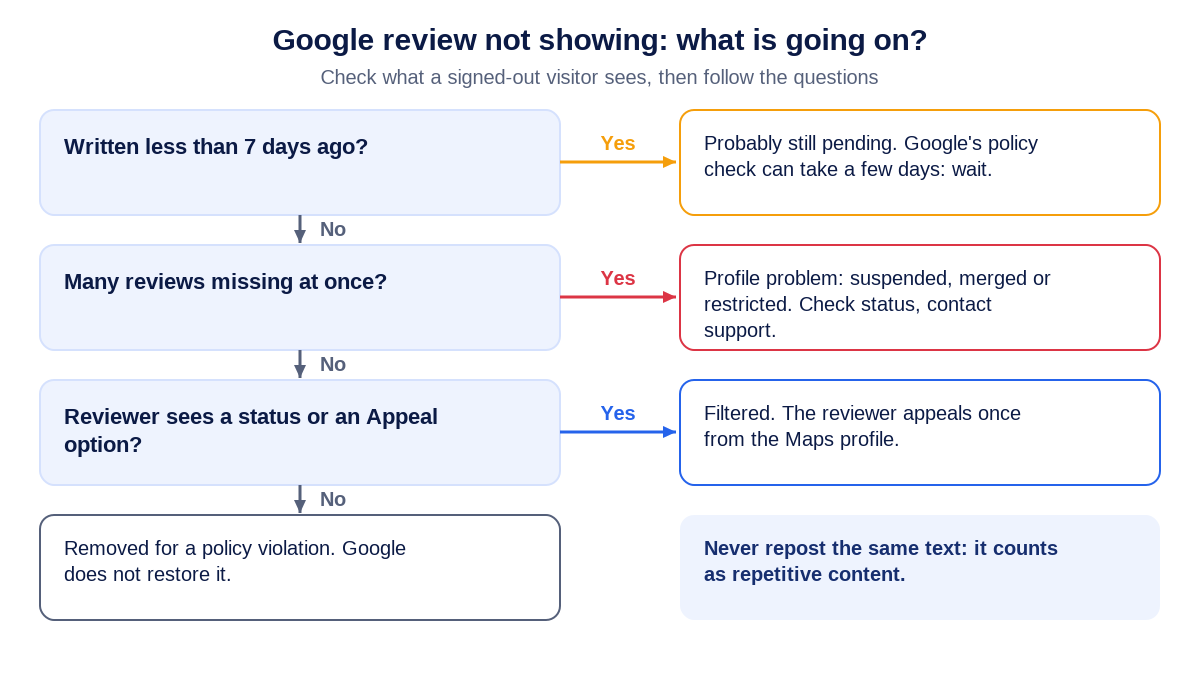
Google review pending: how long does it take?
Most reviews appear within minutes. Some are held while Google checks them, and Google's own wording is that this "can take a few days". There is no official maximum.
A practical rule: give a new review up to seven days. If it is still invisible to signed-out visitors after that, stop waiting and treat it as filtered. Waiting longer rarely changes the outcome, while an appeal from the reviewer can.
Two situations take longer by nature. After two profiles are merged, Google says reviews from both can take a few days to appear on Search and Maps. After a suspended profile is reinstated, reviews may not come back on their own, and Google asks owners to contact support.
Why do Google reviews disappear after being published?
This is the case that upsets owners most: the review was visible for weeks, then it was gone. The usual reasons are:
- A later check. Google's systems can look at reviews again long after they were posted, for example when a network of fake accounts is found. Reviews from accounts linked to that network go, sometimes including genuine ones.
- The reviewer's account. If the account that wrote the review is suspended or deleted, its reviews disappear with it. The reviewer can also delete or edit their own review at any time.
- A policy report. Anyone can report a review. If Google agrees it breaks a rule, it is removed for everyone.
- The profile changed. A merge, a suspension or a restriction affects all reviews on the profile, not one.
Google admits that automated removal is not perfect and can occasionally catch legitimate reviews. That is why the appeal exists, and why it is worth using for a genuine customer review.
Which reviews Google filters before they show
Some reviews never appear at all. The content policy lists what is not allowed, and the patterns below are the ones most often behind a genuine review that does not show:
- Links to other websites in the text. The policy forbids them outright.
- Conflict of interest: the reviewer works or worked for the business, is a supplier, a relative or a competitor. Reviews from staff are a common cause of "my review disappeared".
- Repetitive content: the same text posted more than once, from one account or several.
- Unusual volume or patterns, which Google calls rating manipulation: many reviews in a short time, for example from a crowd of customers asked at the same moment, all on the same network.
- Off-topic text: comments about general news, politics or a different place.
- Personal information, such as a staff member's phone number or full name with private details.
Here is a hypothetical example. You run a gym and ask 40 members to leave a review during one evening event, all from the gym's Wi-Fi, many from new accounts. Ten reviews appear, thirty stay invisible. Nothing was wrong with the members' intentions, but the pattern looks like coordinated activity. Spreading the same 40 requests over four weeks would have looked like normal customer flow.
What the reviewer can do
If you wrote the review yourself, or you are helping a customer, these are the steps:
- Wait a few days after posting before doing anything.
- Check the status on your Google Maps profile, in your reviews.
- Appeal once if the option is offered. Google's page on appealing Maps content decisions says you can track the appeal from your Maps profile, that each removal can be appealed only once and that appeals are available only for some violation types and accounts.
- Do not edit or delete the review while the appeal is open: Google says that cancels the appeal.
- Do not post the same text again. Repeated content is itself a violation, and a copy usually meets the same filter.
If the appeal is denied, the original review stays down. A new review written later, in different words and describing the real visit, follows the normal checks like any other.
What the business owner can do
As the owner you cannot publish or restore a review yourself. What you can do is check the profile and contact support.
- Check the profile status. A suspended or disabled profile hides everything, and the fix is the appeal described in our guide to a suspended Google Business Profile.
- Read Google's emails. A restriction for fake engagement comes with an email and an appeal link. The causes and effects are covered in the guide on fake Google reviews.
- Contact Business Profile support from the help page, choosing the missing reviews issue. Include your Business Profile ID, screenshots that show the review before it went missing, the reviewer's name and the number of reviews missing.
- Do not ask customers to repost the same review again and again. It adds repetitive content to your profile and rarely works.
- Reply to visible reviews as usual. A missing review does not stop you from showing visitors that you answer.
How to ask for reviews so fewer get filtered
Most filtered reviews from real customers come from the way they were asked. The aim is a flow that looks like what it is: real customers, at their own pace.
- Send the review link after the visit, by email or text, not at the counter on your own Wi-Fi. The guide to the Google review link shows where to find it.
- Spread requests over time. Ask every customer as they come, not 50 people in one afternoon.
- Never offer anything in return and never ask staff, friends or family to review.
- Tell customers to describe the visit in their own words, without links or phone numbers.
- Reply to every review, which also shows Google the profile is actively managed. The guide on getting and answering Google reviews has examples.
Track your review count so you notice drops
Missing reviews are only a problem if you never notice them. Once a month, write down three numbers: total reviews, average rating and new reviews in the month. If the total goes down while you received new reviews, some were removed.
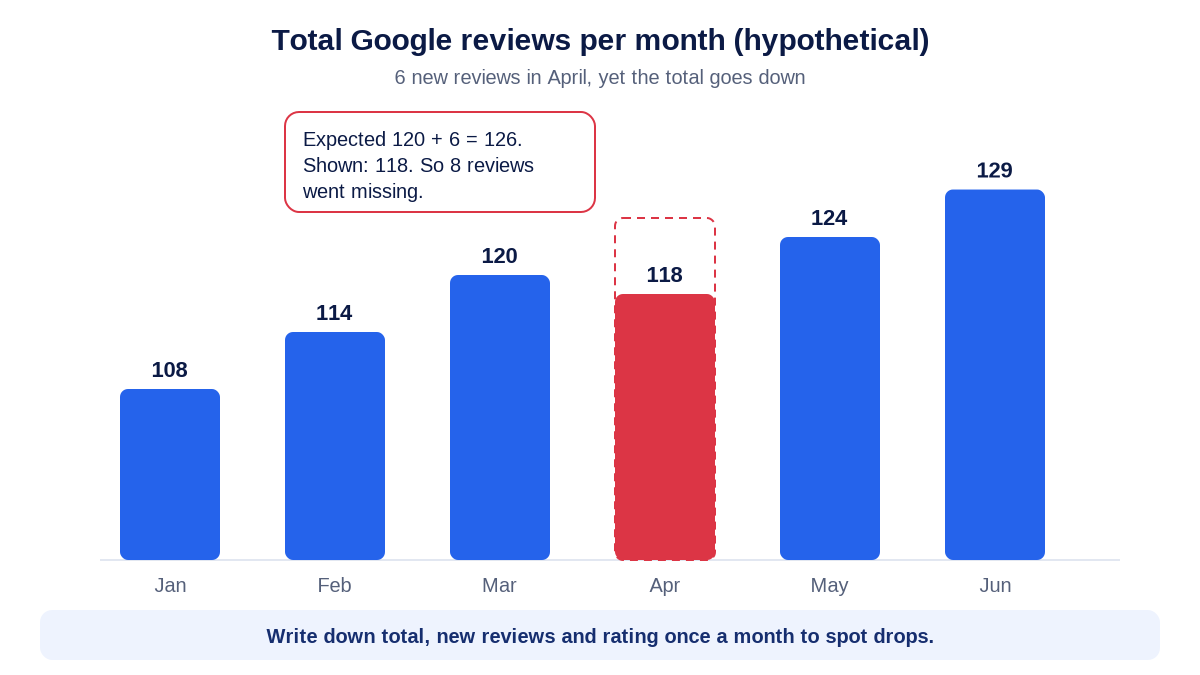
A hypothetical example: you had 120 reviews at the end of March, received 6 new ones in April, and at the end of April you have 118. You expected 126 and you see 118, so 8 reviews were removed or hidden in April. Eight is enough to look at the reviews list, check the profile status and, if needed, contact support while the dates are fresh.
Klyrax reads the public data of your Google profile (rating, total reviews, new and unanswered reviews, Maps positions for the keywords you choose) next to your website and ads data. A drop in the review count shows up in the trend, and the monthly written report points it out in plain language.
Frequently asked questions
Why is my Google review not showing?
Google checks every review against its policies before and after it is published, and that check can take a few days. If the review is still missing after a week, it was probably filtered as a possible violation: a link, a conflict of interest, repeated text or an unusual pattern of reviews on the same place. The profile itself may also be merged, suspended or restricted.
Why does my Google review only show up for me?
When you are signed in, Google Maps can show you your own review even if other people cannot see it. That usually means the review is still pending or was not published by the spam filter. Check from a signed-out browser or another account. If it is still missing there after a few days, look at the review's status on your Maps profile and appeal if the option is offered.
How long does it take for a Google review to show up?
Most reviews appear within minutes, but Google says its policy checks can take a few days. Reviews on profiles that were just merged can also take a few days to appear on Search and Maps. There is no official maximum, so if a review is still missing after about a week, treat it as filtered rather than pending.
Can a removed Google review be restored?
Only in some cases. Google says reviews removed for policy violations will not be restored. If the removal was a mistake, the reviewer can appeal once from their Maps profile, as long as the violation type and account are eligible. If reviews vanished after the profile was reinstated, the owner should contact Business Profile support instead of asking customers to post again.
Why did all my Google reviews disappear at once?
A sudden loss of many reviews usually points to the profile, not to single reviews: a suspension, a merge with a duplicate, a restriction for fake engagement or reviews temporarily turned off for the category. Check your Business Profile for a status message or an email from Google, then contact support with the profile ID, screenshots and the number of reviews missing.
See how your marketing is really doing
Klyrax connects GA4, Search Console, Google Ads, Meta Ads, your Google reviews and more in read-only mode, shows the numbers that matter for your business and writes you a plain-language report every month.
Request info