
Google Trends shows when and where people search for something on Google, so you can see in advance when demand for what you sell rises and falls. It does not tell you how many searches there are: it gives a relative score from 0 to 100. Read correctly, that score is enough to plan stock, ads and content around the moments when your customers are actually looking.
This guide explains what Google Trends measures, how to use it step by step, and how a small business can turn a curve into a calendar.
What is Google Trends?
Google Trends is a free tool at trends.google.com that shows how search interest for a term or topic changes over time, by country and by region. Google builds it from a sample of real searches and normalizes the data, so you can compare a ski rental shop in January with the same shop in July, or Florida with Texas, on the same scale.
You can look at web search, but also image search, news, Google Shopping and YouTube search. That matters if you sell products: the Shopping view is closer to buying intent than general web search.
What do the numbers in Google Trends mean?
This is the part most people get wrong. According to Google's own FAQ about Google Trends data, each data point is divided by the total searches in the same place and time range. The results are then scaled from 0 to 100.
In practice:
- 100 is the highest point of the chart you are looking at, for that term, place and period.
- 50 means the term was half as popular as at its peak.
- 0 means there was not enough data, not that nobody searched.
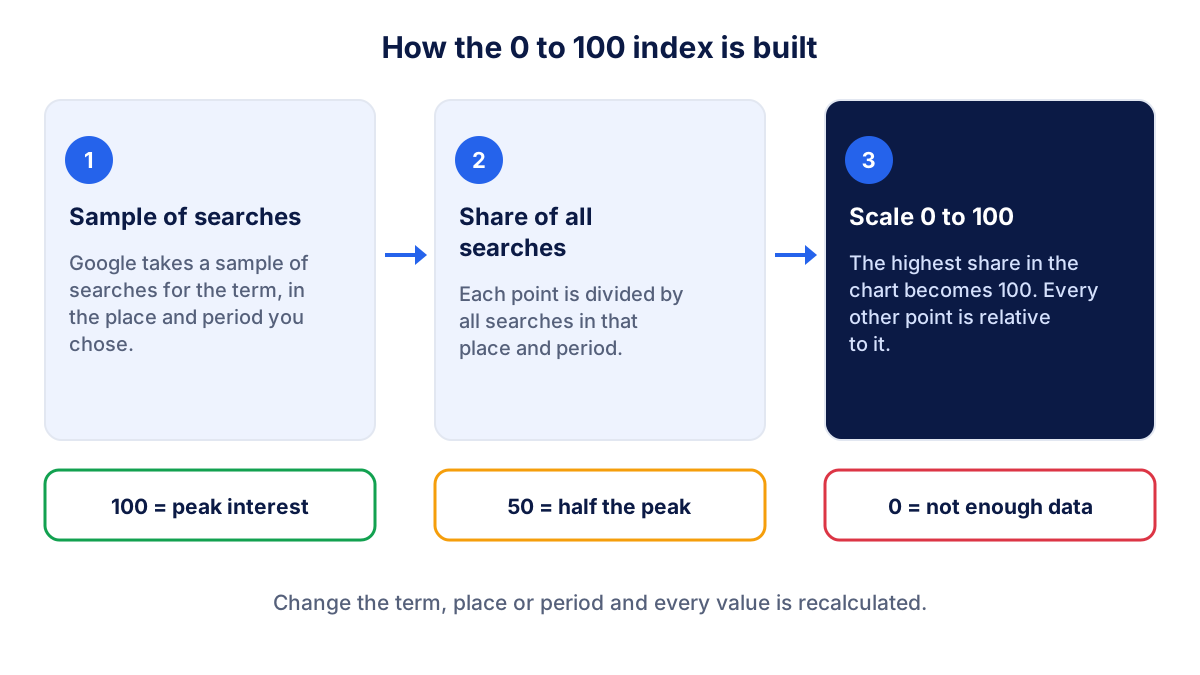
Two consequences follow. First, a rising line can mean more people search for your term, or that your term is taking a bigger share of all searches. Second, a value of 80 in one chart and 80 in another chart are not comparable unless the term, place and period are the same. If you want to compare two products, put them in the same chart.
Google also explains that it removes repeated searches by the same person in a short time, filters out queries with special characters such as apostrophes, and shows only terms with enough volume. That is why small niches often look flat or empty.
How to use Google Trends step by step
- Type a term in the search box on trends.google.com, for example the product or service you sell.
- Pick term or topic. A search term matches the words you typed. A topic groups searches about the same concept, in any language, which is useful for broad themes.
- Set the place: worldwide, a country or a region. Choose the market where your customers are.
- Set the period. For seasonality use the past five years. For a news spike, use the past seven days.
- Choose the category and search type if your term is ambiguous ("jaguar" the car or the animal) or if you sell products (Google Shopping).
- Add comparison terms with the "Compare" field.
- Scroll down to see interest by subregion, related topics and related queries.
Each chart has a download button for a CSV file. Saving the five-year file once a year gives you a reference you can reuse when you plan.
How to compare terms in Google Trends
Comparison is where Google Trends becomes useful for decisions. Put your main options in the same chart and read them on the same scale. A garden center might compare "artificial grass", "lawn seed" and "lawn turf" before deciding what to promote in spring.
Google's help page on comparing terms and topics describes how many terms you can add, and the limit depends on the version of the Explore page you use. In practice three to five options are already enough to read a chart clearly.
A few rules keep comparisons honest:
- compare terms people actually type, not your internal product names;
- check that each term means one thing in your market;
- keep the same place and period for every term;
- when a term is ambiguous, switch to the matching topic or narrow the category.
Seasonality: when do people search for what you sell?
Seasonality is the most valuable thing a small business can learn from Google Trends. Five years of data show whether demand peaks every year in the same weeks, whether the peak is moving earlier, and how deep the off season is.
Take a hypothetical shop that sells air conditioners. Over the past twelve months, Google Trends shows interest at 25 in April, 80 in June and 100 in July, then back to 30 in September.
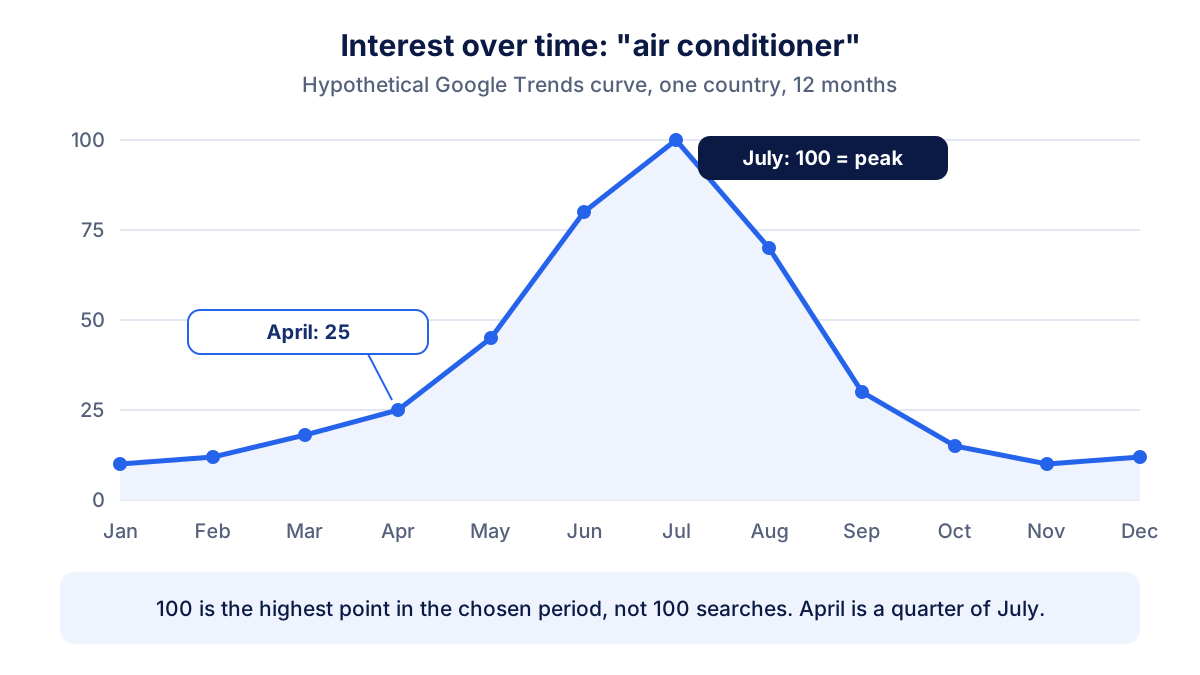
The reading is simple: by the time interest reaches its peak, it is too late to order stock or start writing content. The useful moment is when the curve starts to rise.
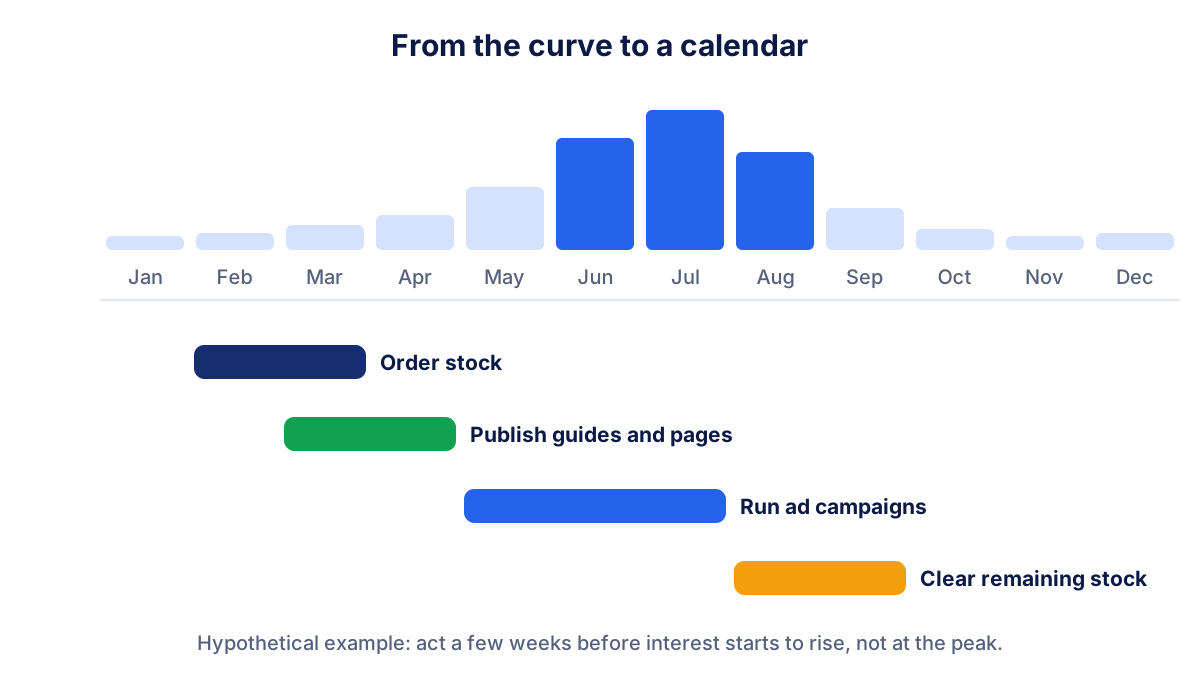
| What you plan | When to do it, based on the curve |
|---|---|
| Stock orders | Before interest starts to rise, allowing for supplier lead times |
| New pages, guides, FAQs | Four to eight weeks before the rise, so Google has time to index them |
| Ad campaigns | During the rise and the peak, with budget weighted toward the peak |
| Email and social posts | In the first weeks of the rise, when people start comparing |
| Clearance and discounts | When interest falls after the peak |
The four to eight weeks are a cautious rule of thumb, not a Google figure. New pages can take longer to rank in competitive markets.
Related queries and rising searches
Below the chart, Google Trends lists related topics and related queries in two views. Top shows the searches most often made together with your term. Rising shows the searches that grew the most compared with the previous period. When growth is above 5000%, Google writes Breakout instead of a percentage, as its help on related queries explains.
For a small business, Rising is a list of ideas to check:
- new product names or models your customers ask about;
- new problems ("air conditioner smells" in spring);
- local questions ("installation cost Houston") worth a page on your site;
- competitors' names, which tell you who people are comparing you with.
Treat each idea as a lead, not a fact. A breakout in a small region can come from a handful of extra searches.
Practical uses for a small business
Here is how Google Trends fits into real decisions, without spending money:
- Stock and staffing. Plan orders and extra staff around the yearly peak instead of last year's memory.
- Campaign timing. Start search and social campaigns when interest begins to rise. The guide on Google Ads costs helps you size the budget.
- Content calendar. Publish the guide that answers the seasonal question before the season, then update it every year.
- Local focus. Interest by subregion shows where a product is searched more. Useful if you deliver to some areas or open a second location.
- Naming. Use the words people search in titles and product pages, not the words in your catalog.
The limits of Google Trends
Google itself says that Trends is not a scientific poll and should be one data point among others. The main limits to keep in mind:
- No volumes. A term at 100 can still be searched by few people in a small country.
- Sampling and noise. Data comes from a sample. Small terms and short periods show noise and sudden spikes that are not real changes in demand.
- Low volume shows as 0. Many niche B2B services do not have enough searches to appear.
- No link to your sales. Trends tells you about the market, not about your site or your shop.
For volumes, the Keyword Planner in Google Ads gives ranges. For your own visibility, you need data from your website.
How to pair Google Trends with Search Console
Google Trends shows the demand in the market. Google Search Console shows how your site captures that demand: impressions, clicks and positions for the searches where you appear. Read them together every month.
If your Search Console impressions drop in October and Google Trends shows that the whole market drops in October every year, there is nothing to fix: it is seasonality. If the market is stable or rising and your impressions fall, the problem is on your side, maybe positions lost or a page that no longer ranks. That comparison saves you from panicking in the off season and from relaxing when you are actually losing ground.
The same logic applies to website traffic in general: always compare with the same month of the previous year before drawing conclusions.
Klyrax puts Search Console, Google Analytics 4 and your ad platforms in one summary and compares each number with the previous period. The monthly written report then explains in plain language what changed. Keep a Google Trends chart of your main product next to it, and you will know whether a drop is the market or your site.
Frequently asked questions
Does Google Trends show the number of searches?
No. Google Trends shows relative interest, not search volumes. Each data point is divided by all searches in the same place and period, then scaled from 0 to 100, where 100 is the highest point of that chart. A term at 50 is half as popular as at its peak. To estimate volumes, use the Keyword Planner in Google Ads or the impressions in your own Search Console.
What does 0 mean in Google Trends?
A value of 0 means Google Trends did not have enough data for that term, place and period. It does not mean nobody searched. Google only shows data for terms with enough search interest, so niche products, small towns or very short periods often show 0. Try a broader term, a larger region or a longer time range.
Is Google Trends free?
Yes. Google Trends is free and you only need a browser at trends.google.com. You do not need a Google account to explore terms, compare them, filter by country, region, period, category or search type, and see related queries. You can also download the data of each chart as a CSV file to keep a record or build your own seasonal calendar.
What is a breakout in Google Trends?
In the related queries and related topics boxes, the Rising view shows terms whose searches grew the most compared with the previous period. When the growth is above 5000%, Google Trends shows the word Breakout instead of a percentage. For a small business a breakout can signal a new product, a new need or a news story worth checking quickly.
How far back does Google Trends data go?
For web search, Google Trends data starts in 2004 and you can choose ranges from the past hour up to the full period. Short ranges show hourly or daily points, long ranges show weekly or monthly points. For seasonality, use the past five years, so that one unusual year does not mislead you.
See how your marketing is really doing
Klyrax connects GA4, Search Console, Google Ads, Meta Ads, your Google reviews and more in read-only mode, shows the numbers that matter for your business and writes you a plain-language report every month.
Request info