
LinkedIn Ads let you show ads to people chosen by company, industry, company size and job title. For a B2B company that is the main reason to pay more than on other platforms: you can reach the purchasing manager of a 200-person manufacturer without paying for students and job seekers. This guide explains when LinkedIn advertising makes sense, what it costs according to LinkedIn's official minimums, how to set a budget from the customers you want, and the three numbers to check every month.
It does not repeat the basics of B2B leads: those are in the guide to lead generation. Here we stay on LinkedIn.
When do LinkedIn Ads make sense for a B2B company?
LinkedIn advertising is rarely the cheapest channel per click. It pays off when the precision of the targeting is worth more than the higher price. Four questions decide it.
| Question | Points to LinkedIn Ads | Points to other channels first |
|---|---|---|
| What is one new customer worth? | Several thousand in gross profit, or a long contract | A few hundred or less |
| Can you describe the buyer? | Clear industries, company sizes and job titles | "Anyone who needs it" |
| Do people search for what you sell? | Rarely: the need must be created or reminded | Often: search ads catch existing demand |
| Who follows up the leads? | Someone who calls back within a day | Nobody has time this month |
If most answers fall in the middle column, a three-month test is reasonable. If people already search for your service, start with search: the guide to Google Ads cost shows how to size that budget. LinkedIn then works well as a second channel that reaches buyers before they search.
How much do LinkedIn Ads cost? The official minimums
LinkedIn publishes minimums, not average prices. These are the ones that matter when you plan, as listed in LinkedIn's help pages on campaign budgets and targeting in November 2026.
| Rule | Official value | What it means for you |
|---|---|---|
| Minimum daily budget | $10 per campaign (or the equivalent in your account currency) | Technically you can start very small |
| Minimum lifetime budget | $100 for a new campaign | A short test still needs at least this |
| Daily overspend | Up to 50% above the daily budget on a given day | A $100 day can cost $150 |
| Weekly cap (continuous schedule) | Seven times the daily budget | Over a week, the average holds |
| Minimum audience | 300 members | Narrower audiences cannot be saved |
How you pay depends on the objective and the bidding: per click (CPC), per 1,000 impressions (CPM) or, for message ads, per send. The price itself comes from an auction, so it moves with your audience, your country and the competition for those people. LinkedIn does not publish benchmark costs, and the figures you find in blog posts vary a lot. Treat any number you read, including the hypothetical ones below, as an example and not a price list.
The practical point: the $10 minimum lets a campaign run, but rarely produces enough clicks or leads in a month to judge it. Plan the budget from your goal instead.
How to set a LinkedIn Ads budget backwards
Start from the customers you want and walk back to the money. All numbers here are hypothetical.
- Customers wanted per month: 4.
- Share of qualified leads that become customers: 25%, so you need 4 ÷ 0.25 = 16 qualified leads.
- Share of leads that are qualified: 50% (the rest are the wrong company, wrong role or just curious), so you need 16 ÷ 0.50 = 32 leads.
- Expected cost per lead: $75, from the Campaign Manager forecast or a first test month.
- Monthly budget: 32 × $75 = $2,400, about $80 a day.
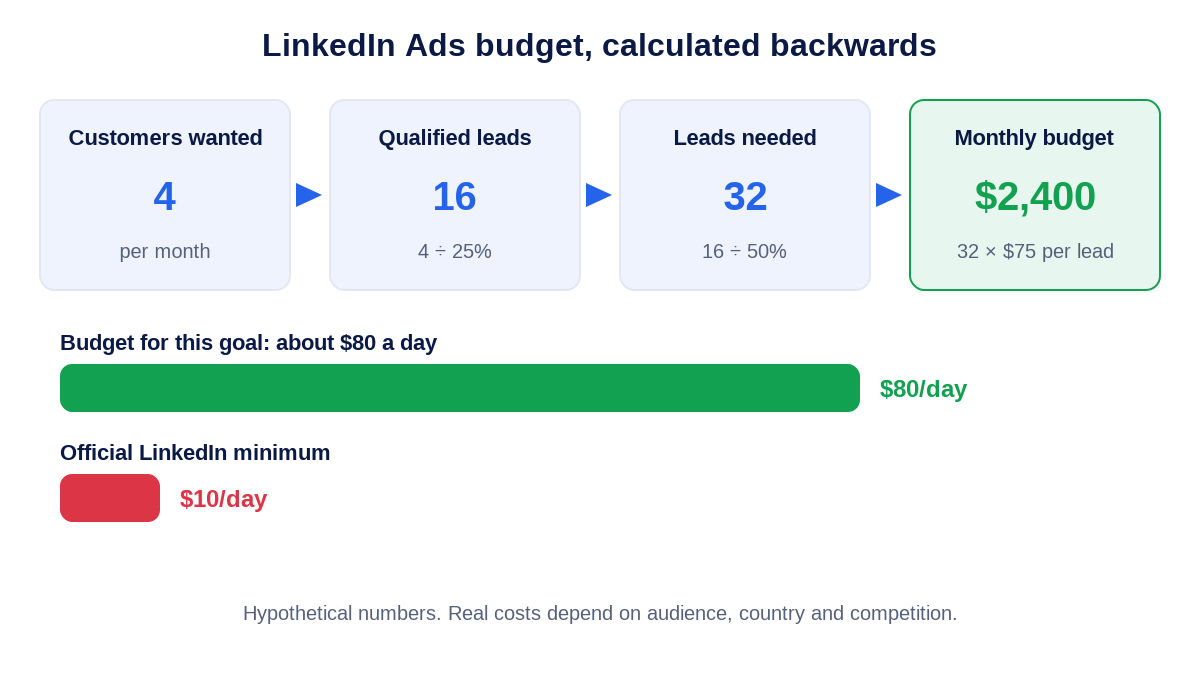
Now check the result against what a customer is worth. If one customer brings $6,000 of gross profit, four bring $24,000 for $2,400 of ads: comfortably positive. If one customer brings $800, the same plan loses money and LinkedIn is the wrong channel for now. The guide to customer acquisition cost shows how to add sales time and other costs to the picture.
Campaign objectives and ad formats: which to choose
In Campaign Manager you first pick an objective. LinkedIn groups them in three stages: awareness (Brand awareness), consideration (Website visits, Engagement, Video views) and conversions (Lead generation, Website conversions, Job applicants). The objective decides what LinkedIn optimizes for and which formats you can use.
For a B2B company that wants contacts, two objectives cover most needs:
- Lead generation uses Lead Gen Forms inside LinkedIn. It is the easiest place to start.
- Website conversions sends people to your own landing page and needs conversion tracking (the Insight Tag or the Conversions API).
Website visits and Brand awareness are useful later, to warm up an audience you will retarget, but they do not produce leads on their own. Judge them on reach and visits, not on cost per lead.
The formats you will see most are Single image ads, Carousel ads, Video ads and Document ads in the feed, Thought Leader ads that promote a post by a person in your company, and message formats such as Conversation ads. A sensible first test is one objective, one audience and two or three single image ads with different messages. Add formats once you know which message works.
Targeting: how to build a B2B audience on LinkedIn
LinkedIn targeting starts with a required location and profile language, then audience attributes: company (industry, size, name, followers), job experience (job title, function, seniority, skills, years of experience), education, demographics and interests. Matched Audiences add your own lists and retargeting. The targeting options page lists them all, and notes that several are limited or unavailable in the EEA and Switzerland.
A workable recipe for a small B2B company:
- Choose the countries or regions you actually serve.
- Add company size and industry to match your typical customer.
- Add job function plus seniority rather than dozens of exact job titles, which tend to miss people with unusual titles.
- Check the audience estimate. LinkedIn requires at least 300 members and, for single image ads, recommends 50,000 or more for good delivery.
- Upload a list of target companies as a Matched Audience if you have one. Keep it as a separate campaign so you can compare results.
Audience expansion and predictive audiences can widen your reach automatically. Leave them off in the first test, so you know who you paid to reach.
Lead Gen Forms, Insight Tag and Conversions API
Lead Gen Forms are forms that open inside LinkedIn, prefilled with profile data. Fewer fields to type means more people complete them, and also more leads who are only half interested. Two practical points: ask one qualifying question (company size, timeline or budget range) to filter, and download leads often or connect the form to your CRM, because LinkedIn keeps lead data for 90 days and then deletes it.
The Insight Tag is a JavaScript snippet you add to every page of your website. It counts conversions such as a sent contact form, builds retargeting audiences from your visitors and shows anonymized company data about them. The Conversions API sends conversions from your server or CRM instead of the browser, so it is not affected by cookies; LinkedIn deduplicates events that arrive both ways. It also allows the Qualified leads optimization goal, where LinkedIn learns from the leads you marked as good.
Whichever you use, add UTM tags to the ad links (see UTM parameters), so GA4 also shows the leads that arrive from LinkedIn.
What to measure: CPL, lead form completion rate and cost per qualified lead
Three numbers tell you whether LinkedIn Ads are working. They come from Campaign Manager plus one column in your CRM or spreadsheet.
Cost per lead (CPL) = spend ÷ leadsLead form completion rate = leads ÷ lead form opens × 100Cost per qualified lead = spend ÷ qualified leads
The lead form completion rate tells you whether the form is the problem: many opens and few leads means too many fields or a confusing question. Click-through rate shows whether the ad itself interests people (the CTR guide explains how to read it).
Cost per qualified lead is the one to base decisions on. Take two hypothetical campaigns with the same $1,500 budget:
| Campaign A: Lead Gen Form, broad audience | Campaign B: website, narrow audience | |
|---|---|---|
| Leads | 30 | 12 |
| CPL | $50 | $125 |
| Qualified leads | 6 | 9 |
| Cost per qualified lead | $250 | $167 |
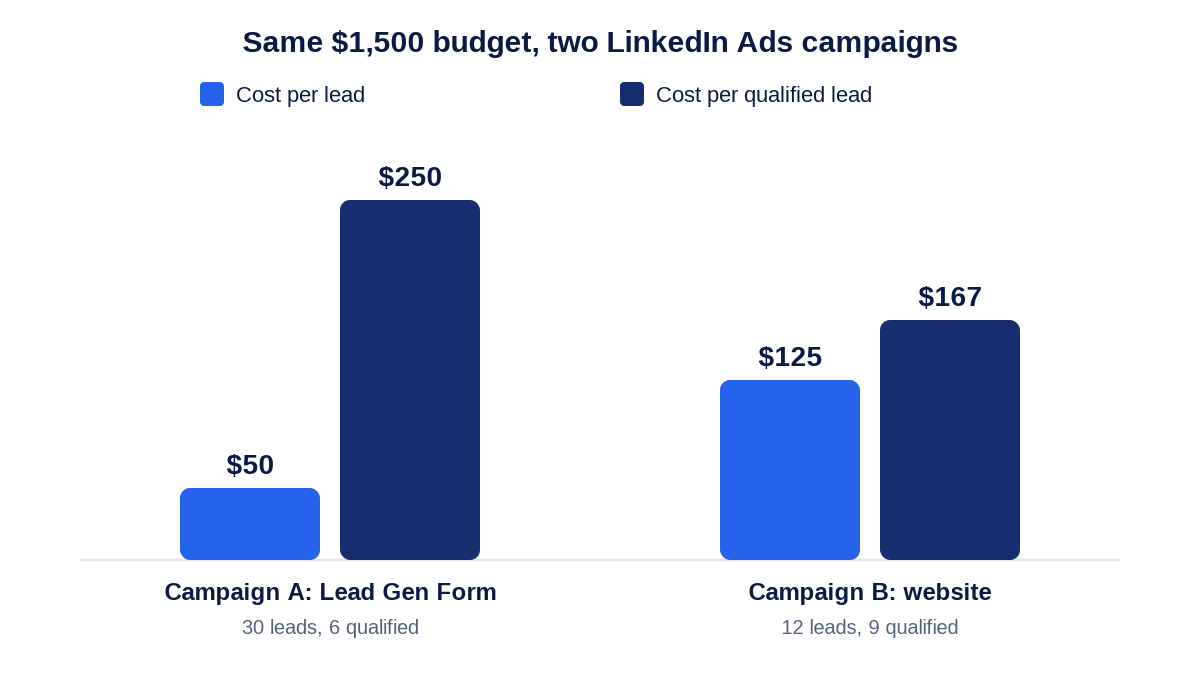
Campaign A wins on CPL, Campaign B wins where it counts. Without the qualified column you would move budget in the wrong direction.
Klyrax connects to LinkedIn pages and LinkedIn Ads in read-only mode and shows spend, leads and cost per lead next to Google Ads, Meta Ads and GA4. With "lead generation" chosen as your goal, the summary compares these numbers with the previous period, and the monthly written report explains what changed. The qualified column still comes from you.
Common mistakes with LinkedIn advertising
- Judging after two weeks. B2B leads sign weeks later. Look at a rolling three months before you stop.
- Running on the minimum budget. At $10 a day you may get a handful of leads a month, too few to learn anything.
- Too many exact job titles. The audience shrinks and the price rises. Use function and seniority.
- A long form without a qualifying question. You get names, not buyers.
- Leads left in Campaign Manager. After 90 days they are deleted, and a lead called back a week later has often moved on.
- Comparing CPL with Google Ads alone. Compare cost per qualified lead and, later, cost per customer.
Start with one campaign, a budget sized from your goal and a clear definition of a qualified lead. After three months you will know whether LinkedIn earns its higher price for your business.
Frequently asked questions
How much do LinkedIn Ads cost?
LinkedIn sets a minimum daily budget of $10 per campaign and a minimum lifetime budget of $100 for new campaigns. What you actually pay per click or per lead depends on your audience, your bid and the competition for it, and LinkedIn does not publish averages. Use the forecast in Campaign Manager and your first month of data to set realistic numbers.
Are LinkedIn Ads worth it for a small B2B company?
LinkedIn Ads are usually worth testing when a new customer is worth several thousand in revenue, when you can name the industries and job titles that buy from you, and when you have someone who calls leads back quickly. If your average sale is small or your buyers are consumers, search ads or Meta Ads are generally a cheaper start.
What is a good cost per lead on LinkedIn?
There is no universal good cost per lead on LinkedIn, because it varies by country, sector and audience. Work out your own ceiling instead: if one customer is worth $6,000 of gross profit and you win one in eight leads, a lead can cost up to $750 before you lose money. Then compare cost per qualified lead between campaigns.
What is the difference between Lead Gen Forms and website conversions?
Lead Gen Forms open inside LinkedIn and are prefilled with profile data such as name, job title and company, so more people complete them. The Website conversions objective sends people to your own page, where you track the form with the Insight Tag. Forms usually bring more leads at a lower cost per lead; your website often brings fewer but more motivated ones.
Do I need the LinkedIn Insight Tag?
You need the LinkedIn Insight Tag, or the Conversions API, if your campaigns send people to your website and you want LinkedIn to count the forms, calls or purchases that follow. It also lets you retarget website visitors. If you only use Lead Gen Forms, leads are counted inside LinkedIn without it, but the tag still helps you see later website actions.
See how your marketing is really doing
Klyrax connects GA4, Search Console, Google Ads, Meta Ads, your Google reviews and more in read-only mode, shows the numbers that matter for your business and writes you a plain-language report every month.
Request info