
Lead generation is the work of getting potential customers to contact you: a form on your website, a phone call, a quote request, a demo booking. For a business that sells services or sells to other companies, leads are the step between marketing and revenue. This guide explains what counts as a lead, which channels a small business can use, and how to measure leads so you know which channel actually brings customers.
You will find a channel map with what to track in each one, a worked example with hypothetical numbers and a simple monthly lead report you can copy.
What is lead generation?
Lead generation is the set of marketing actions that turn strangers into people who have asked to hear from you. A lead is a person or company that has shown interest and left contact details. A lead is not a sale. It is a chance to make one.
What counts as a lead depends on your business. A plumber counts calls and WhatsApp messages. A software company counts demo requests. An accountant counts contact form submissions and booked consultations. Write your own definition down before you measure anything, because "lead" will otherwise mean a different thing in every tool.
Many companies split leads into two levels:
- Marketing lead: someone who downloaded a guide, signed up for a webinar or subscribed to a newsletter. Interest is real but early.
- Sales lead: someone who asked for a quote, a call or a meeting. This person wants to talk about buying.
For a small business, the second kind is the one that pays the bills. Count both if you like, but report them separately.
Inbound vs outbound lead generation
Inbound lead generation means the prospect finds you and makes the first move: a Google search, a post, a referral. Outbound means you make the first move: cold emails, calls, LinkedIn messages, trade fair stands.
| Inbound | Outbound | |
|---|---|---|
| Who starts the contact | The prospect | You |
| Typical channels | Search, Google Ads, Maps, content, referrals | Cold email, calls, LinkedIn outreach, events |
| Speed | Slow to build, then steady | Fast to start, stops when you stop |
| Cost profile | Time and content, ad spend for paid search | Sales time, data, tools |
| What to measure | Leads by source, conversion rate | Replies, meetings booked, deals |
Most small service businesses rely on inbound, with some outbound in B2B. The rest of this guide focuses on inbound, because that is where your website and marketing data can tell you what works.
Lead generation channels for a small business
You do not need ten channels. You need two or three that bring leads you can afford, and a way to see each one separately.
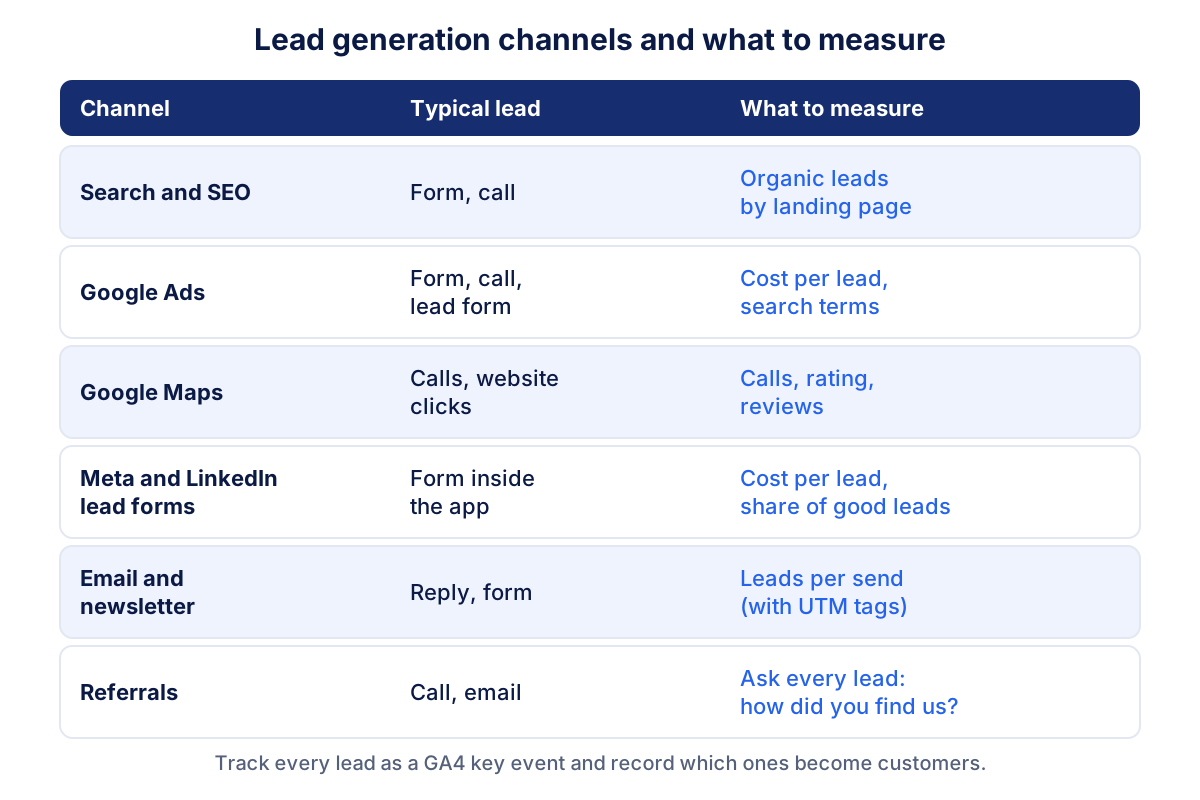
Search and SEO
People who search "IT support for small offices" or "commercial cleaning near me" already have a need. Pages that answer that need, with a clear contact option, bring leads month after month without paying per click. Measure organic leads, not just organic traffic: our guide to traffic sources explains how GA4 separates organic search from the rest.
Google Ads
Google Ads puts you on top of the same searches from day one. You pay per click, so cost per lead is the number that matters. Google Ads also offers lead form assets for Search and Performance Max campaigns, which let people send their details without visiting your site. For businesses that serve one area, the guide to local Google Ads covers location targeting and call tracking.
Local search and Google Maps
For a business with a service area, the Google Business Profile often brings more calls than the website. Leads here are mostly phone calls, direction requests and website clicks from the profile. Reviews and rating decide who gets the call. The guide to ranking on Google Maps covers the steps.
Meta and LinkedIn lead forms
Meta lead ads use instant forms that open inside Facebook or Instagram, with contact fields often prefilled. LinkedIn offers Lead Gen Forms that fill in profile data such as job title and company. Both make it very easy to submit, which brings volume and, often, lower quality. Meta leads must be downloaded within 90 days of submission, so connect the forms to your CRM or export them regularly.
Email, content and referrals
A newsletter keeps you in front of people who are not ready yet. Useful content (a price guide, a checklist, a case study) gives search and social something to point to. Referrals from happy customers are often the best leads of all, and the hardest to track: ask every new lead how they heard about you and record the answer.
B2B lead generation: what changes
B2B lead generation follows the same logic with a few differences you should plan for.
- Fewer, bigger leads. Twenty good leads a month can be plenty if a contract is worth thousands.
- Longer cycles. A lead from March may sign in June. Look at three-month periods, not single months.
- Several decision makers. The person who fills in the form is not always the one who signs. Content that helps them convince their boss is worth writing.
- Quality beats volume. One qualified request from a company in your target sector is worth more than fifty ebook downloads from students.
LinkedIn, search, referrals and trade events usually do the heavy lifting in B2B. Meta can work for some B2B services, but expect more filtering.
How to measure leads properly
Measuring leads needs four pieces in place. Without them, every channel looks either great or useless depending on which tool you open.
- Track every lead as a key event in GA4. Fire an event when a form is really sent (the thank-you page is the safest trigger) and when someone clicks your phone number or email link. Mark these events as key events in the GA4 admin. Google's recommended events suggest the name generate_lead. The automatic form_submit event of enhanced measurement can also fire on newsletter or search forms, so check what it counts before you rely on it. The GA4 guide explains key events in more detail.
- Tag campaign links with UTM parameters. Newsletters, LinkedIn posts and paid social need UTM tags, or their leads end up in "direct" or "referral". See UTM parameters.
- Track calls. For many service businesses, half the leads are calls. Use call reporting in Google Ads, the call clicks on your site and, if you can, a different number on the website and on the Business Profile.
- Record the outcome. Note in your CRM or a spreadsheet which leads became customers and where each lead came from. GA4 knows the source. Only you know who paid.
With those in place, three formulas tell you most of what you need:
Lead conversion rate = leads ÷ sessions × 100Cost per lead = channel cost ÷ leads from that channelLead-to-customer rate = new customers ÷ leads × 100
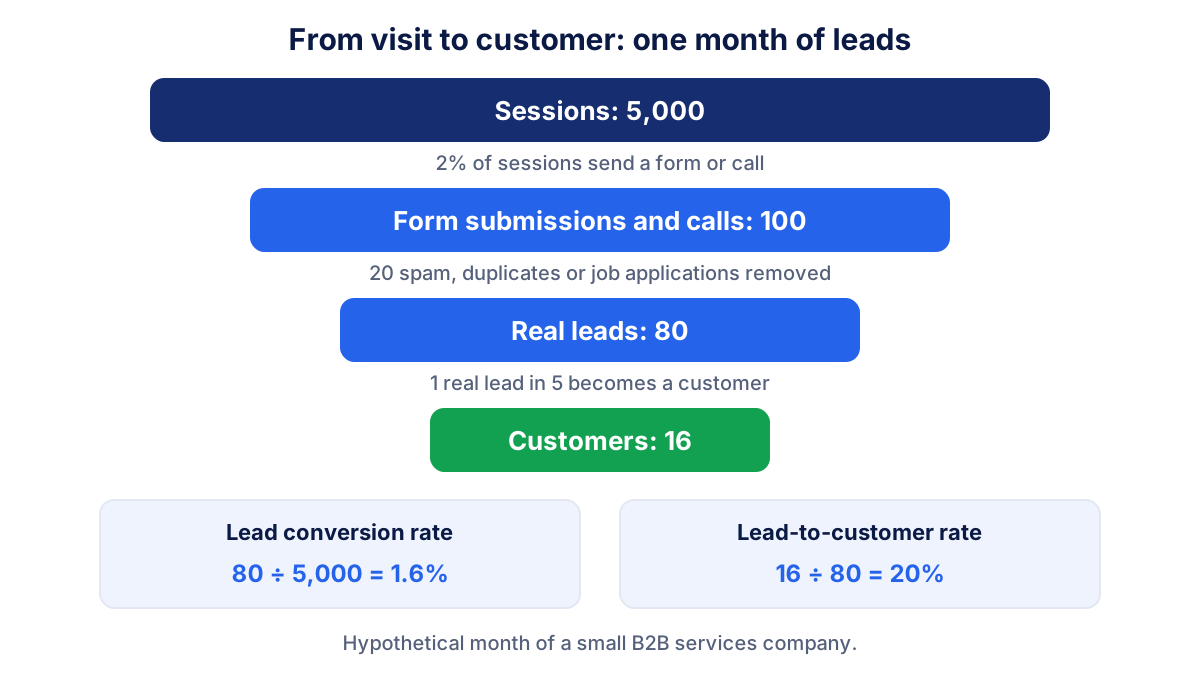
A worked example with hypothetical numbers. A B2B services company gets 5,000 sessions in a month and records 100 form submissions and calls. After removing spam, duplicates and job applications, 80 real leads remain. Sixteen become customers. The lead conversion rate is 80 ÷ 5,000 = 1.6%, and the lead-to-customer rate is 16 ÷ 80 = 20%. For how cost per lead fits with the cost of a customer, read the guide to customer acquisition cost. For how to improve the first rate, see conversion rate.
Lead quality: why lead count can mislead you
Two channels with the same number of leads can be worth completely different amounts. In the same hypothetical month, Google Ads brings 30 leads for $1,500 ($50 per lead) and LinkedIn Ads brings 10 leads for $900 ($90 per lead). Judged by cost per lead, Google Ads wins easily.
Then look at who bought. Three of the 30 Google Ads leads became customers, so each customer cost $500. Four of the 10 LinkedIn leads became customers, so each cost $225. The channel that looked expensive is the cheaper way to win a customer.
A simple way to score lead quality without a complex system: after each first call, mark the lead as good, maybe or not a fit. Once a month, count the good ones by source. That one column in a spreadsheet will change more budget decisions than any dashboard.
A simple monthly lead report
A useful monthly lead report fits on one page and compares every number with the previous month.
| Number | This month | Previous month | Change |
|---|---|---|---|
| Real leads (spam removed) | 80 | 72 | +11% |
| Lead conversion rate | 1.6% | 1.5% | +0.1 pts |
| Cost per lead (paid channels) | $60 | $65 | -8% |
| Lead-to-customer rate | 20% | 18% | +2 pts |
| New customers | 16 | 13 | +3 |
| Top source by customers | Organic search | Google Ads |
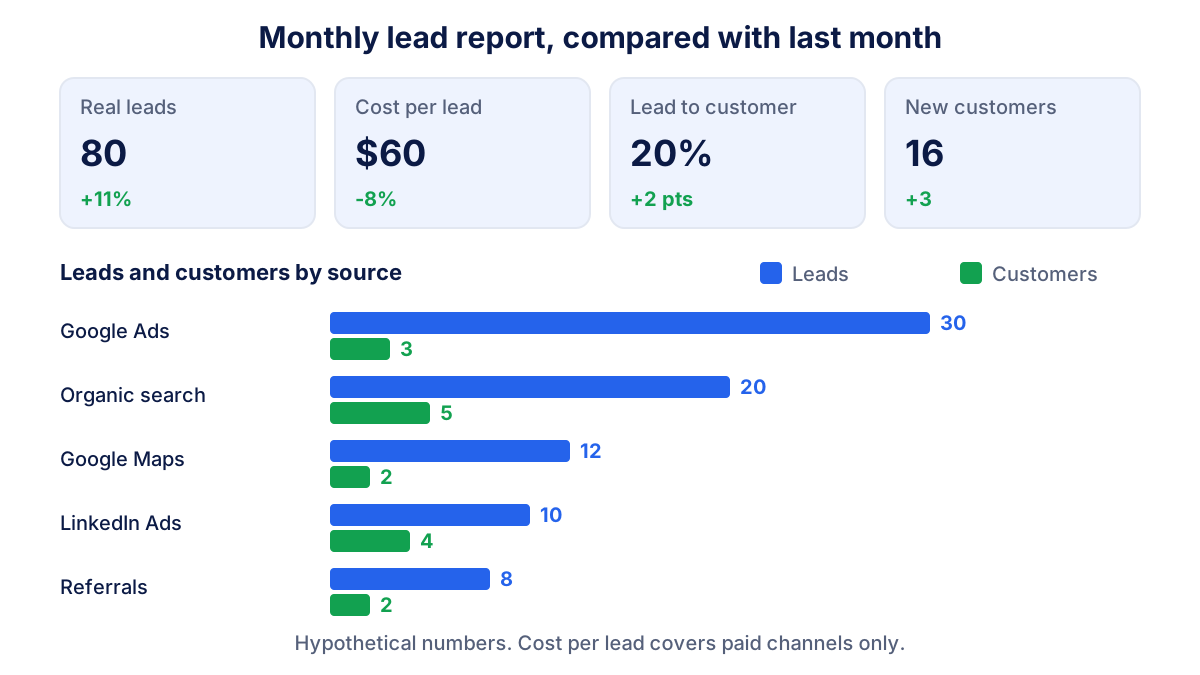
Below the table, add leads and customers by source and three short lines: what changed, why, and what you will do next month. The monthly marketing report template shows how to write those lines for the rest of your marketing.
Klyrax does most of this for you. Choose "lead generation" as your business goal and the summary shows the four to six numbers that matter (leads, cost per lead, conversion rate and sources) next to the previous period, from GA4, Google Ads, Meta Ads, LinkedIn Ads and Microsoft Ads. On the 1st of each month a written report explains in plain language what changed. Customers still come from your CRM, since only you know who signed.
Common lead generation mistakes
- Counting spam as leads. Bot submissions, sales pitches and job applications inflate the count. Filter them before you calculate any rate.
- Not tracking calls. If half your customers phone you, a report based on forms alone undervalues the channels that bring calls, usually Maps and local search ads.
- Judging channels by lead count only. As the example above shows, the cheapest lead is not always the cheapest customer.
- No source on offline leads. Referrals and trade fair contacts vanish from the data unless someone records them.
- Reading one month in B2B. With long sales cycles, a single month of customers says little. Use a rolling quarter.
- Slow follow-up. A lead answered the next week has often already chosen someone else. Response time is part of lead generation too.
Frequently asked questions
What is lead generation in simple terms?
Lead generation is the work of attracting people who might buy from you and getting them to leave a way to be contacted: a contact form, a phone call, a quote request, a demo booking. A lead is not yet a customer. It is someone you can now follow up, and your sales process decides whether that person ever pays you.
What is the difference between a lead and a customer?
A lead has shown interest and given you contact details. A customer has paid. Between the two sits your sales process: answering, qualifying, quoting, closing. That is why a business that only counts leads can feel busy while sales stay flat. Track the lead-to-customer rate next to the lead count to see the full picture.
What is B2B lead generation?
B2B lead generation means finding leads among companies rather than consumers. Leads are fewer and worth more, several people often decide together, and a deal can take weeks or months to close. Search, LinkedIn, referrals, trade events and useful content tend to work well, and lead quality matters far more than volume.
How do I track leads in Google Analytics 4?
Create an event that fires only when a real lead happens, such as the thank-you page after a contact form or a click on your phone number, and mark it as a key event in the GA4 admin. Google recommends the event name generate_lead for this. Then read key events by session source and medium to see where leads come from.
How many leads should a small business get per month?
There is no standard number, because it depends on your price, your sales capacity and how many leads you need to win one customer. Work backwards instead: if you want 10 new customers a month and one lead in five becomes a customer, you need about 50 qualified leads. Then check which channels can deliver them at an acceptable cost.
See how your marketing is really doing
Klyrax connects GA4, Search Console, Google Ads, Meta Ads, your Google reviews and more in read-only mode, shows the numbers that matter for your business and writes you a plain-language report every month.
Request info