
Google Keyword Planner is Google's free tool for finding the searches people type and estimating how often they type them. You can use it without spending money: you need a Google Ads account with billing details, but no ad has to run. For a business owner it answers a simple question: which words do my customers use when they look for what I sell?
This guide shows how to get access without spending, which of the two tools to use, why volumes show up as ranges, and how to turn the results into website pages and ads, checked against your own Search Console data.
Is Google Keyword Planner free?
Yes. Keyword Planner is included in every Google Ads account at no cost. Google Ads charges for ad clicks (or impressions, for some campaign types), not for using its planning tools.
There is one condition. Google's help page says you must complete account setup, including billing information, before you can use basic features such as keyword ideas (Use Keyword Planner). Adding a payment method does not mean you pay: with no active campaign, nothing is charged.
The free tier has one practical limit. Accounts with little or no ad spend usually see search volumes as broad ranges instead of exact averages. The section on ranges below explains how to work with that.
How to access Keyword Planner without spending
The Google Ads sign-up flow is built to get you to launch a campaign. You can avoid that and still end up with a working account.
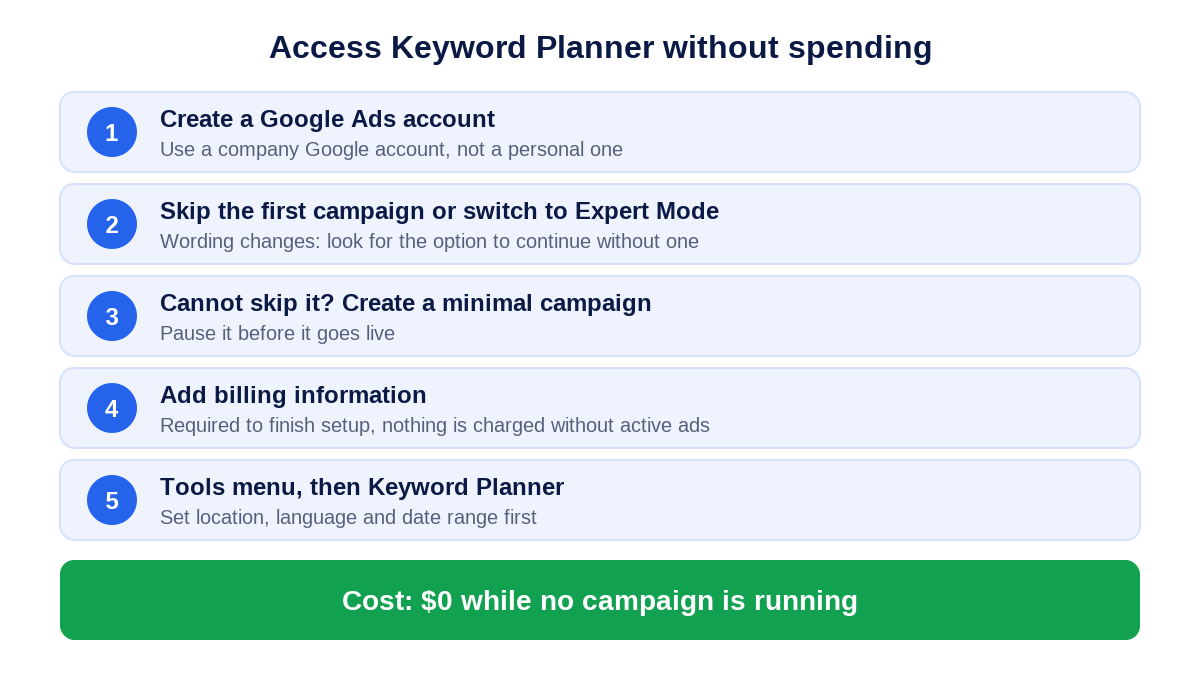
- Go to ads.google.com and sign in with the Google account you want to use for the business (ideally a company address, not a personal one).
- When the setup asks you to create your first campaign, look for the option to switch to Expert Mode or to continue without a campaign. The wording changes over time. If the account was created in Smart Mode, Google lets you use "Switch to Expert Mode" from the settings, and the switch cannot be undone.
- If you cannot skip campaign creation, create a minimal campaign and pause it before it goes live.
- Add your billing information to complete the setup. No charge is made while no campaign is running.
- Open the Tools menu and choose Keyword Planner.
Check the account once a month at the start. A paused campaign stays paused, but it takes ten seconds to confirm that nothing is spending.
Discover new keywords or get search volume: which one to use?
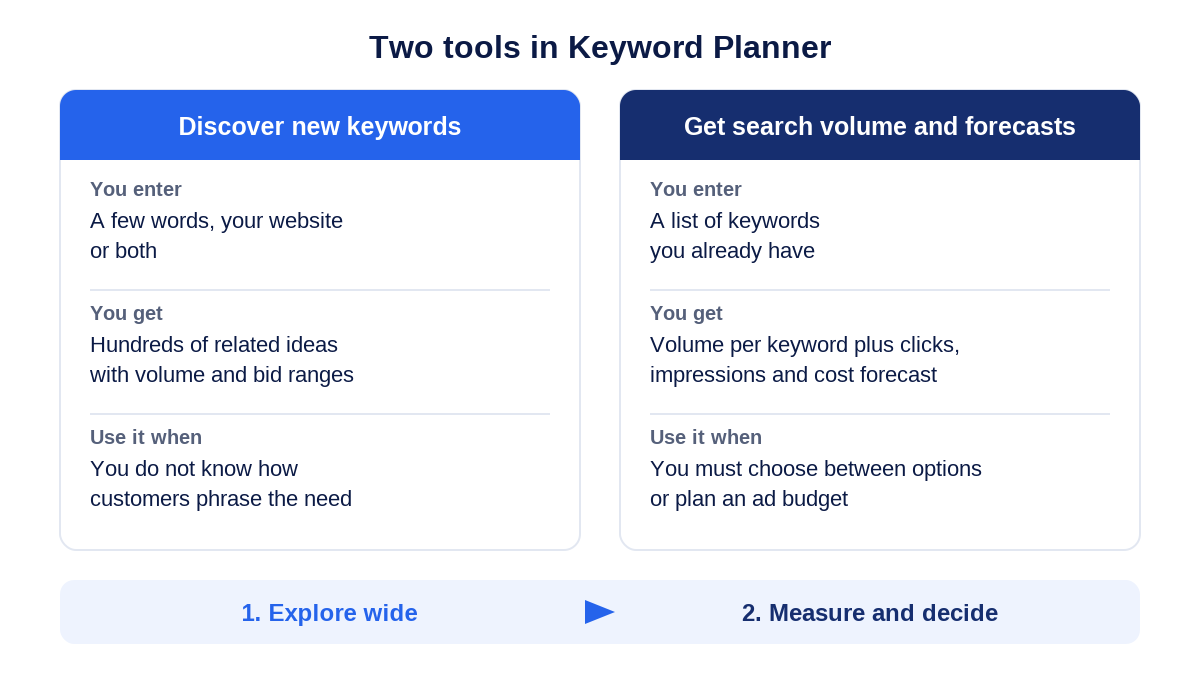
Keyword Planner opens with two options. They do different jobs.
| Discover new keywords | Get search volume and forecasts | |
|---|---|---|
| You enter | A few words, your website, or both | A list of keywords you already have |
| You get | Hundreds of related ideas with volumes | Volume and trend for each keyword on your list |
| Extra | Filter by text, volume, competition | Forecast of clicks, impressions and cost for a budget |
| Use it when | You do not know how customers phrase the need | You must choose between options or plan a budget |
Before reading any result, set the location, the language and the date range at the top of the page. A bathroom renovation company working only around Denver should target Denver and its area, not the whole United States. The network setting "Google" covers Google Search only, "Google and search partners" adds partner sites. For planning, Google Search alone is cleaner.
Columns worth reading
- Average monthly searches: how many times per month, on average over the chosen period, people searched that keyword and close variants.
- Three month change and YoY change: whether demand is rising or falling.
- Competition: how many advertisers bid on the keyword. It says nothing about organic ranking difficulty.
- Top of page bid (low range) and (high range): what advertisers have historically paid to appear at the top. Our guide on how much Google Ads costs shows how to turn this into a budget.
Why are volumes shown as ranges?
If your account has no recent ad spend, Keyword Planner usually shows volumes as buckets: 10-100, 100-1K, 1K-10K. Google does not publish the exact rule, but accounts with active campaigns generally see more precise numbers.
A range like 1K-10K is wide. A keyword in that bucket could have 1,200 searches a month or 9,000. Three ways to narrow it without spending:
- Compare inside the same bucket. Trends and the bid ranges still differ between keywords. Two keywords in the same range are not necessarily equal.
- Use the forecast. Add the keywords to a plan and look at forecast impressions for a realistic budget. The forecast is not a volume, but it helps rank options.
- Check Search Console. If your site already appears for that search, the impressions in the Performance report give you a real lower bound for your area.
Volumes are also rounded and averaged over 12 months by default. A seasonal service can have three times the average in its peak month. Change the date range, or check the pattern in Google Trends, before planning a campaign around one number.
How to find what your customers search, step by step
Here is a hypothetical example. A bathroom renovation company in Denver wants to know which searches to cover on its website and in ads.
- Start from the customer's words. In Discover new keywords, enter three to five phrases a customer would say on the phone: "bathroom remodel", "walk in shower", "bathroom renovation cost". Add your website address in the second tab to get ideas based on your pages.
- Set the area. Location Denver plus nearby, language English, network Google.
- Filter out noise. Use the filter to exclude words like "diy", "ideas" or "jobs" when they bring people who will never hire you.
- Group by intent. Put ideas into groups that match one service or one question.
- Assign each group to a page or an ad group. One group, one page. If no page fits, that is a gap.
| Keyword group (hypothetical) | Avg. monthly searches | Top of page bid | Use it for |
|---|---|---|---|
| bathroom remodel denver | 1K-10K | $4-$12 | Main service page and main ad group |
| walk in shower installation | 100-1K | $3-$9 | Dedicated service page |
| bathroom remodel cost | 1K-10K | $2-$6 | Guide page with price ranges |
| small bathroom ideas | 10K-100K | $0.50-$2 | Skip or blog only: inspiration, not buyers |
Notice the last row. The biggest number is often the least useful one: people looking for ideas are not ready to call. Searches that include a place, a service and a price word usually bring fewer but better visits. Measure the result later with your conversion rate, not with traffic alone.
How to combine Keyword Planner with Search Console
Keyword Planner tells you what the market searches. Google Search Console tells you which of those searches your site already appears for, with impressions, clicks and average position. Together they show where to act.
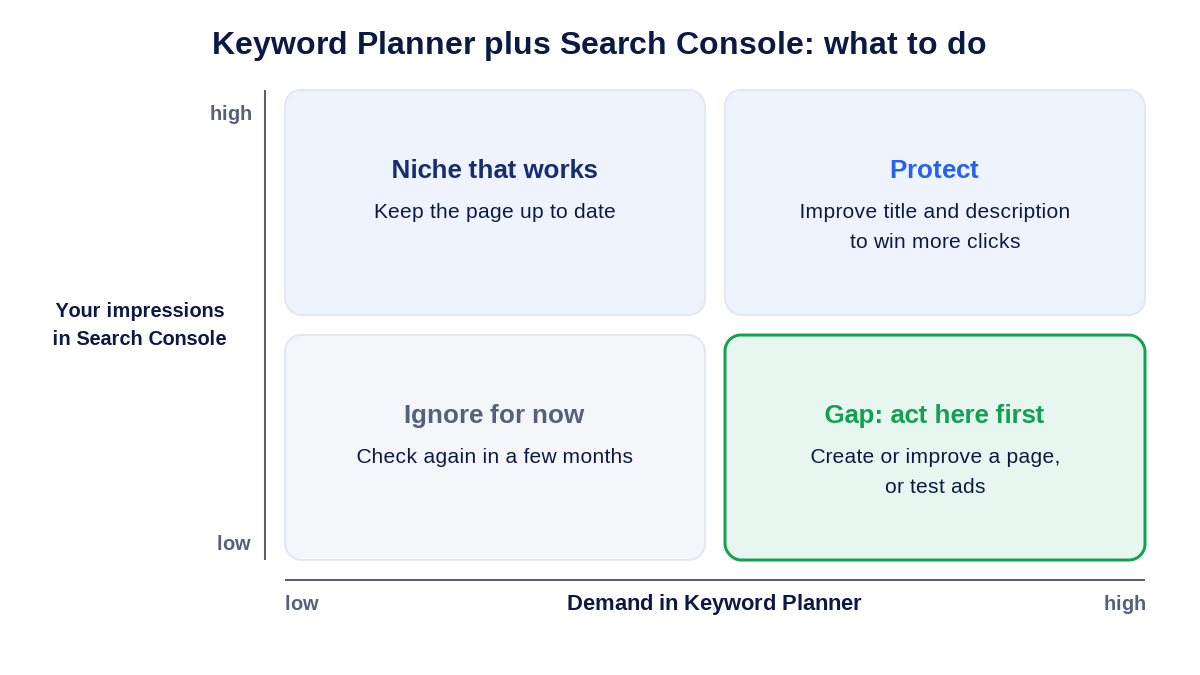
Export the Queries tab of the Search Console Performance report for the last three months. Put your Keyword Planner shortlist next to it and sort each keyword into one of four boxes.
| Demand in Keyword Planner | Your impressions in Search Console | What to do |
|---|---|---|
| High | Low or none | Gap: create or improve a page, or test ads |
| High | High | Protect: improve title and description to win more clicks |
| Low | High | A niche that works: keep the page up to date |
| Low | Low or none | Ignore for now |
Search Console has its own limits: it shows only searches where your site appeared, and it hides rare queries for privacy. That is exactly why the two sources complement each other.
Klyrax shows your Search Console queries next to Google Ads and Google Analytics 4 in one summary, compared with the previous period, so you can see each month whether the pages you created for a keyword group start to get impressions and clicks.
Using forecasts before you spend on ads
Get search volume and forecasts also estimates what a budget would buy. Add your keyword groups to a plan, set a monthly budget and read the forecast clicks, impressions and cost (About Keyword Planner forecasts).
A hypothetical example: with a budget of $600 a month and a forecast average cost per click of $3, you can expect about 200 clicks. If 5% of visitors ask for a quote, that is about 10 requests, or $60 per request. If a renovation job brings in thousands of dollars of margin, that test is worth running. If it does not, you have learned it without spending anything.
Forecasts take bids, budget and seasonality into account, but new accounts get estimates based on averages across advertisers. Treat them as a starting point and compare them with real data after two or three weeks.
Common mistakes with Keyword Planner
- Choosing by the biggest number. High volume often means vague intent. Prefer searches that describe a service and a place.
- Forgetting the location. National volumes mean nothing for a business that works in one city.
- Reading competition as SEO difficulty. Competition is about advertisers bidding, not about other websites.
- Treating a range as a number. 1K-10K is a bracket. Narrow it with the forecast and Search Console.
- Leaving a campaign active by mistake. If setup forced you to create one, check that it is paused.
- Doing it once. Repeat the check every few months: language and demand change, and new services bring new searches.
Keyword Planner gives you the customer's vocabulary for free. Use it to decide which pages to write and which searches to test with ads, then let your own Search Console and Google Ads data tell you which choices worked.
Frequently asked questions
Is Google Keyword Planner really free?
Yes. Keyword Planner is part of Google Ads and costs nothing to use. Google asks you to complete account setup, including billing information, before it shows keyword ideas. You are charged only when ads run and people click them, so an account with no active campaign does not spend anything. Keep any campaign created during setup paused.
Can I use Keyword Planner without running ads?
Yes. You can open Keyword Planner from the Tools menu of a Google Ads account that has no active campaigns. The trade-off is precision: accounts with little or no ad spend often see search volumes as broad ranges, such as 1K-10K, instead of a single number. The keyword ideas, the trends and the bid ranges remain useful for planning.
Why does Keyword Planner show ranges like 1K-10K?
Accounts with low or no recent ad spend usually get bucketed volumes instead of precise averages. Google does not publish the exact rule. To narrow a range, compare keywords inside the same bucket, use the forecast for a realistic budget, and check the impressions your site already gets for that search in Google Search Console.
What is the difference between Discover new keywords and Get search volume and forecasts?
Discover new keywords starts from a few words or a website address and returns related keyword ideas with volumes, competition and bid ranges. Get search volume and forecasts starts from a list you already have and returns the volume of each keyword, plus a forecast of clicks, impressions and cost for a budget. Use the first to explore, the second to decide.
Is Keyword Planner good for SEO, not only for ads?
Yes, as long as you remember it was built for advertisers. The volumes tell you which wording customers use and how demand changes over the year, which helps you name pages and services. Competition refers to advertisers, not to how hard it is to rank organically. For your own organic results, Search Console is the better source.
See how your marketing is really doing
Klyrax connects GA4, Search Console, Google Ads, Meta Ads, your Google reviews and more in read-only mode, shows the numbers that matter for your business and writes you a plain-language report every month.
Request info