
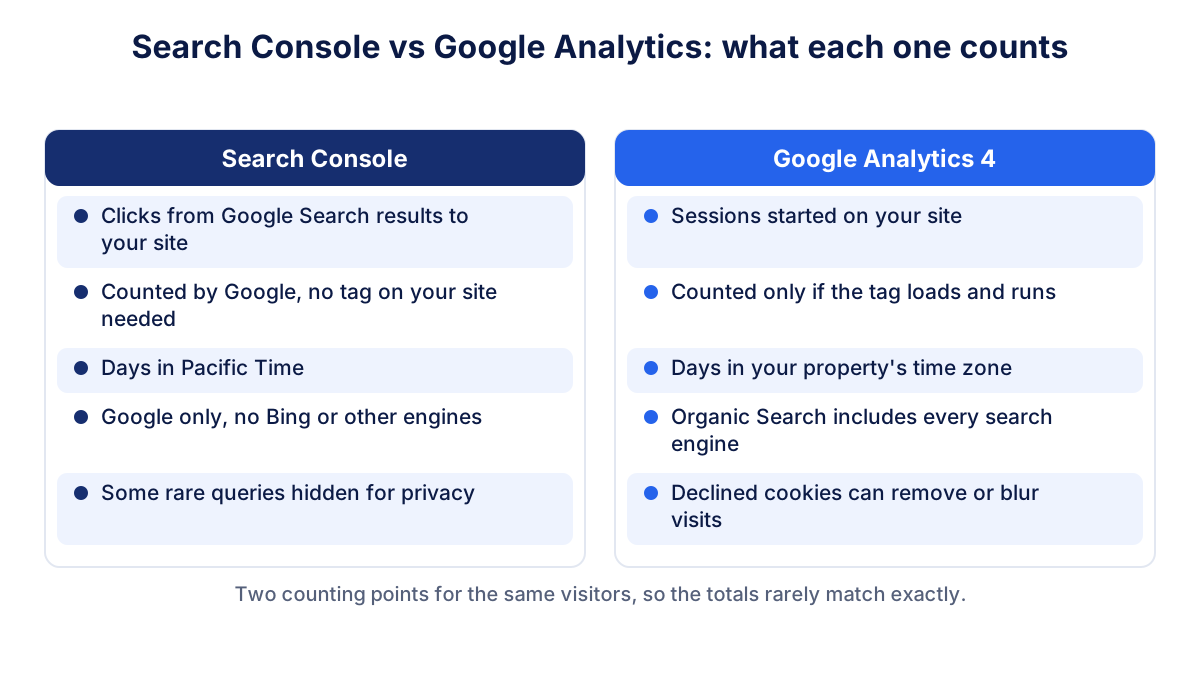
Search Console vs Google Analytics is one of the first puzzles of anyone who looks at their own website data: Search Console says 1,000 clicks from Google, GA4 shows fewer organic sessions for the same month. Both are right. Search Console counts clicks on your results in Google Search, before the visit. Google Analytics 4 counts sessions recorded by its tag on your site, after the page loads.
This guide explains what each tool measures, the reasons for the differences according to Google's own help pages, which tool to use for which question, how to link them and what to check every month.
What does Search Console measure?
Google Search Console measures how your site performs in Google Search: how often it appears (impressions), how often people click (clicks), the click-through rate and the average position, broken down by query, page, country and device. Google collects this data on its own servers. Nothing needs to run on your site.
The definitions matter. In Google's help for the Performance report, a click is counted when a user clicks a result that takes them outside Google Search. Clicking the same link again after coming back counts only once, while clicks on different links of your site count separately. Data for all variations of a page is assigned to its canonical URL, and a redirect after the user lands does not change which URL gets the click.
If you are new to the tool, the guide to Google Search Console covers setup and the main reports.
What does Google Analytics 4 measure?
GA4 measures what happens on your site: sessions, users, engagement, key events such as purchases or form requests, and the channel each visit came from. It works through a tag, a piece of JavaScript that runs in the visitor's browser when the page loads.
A session in GA4 starts when someone opens your site and, by default, ends after 30 minutes of inactivity. GA4 groups visits into channels. Its Organic Search channel includes every search engine it recognizes, not only Google. The guide to GA4 and its reports explains the setup and the main metrics.
Why don't Search Console and Google Analytics match?
Google lists the main reasons in its help page on Performance report data discrepancies: privacy filtering of rare queries, processing that removes duplicates, a time lag of usually two to three days, time zones (Search Console uses Pacific Time) and JavaScript, because tools like GA4 only see visitors whose browser runs it. Add the way sites are built and how GA4 groups traffic, and you get this list:
| Reason | What happens | Which number is higher |
|---|---|---|
| Declined cookies | GA4 records less detail or no visit, depending on your consent setup | Search Console |
| Blocked or failed tag | Ad blockers, disabled JavaScript or a broken tag stop GA4 | Search Console |
| Visitor leaves early | The click happened, the page never loaded fully | Search Console |
| Several clicks, one session | Two results clicked within minutes can be one GA4 session | Search Console |
| Files without a tag | Clicks on PDFs count in Search Console, GA4 cannot see them | Search Console |
| Other search engines | GA4 Organic Search includes Bing and others | GA4 |
| Long visits split | More than 30 minutes of inactivity starts a new session | GA4 |
| Time zones | Pacific Time vs your property's time zone shifts days | Varies by day |
| Data lag | The last two or three days are incomplete in Search Console | GA4, for recent days |
Consent and blocked tags
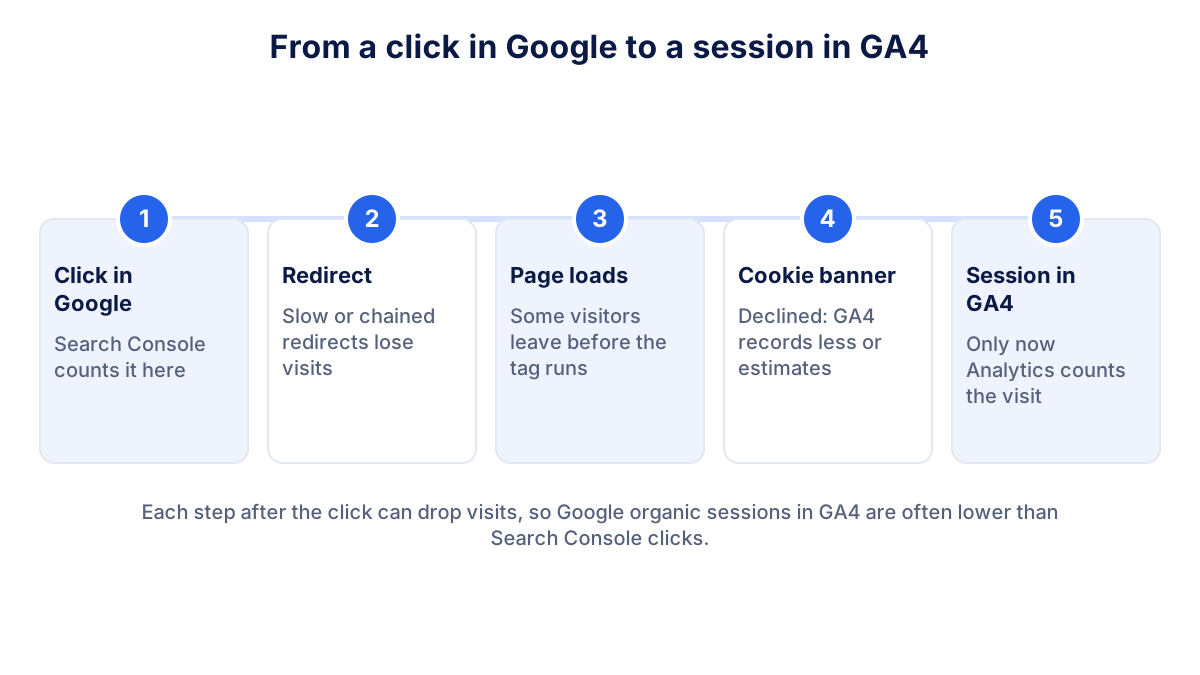
For European sites, consent is usually the biggest factor. If a visitor declines analytics cookies, GA4 either records nothing or, with consent mode, receives limited signals and may estimate part of the activity. Either way GA4 will show fewer Google organic sessions than Search Console shows clicks. This is expected, not an error.
Redirects and lost referrers
A visitor who lands on an old URL and is redirected still counts in Search Console under the canonical page. In GA4, a slow chain of redirects can lose visitors before the tag runs, and some JavaScript redirects drop the information about where the visit came from. Those sessions then appear as direct traffic instead of organic. The article on traffic sources explains how GA4 assigns channels.
A worked example: how to compare the two correctly
Imagine a small consultancy website. In October, Search Console reports 1,000 clicks from Google web search. GA4 reports 1,150 sessions in the Organic Search channel. At first sight GA4 is higher, which looks strange.
Filter GA4 on the session source google and the medium organic: the number drops to 820 sessions, because the other 330 came from Bing, DuckDuckGo and other engines. Now the comparison makes sense. Search Console counts 1,000 clicks, GA4 counts 820 Google organic sessions. The remaining gap comes from visitors who declined cookies, left before the page loaded or clicked two results within one session.
All these figures are hypothetical. Your own ratio depends on your audience, your consent banner and your site. What you want is a ratio that stays roughly stable from one month to the next.
Common mistakes when comparing Search Console and GA4
- Comparing all Organic Search with Google clicks. Always filter GA4 on google / organic first.
- Comparing single days. Time zones and the data lag distort daily figures. Compare whole weeks or months.
- Adding the two numbers together. Clicks and sessions describe the same visitors at two different moments.
- Treating the gap as a bug. A stable gap is normal. Only a sudden change is a reason to check the setup.
- Using Search Console for conversions. Search Console stops at the click. Leads and sales live in GA4 or in your own systems.
Search Console or Google Analytics: which tool for what?
The simplest rule: Search Console for everything that happens before the click, GA4 for everything after it.
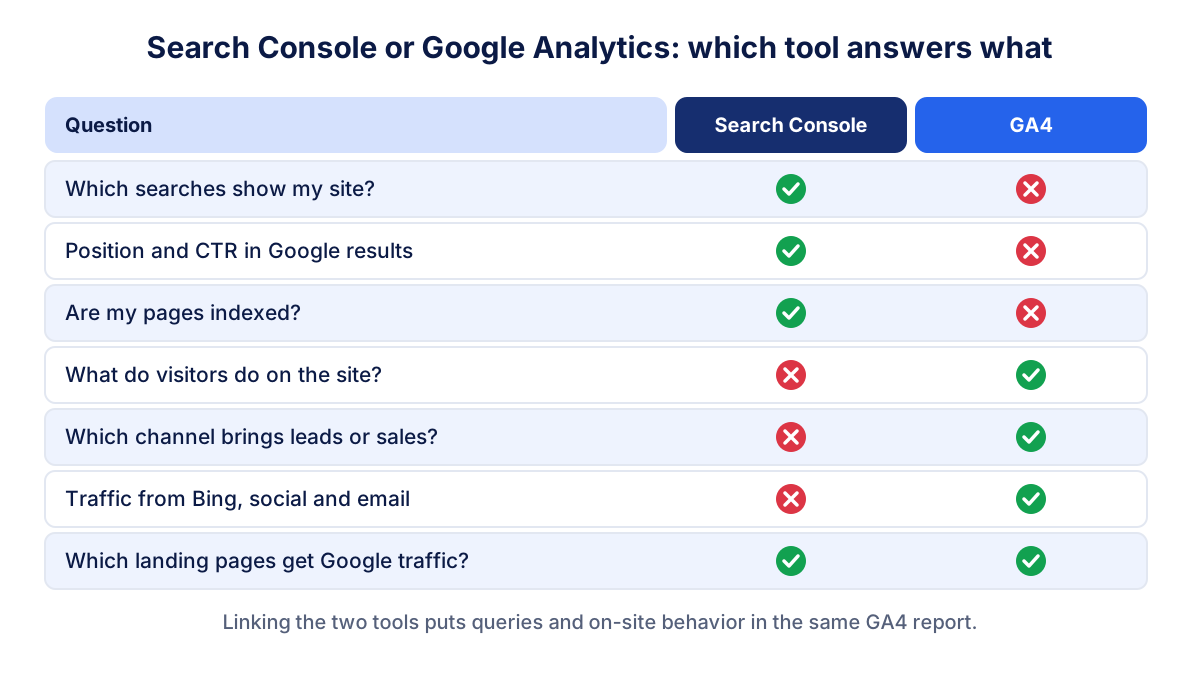
Use Search Console to see:
- which searches show your site and which pages appear for them;
- impressions, clicks, CTR and average position in Google;
- indexing problems, Core Web Vitals and manual actions.
Use GA4 to see:
- what visitors do on the site and how engaged they are;
- which channels bring leads or sales, including organic search;
- traffic from other search engines, social media, email and ads.
When you need both, for example to find pages that rank well but convert poorly, link the two tools.
How to link Search Console and GA4
Linking puts Search Console data inside GA4. Google's help page on the Search Console integration lists the steps:
- In GA4, open Admin, then Product links, then Search Console links, and click Link.
- Choose the Search Console property you manage. You need the Editor role in GA4 and must be a verified owner in Search Console.
- Select the web data stream of your site and submit.
- In Reports, open the Library and publish the Search Console collection, which is unpublished by default.
You then get two reports: Google Organic Search Queries, with Search Console metrics by search query, and Google Organic Search Traffic, with landing pages showing both Search Console and GA4 metrics. One web data stream can link to only one Search Console property. The data appears about 48 hours after Search Console collects it.
What to check every month
You do not need to make the two tools agree. You need to know whether your organic visibility is growing and whether the gap between them behaves normally. A short monthly routine:
- Search Console clicks and impressions compared with the previous month and the same month last year, since search demand is seasonal.
- Top queries and pages: did any important page lose clicks or position?
- Indexing: are new or important pages indexed?
- GA4 sessions from google / organic and the key events they bring.
- The ratio between the two: if Search Console shows 1,000 clicks and GA4 shows 820 Google organic sessions, the exact gap matters less than its stability. If it suddenly widens, check the consent banner, the tag and recent site changes.
These numbers belong in the same monthly marketing report as your other channels. Klyrax connects to Search Console and GA4 in read-only mode, shows clicks, positions, sessions and conversions side by side in a summary built around your business goal, and explains the month in a plain-language report on the 1st.
Frequently asked questions
Why are Search Console clicks higher than Google Analytics sessions?
Search Console counts a click as soon as someone clicks your result in Google. GA4 only counts a session if the page loads, its tag runs and the visitor's consent choice allows measurement. Visitors who leave early, block scripts or decline cookies are missing from GA4, and two quick clicks on different results can become one session. So Search Console clicks are often higher.
Can Google Analytics show more organic traffic than Search Console?
Yes. The Organic Search channel in GA4 includes every search engine, such as Bing, DuckDuckGo or Ecosia, while Search Console only covers Google. A long visit interrupted for more than 30 minutes can also become two sessions in GA4. To compare like with like, filter GA4 on the source google and the medium organic.
Which is more accurate, Search Console or Google Analytics?
Neither is wrong: they measure different moments. Search Console is the reference for what happens in Google Search, such as impressions, clicks, queries and positions. GA4 is the reference for what happens on your site, such as engagement, conversions and the comparison between channels. Use each one for its own question instead of choosing a winner.
How do I link Search Console to Google Analytics 4?
In GA4 go to Admin, then Product links, then Search Console links, and click Link. You need the Editor role on the GA4 property and must be a verified owner of the Search Console property. Choose the Search Console property, select your web data stream and submit. The new reports then have to be published from the GA4 Library.
Why do daily numbers differ more than monthly ones?
Search Console labels days in Pacific Time, while GA4 uses the time zone set in your property. For a European site the two days are cut at different hours, so daily figures shift. Search Console data also arrives with a delay of two to three days. Over a full month these effects shrink, which is why monthly comparisons are more reliable.
See how your marketing is really doing
Klyrax connects GA4, Search Console, Google Ads, Meta Ads, your Google reviews and more in read-only mode, shows the numbers that matter for your business and writes you a plain-language report every month.
Request info