
Email open rate is the percentage of delivered emails that were opened. It used to be the first number anyone checked after sending a newsletter. Today it is the least reliable one, because privacy features open emails automatically. Read it as a trend, and judge each campaign mainly on clicks, unsubscribes and the sales or enquiries it brings.
This guide covers the formulas for open rate, click rate and click-to-open rate, what changed with Apple Mail Privacy Protection, what a normal average looks like, how to improve your numbers and what to check every month.
What is email open rate?
Email open rate is the share of successfully delivered emails that recipients opened. Mailchimp defines it in its help page on open and click rates as a percentage that tells you how many successfully delivered emails were opened.
Opens are tracked with a tiny invisible image in the email. When the email client loads that image, the platform records an open. This is why open tracking has never been exact: someone who reads your email with images blocked does not count, while a system that loads images automatically does.
Click rate works differently. A click on a link in the email goes through a tracked redirect, so it requires a real action. That difference matters more and more, as we will see.
How to calculate open rate, click rate and click-to-open rate
All three rates start from the number of delivered emails, which is sent minus bounced.
Open rate = unique opens ÷ delivered emails × 100Click rate = unique clicks ÷ delivered emails × 100Click-to-open rate (CTOR) = unique clicks ÷ unique opens × 100
Suppose you send a newsletter to 2,050 addresses. 50 bounce, so 2,000 are delivered. 800 people open it and 60 click a link.
| Metric | Calculation | Result |
|---|---|---|
| Delivery rate | 2,000 ÷ 2,050 | 97.6% |
| Open rate | 800 ÷ 2,000 | 40% |
| Click rate | 60 ÷ 2,000 | 3% |
| Click-to-open rate | 60 ÷ 800 | 7.5% |
| Unsubscribe rate | 4 ÷ 2,000 | 0.2% |
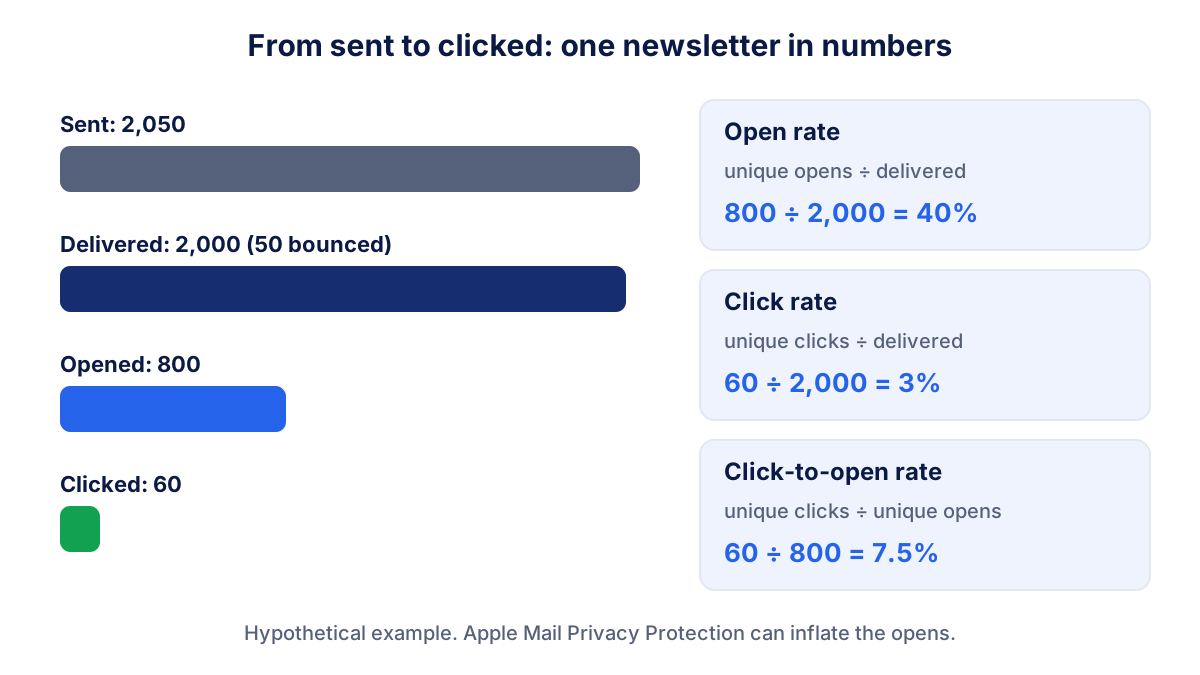
Use unique opens and clicks, not totals. If one subscriber opens the same email five times, that is still one person. Most platforms show both, and the unique figure is the one to report.
Click rate on email is a close cousin of the click-through rate you see in ads and search: clicks divided by the people who had the chance to click.
Why the open rate is no longer reliable
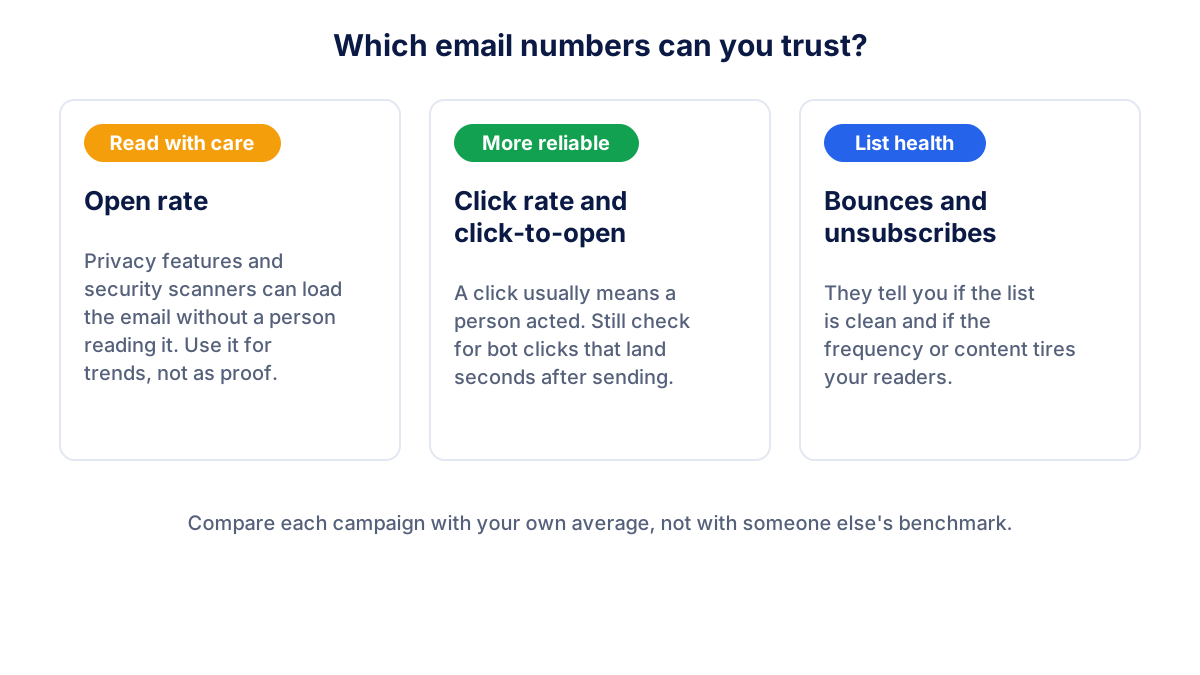
In 2021 Apple introduced Mail Privacy Protection in its Mail app. Apple's own help page on Mail Privacy Protection says it hides your IP address and prevents senders from seeing if you have opened the email they sent you. In practice, when a reader turns it on, Apple loads the email content in the background, tracking image included, whether or not the person reads it.
The effect on your reports is simple: opens go up, and many of them are not people. Mailchimp states that bot activity such as Apple's Mail Privacy Protection can falsely inflate open and click metrics, and it suggests excluding MPP and bot activity from your reports where the option is available.
Apple is not the only source. Company mail servers and security filters often open emails and test links before they reach the inbox. This is why you may see a burst of opens and even clicks a few seconds after sending.
What it means for you:
- Do not compare today's open rate with your open rate from five years ago. The measurement changed.
- Do not use opens to decide a subject line test. If half the opens are automatic, the winner may be random.
- Use the open rate for trends inside your own list, and use clicks and conversions to judge a campaign.
What is a good email open rate?
There is no universal good open rate. Email platforms publish averages by industry, and since Mail Privacy Protection many of those averages sit roughly between 20% and 40%. Treat any such range with care: it depends on your sector, on whether you write to consumers or businesses, on the size and age of your list, and on how many of your readers use Apple Mail.
For click rate, averages are much lower, usually in the low single digits, often between 1% and 5%. A click-to-open rate is higher because it only counts people who opened.
| Metric | Cautious range seen in many reports | What really matters |
|---|---|---|
| Open rate | about 20% to 40%, often higher | stable or rising over your last campaigns |
| Click rate | about 1% to 5% | clicks on the link that leads to a sale or enquiry |
| Click-to-open rate | about 5% to 15% | which content earns the click |
| Unsubscribe rate | below about 0.5% per send | no spikes after one specific email |
| Bounce rate | below about 2% | no sudden jump after an import |
These ranges are not targets. The most useful benchmark is your own average over the last six to ten campaigns. A newsletter with a 25% open rate that keeps steady and drives sales is in better shape than one with 50% opens and no clicks.
Unsubscribe and bounce rates: the health of your list
The unsubscribe rate is unsubscribes ÷ delivered × 100. Some unsubscribes are normal: people change jobs, interests and inboxes. What deserves attention is a spike after a particular email, which tells you the topic, the offer or the frequency did not match expectations.
The bounce rate is the share of emails that could not be delivered. Mailchimp's help on soft and hard bounces explains the two kinds:
- Hard bounce: a permanent reason, such as an address that does not exist. Mailchimp removes these addresses from future sends.
- Soft bounce: a temporary problem, such as a full inbox. After repeated soft bounces Mailchimp treats the address like a hard bounce.
A high bounce rate usually comes from old or imported lists. It hurts more than the numbers suggest, because mailbox providers watch bounces and complaints when deciding whether your next email lands in the inbox or in spam.
How to improve your open and click rates
Start with the things that affect real readers, not the tracking pixel.
- Clean the list. Remove hard bounces and consider a re-engagement email for subscribers who have not clicked in a year. A smaller, active list delivers better.
- Make the sender recognisable. Use a sender name people know, such as your business name or a person from your team, and keep it the same over time.
- Write a specific subject line. "October price list for wooden doors" tells the reader what is inside. Vague teasers get ignored.
- Put one main action first. One clear button near the top earns more clicks than six links of equal weight.
- Send at a steady rhythm. Readers who know when to expect you open more, and a regular cadence keeps unsubscribes stable.
- Tag your links. Add UTM parameters to every link so that Google Analytics shows what email visitors do on your site.
The last step connects email to your business results. Clicks that turn into purchases or enquiries show up in your conversion rate, and that is where a newsletter proves its value.
What to check every month
Ten minutes a month is enough for most businesses:
- Click rate per campaign, compared with your own average of recent sends.
- Click-to-open rate, to see which topics and formats earn clicks.
- Unsubscribes and bounces, looking for spikes rather than single values.
- Open rate trend, only as a signal: a sharp drop can point to a deliverability problem.
- Visits, sales or leads from email in your analytics, thanks to the UTM tags.
- List growth: new subscribers minus unsubscribes and cleaned addresses.
Klyrax connects to Mailchimp in read-only mode and shows your campaigns next to your website, search and ads data, compared with the previous period. On the 1st of each month it writes a short report in plain language with what happened and up to three things to do. To bring email into the bigger picture, see the guide to the monthly marketing report.
Frequently asked questions
What is a good email open rate?
There is no single good number. Since Apple Mail Privacy Protection, many platforms report averages between roughly 20% and 40%, but the figure depends on your sector, list size, audience and how many readers use Apple Mail. A better test is your own trend: if your open rate holds steady across campaigns, the list is healthy. A sudden drop usually points to deliverability or a tired list.
How do you calculate email open rate?
Divide the number of unique opens by the number of delivered emails and multiply by 100. Delivered means sent minus bounced. If you send 2,050 emails, 50 bounce and 800 people open, the open rate is 800 ÷ 2,000 × 100 = 40%. Mailchimp uses delivered emails as the base for both open rate and click rate.
Why is my email open rate so high?
Often because of automatic opens. Apple says Mail Privacy Protection prevents senders from seeing whether you opened their message, and Mailchimp warns that MPP and other bot activity can inflate open and click metrics. Security scanners in company inboxes can also load emails. A jump in opens without more clicks or sales is usually machines, not readers.
What is the difference between click rate and click-to-open rate?
Click rate divides unique clicks by delivered emails, so it measures the whole campaign: subject line, timing and content together. Click-to-open rate divides unique clicks by unique opens, so it measures only how convincing the content was for those who opened. With 60 clicks, 800 opens and 2,000 delivered emails, click rate is 3% and click-to-open rate is 7.5%.
What is a normal unsubscribe rate for a newsletter?
A common rule of thumb is that an unsubscribe rate below about 0.5% per campaign is not a cause for concern, but it varies with how often you send and how the list was built. Watch for sudden spikes after a specific email: they tell you that the topic, the offer or the frequency did not match what subscribers expected.
See how your marketing is really doing
Klyrax connects GA4, Search Console, Google Ads, Meta Ads, your Google reviews and more in read-only mode, shows the numbers that matter for your business and writes you a plain-language report every month.
Request info