
Google AI Mode is a conversational way of searching on Google: you ask a question, Google writes the answer and shows a few links to the pages it used. AI Overviews are the shorter version of the same idea, a summary placed above the normal results. For a business website, both mean that more people see your pages on Google while fewer of them need to click on some types of questions.
This guide explains the difference between AI Overviews and AI Mode, where they are available, how they show up in Search Console, how your site can be cited as a source and what to check from this month on.
What is Google AI Mode?
Google AI Mode is a separate mode of Google Search in which the result is a written answer instead of a list of ten links. You open it from the AI Mode button on google.com, from google.com/ai or from the Google app, and you can keep asking follow-up questions in the same thread, as in a chat.
Behind the answer, Google uses what it calls query fan-out: it splits your question into several related searches, runs them against its index and other data sources, and builds one response from the pages it finds. According to Google's documentation on AI features, this can surface a wider set of pages than a classic results page.
AI Overviews vs AI Mode: what is the difference?
AI Overviews appear inside the normal results page. They are a block at the top with a short AI summary and links to sources, and the usual organic results, ads and maps are still below. Google says it shows them only when they add something to classic Search, so many queries have no AI Overview at all.
AI Mode replaces the results page. The person has chosen to search in conversation, so the AI answer is the whole screen and the links sit next to or inside the text.
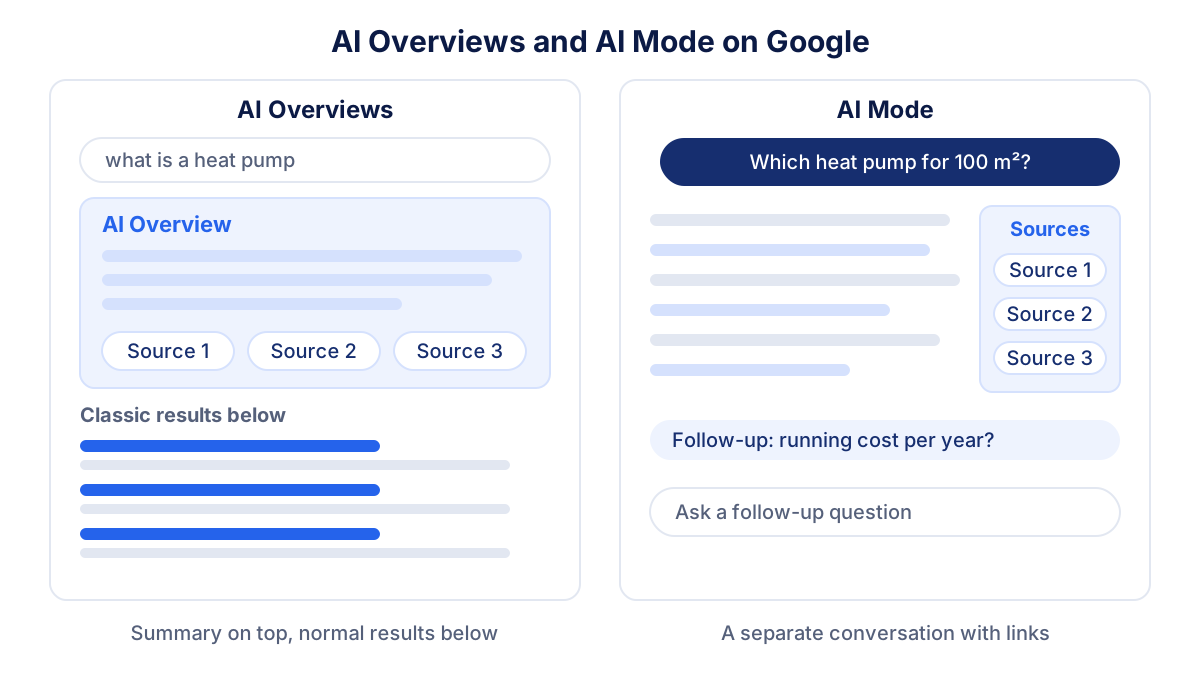
| AI Overviews | AI Mode | |
|---|---|---|
| Where it appears | top of a normal results page | separate screen or tab |
| When | only on queries where Google judges it useful | when the user chooses it |
| Classic results below | yes | no, links are inside the answer |
| Follow-up questions | no, a new search | yes, in the same thread |
| Typical query | "what is a heat pump" | "which heat pump for a 100 m² flat, and what does it cost to run" |
| Counted in Search Console | Performance, Web search type | Performance, Web search type |
Where are Google AI Mode and AI Overviews available?
AI Overviews reached the United States first, in 2024, and AI Mode followed there in 2025. Both have since spread to most countries. When we checked Google's help pages on 27 October 2026, the lists of supported countries for both features included the United States, Italy, France, Germany and Spain, and the supported languages included English, Italian, French, German and Spanish.
Availability still varies by account and device, and some newer functions inside AI Mode reach fewer countries than the mode itself. If a feature is missing for you, check the current list in the Google Search Help center rather than an old news article.
How do AI Overviews and AI Mode change your website traffic?
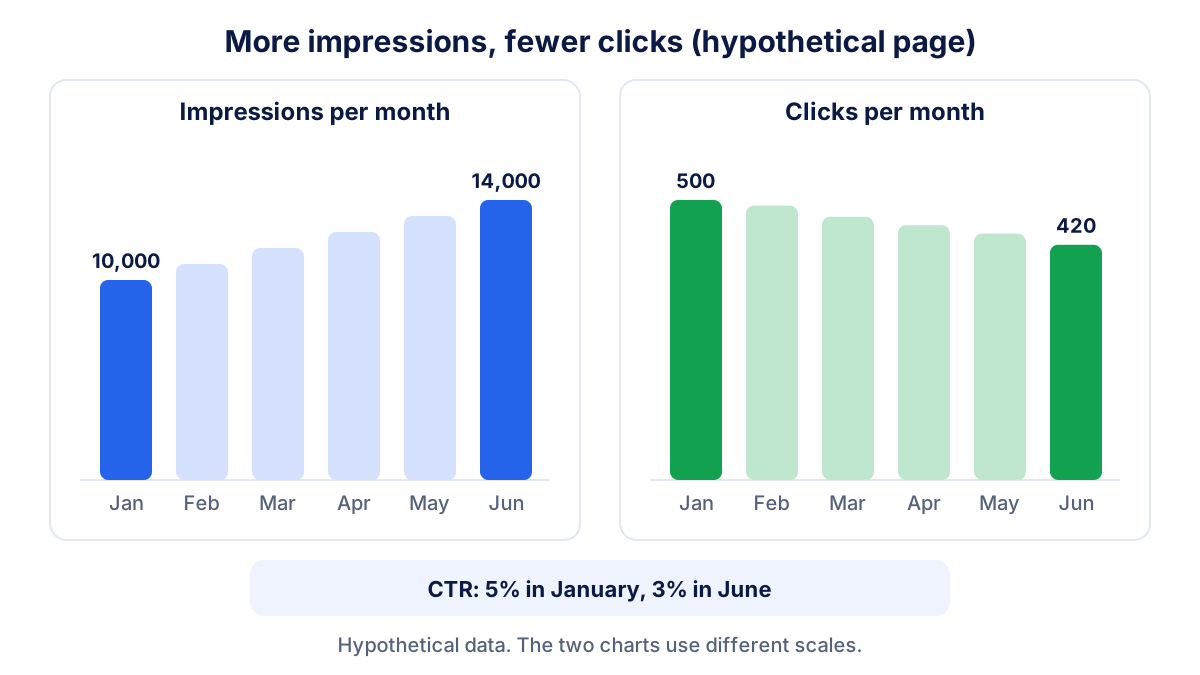
The pattern many site owners see in their reports is simple: impressions go up, clicks do not follow. Two mechanics explain it.
First, an AI answer that links to your page counts as an impression for you even if the person reads the summary and stops there. Because fan-out pulls in more pages per question, a page can collect impressions on queries where it would never have ranked on the first page of classic results.
Second, for simple informational questions ("opening hours of…", "what does ROAS mean") the summary often answers well enough. The person gets the answer on Google and does not visit any site. The effect is strongest on definitions and quick facts, and weaker on queries where people need to buy, book, compare offers or contact someone.
Take a hypothetical guide page on your site. In January it had 10,000 impressions and 500 clicks: a click-through rate of 5%. Six months later, with AI answers on more of its queries, it has 14,000 impressions and 420 clicks.
CTR = clicks ÷ impressions × 100
The CTR falls from 5% to 3%. The page is more visible and brings fewer visits. Google says that clicks from results pages with AI Overviews are "higher quality", meaning people tend to spend more time on the site, so look at what those visitors do as well: enquiries, purchases, time on page.
How to see AI Mode and AI Overviews in Search Console
Google does not hide this traffic, but it does not separate it either. The rules, from the Search Console help on Performance data:
| Metric | AI Overviews | AI Mode |
|---|---|---|
| Impression | standard rules: your link is shown | standard rules: your link is shown |
| Click | a click on a link to your page | a click on a link to your page |
| Position | the whole AI Overview takes one position, all its links share it | same method as a normal results page |
| Follow-up question | not applicable | counted as a new query |
All of this is inside the Performance report under the "Web" search type, together with classic results. Data from experiments in Search Labs is not included. If you are new to the report, the Search Console guide explains impressions, clicks, CTR and position.
Since 2026 Search Console also has a Generative AI performance report. It shows impressions in AI Overviews and AI Mode by page, country, device and date, and Google had rolled it out to all websites by 31 August 2026. The help page for the report lists impressions as the metric, not clicks, and the report may not appear if your site has very few impressions in these features.
A practical way to read both:
- Open the Generative AI report and note your top pages by AI impressions for the last three months.
- Open the Performance report, filter the same pages and compare impressions, clicks and CTR with the same period last year.
- Where AI impressions are high and CTR has dropped, the AI answer is probably satisfying the question on Google.
- Check in Google Analytics whether visits from those pages still lead to enquiries or sales. The guide to Search Console vs Google Analytics explains why the two tools never match exactly.
How can your business be cited as a source?
Google's position is clear: there are no special optimizations for AI Overviews or AI Mode. A page needs to be indexed and eligible to show a snippet. No special schema, no AI text file, no need to cut content into small pieces. What helps is what helps normal SEO, written with the question in mind.
- Answer first. Put the direct answer in the first two or three sentences of the page or section, then the detail.
- One question per section. Headings phrased like real questions make it easier for fan-out searches to land on the right passage.
- Original facts. Your prices, your process, your experience, your data. A page that repeats what ten other pages say gives Google no reason to cite it.
- Tables and lists. Comparisons, steps and specifications are easy to quote.
- Up to date business details. Google says a complete Google Business Profile can help local businesses appear in AI responses. Keep address, hours and services consistent everywhere.
- Crawlable pages. Check that robots.txt, your CDN or a security plugin do not block Googlebot, and that important text is not hidden behind scripts.
The same habits help in ChatGPT, Gemini, Perplexity and Claude. The guide to AI visibility in ChatGPT shows a monthly test you can run yourself, and GEO vs SEO explains where generative engine optimization adds to classic SEO.
Should you exclude your site from AI features?
Search Console now has a Search generative AI control under Settings. Include is the default. Exclude keeps your content out of AI Overviews, AI Mode and generative features in Discover, and you receive no impressions or traffic from them. Google states in the help page for the control that the setting is not used as a ranking signal for the rest of Search and that it does not affect AI training, which is managed with Google-Extended.
For most businesses, excluding the site is a poor trade. Your competitors stay in the answer and you disappear from it. It can make sense for a publisher whose income depends on page views, or for a page with content you do not want summarized. For single pages, the older nosnippet and max-snippet controls limit what Google can show.
What to do now: a monthly checklist
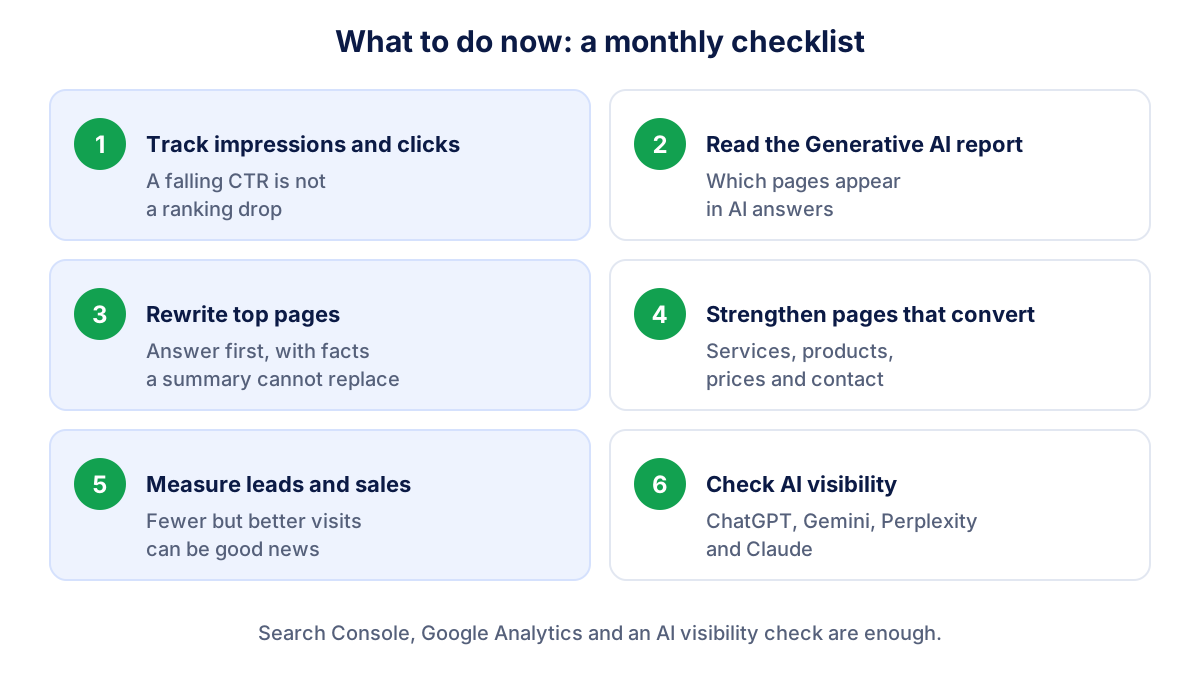
- Track impressions and clicks separately. A falling CTR with rising impressions is not a ranking problem.
- Read the Generative AI report. Note which pages appear in AI answers and whether the list grows.
- Rewrite your top informational pages answer-first, with original facts the summary cannot replace.
- Strengthen the pages that convert. Service, product, price and contact pages are the ones people still click.
- Measure leads and sales, not only visits. Fewer but better visits can be good news.
- Check AI visibility outside Google and your share of voice against competitors.
Klyrax shows your Search Console clicks and impressions next to each other in the summary, compared with the previous period, and the monthly report explains in plain language when impressions grow and clicks do not. Through the psentry integration it also shows how often ChatGPT, Gemini, Perplexity and Claude mention your business.
Frequently asked questions
What is Google AI Mode?
Google AI Mode is a conversational mode of Google Search. You type or speak a question, Google runs several related searches in the background and writes an answer with links to the pages it used. You can then ask follow-up questions in the same thread. It opens from the AI Mode button on google.com or in the Google app, separate from the normal list of results.
What is the difference between AI Overviews and AI Mode?
AI Overviews are a short AI summary that appears at the top of some normal results pages, with the classic blue links still below. Google shows them only when it judges them useful for the query. AI Mode is a separate screen where the whole experience is the AI answer and the conversation. AI Overviews come to you; AI Mode is a place you choose to go.
Can I see AI Mode traffic in Google Search Console?
Yes, partly. Clicks and impressions from AI Overviews and AI Mode are counted in the Performance report under the Web search type, mixed with classic results. The Generative AI performance report shows impressions in those features by page, country, device and date, but not clicks. Comparing the two reports tells you how much of your visibility now comes from AI answers.
How do I get my website cited in Google AI Overviews?
Google says there are no extra technical requirements: the page must be indexed and eligible to show a snippet in Search. Beyond that, write pages that answer a specific question in the first lines, with original facts, clear headings, tables and up to date business details. No special markup or AI text file is needed, and nobody can guarantee a citation.
Can I turn off AI Mode or AI Overviews on Google?
As a searcher, you cannot switch AI Overviews off, but you can use the Web filter after a search to see only text links, and you simply do not open AI Mode if you do not want it. As a site owner, Search Console has a Search generative AI setting that excludes your site from these features, at the cost of losing their impressions and clicks.
See how your marketing is really doing
Klyrax connects GA4, Search Console, Google Ads, Meta Ads, your Google reviews and more in read-only mode, shows the numbers that matter for your business and writes you a plain-language report every month.
Request info