
Google Merchant Center is the free Google account where an online shop uploads its products so they can appear on Google: for free in the Shopping tab (free listings) and, if you link Google Ads, in paid Google Shopping ads. If you sell online, it is one of the few places where Google shows your price, photo and stock before anyone visits your site.
This guide is for a shop owner who wants it working without an agency: what to choose between free listings and Shopping ads, the setup steps, the product feed, the disapprovals that block most shops and the numbers to check every month.
What does Google Merchant Center do for an online shop?
Merchant Center holds your product data: title, price, photo, availability, shipping and returns. Google uses that data to show your products in Google Shopping, in search results with price and stock, in Google Images and, depending on the country, on YouTube and Maps.
Merchant Center does not sell anything and does not take payments. Shoppers who click go to your product page and buy there. Think of it as a catalogue you hand to Google, which Google checks against your website.
Free listings vs Google Shopping ads: which do you need?
Both run on the same product data. The difference is who decides how often your products show.
| Free listings | Google Shopping ads | |
|---|---|---|
| Cost | free | you pay per click (Google Ads) |
| Where | Shopping tab, rich results in Search, Images, sometimes YouTube | top of Search results, Shopping tab, partner sites |
| Control | none: Google decides | budget, bids, which products to push |
| Traffic | usually modest | can scale with budget |
| Setup | Merchant Center only | Merchant Center linked to Google Ads |
| Good for | every shop, from day one | shops with clear margins and a tested product range |
Free listings are usually switched on by default once products are approved (Google: about free listings). There is no reason to skip them. Shopping ads are a business decision: they make sense when you know how much a sale can cost you, which the Google Ads cost guide helps you estimate.
In Google Ads, Shopping products can run in a Shopping campaign or in a Performance Max campaign, both reading the feed from your linked Merchant Center account. Campaign types and their options change often, so check the current choices inside Google Ads when you create one.
How to set up Google Merchant Center: 6 steps
You need a Google account with admin access and about an hour, plus the time for Google's review.
- Create the account. Sign in at Merchant Center with the Google account the business will keep. One Google account can create only one Merchant Center account.
- Add business details. Store name, business address and country. The country you choose cannot be changed later, so pick the one where you sell.
- Verify and claim your website. Under Settings, Business info, add your online store URL and verify it: through your e-commerce platform, an HTML tag or file, Google Tag Manager or Google Analytics (verification methods).
- Set shipping and returns. Add shipping costs and delivery times, and your return policy. Shipping settings are required in several countries, including the US, the UK, Germany and France.
- Add your products. Let Google read them from your site, connect your shop platform (Shopify, WooCommerce and others have a Google app or plugin that syncs automatically), or upload a file or Google Sheet.
- Check approvals, then link Google Ads if you want ads. Wait for the review, fix anything in Needs attention, and only then decide on Shopping ads.
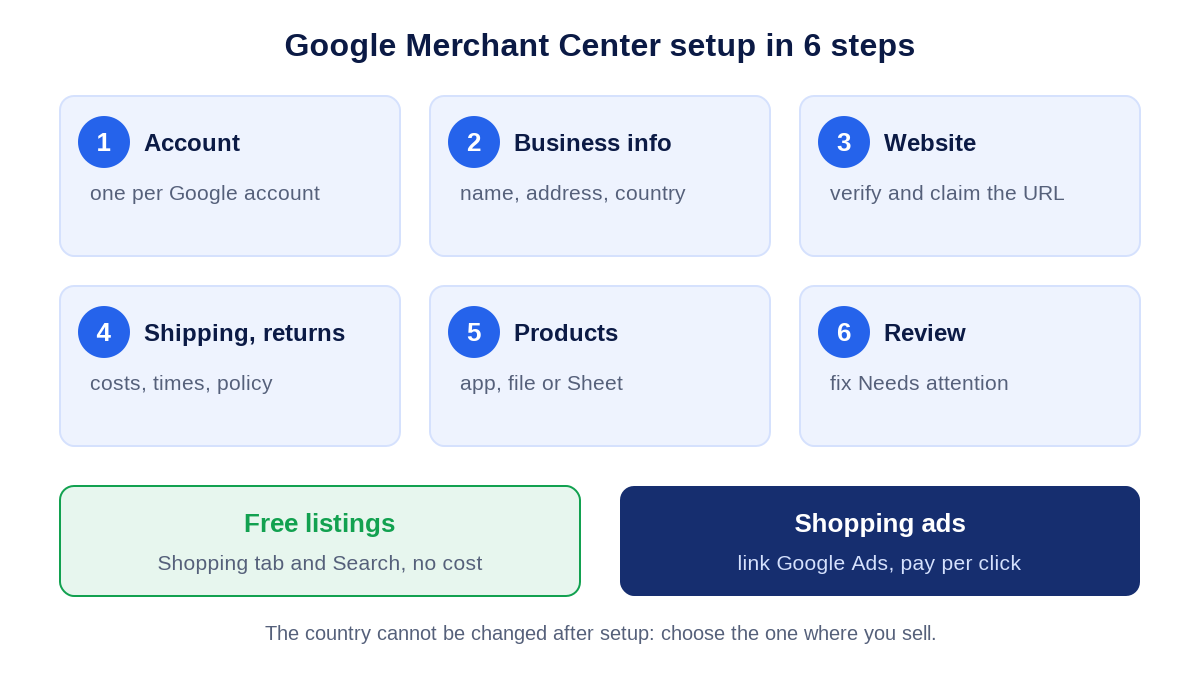
If your platform offers an official Google integration, use it. It keeps price and stock in sync automatically, which prevents the most common disapprovals.
Product feed basics: the attributes that matter
The product feed is the list of your products with their attributes. Google requires some for every product and others depending on the product.
| Attribute | What it is | Tip |
|---|---|---|
| id | your unique product code | never reuse it for another product |
| title | product name | brand, product type and key detail: "Linen shirt men white" |
| description | text about the product | what it is, material, size; no shop slogans |
| link | URL of the product page | must open that exact product, not a category |
| image_link | main photo | clean photo, no promo text or watermark |
| price and availability | price and stock | must match the product page exactly |
| brand, gtin, mpn | identifiers | GTIN if the manufacturer assigned one, otherwise brand and MPN |
| condition | new, used, refurbished | required for used or refurbished products |
The full list is in Google's product data specification. Clothing needs extra attributes such as color, size, age group and gender.
Titles matter most for results. Shoppers search "running shoes women size 38", not your collection name. Put the words people search at the start of the title and keep marketing phrases out.
Common Merchant Center disapprovals and how to fix them
Product issues appear in the Needs attention tab of Products. Google distinguishes warnings, where products keep showing but may perform worse, from disapprovals, where products stop showing (Google: fix product issues). Account level issues appear as a banner and affect every product.
| Issue | Typical cause | Fix |
|---|---|---|
| Price mismatch | price on the site changed, feed did not | automatic sync or automatic item updates |
| Availability mismatch | out of stock on the site, in stock in the feed | sync stock, update the feed more often |
| Landing page not working | broken link, redirect to the home page | link each product to its own live page |
| Image problems | promo text, placeholder, blocked image | plain product photo, allow Googlebot-image |
| Missing identifiers | no brand, GTIN or MPN | add the real values, never invent a GTIN |
| Missing shipping or returns | settings not completed | complete shipping and return policy |
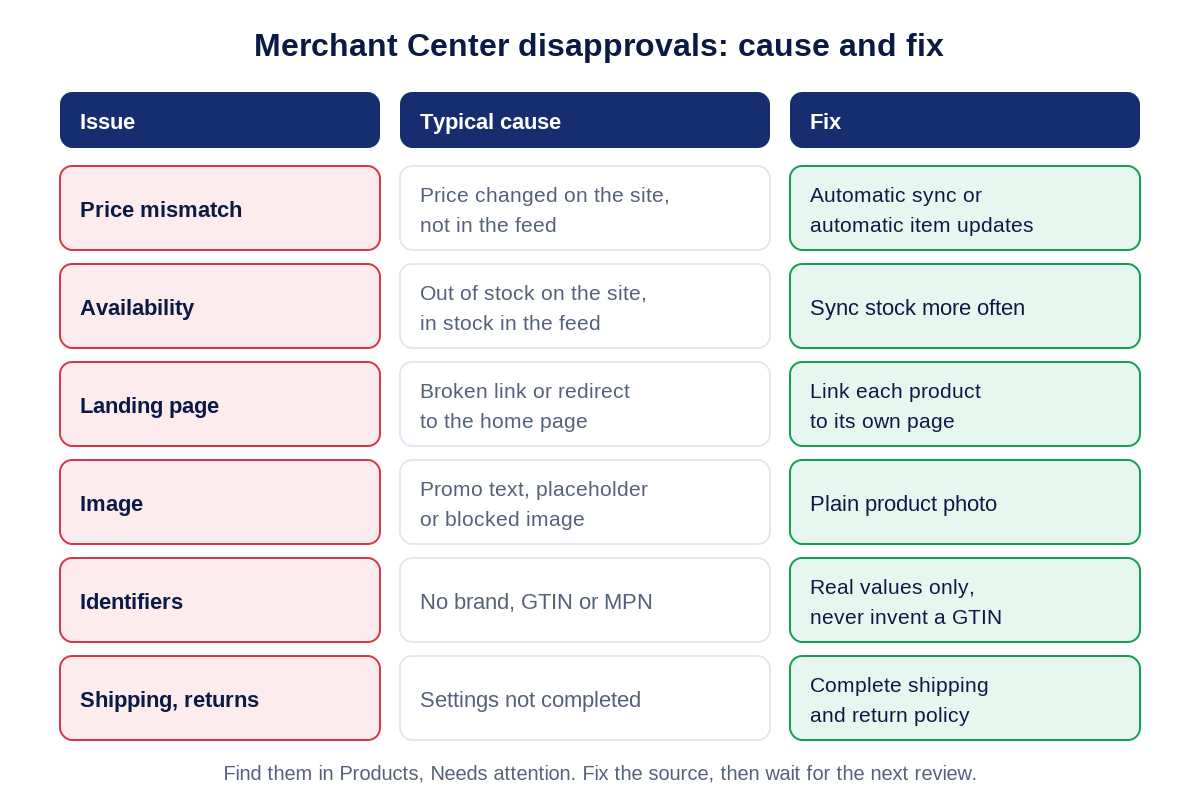
A price or availability mismatch can lead to a preemptive disapproval: Google pulls the product until the data matches. Fixing the sync once usually solves dozens of products at a time.
Account suspensions are rarer but more serious. They usually come from missing business information, unclear return policies or policy problems with the products. Read the banner, fix what it names and request a review.
Which numbers to watch in Merchant Center and Google Ads
Merchant Center's performance reporting shows clicks, impressions and CTR, and lets you split free traffic from ads. Google Ads adds cost and conversions for Shopping ads. Here is one hypothetical month for a shop with an $80 average order and a 40% gross margin.
| Free listings | Shopping ads | |
|---|---|---|
| Impressions | 30,000 | 100,000 |
| Clicks | 600 | 2,000 |
| CTR | 2% | 2% |
| Cost | $0 | $1,000 ($0.50 per click) |
| Orders (2% conversion) | 12 | 40 |
| Revenue | $960 | $3,200 |
| ROAS | n/a | 3.2 |
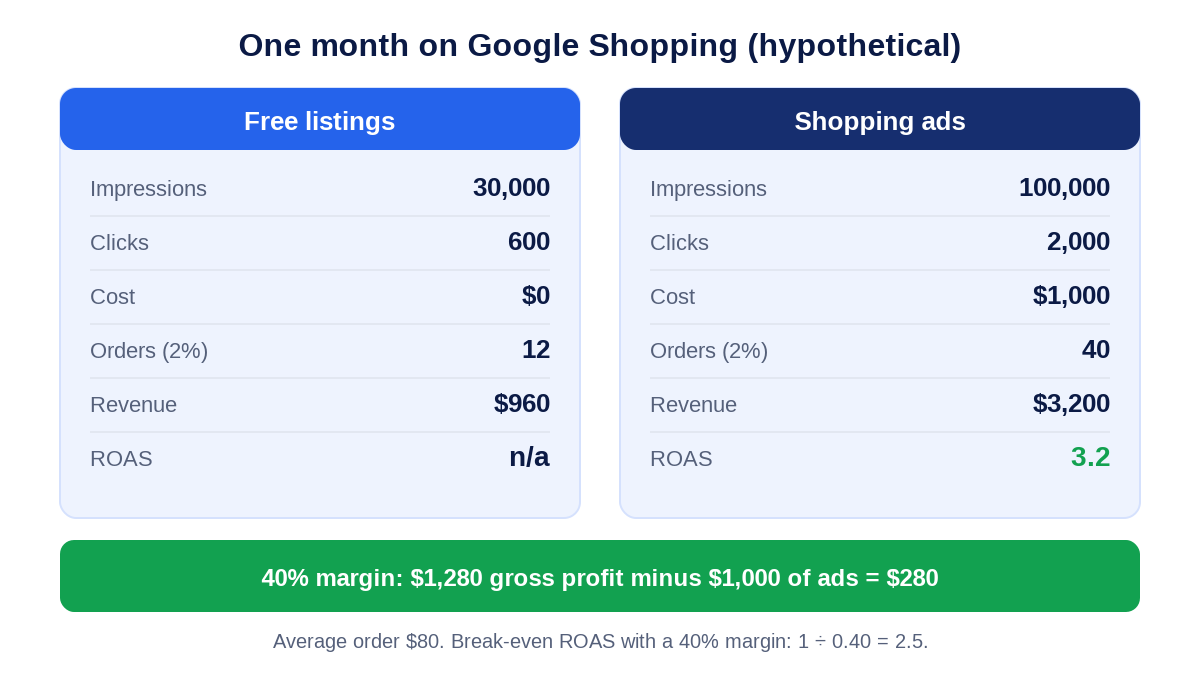
The free listings bring 12 orders for nothing. The ads bring 40 orders for $1,000. Are the ads worth it? Gross profit is $3,200 × 40% = $1,280, minus $1,000 of spend leaves $280. With a 40% margin the break-even ROAS is 1 ÷ 0.40 = 2.5, so 3.2 is above it. The ROAS guide explains this break-even in detail.
Check these every month:
- Approved vs disapproved products. A sudden drop in approved products explains a drop in sales faster than any other number.
- Clicks from free listings. Free traffic that grows month after month is a sign your titles and prices work.
- CTR by product. Products with many impressions and few clicks often have a weak photo or a high price compared with other sellers.
- Shopping ads cost, revenue and ROAS. Compare ROAS with your break-even ROAS, not with an average from a blog.
- Conversion rate on product pages. If clicks rise and orders do not, the problem is on your site. The conversion rate guide covers what to check.
In Google Analytics 4, visits from Google Shopping appear in channel groups such as Organic Shopping and Paid Shopping, so you can compare their sales with your other ecommerce KPIs. Expect small differences between Merchant Center, Google Ads and GA4: each counts clicks and conversions in its own way.
Free listings or Shopping ads first?
For most small shops the order is simple: free listings first, ads later.
- Start with free listings when the feed is new, you are still fixing disapprovals, or you do not know your margin per product.
- Add Shopping ads when the feed is clean, you know your break-even ROAS and you can spend for at least a month without judging it after one week.
- Start ads with a few products, the ones with good margins, good photos and competitive prices, rather than the whole catalogue.
Klyrax does not connect to Merchant Center, but it puts Google Ads spend and ROAS next to the sales and channel data from Google Analytics 4 in one summary for an online shop. On the 1st of each month a written report explains what changed and up to three things to do.
Mistakes that cost shops sales on Google Shopping
- Updating prices on the site and not in the feed. It is the fastest way to disapprovals. Automate the sync.
- Titles written for the brand, not for search. "Summer Dream" says nothing. "Women's linen dress blue midi" does.
- Inventing GTINs. A wrong identifier causes more trouble than a missing one.
- Linking products to the home page or a category. Every product needs its own page with the same price.
- Judging Shopping ads after a few days. Give a campaign a full month of data before deciding.
- Ignoring free listings once ads are running. Free clicks still count and cost nothing. Keep an eye on them in the same monthly check.
Set up Merchant Center once, keep the feed in sync and look at approvals, clicks and ROAS once a month. That routine is enough for most online shops to get steady, measurable traffic from Google Shopping.
Frequently asked questions
Is Google Merchant Center free?
Yes. Creating a Google Merchant Center account and showing products in free listings costs nothing. You only pay when you run Shopping ads or Performance Max campaigns in Google Ads, where you are charged for clicks like any other Google Ads campaign. Free listings are usually turned on by default once your products are approved.
What is the difference between free listings and Google Shopping ads?
Both use the same product data from Merchant Center. Free listings appear without cost in the Shopping tab and other Google surfaces, but you cannot control when or how often they show. Shopping ads are paid per click through Google Ads, appear in more prominent positions and let you set budgets and bids, so they bring far more traffic.
How long does it take for products to be approved in Merchant Center?
Google reviews new products after you add them, which usually takes a few days. Impressions may not appear right away even for approved products. If products stay in the Needs attention tab, open the issue, fix the product page or the feed, and wait for the next review instead of uploading the same data again.
Do I need a GTIN for Google Shopping?
Google strongly recommends the GTIN (the barcode number) whenever the manufacturer assigned one, and asks for brand and MPN when there is no GTIN. Products you make yourself often have no GTIN: in that case leave it empty rather than inventing one, because a wrong GTIN causes more problems than a missing one.
Can I use Google Merchant Center without a website?
For free listings and Shopping ads that send people to your shop, you need a website with product pages where people can buy, and you have to verify and claim that website. Physical stores can also show products locally, but that setup is different and depends on the country and the programs available.
See how your marketing is really doing
Klyrax connects GA4, Search Console, Google Ads, Meta Ads, your Google reviews and more in read-only mode, shows the numbers that matter for your business and writes you a plain-language report every month.
Request info