
Microsoft Ads is Microsoft's advertising platform for search ads on Bing and its partner search engines, plus display, native and video ads on Microsoft sites. Its official name is Microsoft Advertising, and until 2019 it was called Bing Ads. For a business that already uses Google Ads, it is the most direct second search channel to test: the same keywords, the same kind of ads, a different audience and often less competition.
This guide explains where Microsoft Ads appear, who you reach, how the platform compares with Google Ads, when a test makes sense for a small or local business, how to set up a first campaign and how to read the results month by month.
What is Microsoft Ads (formerly Bing Ads)?
Microsoft Ads is a pay-per-click platform: you choose keywords, write ads, set a budget and pay when someone clicks. An auction decides which ads appear and in what order, much like on Google. Bing Ads became Microsoft Advertising in April 2019, and the name "Microsoft Ads" is the short form most people now use.
Two kinds of campaigns matter for most businesses:
- Search campaigns: text ads next to the results when someone searches for what you sell. This is the core of the platform.
- Audience campaigns: display, native and video ads shown to people while they read news, check email or open a new browser tab.
There are also Shopping campaigns for online shops and Performance Max campaigns that combine several placements. For a first test, a search campaign is enough.
Where do Microsoft Ads appear?
Microsoft calls the set of places where ads can run the Microsoft Advertising Network. According to its help page on the Microsoft Advertising Network, search ads can appear with search results on Microsoft Bing, AOL, Yahoo, DuckDuckGo, Ecosia and other partners, while audience ads can appear on sites such as MSN, Microsoft Start, Microsoft Edge, Outlook.com and publisher partners.
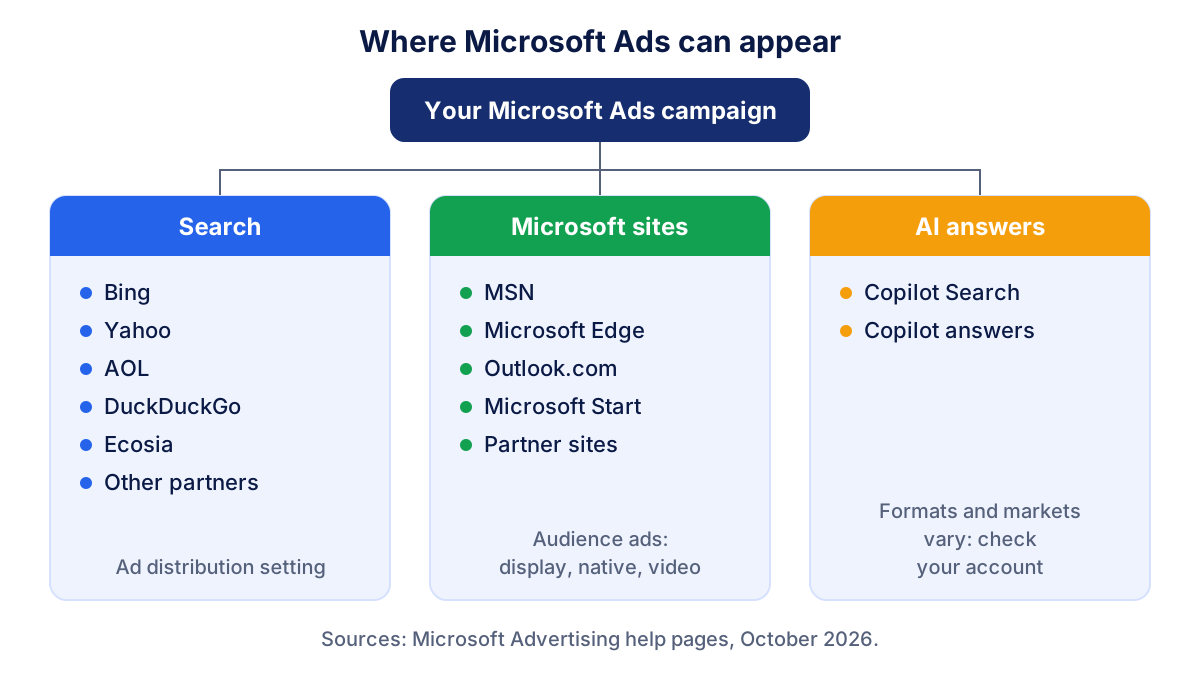
Microsoft also shows ads inside Copilot, its AI assistant. On its advertising blog, Microsoft describes ads in Copilot Search and Copilot answers and new formats for retail. Several of these formats are in pilot or available only in some markets, so check what your account offers before counting on them.
For search ads, the ad distribution setting decides how far your ads travel. The ad distribution settings page lists two options: the entire Microsoft Advertising Network (recommended by Microsoft, with additional partner traffic and lower cost per click) or Microsoft sites and select traffic. The setting lives at ad group level. Partner sites can be checked in the Website URL (publisher) report and excluded one by one.
Who can you reach with Microsoft Ads?
Bing is the default search engine in Microsoft Edge and in Windows search, so a good part of its traffic comes from computers at work and at home. Microsoft Ads therefore tends to suit businesses whose customers search from a desk: B2B services, professional services, software, finance, travel planning and many online shops.
The platform adds one targeting option Google does not have: LinkedIn profile targeting. Microsoft's help page on LinkedIn profile targeting explains that you can adjust bids for people by company, industry or job function. It does not narrow your audience; it raises or lowers your bid for those profiles. It is not available for every target market, so check the market availability page in the help center for yours.
Do not expect the same volume as Google. In most countries Google handles far more searches, so the same campaign will collect fewer impressions and clicks on Microsoft Ads. The question is whether those clicks cost less and convert as well.
Microsoft Ads vs Google Ads: how do they compare?
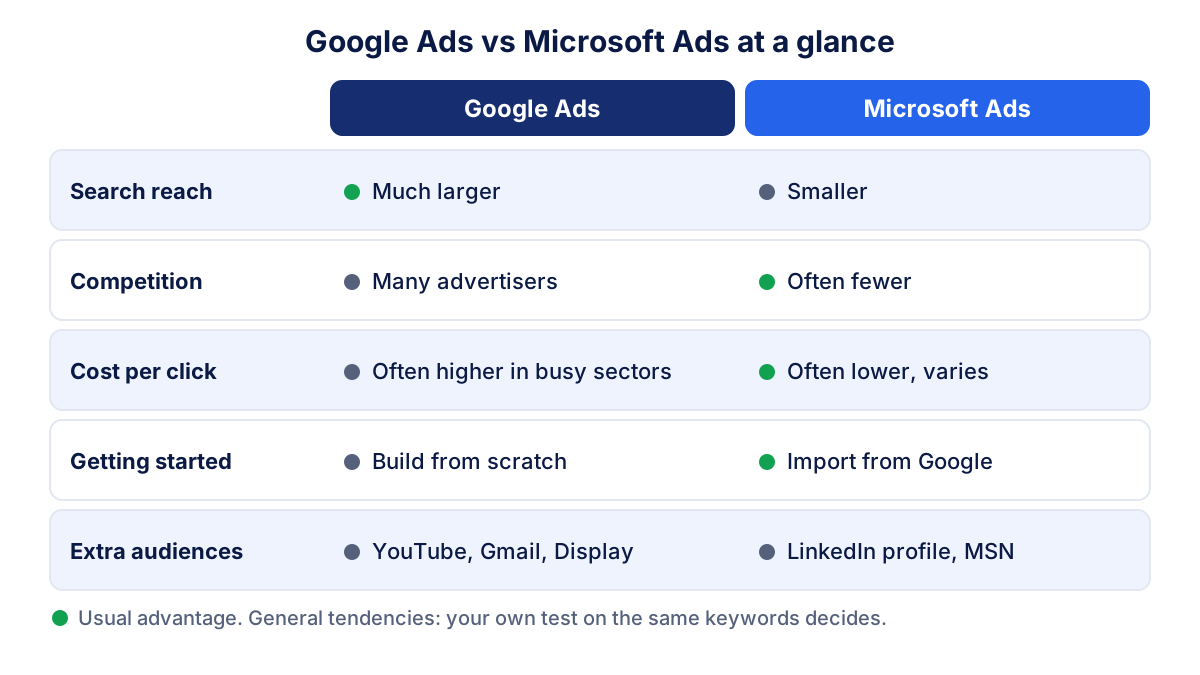
The two platforms work in a very similar way. The differences are in reach, competition and a few targeting options.
| Google Ads | Microsoft Ads | |
|---|---|---|
| Search reach | Much larger in most markets | Smaller: Bing, Yahoo, AOL, DuckDuckGo, Ecosia and partners |
| Competition | Many advertisers in most sectors | Often fewer advertisers for the same keywords |
| Cost per click | Set by the auction; often higher in crowded sectors | Set by the auction; often lower, but it varies by sector and country |
| Setting up | Build campaigns from scratch | Google Import copies existing Google Ads campaigns |
| Audience options | Google audiences, YouTube, Gmail, Display Network | LinkedIn profile targeting, MSN, Edge, Outlook.com |
| Conversion tracking | Google tag | UET tag (Universal Event Tracking) |
How Google prices clicks is explained in our guide to Google Ads cost. The logic is the same on Microsoft Ads: your bid, the quality of your ad and landing page, and how many rivals bid on the same search.
When is Microsoft Ads worth testing for a small business?
A test usually makes sense when three things are true:
- Google search campaigns already work. You have keywords and ads that bring leads or sales at a cost you accept. These are what you import.
- Conversions are tracked. Without conversion tracking you only know what you spent, on either platform.
- The budget can cover both. If your Google campaigns are already short of budget, put the money there first.
For a local business the same rules apply, with one more check: search volume in your area. A plumber in a small town may get only a handful of Bing searches per month for "emergency plumber". Microsoft's Keyword Planner shows estimated volumes for your keywords and location. If the numbers are tiny, the test will tell you little. Our guide to local Google Ads covers location targeting and call assets; Microsoft Ads has similar settings for location and calls.
A simple plan for your first Microsoft Ads campaign
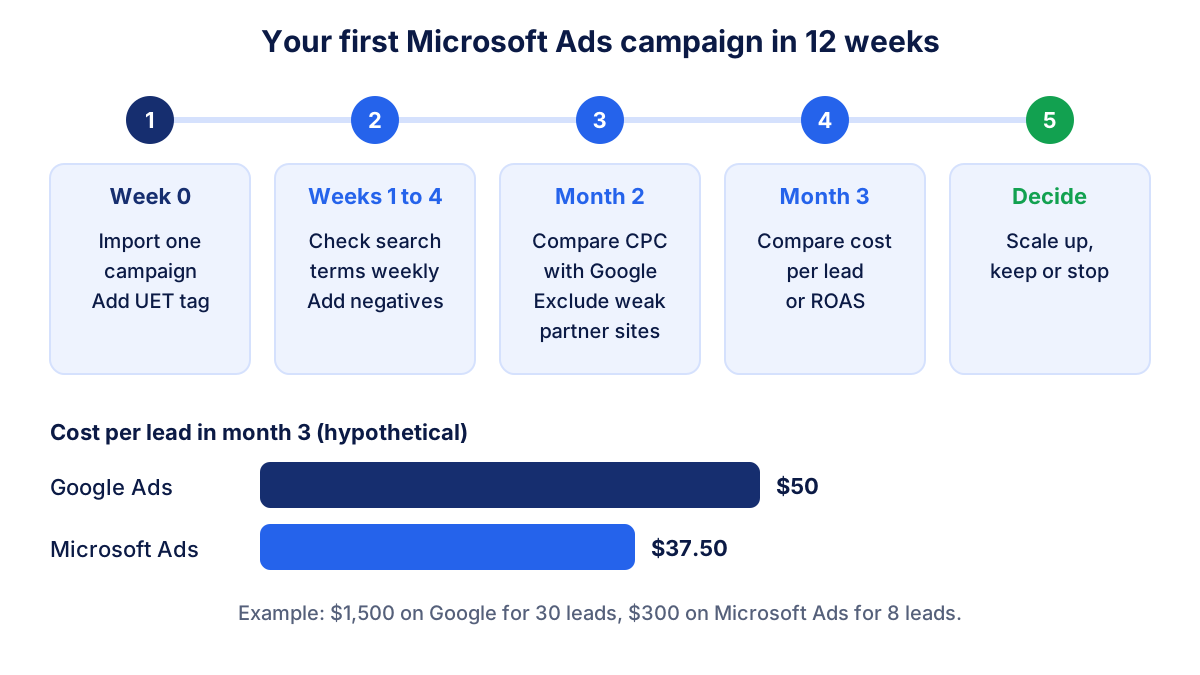
- Create the account in your company's name and set the billing details. If an agency manages your ads, ask it to work in your account as a user.
- Install the UET tag on your site and create the same conversion goals you use in Google Ads: form sent, call, purchase.
- Import one campaign with Google Import. Choose your best search campaign, not all of them. Microsoft's page on what gets imported from Google Ads lists the exceptions: unsupported bid strategies are replaced, and some settings must be added back.
- Check the imported settings: location, language, ad schedule, budget and ad distribution. Import it once rather than on a recurring schedule, so the changes you make later are not overwritten.
- Set a test budget. A practical rule is 10% to 20% of what the same campaign spends on Google. If Google gets $1,500 a month, start Microsoft Ads at $150 to $300.
- Review search terms every week in the first month and add negative keywords, as you would on Google.
How to read Microsoft Ads results month by month
Read the same numbers you read for Google Ads: spend, impressions, clicks, average cost per click, click-through rate, conversions, cost per conversion and, for an online shop, revenue and ROAS. Then put the two platforms side by side.
A hypothetical third month:
| Google Ads | Microsoft Ads | |
|---|---|---|
| Spend | $1,500 | $300 |
| Clicks | 1,000 | 250 |
| Average CPC | $1.50 | $1.20 |
| Leads | 30 | 8 |
| Cost per lead | $50 | $37.50 |
Cost per lead = spend ÷ leads
In this example Microsoft Ads brings fewer leads at a lower cost per lead, so adding budget is reasonable until the cost per lead approaches Google's. The opposite result is just as possible. These figures are an example, not a benchmark.
What to look at each month:
- Month 1: is the campaign spending, and are conversions recorded? Clean up search terms. Do not judge cost per lead yet.
- Month 2: compare cost per click and conversion rate with Google on the same keywords. Check the publisher report and exclude partner sites that bring clicks without leads.
- Month 3: compare cost per lead or ROAS. Scale up, keep as it is or stop.
Common mistakes with Microsoft Ads
- Importing everything at once. Twenty campaigns with a small budget each learn nothing. Start with one.
- Never checking after import. Bid strategies, locations and ad extensions can change during import. Review before launch.
- Leaving recurring import on. A scheduled import can overwrite the bids and negatives you set in Microsoft Ads.
- No UET tag. Without it, Microsoft Ads reports clicks but no conversions, and automated bidding has nothing to learn from.
- Ignoring partner traffic. Look at the Website URL report and exclude sites that waste budget.
- Comparing raw volumes. Microsoft Ads will always bring fewer clicks than Google. Compare cost per lead and ROAS, not totals.
- Forgetting organic Bing. If people search for you on Bing, your free listings matter too. Our Bing Webmaster Tools guide shows how to check them.
Seeing Microsoft Ads and Google Ads in one place
Switching between two ad platforms every month is where most comparisons stop. Klyrax connects in read-only mode to Microsoft Ads, Google Ads and Bing Webmaster Tools, shows spend, clicks, conversions and ROAS from both ad platforms side by side in one summary, and on the 1st of each month writes a plain-language report on what changed and what to do next. With or without a tool, the rule is the same: judge Microsoft Ads by cost per lead or ROAS against Google, over at least two to three months.
Frequently asked questions
What is Microsoft Ads?
Microsoft Ads is the common name for Microsoft Advertising, the advertising platform from Microsoft. You pay per click for text ads that appear next to search results on Bing and partner search engines, and you can also run display, native and video ads on Microsoft sites such as MSN, Microsoft Edge and Outlook.com. It works much like Google Ads: keywords, an auction, budgets and conversion tracking.
Is Bing Ads the same as Microsoft Ads?
Yes. Bing Ads was renamed Microsoft Advertising in April 2019, and many people now call it Microsoft Ads. The platform, the accounts and the way campaigns work stayed the same. Bing is still the name of the search engine, which is why searches for "bing ads" and "microsoft ads" lead to the same product.
Is Microsoft Ads cheaper than Google Ads?
Often, but not always. Microsoft Ads runs an auction like Google, and in many sectors fewer advertisers compete for the same keyword, which can lower the cost per click. Search volume is also much smaller. The only reliable answer comes from your own test: compare the cost per lead or the ROAS of both platforms on the same keywords over the same months.
Can I import my Google Ads campaigns into Microsoft Ads?
Yes. Microsoft Advertising has a Google Import tool that signs in to your Google Ads account and copies campaigns, ad groups, keywords, ads, bids and budgets. You can import everything or only selected campaigns, once or on a schedule. Not everything transfers: some bid strategies are replaced and some settings must be rebuilt, so review every imported campaign before it starts spending.
Is Microsoft Ads worth it for a small business?
It is worth a test when your Google Ads search campaigns already bring leads or sales at a cost you accept, because then you have a proven set of keywords and ads to copy. It is less useful when your market searches very little, or when your budget is too small to run Google Ads properly. Start with 10% to 20% of your Google search budget.
See how your marketing is really doing
Klyrax connects GA4, Search Console, Google Ads, Meta Ads, your Google reviews and more in read-only mode, shows the numbers that matter for your business and writes you a plain-language report every month.
Request info