
WhatsApp Business is Meta's way for a company to chat with customers on WhatsApp. It comes as a free app for small teams and as a paid platform (the API) for larger setups. Most companies need the free app, a clear way to count the chats it brings, and nothing else.
This guide answers the practical questions: which version you need, what it costs, which features save time, and how to measure the contacts WhatsApp brings you, from the click on your website to the cost per chat.
WhatsApp vs WhatsApp Business: which one do you need?
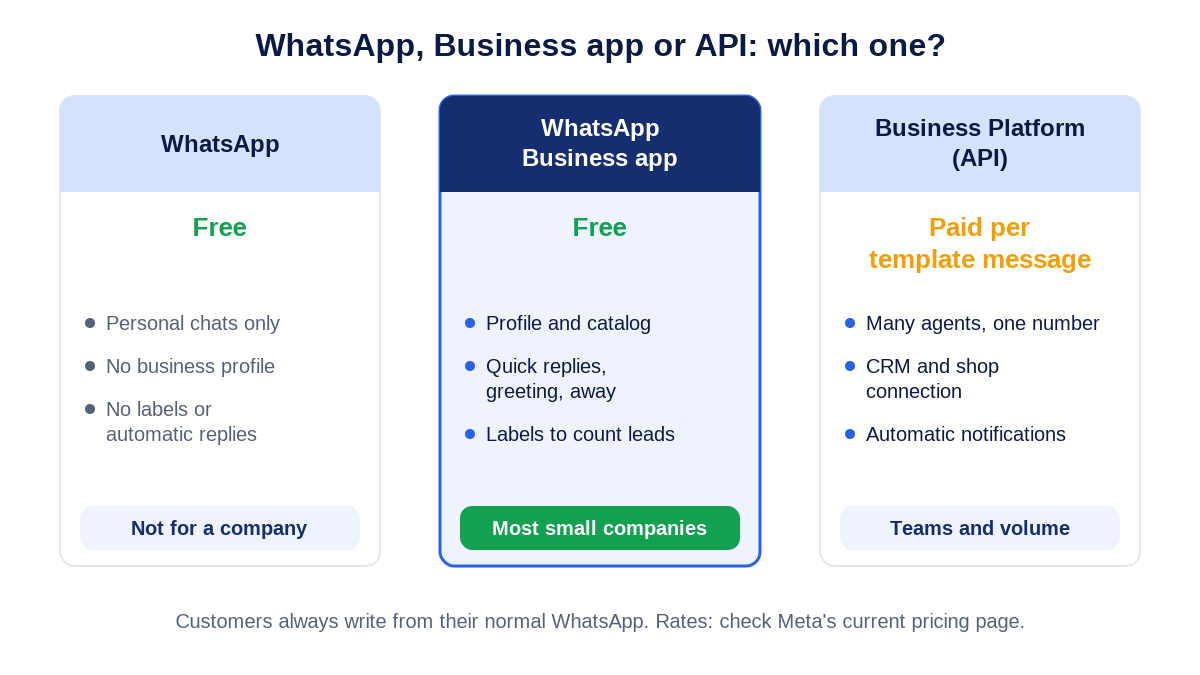
There are three products with similar names. Your customers always use their normal WhatsApp. What changes is the tool on your side.
| WhatsApp Business app | WhatsApp Business Platform (API) | ||
|---|---|---|---|
| Made for | personal chats | small companies, one or a few people | companies with teams, software, volume |
| Cost | free | free (optional paid extras) | per delivered template message, plus any provider fee |
| How you use it | phone app | phone app, plus linked devices | through a provider or your own software |
| Business profile, catalog | no | yes | yes |
| Quick replies, away messages, labels | no | yes | built in your software |
| Automation and CRM connection | no | limited | yes |
The rule of thumb is simple. If one or two people answer chats by hand, use the WhatsApp Business app. If you need several agents on one number, automatic order or booking updates, or a connection to your CRM or online shop, look at the WhatsApp Business Platform.
Do not run your company on a personal WhatsApp account. You lose the business profile, the away messages and the labels you need to count leads, and your private chats mix with customer chats.
What does WhatsApp Business cost?
The WhatsApp Business app is free to download and use. Meta offers optional paid extras, such as the Meta Verified subscription in the markets where it is available, but the core features cost nothing.
The WhatsApp Business Platform is paid. Since July 2025, Meta charges per delivered message instead of per conversation, according to its pricing page for the platform. As of November 2026 the model works like this:
- Marketing, utility and authentication templates (pre-approved messages you start, such as offers, order updates or login codes) are charged per delivered message. The rate depends on the category and on the country of the recipient.
- Service messages (your free-form replies inside the 24 hour window that opens when a customer writes or calls) have a free tier of 1,000 per business phone number per month. Beyond it, they are charged.
- Chats started from a Click-to-WhatsApp ad open a free window, during which your messages to that person are not charged.
- Messages customers send you are never charged.
Meta updates the rates several times a year, so always check the current rate card for your country before you budget. If you use a provider (a Business Solution Provider) to run the platform, add its monthly or per-message fee on top.
A hypothetical example. You send 2,000 marketing templates a month to customers who opted in. If the marketing rate for your country were $0.05 per message, the platform would cost you about $100 a month for those templates, plus your provider. Replies to customers who write to you would stay inside the free tier unless you exceed 1,000 a month.
How to set up the WhatsApp Business app
Setting up the app takes about twenty minutes:
- Choose the number. Use a number that will stay with the company. A landline works too: you can verify it with a voice call.
- Install WhatsApp Business from the App Store or Google Play and verify the number. If the number is already on personal WhatsApp, the app offers to move the account and its chats.
- Fill in the business profile: name, category, description, address, opening hours, email and website. Customers see it before they write.
- Add the catalog with your main products or services, with a price or "from" price.
- Write the greeting message, the away message and five to ten quick replies (see the next section).
- Create the labels you will use to count leads, for example "New lead", "Quote sent", "Customer".
- Copy your short link (wa.me plus your number) and put it on your website, Google Business Profile, email signature and social profiles.
Which WhatsApp Business features are worth using?
The app has many functions. These five give a company the most time back, and the last one is also what makes measurement possible.
| Feature | What it does | Use it for |
|---|---|---|
| Catalog | shows products or services with photo, price and description | answering "what do you offer and for how much" without typing |
| Quick replies | saved answers you insert with a shortcut | prices, directions, documents to bring, payment details |
| Greeting message | automatic first reply to new chats | setting expectations ("we reply within 2 hours") |
| Away message | automatic reply outside your opening hours | not losing evening and weekend contacts |
| Labels | colored tags on chats | counting new leads, quotes and customers each month |
Keep automatic messages short and honest. A greeting that promises a reply "within minutes" when you answer the next morning costs you more trust than no greeting at all.
How to measure the contacts WhatsApp brings
WhatsApp chats happen outside your website, so no analytics tool sees them on its own. You measure them in three steps: the click, the chat, the outcome.
Step 1: use a wa.me link with a prefilled message
The click-to-chat link has this format: https://wa.me/15551234567?text=Hi%2C%20I%20have%20a%20question%20(web). The number goes in international format without "+", zeros or spaces, and the text after ?text= appears in the customer's message box, ready to send.
Use a different prefilled text per place: "(web)" on the website, "(IG)" in the Instagram bio, "(GBP)" on Google Business Profile. When the chat arrives, you know where it came from without asking.
Step 2: track the click in GA4
UTM parameters on the wa.me link itself are useless for GA4, because the visitor leaves your site. Put the UTM parameters on the link that brings people to your page (ad, newsletter, post), as explained in the UTM parameters guide. Then count the click on the WhatsApp button:
- With enhanced measurement on, GA4 records clicks on external links as a
clickevent with the link URL. - In Admin, under Events, use Create event to build a
whatsapp_clickevent fromclickevents whose link URL containswa.me. - Mark
whatsapp_clickas a key event. GA4 now shows WhatsApp clicks per source, medium and campaign, next to your forms and calls.
Step 3: count the chats each month
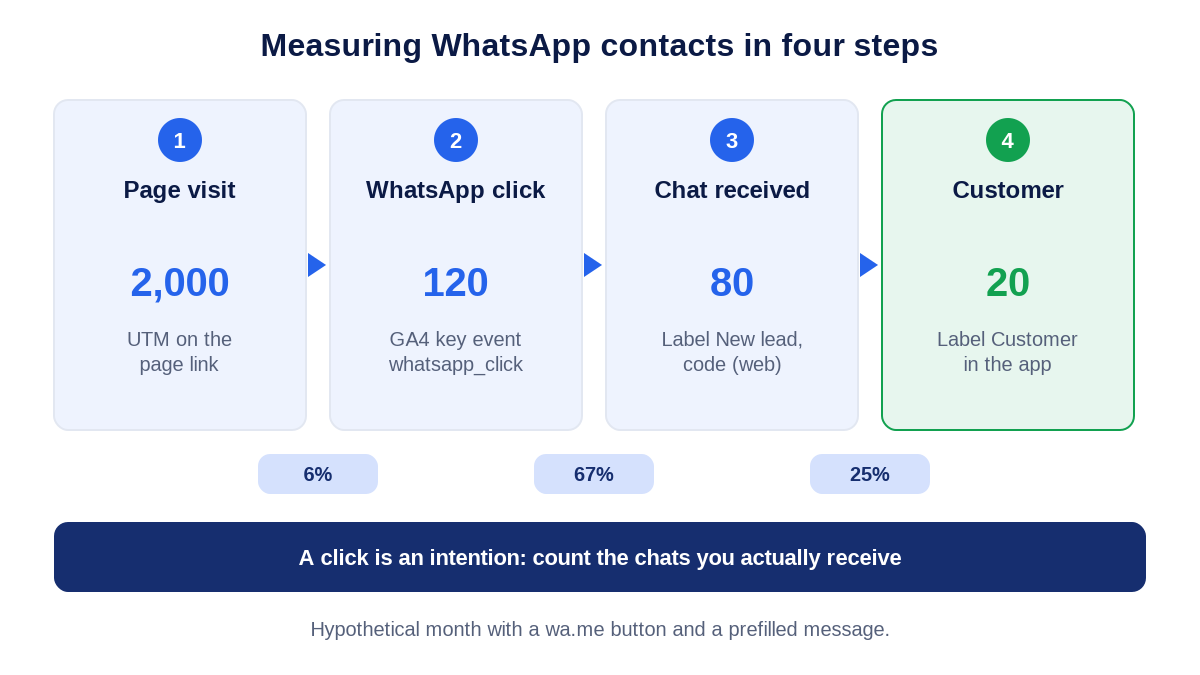
A click is not a chat: some people open WhatsApp and never send the message. At the end of each month, filter the "New lead" label in the app and count. Note how many became customers. That gives you the real funnel.
Cost per contact: a worked example
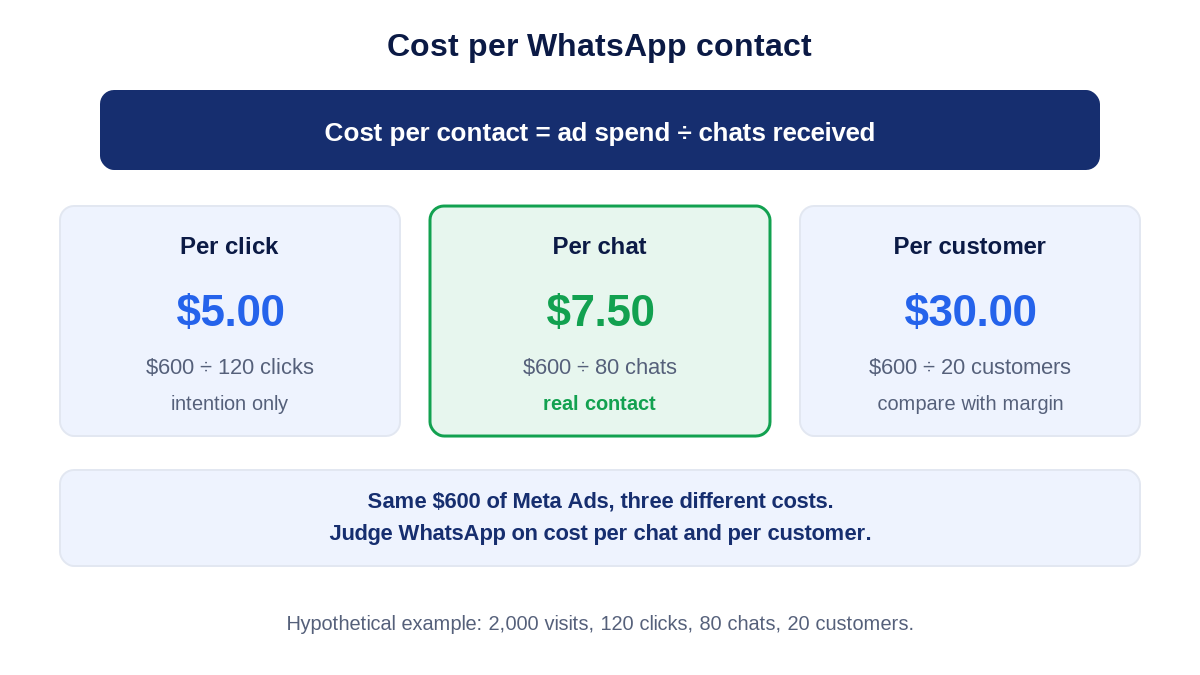
Suppose (hypothetically) you spend $600 in a month on Meta Ads that send people to a landing page with a WhatsApp button. Your numbers:
| Step | Count | Rate | Cost each |
|---|---|---|---|
| Visits to the page (UTM) | 2,000 | $0.30 | |
| WhatsApp clicks (GA4 key event) | 120 | 6% of visits | $5.00 |
| Chats received (label "New lead") | 80 | 67% of clicks | $7.50 |
| New customers | 20 | 25% of chats | $30.00 |
Cost per WhatsApp contact = ad spend ÷ chats received = $600 ÷ 80 = $7.50.
Cost per customer = ad spend ÷ new customers = $600 ÷ 20 = $30. Compare it with the margin on a first sale and with your customer acquisition cost from other channels.
If you run a Click-to-WhatsApp ad instead, the chat opens directly from the ad and Meta Ads reports the conversations started. Count them against your labels anyway: ad platforms and your inbox rarely agree to the unit.
What to check every month
A short monthly routine is enough:
- WhatsApp clicks in GA4 by source and campaign, compared with last month.
- Chats received with the "New lead" label, and the share of clicks that became chats.
- Customers from WhatsApp and the cost per chat and per customer of each paid channel.
- Response time: chats left unanswered for a day usually do not convert.
- Source codes in prefilled messages: which places bring chats that turn into customers.
Klyrax does not connect to WhatsApp. On the website and ads side, Klyrax shows your GA4 key events, including the WhatsApp clicks you set up, next to Google Ads and Meta Ads spend in one summary, and the monthly written report explains what changed. The chat count from your labels stays a number you add yourself. The lead generation guide shows how to keep WhatsApp leads next to forms and calls.
Common mistakes with WhatsApp Business
- Using a personal number and account. When the employee leaves, the customer history leaves too.
- Counting clicks as leads. Clicks on the button are an intention. Count the chats you actually receive.
- Adding UTMs to the wa.me link only. GA4 never sees them. Tag the page link and use prefilled codes.
- Buying the API too early. If one person answers by hand, the platform adds cost and setup without a clear gain.
- Mass messages without consent. Users block or report the number, and WhatsApp can limit it.
- No away message. Evening and weekend contacts get silence and go to a competitor.
Start with the free app, a wa.me button with a prefilled code and one GA4 key event. After a month you will know how many chats WhatsApp brings and what each one costs, which is the number that decides whether it deserves more budget.
Frequently asked questions
Is WhatsApp Business free?
The WhatsApp Business app is free to download and use, with optional paid extras such as the Meta Verified subscription where it is offered. The WhatsApp Business Platform (API) is not free: Meta charges per delivered template message, with rates by category and country, and a provider may add its own fee. Replies to customers inside the 24 hour service window are covered by a monthly free tier.
What is the difference between WhatsApp and WhatsApp Business?
WhatsApp is for personal chats. WhatsApp Business is a separate free app for companies, with a business profile, a product catalog, quick replies, greeting and away messages and labels to sort chats. Customers chat with you in their normal WhatsApp in both cases. You can move an existing number from WhatsApp to WhatsApp Business.
Do I need the WhatsApp Business API?
Only if the app is no longer enough: several people answering from a shared system, a connection to your CRM or shop, automated order or booking notifications, or messages to large opted-in lists. A shop or a service company that answers a few dozen chats a day by hand is usually fine with the free WhatsApp Business app.
How do I track WhatsApp clicks in Google Analytics 4?
Link your WhatsApp button to wa.me followed by your number. With enhanced measurement on, GA4 records the click as an outbound click event. Create a custom event, for example whatsapp_click, from click events whose link URL contains wa.me, and mark it as a key event. GA4 then shows WhatsApp clicks by source and campaign.
Can I put UTM parameters on a wa.me link?
You can, but GA4 will not see them: the chat happens in WhatsApp, not on your website. Put the UTM parameters on the link that brings people to the page with the WhatsApp button. For wa.me links shared directly, for example in an Instagram bio, use a different prefilled message per source so you can tell the chats apart.
See how your marketing is really doing
Klyrax connects GA4, Search Console, Google Ads, Meta Ads, your Google reviews and more in read-only mode, shows the numbers that matter for your business and writes you a plain-language report every month.
Request info