
Ecommerce KPIs are the few numbers that tell an online shop owner whether the business is growing and why. Every week, check revenue, orders, conversion rate, average order value, ROAS and cart abandonment. Every month, add customer acquisition cost, repeat purchase rate and gross margin. Each number only means something next to the previous period.
This guide gives you the formulas in one table, a worked example of one week in a small shop, a one-page dashboard layout, the link between ROAS and margin, and the mistakes that make ecommerce metrics misleading.
What are ecommerce KPIs?
An ecommerce KPI is a metric you have chosen to steer your online shop by, because it is directly tied to sales or profit. Your analytics tool shows dozens of ecommerce metrics. Only a handful deserve a place on the page you read every Monday.
The difference matters. "Pages per session" is a metric. "Conversion rate" is a KPI for a shop, because when it drops, revenue drops with it. The general guide to marketing KPIs explains how to pick KPIs for any business. For a shop, the choice is easier: almost everything comes back to one equation.
Revenue = sessions × conversion rate × average order value
If revenue goes down, one of those three factors went down. The KPIs below help you find which one, and whether the revenue you made was profitable.
The 9 ecommerce KPIs and their formulas
| KPI | Formula | What it tells you |
|---|---|---|
| Revenue | sum of order values in the period | the result, before costs |
| Orders | number of completed orders | volume of sales |
| Conversion rate | orders ÷ sessions × 100 | how well the shop turns visits into sales |
| Average order value (AOV) | revenue ÷ orders | how much each order is worth |
| ROAS | revenue from ads ÷ ad spend | how much each dollar of advertising brings back |
| Customer acquisition cost (CAC) | marketing costs ÷ new customers | what a new customer costs you |
| Repeat purchase rate | customers with 2+ orders ÷ all customers × 100 | how many customers come back |
| Cart abandonment rate | (1 minus orders ÷ carts) × 100 | how many people leave after adding to cart |
| Gross margin | (revenue minus cost of goods) ÷ revenue × 100 | how much of each sale you keep |
Three of these have their own guides: conversion rate, ROAS and customer acquisition cost. Here we look at how they work together.
A worked example: one week in a small shop
Imagine a small online shop selling kitchen products. In one week it records 10,000 sessions. Visitors create 500 carts and complete 200 orders worth $14,000. The shop spends $2,000 on Google Ads and Meta Ads, and the platforms attribute $8,000 of sales to those ads. 80 of the 200 orders come from first-time customers.
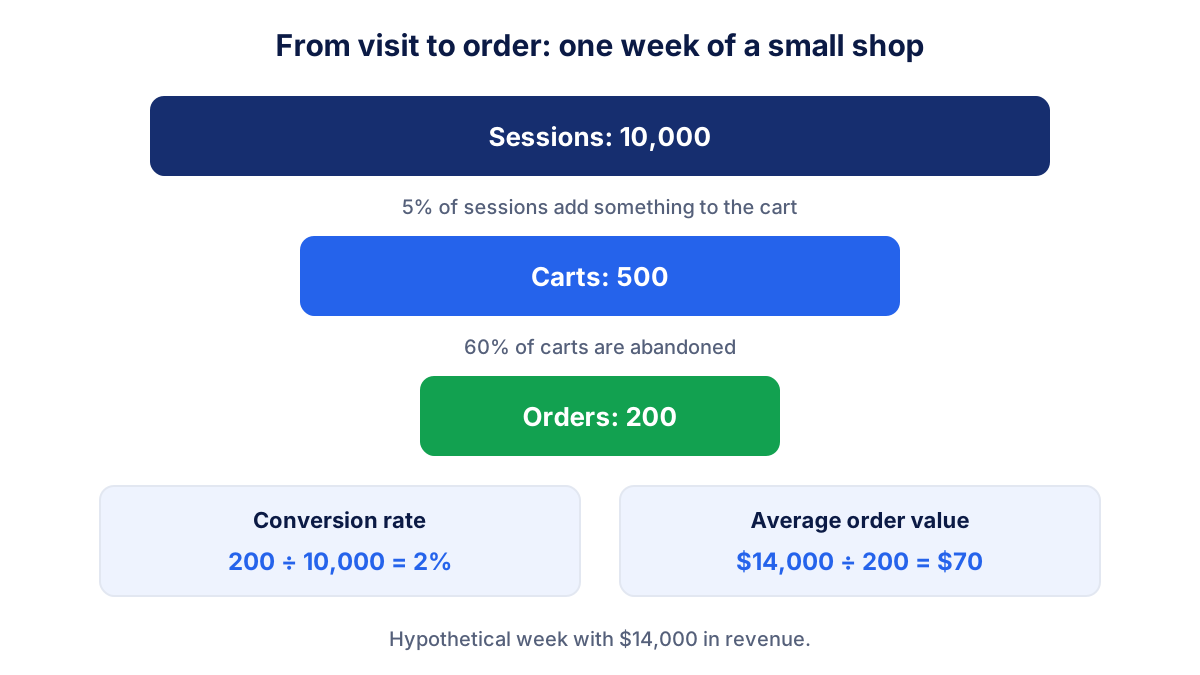
The numbers for this hypothetical week:
- Conversion rate: 200 ÷ 10,000 × 100 = 2%
- Average order value: $14,000 ÷ 200 = $70
- ROAS: $8,000 ÷ $2,000 = 4
- CAC: $2,000 ÷ 80 = $25 (only ad spend here; add other marketing costs if you have them)
- Cart abandonment: (1 minus 200 ÷ 500) × 100 = 60%
- Gross profit: with a 40% gross margin, $14,000 × 0.40 = $5,600 before advertising and other costs
None of these numbers is good or bad on its own. A 2% conversion rate is fine for a shop with expensive products and cold traffic and weak for a shop that sells refills to existing customers. What you want to know is the direction: up, down or flat compared with last week.
Which ecommerce KPIs to check weekly and which monthly
Weekly numbers react fast, which makes them useful for catching problems: a broken checkout, a campaign that stopped, a promotion that did not work. Monthly numbers need more orders to be meaningful.
| Every week | Every month |
|---|---|
| Revenue and orders | Customer acquisition cost |
| Conversion rate | Repeat purchase rate |
| Average order value | Gross margin |
| Ad spend and ROAS | Revenue by channel |
| Cart abandonment rate | Best and worst selling products |
Compare each weekly number with the previous week and, once you have a year of data, with the same week last year. Seasonality is strong in ecommerce. A drop in the first week of January means little; the same drop in the middle of November deserves a look the same day.
Repeat purchase rate is the slowest of all. Many shops measure it over 12 months: of all customers who bought in the last year, how many bought more than once. Checking it every week would only show noise.
A one-page ecommerce dashboard
The best ecommerce dashboard fits on one screen and answers one question in under a minute: is the shop doing better or worse than last week, and where?
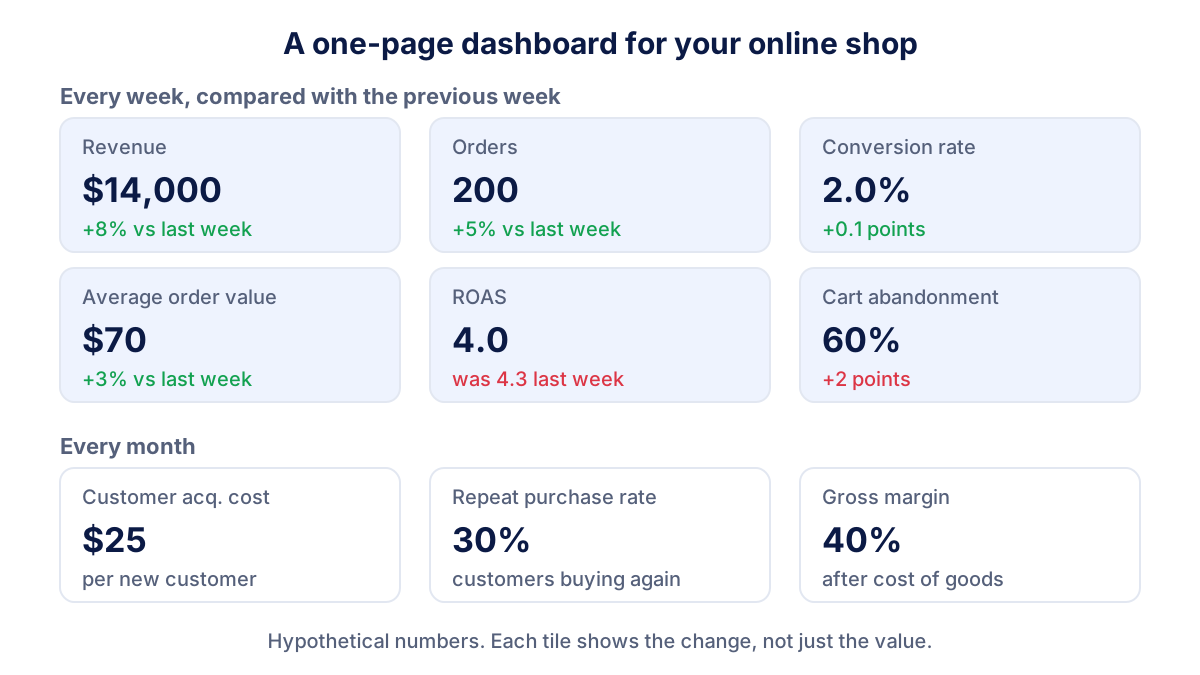
A layout that works for most small shops:
- Top row: revenue, orders, conversion rate. The result and its main driver.
- Second row: average order value, ROAS, cart abandonment. The levers you can pull.
- Monthly row: CAC, repeat purchase rate, gross margin. Whether growth is profitable and lasting.
- Below the tiles, if you want more: revenue by channel (search, ads, email, social) and the top ten products.
Every tile shows the change against the previous period, colored only when the change is meaningful. Leave out anything you would not act on. If nobody changes a decision because of "average session duration", it does not belong on this page.
ROAS, CAC and margin: is your growth profitable?
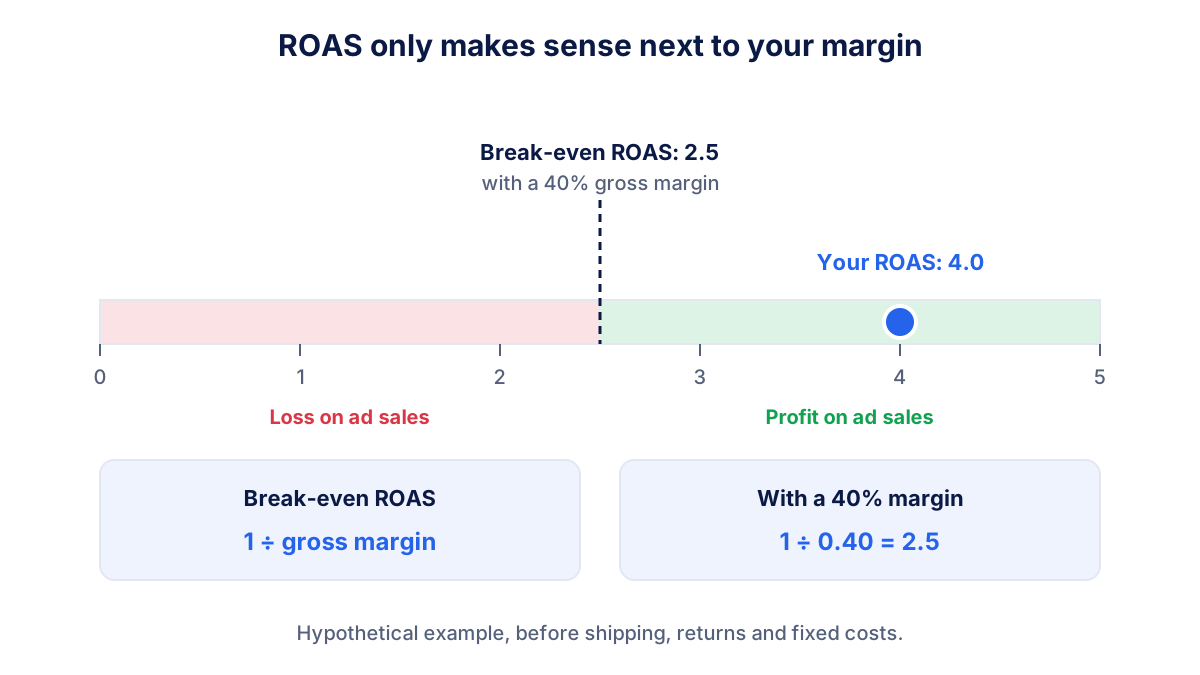
ROAS on its own can make a loss look like a success. A ROAS of 4 means $4 of revenue for every $1 of advertising, not $4 of profit. To know whether ads make money, compare ROAS with your margin.
Break-even ROAS = 1 ÷ gross margin
With a 40% gross margin, break-even ROAS is 1 ÷ 0.40 = 2.5. Below 2.5, each sale from ads costs more in advertising than it leaves in gross profit. In our example, ROAS 4 is above that line, so the ads pay for themselves before shipping, returns and fixed costs.
CAC adds the long view. A first order of $70 with 40% margin leaves $28 of gross profit. With a CAC of $25 the first order barely covers the cost of finding the customer, so the shop needs some of those customers to buy again. This is why repeat purchase rate belongs on the same page: it tells you how much a customer is worth after the first order.
Common mistakes with ecommerce metrics
- Watching revenue only. Revenue can grow while margin shrinks, for example after heavy discounts or a rise in ad costs.
- Mixing definitions. Revenue with tax one week and without tax the next, or sessions from one tool and orders from another, make trends meaningless.
- Trusting platform ROAS blindly. Google Ads and Meta Ads each count conversions with their own attribution rules, so the same order can appear in both. Compare ad platform figures with the orders in your shop.
- Reading daily data. A small shop with 30 orders a day sees big random swings. Use weeks.
- Ignoring returns. If customers send back many orders, gross revenue overstates what you kept. Track net revenue or the return rate.
- No benchmark of your own. Industry averages vary too much to judge your shop. Your own last 12 weeks are the best benchmark you have.
Where the data comes from
Most ecommerce KPIs come from three places. Your shop platform knows orders, revenue, customers and returns. Google Analytics 4 records sessions, carts and purchases if ecommerce tracking is set up with events such as add_to_cart and purchase. Your ad platforms report spend and the conversions they attribute to themselves. Margin and cost of goods usually come from your own accounts.
Klyrax connects in read-only mode to Google Analytics 4, Google Ads, Meta Ads and Microsoft Ads. If you choose "online shop" as your goal, the summary shows the handful of numbers that matter for a shop, compared with the previous period, and on the 1st of each month a written report explains in plain language what changed and up to three things to do next.
Frequently asked questions
What are the most important ecommerce KPIs?
For most online shops the core set is revenue, number of orders, conversion rate, average order value, ROAS of paid campaigns, customer acquisition cost, repeat purchase rate, cart abandonment rate and gross margin. Revenue tells you what happened. The other eight tell you why: more visitors, better conversion, bigger baskets, cheaper customers or more loyal ones.
How do you calculate average order value?
Divide revenue by the number of orders in the same period. If your shop makes $14,000 from 200 orders in a week, average order value is $14,000 ÷ 200 = $70. Decide once whether revenue includes tax and shipping, and keep the same definition every week, otherwise the trend will move for reasons that have nothing to do with your customers.
What is a good conversion rate for an online shop?
Many online shops convert somewhere between about 1% and 3% of sessions, but the range is wide and depends on sector, price, device mix and how much of your traffic comes from cold advertising. A shop selling repeat consumables can sit well above it, a shop selling furniture below it. Compare your rate with your own previous weeks first.
How do you calculate cart abandonment rate?
Cart abandonment rate is 1 minus orders divided by carts created, times 100. With 500 carts and 200 orders, abandonment is (1 minus 200 ÷ 500) × 100 = 60%. Many carts are abandoned in every shop because people compare prices or save items for later, so watch the trend and look for jumps after changes to shipping costs or checkout.
How often should I check ecommerce KPIs?
Check revenue, orders, conversion rate, average order value, ROAS and cart abandonment once a week, always against the previous week and the same week last year if you have it. Check customer acquisition cost, repeat purchase rate and margin once a month, because they need more orders to be stable. Daily checks mostly show noise unless you run big promotions.
See how your marketing is really doing
Klyrax connects GA4, Search Console, Google Ads, Meta Ads, your Google reviews and more in read-only mode, shows the numbers that matter for your business and writes you a plain-language report every month.
Request info